


 Video Converter Ultimate
 Skärminspelare
 Video reparation
 Säker nedladdning
Hur man komprimerar PDF-filer för e-post 3 effektiva sätt att välja
Att skicka stora filer via e‑post kan verkligen vara krångligt. Det kan faktiskt orsaka problem eller leda till att meddelandet inte levereras alls. Dessutom begränsar många e‑postleverantörer bilagor till en viss filstorlek, vilket är lätt att överskrida med en komplex PDF. Detta gäller särskilt PDF‑filer med många bilder eller mycket långa dokument. För att lösa detta använder de flesta i den här situationen fildelningstjänster som Dropbox eller Google Drive. Men många glömmer ett praktiskt knep, nämligen filkomprimering. Det finns många kostnadsfria onlinetjänster som klarar detta, och vissa är mycket populära. Men hur komprimerar man en PDF för e‑post på ett effektivt sätt? Det är vad du kommer att få lära dig när du fortsätter att läsa innehållet nedan.

Del 1. Vilken är den bästa PDF-storleken för e-post
Här är ett faktum: det finns inget magiskt tal för den idealiska PDF-storleken för e-post. Saken att se upp med är din e-postplattforms gräns för bilagor. Populära tjänster täcker bilagor runt 20 MB, vilket kan vara förvånansvärt lätt att nå, särskilt med PDF-filer som innehåller många bilder eller är mycket långa dokument. Om din PDF-fil är större än den nämnda gränsen på 20 MB, kommer din e-post troligen inte att skickas, och du kommer att få ett felmeddelande. Som sagt, istället för att sikta på en specifik storlek eller den bästa PDF-storleken för e-post, är det bäst att spela det säkert och hålla det under 20 MB. På så sätt kan du vara säker på att den kommer att bifoga och skicka framgångsrikt.
Del 2. Ett klick för att komprimera PDF-filer för e-post
Här är ett snabbt och smidigt sätt att komprimera filer för e‑post. Förbered dig på att använda det här kostnadsfria verktyget som heter FVC Free PDF Compressor, som kan krympa dina tunga PDF‑filer utan att förstöra dem. Eftersom de flesta e‑posttjänster bara tillåter bilagor på runt 20 MB kan PDF‑filer med bilder eller mycket text lätt nå den gränsen. Den här kompressorn kan göra din PDF betydligt mindre, till och med under 100 kilobyte! Du behöver inte oroa dig för hur den drastiskt komprimerar PDF‑filer för e‑post, eftersom filernas kvalitet ändå bibehålls. Faktum är att du troligen inte ens kommer att märka någon skillnad mellan originalet och den komprimerade versionen.
Dessutom är detta fantastiska verktyg superenkelt att använda, och alla med någon nivå av expertis kan använda det. Allt du behöver göra är att dra och släppa PDF-filen i programmet, så krymper den automatiskt. Sedan kan du med bara ett klick spara den mindre PDF-filen på din dator. På så sätt kan du snabbt komprimera PDF till e-poststorlek online till en storlek som är perfekt för att skicka e-post eller ladda upp allt utan några vattenstämplar på det slutliga dokumentet. För att få en bättre förståelse av dess process, se de detaljerade riktlinjerna nedan.
Steg 1. Klicka på fliken Add PDF File i huvudgränssnittet och välj den PDF‑fil du vill komprimera.
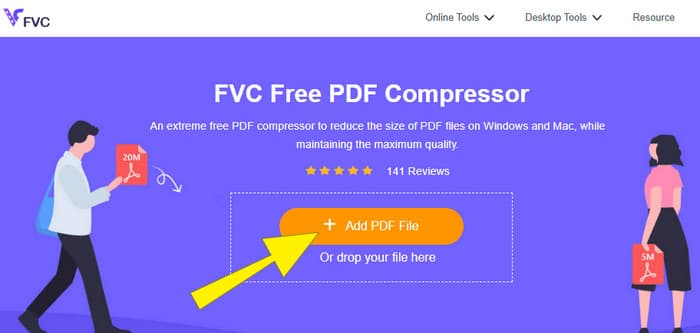
Steg 2. Medan PDF‑filen laddas upp arbetar verktyget samtidigt med att komprimera den.
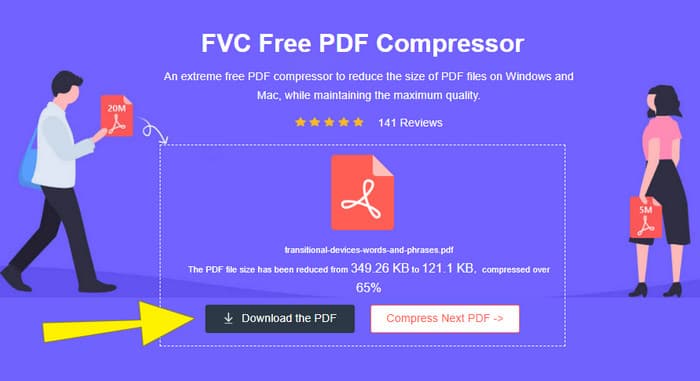
Steg 3. När det är klart klickar du på knappen Download the PDF.
Del 3. Komprimera PDF-filer för e-post med redigeringsfunktioner
Om du föredrar ett verktyg som även har redigeringsfunktioner är Adobe Acrobat det du behöver för den här uppgiften. Adobe Acrobat är ett program som är känt för att skapa, redigera och hantera PDF‑filer. Det är som en kraftfull verktygslåda särskilt utformad för PDF‑arbete. En av dess praktiska funktioner är PDF‑komprimering, som du kan använda när du har en tung PDF som inte får plats i din e‑post på grund av storleksbegränsningar. Adobe Acrobat, som finns både online och som skrivbordsprogram, kan hjälpa dig att komprimera stora PDF‑filer för e‑post utan att försämra kvaliteten alltför mycket. Det görs på flera sätt, till exempel genom att minska storleken på bilder i PDF‑filen eller ta bort onödiga typsnitt. Men med tanke på Adobe och deras programsvit bör du inte bli förvånad om du upplever att inlärningskurvan är brant. Här är därför stegen som hjälper dig att göra processen enklare.
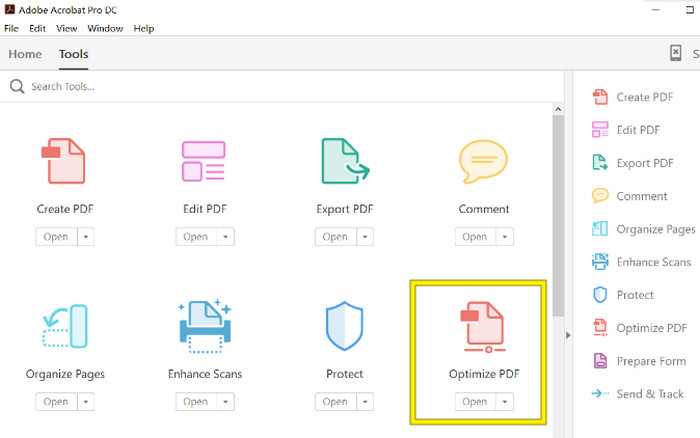
Steg 1. Starta Acrobat och öppna PDF‑filen du vill arbeta med. För att göra detta går du till Verktyg–Optimera PDF–Öppna (Tools–Optimize PDF–Open).
Steg 2. När du har öppnat PDF‑filen klickar du på alternativet Reduce File Size i den nya navigeringen som visas. Ställ sedan in eller använd de redigeringsalternativ som finns för att uppnå den komprimering och optimering du önskar.
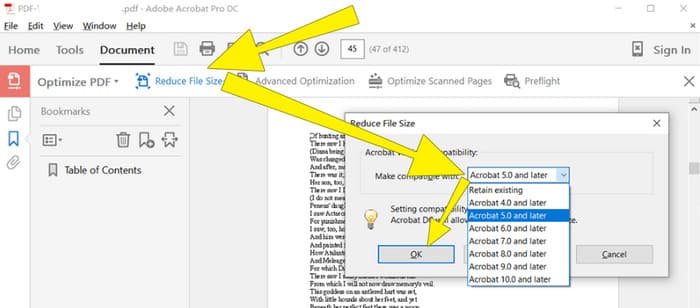
Steg 3. Spara sedan den komprimerade PDF‑filen.
Del 4. Komprimera PDF-filer för e-post genom att konvertera
Vill du lära dig ett nytt knep för hur man komprimerar en PDF för att skicka via e‑post? Låt oss konvertera filen till JPG. Detta konverteringstrick kan göras utmärkt i PowerPoint. PowerPoint är ett program du troligen använder för att skapa presentationer. Tänk dig ett bildspel med text, bilder och kanske till och med videor. PowerPoint låter dig bygga sådana presentationer med enskilda bilder som du klickar dig igenom för att visa för din publik. Det är ett populärt verktyg för lärare, studenter, affärsanvändare och alla som vill dela information visuellt.
Nu kan det vara praktiskt att infoga en PDF i din PowerPoint-presentation, men det kanske inte är den mest intuitiva processen. Men när du väl gör det blir det enkelt att skapa en JPG-fil. Men oroa dig inte! Vi kan gå igenom det steg-för-steg, som du måste följa för att få din PDF inbäddad på nolltid.
Steg 1. Starta PowerPoint på din dator och välj rätt bild där du kan öppna PDF‑filen.
Steg 2. Gå sedan till menyn Insert och leta upp alternativet Object under Text. Klicka på alternativet så visas ett nytt fönster. I det fönstret markerar du Create from File, som finns på vänster sida i gränssnittet. Klicka sedan på knappen Browse, vilket låter dig importera PDF‑filen till bilden.
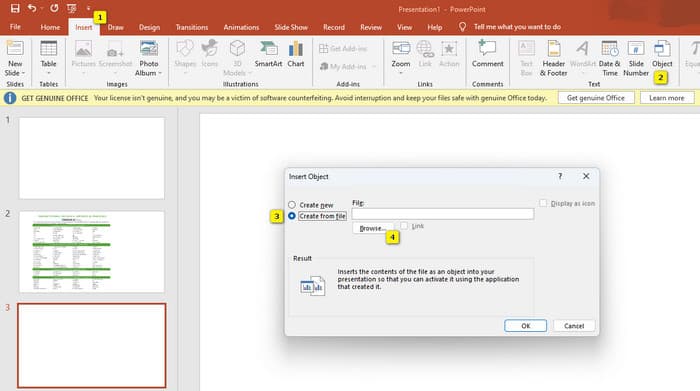
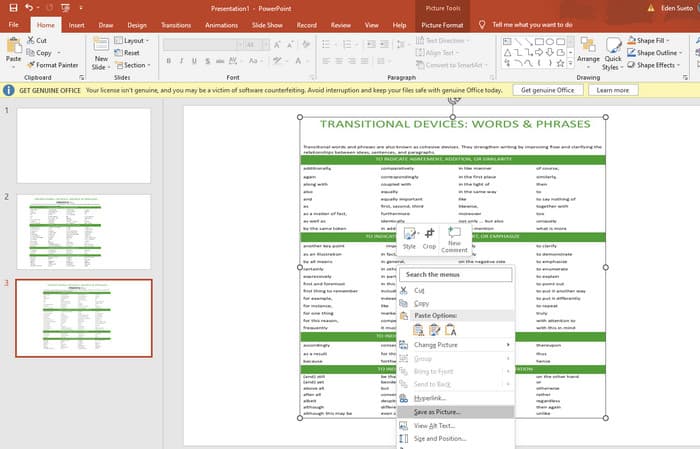
Steg 3. När PDF‑filen har laddats upp kan du konvertera den till JPG. För att göra detta högerklickar du på PDF‑filen på bilden, väljer Save As Picture och sparar den som JPEG.
Del 5. Vanliga frågor om PDF och komprimering
Vilken storlek kan du maila en PDF-bilaga?
Det beror på din e-postleverantör, men de flesta begränsar bilagor till cirka 20 MB.
Vilken är den bästa gratis PDF-kompressorn?
Det finns gratis PDF-kompressorer tillgängliga, men den bästa beror alltid på användarnas preferenser. Hittills är FVC Free PDF Compressor det mest rekommenderade gratis onlineverktyget.
Hur zippar man PDF-filer för e-post?
I själva verket fungerar zippa för PDF-filer eftersom de redan är komprimerade filer.
Slutsats
Den här artikeln beskriver på vilka sätt du bäst kan komprimera PDF‑filer för e‑post. Du kan nu se till att skicka dina PDF‑filer via e‑post på ett smidigare och bättre sätt, så länge du komprimerar dem ordentligt så att de håller sig inom filbegränsningen.
-
 3 bästa lösningarna för hur man enkelt tar bort vattenstämpel från videor
 Vill du ta bort den irriterande vattenstämpeln på videon? Med den här bloggen kan du lära dig olika idéer om att ta bort vattenstämpeln på en video.
-
 4 bästa sätten att lägga till vattenstämpel på alla videor snabbt
 Låt oss lära oss hur du lägger till vattenstämpel till alla videor på Windows, Mac, Online, iOS och Android med detaljerade steg om du läser den här artikeln.
-
 3 enklaste sätten att lägga till vattenstämpel till en GIF online och offline
 Att lägga till en vattenstämpel till en GIF kan vara så enkelt som 1-2-3 om du använder rätt verktyg på rätt sätt. Verktygen på marknaden är för breda, men vi kommer att presentera de tre verktyg du kan lita på.
