


 Video Converter Ultimate
 Skärminspelare
 Video reparation
 Säker nedladdning
3 gratis sätt att konvertera FLV till WAV
Vill du extrahera ljud från nedladdade videor men vet inte hur? Letar du efter ett enkelt sätt att konvertera FLV till WAV eller MP3?
I vissa fall behöver du bara ljudspåret eller bakgrundsmusiken för en video. Så du måste konvertera video till ljud. Detta inlägg kommer främst att prata om hur man konverterar FLV till WAV.

Här rekommenderas 3 utmärkta FLV till WAV‑omvandlare så att du kan konvertera dina FLV‑filer. Du kan välja den metod du föredrar för att göra om FLV till WAV‑ljud.
Del 1. Konvertera FLV till WAV Online
När du söker på internet efter en metod för att konvertera FLV till WAV ser du att många av sökresultaten är kostnadsfria online‑omvandlare. Om du inte vet vilken du ska använda, vill vi här uppriktigt presentera den populära Free Online Video Converter. Den är särskilt utformad för att konvertera FLV till alla vanligt förekommande video‑ och ljudformat som MP4, MOV, AVI, MP3, AAC, M4A och WAV.
Jämfört med andra online FLV till WAV-omvandlare stöder den fler in- och utdataformat och erbjuder en snabbare omvandlingshastighet. Dessutom kräver det ingen kontoregistrering eller inloggning. Det gör att du kan konvertera någon FLV-fil utan filstorleksbegränsning.
Steg 1: Gå till denna kostnadsfria online FLV till WAV‑omvandlarsida i din webbläsare. Den är kompatibel med de flesta webbläsare, inklusive Safari, IE, Chrome, Firefox och Yahoo.
Steg 2: Klicka på Add Files to Convert och sedan på knappen Download för att installera ett startprogram för FLV‑konverteringen. Efter installationen visas ett popup‑fönster där du kan ladda din FLV‑fil.

Steg 3: När du kommer till huvudfönstret för omvandlaren kan du se att några populära videoformat som MP4, MOV, AVI, FLV, MKV, VOB, MPG, WMV och fler listas där. Under detta steg behöver du klicka på ikonen Audio för att visa ljudformaten. Välj WAV som utdataformat.
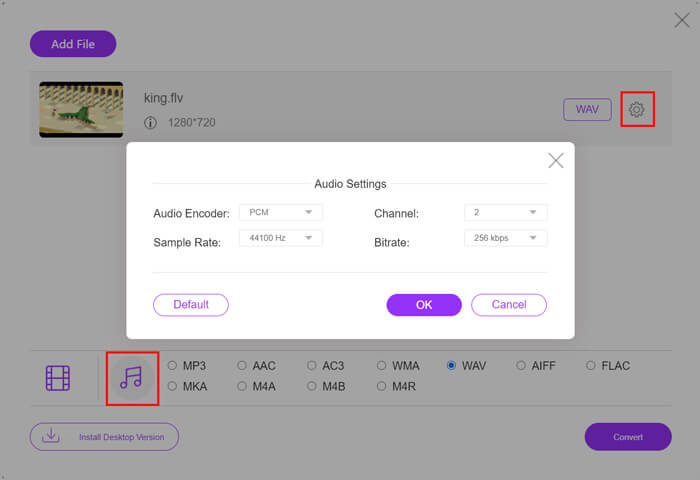
Steg 4: Innan du konverterar FLV till WAV kan du klicka på ikonen Settings bredvid utdataformatet för att anpassa fler ljudinställningar. Här får du justera ljudkodare, kanal, samplingsfrekvens och bithastighet. Klicka sedan på knappen Convert för att ändra din FLV‑fil till WAV‑ljud.
Om du vill konvertera FLV till ljud som MP3, WMA, WAV osv. ska du klicka på fliken för ljud för att markera den.
Del 2. Gratis Konvertera FLV till WAV
Förutom online FLV‑omvandlare finns det också några kostnadsfria videokonverterare som kan hjälpa dig att enkelt konvertera FLV till WAV. För att göra det kan du använda Free FLV Converter.

Gratis FLV till WAV Converter
155321+ nedladdningar- Konvertera FLV till WAV, AAC, MP3, M4A, MP4, MOV, AVI och mer.
- Stöd alla ofta använda video- och ljudformat.
- Stöd de senaste processorerna med flera kärnor och GPU-accelerationer.
- Konvertera en eller flera FLV-filer utan kvalitetsförlust.
Gratis nedladdningFör Windows 7 eller senareSäker nedladdning
Gratis nedladdningFör MacOS 10.7 eller senareSäker nedladdning
Den har alla konverteringsfunktioner du behöver. Följande guide visar dig hur du gör FLV till WAV med det.
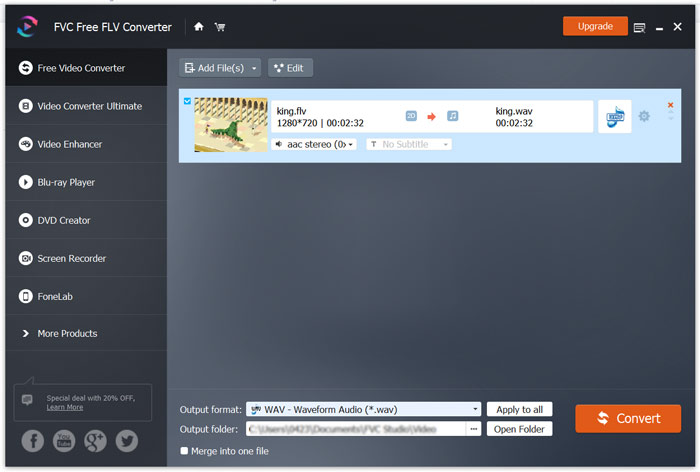
Steg 1: Ladda ner, installera och kör denna kostnadsfria FLV till WAV‑omvandlare på din dator. Klicka på Add Files för att importera din(a) FLV‑fil(er).

Steg 2: Klicka på Output format och välj WAV som målformat. Välj sedan en lämplig målmapp.
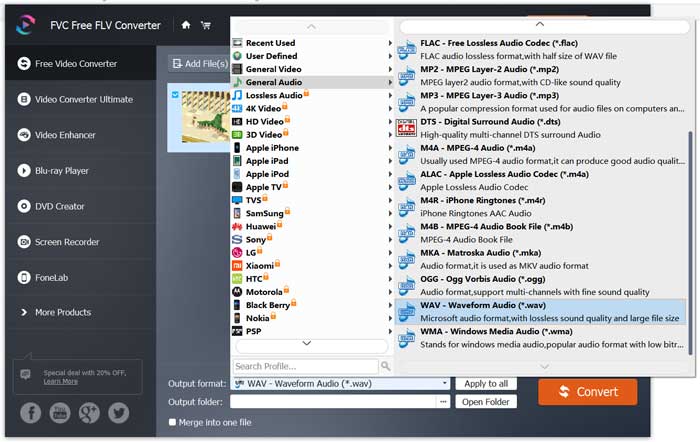
Steg 3: Klicka på knappen Convert för att starta FLV till WAV‑konverteringen.
Del 3. Konvertera FLV till WAV med VLC
Om du har VLC Media Player installerad på din dator kan du också använda VLC för att konvertera FLV till WAV. Du bör känna till att VLC är en populär mediaspelare som också har vissa grundläggande funktioner för konvertering och redigering.
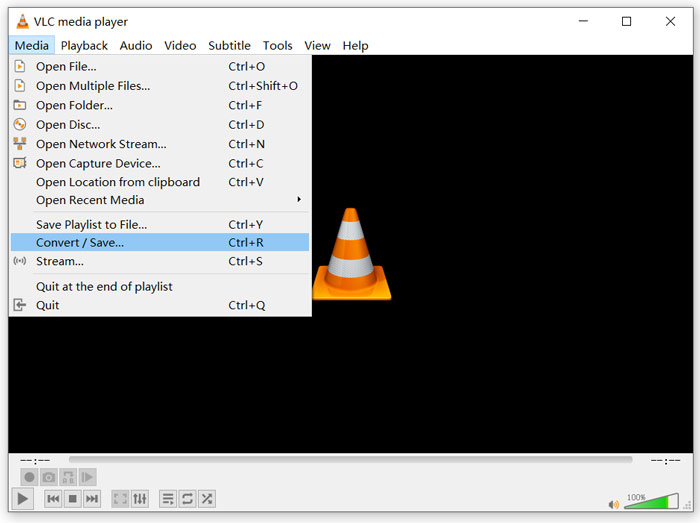
Steg 1: Öppna VLC Media Player på din dator. Du kan kostnadsfritt installera den från webbplatsen VideoLAN. Klicka på Media och välj sedan alternativet Convert/Save i rullgardinsmenyn.
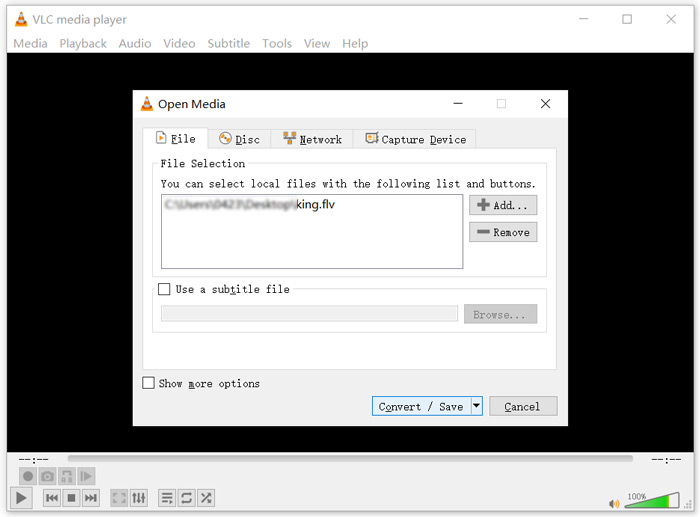
Steg 2: Nu hamnar du i fönstret Open Media. Klicka på knappen Add för att lägga till den FLV‑fil du vill konvertera. Klicka sedan på knappen Convert/Save för att öppna fönstret Convert.
Steg 3: Markera alternativet Display the output under fliken Convert. Välj sedan ett lämpligt utdataformat i rullgardinslistan Profile. Klicka på knappen Browse för att välja en lämplig målmapp. Under detta steg kan du byta namn på utdatafilen.
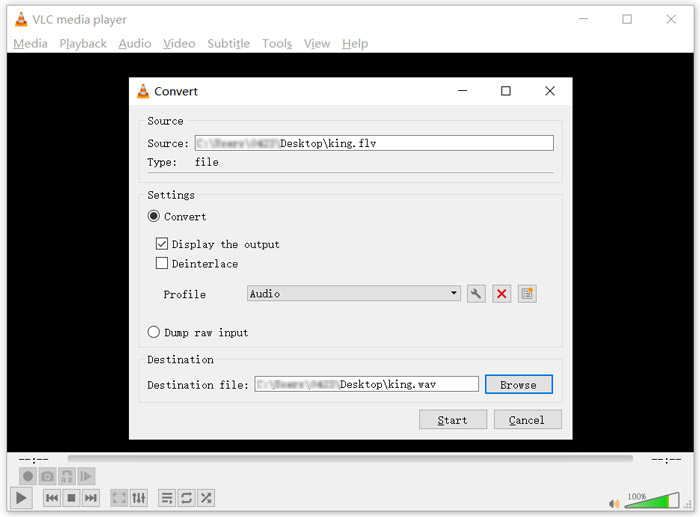
Steg 4: Klicka på knappen Start för att börja konvertera din FLV till WAV. Därefter kommer VLC automatiskt att spela upp den konverterade WAV‑filen. Du kan se meddelandet Converting file under tiden som konverteringen pågår. Stäng inte VLC Media Player helt förrän konverteringen är klar.
Del 4. Vanliga frågor om konvertering av FLV till WAV
FLV vs WAV, vad är skillnaden mellan FLV och WAV?
FLV, Flash Video File, är en flash‑kompatibel videofil som utvecklats av Adobe Systems. Den innehåller ett kort header‑block, sammanflätade video‑, ljud‑ och metadata‑paket. FLV är ursprungligen utformat för att bädda in videoströmmar i Adobe‑program. En FLV‑fil innehåller normalt en videoström på 640x360 och en ljudström med 44,1 kHz, 2 kanaler, AAC.
En fil med filtillägget WAV är ett Waveform Audio File Format och är en behållare som lagrar data i segment. Det utvecklades ursprungligen av Microsoft och IBM och lagrar okomprimerat, förlustfritt ljud, vilket ger mycket stora filstorlekar. Formatet använder behållare för att lagra ljuddata, spårnummer, samplingsfrekvens och bithastighet.
Hur konverterar jag FLV till WAV utan programvara?
Om du vill konvertera FLV till WAV utan någon omvandlingsprogramvara kan du välja att ändra filtillägget från .flv till .wav.
Hur laddar man ner FLV till WAV?
Det finns ett stort antal skärminspelare som erbjuds på marknaden som kan hjälpa dig att spara video som ljudfiler på din lokala dator.
Slutsats
Efter att ha läst detta inlägg kan du lära dig 3 kostnadsfria sätt att extrahera WAV‑ljud från FLV‑filer. När du behöver konvertera FLV till WAV kan du välja den FLV‑omvandlare du föredrar för att göra det.
-
 5 bästa gratis WAV-spelare för Android, iOS och dator
 Hur spelar jag WAV-filer på en Android-telefon? Vilken spelare kan spela WAV? Det här inlägget delar 5 bästa gratis WAV-spelare för Android, iPhone, Mac och PC.
-
 10 bästa FLV-videospelare för Windows 10/8/7, Mac, iOS och Android du måste prova
 FLV-spelare hjälper dig enkelt att komma åt dina FLV-filer på din Windows-, Mac-, Android-, iOS-enhet. Kolla in de bästa FLV-filspelarna du kan ladda ner just nu.
-
 Hur man konverterar WAV till MP3 med de 5 bästa omvandlarna
 Den här sidan är en lång lista över gratis WAV till MP3-omvandlare (iTunes, Audacity, VLC, Windows Media Player och Free Audio Converter) för att ändra WAV till MP3 på datorn.
