


 Video Converter Ultimate
 Skärminspelare
 Video reparation
 Säker nedladdning
Hur slår man samman M4V-filer? Här är de 2 snabbaste lösningarna
M4V-filer, även kända som MPEG-4-videofiler, laddas vanligtvis ner från iTunes. De liknar MP4-filer mycket eftersom de båda använder containerformatet MPEG-4. Det är ganska vanligt att du just har laddat ner flera ofullständiga videoklipp i M4V-format från iTunes och sedan vill slå ihop M4V-filerna till en komplett berättelse utan avbrott. Hur ska man kombinera M4V-filer? Den här artikeln presenterar två metoder för att göra det effektivt och utan att förlora bildkvalitet.

Del 1: Snabbaste lösningen - Använd en gratis M4V-fusion online
För den snabbaste lösningen kan du använda FVC Free Online Video Merger, som inte kräver mycket tid för att lära sig steg och inställningar. Öppna bara verktyget i webbläsaren, lägg till dina M4V-filer och klicka sedan en gång för att slå ihop M4V-filerna.
Nyckelfunktioner
- • Slå samman M4V-filer i valfritt antal och storlek i en fil gratis.
- • Enkelt att använda gränssnitt och intuitiva processer för sammanslagning.
- • Du kan spara de sammanslagna M4V-filerna som 9 andra huvudformat.
- • Lämna inga vattenstämpel i de kombinerade M4V-videorna.
- • Ladda upp dina filer i alla storlekar på bara 1 sekund.
Steg för att slå ihop M4V-filer gratis online
Steg 1. Klicka här för att öppna FVC Free Online Video Merger. På webbsidan för onlinetjänsten klickar du på knappen Upload Videos to Merge i mitten av skärmen.

Obs! Verktyget ber dig ladda ner och installera ett startprogram om du använder det för första gången. När du har installerat startprogrammet klickar du på knappen Upload Videos to Merge igen.
Steg 2. Nu bör fönstret Open dyka upp. Här behöver du markera M4V-filerna och sedan klicka på knappen Open längst ner i fönstret.
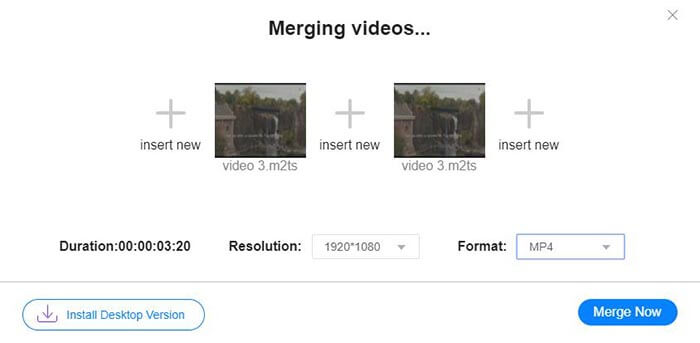
Steg 3. Efter att du har laddat upp M4V-filerna kan du justera ordningen på dem genom att ta bort befintliga filer och lägga till nya på önskade platser.
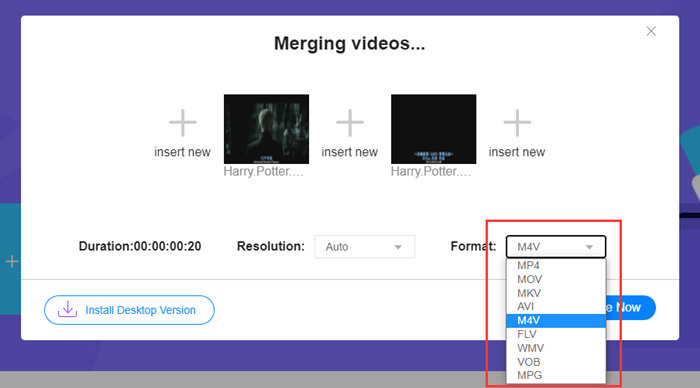
Steg 4. För att behålla den sammanslagna filen i M4V-format behöver du välja M4V i listan Format. Du kan också välja något av de listade formaten för att konvertera den sammanslagna M4V-videon.
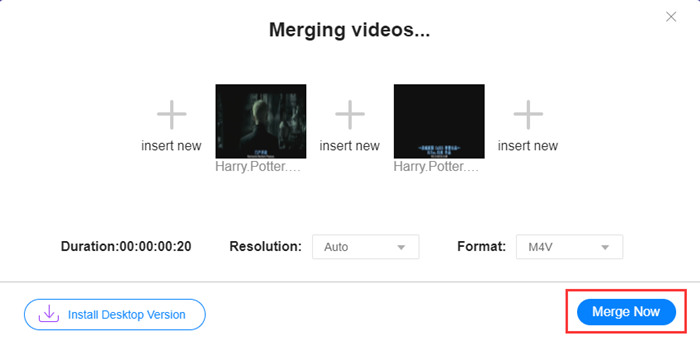
Steg 5. Klicka på knappen Merge Now för att börja kombinera M4V-filerna. Verktyget ber dig sedan välja målmapp för utdatafilen.
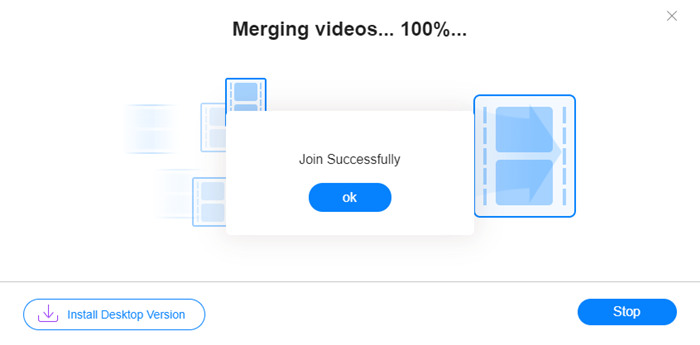
När du ser framgångsmeddelandet nedan sparas den sammanslagna videon på din dator.
Du har nu lärt dig det snabbaste sättet att kombinera M4V-filer. Den här metoden låter dig dock bara sätta ihop videorna efter varandra och kan inte hjälpa dig att klippa bort oönskade början eller slut, vilket kan leda till perioder med svart bild i videon. Kanske behöver du även nästa metod för att inte bara slå ihop M4V-filer, utan också trimma dem sömlöst. Du kan komprimera M4V-filer här.
Del 2: En metod för att slå samman M4V-filer sömlöst
För att få en komplett och sömlös video räcker det inte att bara sammanfoga M4V-filerna i följd. Du behöver också klippa bort oönskade delar i början och slutet. Det innebär att ett videoredigeringsverktyg krävs. Du har många alternativ att välja mellan, men här vill vi rekommendera Video Converter Ultimate. Anledningen är enkel: den är lätt att använda och funktionerna är tillräckligt kraftfulla.
Nyckelfunktioner
- • Slå ihop, klipp, rotera, beskära och lägg till effekter i M4V-videor.
- • Hårdvaruaccelererande teknik hjälper till att avsluta M4V-filer 70 gånger snabbare.
- • Rikliga filter och effektsamling för att försköna dina videor
- • Använd den inbyggda videoförstärkaren för att förbättra din videokvalitet
- • Förvandla dina videoklipp till 3D och njut av dem med dina 3D-glasögon
Gratis nedladdningFör Windows 7 eller senareSäker nedladdning
Gratis nedladdningFör MacOS 10.7 eller senareSäker nedladdning
Steg för att slå ihop M4V-filer sömlöst
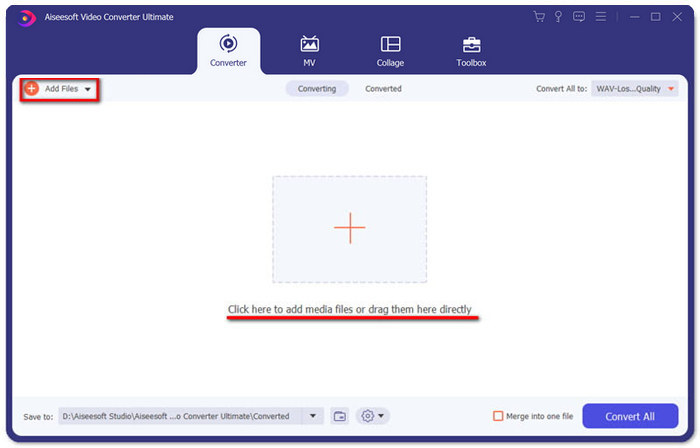
Steg 1. Installera och starta Video Converter Ultimate. Klicka på knappen Add Files eller dra filer till gränssnittet för att lägga till videor.
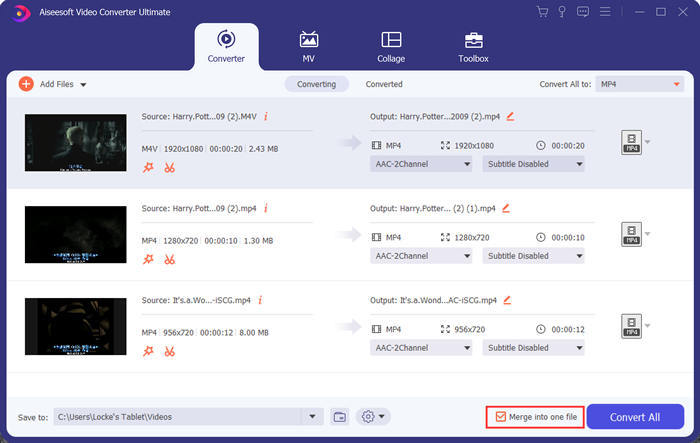
När du har lagt till dem kan du dra filerna uppåt eller nedåt för att ordna deras inbördes ordning. Du behöver också markera rutan Merge into one file så att programmet inte konverterar de tillagda videorna var för sig.
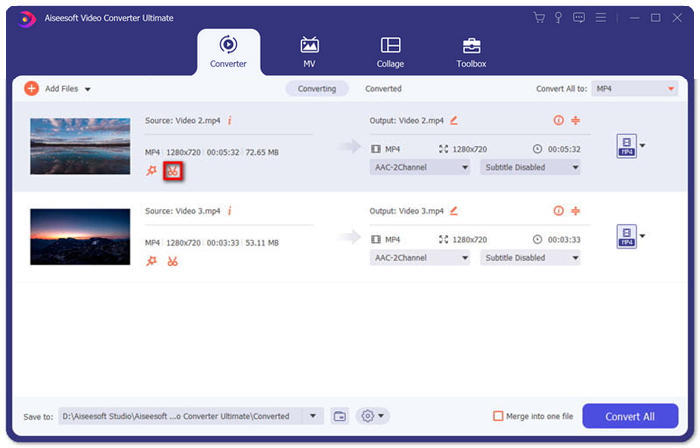
Steg 2. För att använda klippfunktionen kan du klicka på ikonen Cut på en tillagd video.
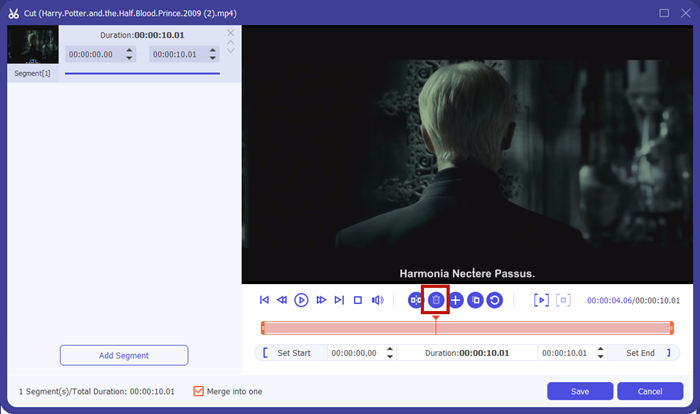
I gränssnittet Cut kan du enkelt klippa bort oönskade delar av en video. Markera bara ett segment genom att ange dess start- och slutpunkt och klicka sedan på papperskorgsikonen för att ta bort det.
Steg 3. Tillbaka i huvudgränssnittet kan du välja utdatafil. Klicka på pilen nedåt bredvid Convert All to. Sedan kan du välja M4V eller andra format som utdataformat.
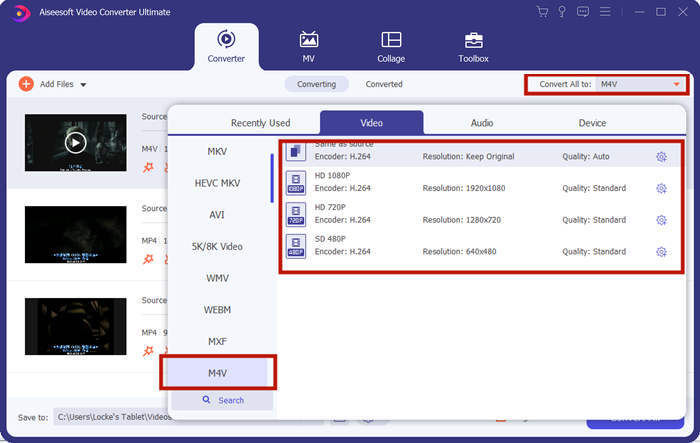
Steg 4. Klicka på knappen Convert All längst ned till höger i programmet och vänta medan programmet slår ihop M4V-filerna.
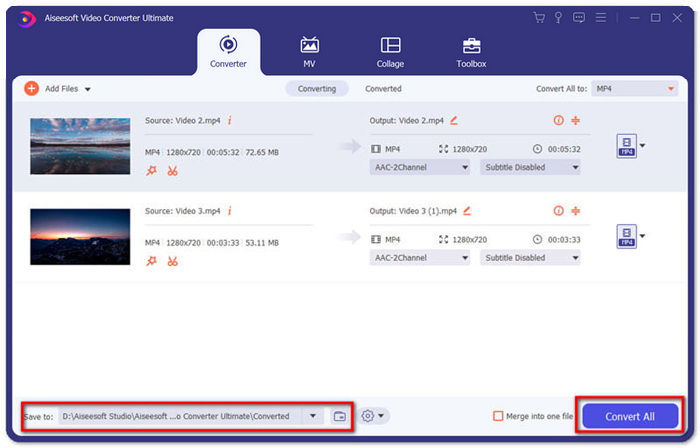
När sammanslagningen är klar ser du ett meddelande om framgång. Sedan kan du hitta den sammanslagna M4V-filen i målmappen. Ovan finns två metoder för att gå med i M4V-videofiler. Vi har också avslutat flera vanliga frågor nedan.
Del 3: Vanliga frågor om anslutning av M4V-filer
Vad är en M4V-fil?
M4V, designad av Apple, kallas ibland också iTunes Video File. Det liknar MP4 eftersom de båda är baserade på MPEG-4. Det mest speciella med M4V är att iTunes kan lägga till DRM-skydd i det för att förhindra obehörig distribution av iTunes-videor.
Hur öppnar jag en M4V-fil?
Om den inte är skyddad av DRM kan en M4V-fil spelas upp i VLC, QuickTime, Windows Media Player och många andra mediaspelare. Ibland fungerar det också att ändra filändelsen .M4V till .MP4 för att öppna filen. En M4V-fil med DRM-skydd kan däremot bara spelas upp på auktoriserade enheter.
Kan jag ta bort DRM-skyddet från en M4V-fil?
Jo det kan du. Du kan hitta otaliga DRM-borttagningsprogram på marknaden. Här är några av dem: TunesKit DRM M4V Converter, Aimersoft DRM Media Converter, Requiem DRM Remover, Ondesoft iTunes Convertert, Apple Music Converter.
Slutsats
Den här texten presenterade två effektiva sätt att slå ihop flera M4V-videofiler till en. För den snabbaste lösningen är FVC Free Online Video Merger ditt bästa val. Du kan använda det utan att ladda ner något program. Uppladdningen kan också bli klar omedelbart. Men om du vill ha högre kvalitet, eller inte bara kombinera M4V-filer utan även trimma dem, kan du vända dig till Video Converter Ultimate. Det ger dig kraftfulla redigeringsfunktioner samtidigt som gränssnittet är lätt att förstå för nybörjare. Om du har hittat ännu bättre lösningar vill vi gärna veta det. Lämna bara en kommentar nedan.
-
 Hur man konverterar M4V till MP4 med / utan DRM
 6 sätt att gratis konvertera M4V till MP4 (DRM-borttagning ingår)
-
 5 bästa M4V-spelare att spela M4V-filer enkelt på datorer / mobiler
 Topp 5 M4V-spelare för Windows / Mac / Android / iOS du borde veta
-
 Hur man extraherar MP3 från M4V med 4 utmärkta metoder du borde veta
 M4V till MP3 Converter - 4 bästa metoder för att extrahera MP3 från M4V-filer
