


 Video Converter Ultimate
 Skärminspelare
 Video reparation
 Säker nedladdning
Hur man slår samman 3GP-videor från mobiltelefon till en fil
När du tar flera videor under din resa med din smartphone kanske du vill slå samman 3GP-filer till en video. Vilka är de bästa metoderna för att kombinera videoklippen? Oavsett om du helt enkelt går med i 3GP-videor eller gör filmer med smartphonefilerna kan du lära dig mer om de två mest använda metoderna från artikeln.

Del 1: Hur man slår samman 3GP gratis
För att slå ihop dina 3GP-filer utan redigering behöver du bara ett praktiskt verktyg som kan slå ihop 3GP-videor gratis online. FVC Free Online Video Merger är en av de bästa 3GP-videosammanslagarna med ett enkelt gränssnitt. Det låter dig kombinera 3GP-filer utan begränsning i antal eller storlek. Dessutom kan du justera upplösning och videoformat.
Steg 1: Gå till Free Online Video Merger med valfri webbläsare. Du kan klicka på knappen Upload Videos to Merge för att ladda upp en 3GP-fil till det webbaserade videomergerverktyget. Du kommer då att föras vidare till gränssnittet för den webbaserade videosammanfogaren.
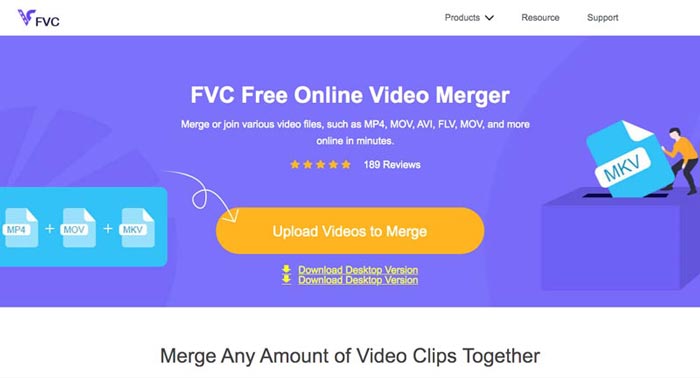
Steg 2. Ladda sedan upp fler 3GP-filer som du behöver kombinera. Därefter kan du ändra upplösningen och formatet på din video genom att klicka på fälten Resolution och Format. Du kan slå ihop dina 3GP-filer till populära videoformat som MP4 eller MKV.
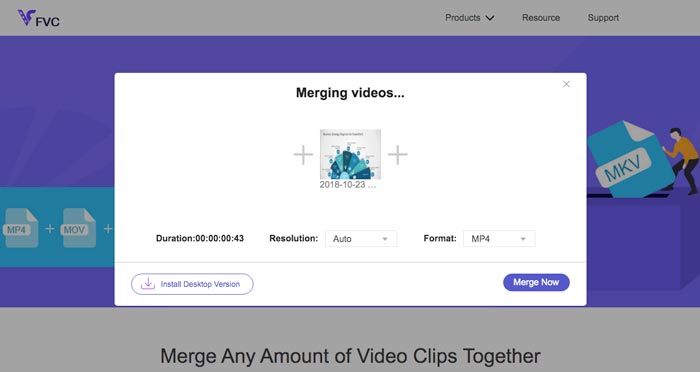
Steg 3. När du är nöjd med utgångsvideon kan du klicka på knappen Merge Now för att starta sammanslagningsprocessen. När sammanslagningen är klar sparas den hopslagna videon på din hårddisk.
Det är ett enkelt sätt att ansluta 3GP-filer gratis online. Men om du vill göra mer redigering för dina videofiler behöver du ett mer professionellt verktyg.
Del 2. Hur man kombinerar 3GP-videor till en film
Oavsett om du behöver kombinera 3GP-videor till en film med några fantastiska filter, eller helt enkelt slå ihop 3GP-filer till en enda fil, är Video Converter Ultimate en mångsidig videokonverterare du bör överväga. Den gör det möjligt att dela upp och slå ihop videoklipp, välja videoteman, lägga till vattenstämplar i videor och till och med konvertera 3GP-videor till andra videoformat för sociala mediesajter direkt.
- 1. Gör att du kan klippa ut önskade delar eller kombinera flera 3GP till en.
- 2. Ge grundläggande videoredigeringsfunktioner, till exempel trimma, dela, beskära och rotera.
- 3. Gå med i 3GP-videoklipp till en film med olika filter, teman, musikfiler etc.
- 4. Lägg till undertexter, ljudspår, 3D-effekter, vattenstämpel, komprimera video, och mer.
Gratis nedladdningFör Windows 7 eller senareSäker nedladdning
Gratis nedladdningFör MacOS 10.7 eller senareSäker nedladdning
Metod 1: Hur man kombinerar flera 3GP-videor direkt
Steg 1: Ladda ner och starta Video Converter Ultimate från den officiella webbplatsen. Välj gränssnittet Converter och klicka på knappen Add Files för att lägga till de 3GP-filer du vill slå ihop. Dessutom kan du också dra 3GP-videorna direkt in i programmet.

Steg 2: När du har importerat 3GP-filerna ska du välja formatet för utdatafilen. Klicka på saxikonen för att klippa ut den önskade delen. Dessutom kan du rotera/beskära videor, lägga på filter, lägga till en vattenstämpel eller justera ljudspår för utgångsvideon.

Steg 3: Gå längst ner i användargränssnittet för att välja målmapp för de sammanslagna 3GP-filerna. Därefter kan du klicka i rutan Merge into One File och klicka på Convert All för att börja slå ihop 3GP-filerna.

Metod 2: Hur man sammanfogar 3GP-filer till en film
Steg 1: När du behöver slå ihop 3GP-filer till en film kan du välja MV-menyn, och därefter går du in i gränssnittet för att skapa MV. Klicka på knappen Add längst ned till vänster i fönstret för att importera dina 3GP-videor och bilder.
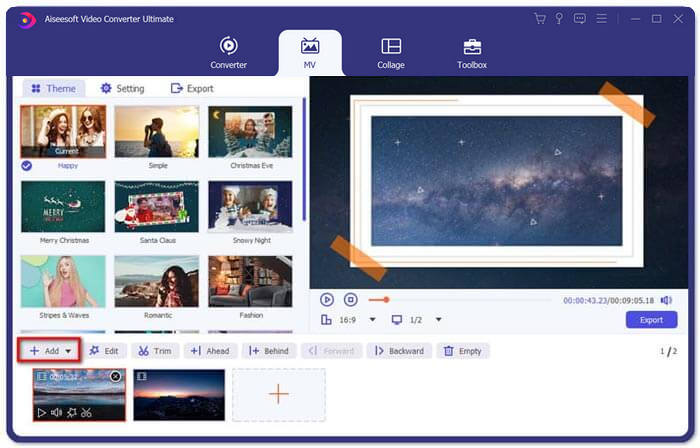
Steg 2: Därefter kan du klicka på knappen Edit för att lägga till videoeffekter. Dessutom kan du också välja ett tema för din MV-film. I den vänstra delen klickar du på fliken Theme och väljer sedan det tema du vill ha för din MV.
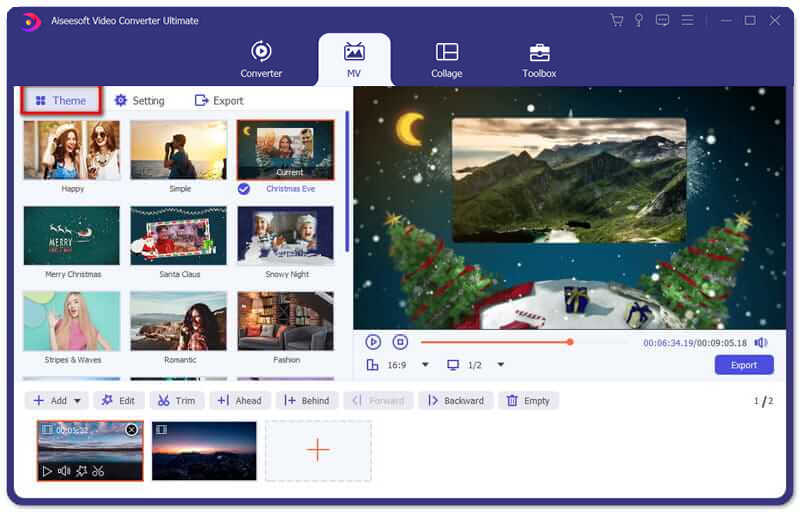
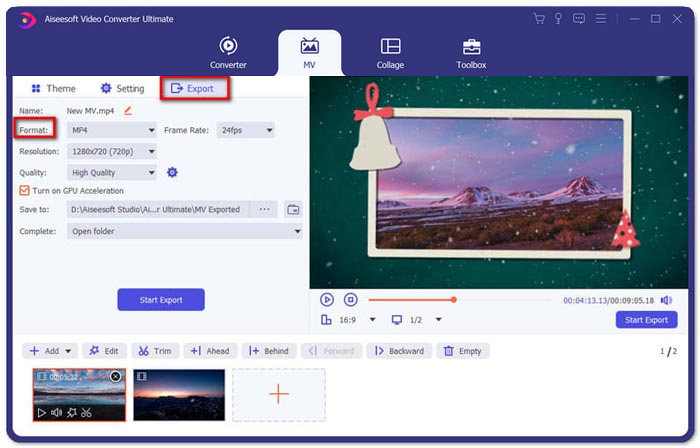
Steg 3: Om du är nöjd med den kombinerade 3GP-filen kan du klicka på knappen Export för att spara videofilen. Som standard är utdataformatet MP4. Självklart kan du också välja det önskade videoformatet enligt dina behov.
Del 3. Vanliga frågor om hur man slår samman 3GP
1. Vad är ett 3GP-format?
3GP är ett multimediafilformat som är utformat för att spara datalagring. Det används ofta på mobila enheter. När du tar bilder eller spelar in videor med din mobiltelefon sparas vanligtvis filen i 3GP-format. Normalt används 3GP på 3G-mobiltelefoner och det kan också spelas på vissa 2G- och 4G-telefoner.
2. Hur slår man samman 3GP-filer på en smartphone?
När du vill slå samman 3GP-filer på en iPhone eller Android-telefon kan du använda Video Merger för en Android-telefon, VivaVideo för en iPhone eller ladda ner andra applikationer för att kombinera videorna. Men när du behöver gå med i 3GP-filerna som en film, måste du fortfarande använda en professionell videofusion.
3. Kan jag kombinera 3GP-videor med ljudfiler?
Ja. Men du kan inte använda ljudfilerna som bakgrund för 3GP-video. Oavsett om du behöver kombinera två filer eller använda ljudet som bakgrund för en 3GP-video, bör den professionella 3GP-kombineraren vara ditt val.
Slutsats
När du behöver slå ihop 3GP-videofiler på dina mobila enheter till en enda videofil kan du lära dig 2 effektiva metoder i den här artikeln. Du kan slå ihop 3GP gratis online genom att använda Free Online Video Joiner. Om du behöver redigera och lägga till specialeffekter i din video, bör Video Converter Ultimate vara ett idealiskt verktyg för dig. Om du har några frågor om att slå ihop 3GP-filer är du välkommen att kontakta oss.
-
 Topp 3 gratis sätt att konvertera FLV till 3GP på Windows / Mac
 Kan du inte öppna FLV-filer på smartphone eller surfplatta? Oroa dig inte! Här delar vi tre metoder för att konvertera FLV till 3GP utan att förlora kvaliteten för att spela på mobil.
-
 3 metoder för att konvertera MP4 till 3GP problemfri
 Vill du konvertera MP4 till 3GP på ett snabbt och enkelt sätt? Här ska vi dela 3 MP4 till 3GP-omvandlare för att ändra MP4 till 3GP för att spela på olika mobiltelefoner.
-
 De 3 bästa gratis 3GP-spelarna för datorer och mobiler du borde veta
 När du enkelt vill spela din 3GP-film utan att installera eller konvertera videokodek kan du lära dig mer om de 3 bästa 3GP-spelarna på Windows, Mac, Android och iPhone i den här artikeln.
