


 Video Converter Ultimate
 Skärminspelare
 Video reparation
 Säker nedladdning
2 effektivt sätt att konvertera WMV till GIF-filer för enkel delning
När du klipper de intressanta och underbara fragmenten från WMV-videor och vill dela dem med dina vänner, kommer du att upptäcka att de inte kan skicka via många plattformar. Den bästa lösningen är att konvertera WMV-segment till animerade GIF-filer med små storlekar och hög kompatibilitet med webben eller bärbara enheter. På så sätt kan du enkelt dela dina favoritögonblick i videorna genom vilken app som helst.
This article will introduce the 2 best methods for you to convert WMV videos to GIFs with detailed steps. You can choose the professional way to solve all the problems or the easy way with simple steps but fewer functions. Please keep reading and learn more about them.

Del 1: Det bästa och effektiva sättet att konvertera WMV-videor till GIF gratis
To make interesting GIFs from WMV videos in an efficient way, you should rely on the professional GIF maker - FVC Free Video to GIF Maker. It is actually a versatile video converter that can transform 100+ formats to any format, including converting WMV format to GIF. Moreover, it supports adjusting the video resolution and frame rate to keep high quality and fluency.
- 1. Överför WMV-videor till GIF-filer med enkla klick.
- 2. Trimma och klipp WMV-videorna så att de förblir de önskade delarna.
- 3. Anpassa videoupplösningen, bildfrekvensen och effekterna fritt.
- 4. Beskär, vattenstämpel, vattenstämpel och rotera WMV innan du gör GIF-filer.
Gratis nedladdningFör Windows 7 eller senareSäker nedladdning
Gratis nedladdningFör macOS 10.7 eller senareSäker nedladdning
Step 1: Free download FVC Free Video to GIF Maker on Windows/Mac and launch it. Click the Add Files button to choose the desired WMV videos to convert to GIFs.
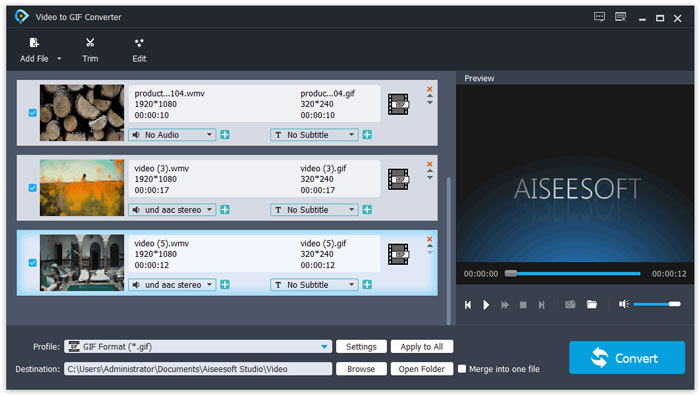
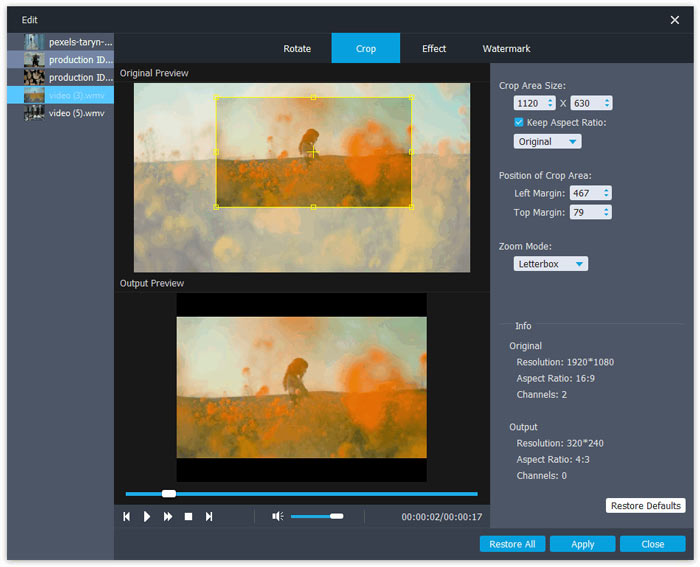
Step 2: Click the Edit button to clip the videos into short animations. You can also crop and rotate the videos freely. Then you can add the desired themes, effects, and subtitles freely.
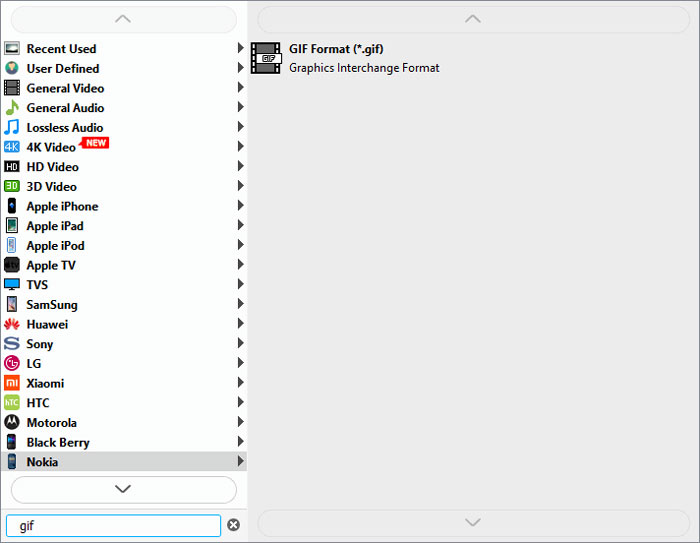
Step 3: Then you should click the Profile menu and choose the GIF format to export. To keep the quality and fluency of GIF files, click the Settings icon and change the resolution and frame rate to the highest one. Then go back to the main interface and click the Convert button to start transferring WMV to GIF.
Del 2: Hur man enkelt förvandlar WMV till den animerade GIF online gratis
FVC Free Online Video Converter is very easy to use that can helps you convert WMV videos to animated GIFs online without downloading other software. It supports importing any format and exporting videos to more than 10 common formats. Regardless of the low resolution and frame rate of GIF settings, it’s the best choice for quick conversion. The detailed steps are introduced in the following:
Step 1: Open FVC Free Online Video Converter on any browser. Click the Add Files to Convert button to install the launcher. Then click the button again to add the edited WMV files and launch the converter.
Ladda ner Skrivbordsversionen för att konvertera filer i batch.
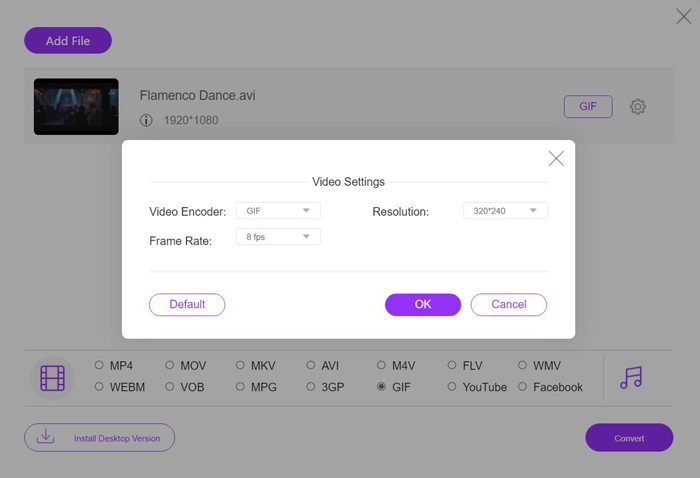
Step 2: Choose the GIF format in the video list, and then click the Settings icon to choose the 320X240p resolution and 8 fps frame rate. Then click the OK button to save the settings. After that, click the Convert button to choose the storage path and start transforming WMV videos to GIF files.
WMV kontra GIF
Producerat av Microsoft var WMV ett av de vanligaste videoformaten på 2000-talet. Den kan ses över webben och spelas upp av olika mediaspelare på Windows. Och det är också standardvideofilformatet för Windows Media Player. Men det har tagits över av andra format nyligen.
GIF är ett vanligt bildformat för webbgrafik. Förutom att spara små bilder och bilder som innehåller text, kan GIF även innehålla och visa grundläggande animationer på webbplatser. Det är ett förlustfritt format och GIF-komprimeringen försämrar inte bildens skärpa.
Del 3: Vanliga frågor om att konvertera WMV-videor till GIF
1. Hur förvandlar man WMV till GIF med originalkvalitet?
Egentligen kan du inte behålla den ursprungliga kvaliteten efter att ha konverterat WMV till GIF. GIF stöder bara 256-bitars färg, så bildkvaliteten är relativt låg och filstorleken är liten. Men du kan använda FVC Free Video to GIF Maker för att justera inställningarna och hålla relativt hög kvalitet.
2. Varför kan jag inte skicka WMV-fragment på Twitter?
Det beror på att Twitter bara stöder MP4- och MOV-videoformat. Om du vill dela ett filmfragment på Twitter, bör du konvertera WMV-videor till kompatibla GIF-filer med mindre storlekar.
3. Ska jag ta bort ljudspåret när jag konverterar WMV till GIF?
Nej, du behöver inte göra det här. Eftersom GIF bara kombineras med flera bilder, så stöder den inte ljudfiler. När du vill överföra WMV till GIF kommer ljudspåret att raderas automatiskt.
Slutsats
GIF är mycket populärt nu, och du kanske vill skapa intressanta eller underbara GIF-filer från WMV-videor. Den här artikeln har introducerat 2 enkla och effektiva sätt att hjälpa dig konvertera WMV-videor till GIF-filer. Du kan omvandla WMV till GIF online gratis med grundläggande justering. För att hålla hög kvalitet och flyt, ladda ner gratis FVC Free Video to GIF Maker för att ändra upplösning och bildhastighet.
-
 Gratis FLV till Xvid Converter - Konvertera FLV till Xvid för CD / DVD-spelare
 Det här inlägget är en steg-för-steg-guide för att gratis konvertera FLV till Xvid-kodade filer så att du kan spela FLV-videofilerna på en CD- och DVD-spelare utan ansträngning.
-
 Hur man laddar ner MKV Codec i Windows Media Player för smidig uppspelning
 Kan du inte spela MKV-video i Windows Media Player? Du kan gratis ladda ner MKV-codec för Windows Media Player. Motsatt konverterar du MKV så att den kan spelas i Windows Media Player.
-
 Hur man konverterar AVI-videor till animerade GIF-filer på Windows / Mac
 Vill du välja de intressanta AVI-segmenten för att skapa GIF-memes? Den här artikeln berättar de 2 bästa metoderna för att klippa AVI-videor och konvertera AVI till animerade GIF-filer gratis.

