


 Video Converter Ultimate
 Skärminspelare
 Video reparation
Bästa omvandlaren för att konvertera AIFF till MP3 med steg-för-steg-guide
AIFF-filer lagrar den högsta formen av ljudfiler du någonsin har hört talas om. Även om detta format kan lagras i ett skrivbordsprogram eftersom det är okomprimerat, är det inte idealiskt att lagra eller ladda ner på din telefon. Det finns alltså ett sätt att lagra AIFF-filer på din mobil och till och med på din dator utan att de tar upp lika mycket lagringsutrymme. Det bästa sättet att lösa detta problem är att konvertera AIFF till MP3-format. Även om konvertering kan ha en bieffekt på dina ljudfiler, har vi samlat tillräckligt många verktyg som du kan välja mellan för att konvertera AIFF utan att förlora filens kvalitet. Så fortsätt, låt oss undersöka verktygen nedan och börja direkt med introduktion och steg-för-steg-guide.

Del 1. Hur man konverterar AIFF till MP3 på Windows & Mac
1. Video Converter Ultimate
Att konvertera format kan vara enastående med Video Converter Ultimate. Om du inte får någon särskild behandling i din nuvarande konverterare, prova det här verktyget. Denna ultimata konverterare erbjuder nämligen många avancerade funktioner som andra konverterare för AIFF till MP3 på Windows eller Mac inte har. Dessutom är verktyget inte begränsat till Windows-program – du kan även ladda ner det på din Mac. Om du alltså vill uppleva den ultimata konverteringen är det ett måste att följa stegen och genomföra en lyckad konvertering av din AIFF-fil.
Steg 1. För att använda konverteraren måste du först ladda ner den till din PC- eller Mac-enhet. Installera den sedan, justera inställningarna och klicka på Slutför för att starta verktyget.
Gratis nedladdningFör Windows 7 eller senareSäker nedladdning
Gratis nedladdningFör MacOS 10.7 eller senareSäker nedladdning
Steg 2. Efter installationen av konverteraren klickar du på Add Files för att lägga till de AIFF-filer du vill konvertera. Om det är många filer i mappen kan du dra och släppa dem i gränssnittet.
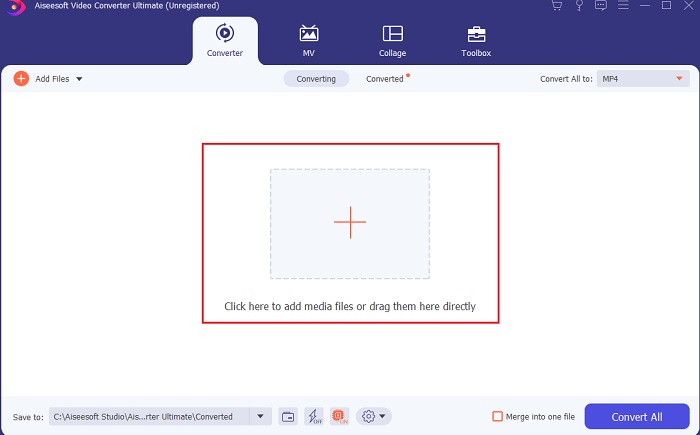
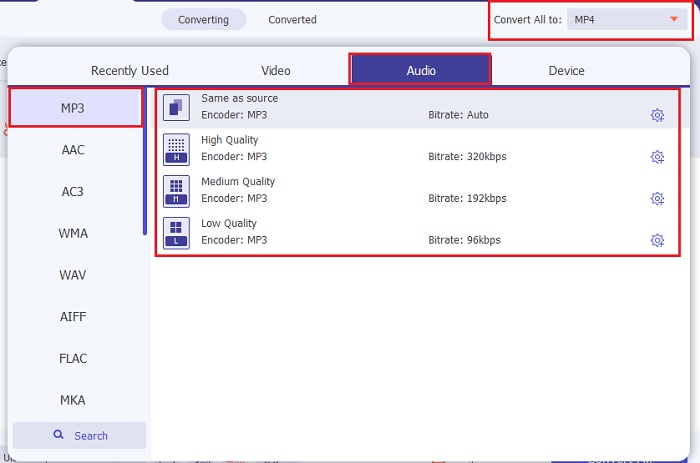
Steg 3. Gå vidare till nästa steg genom att klicka på alternativet Convert All to. Välj sedan vilket ljudformat du vill ha. Till exempel kan du välja MP3 som slutligt format.
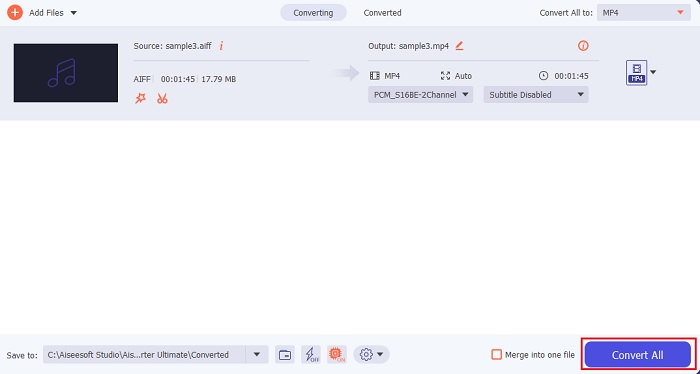
Steg 4. Klicka på knappen Convert All för att starta konverteringen av AIFF-filerna.
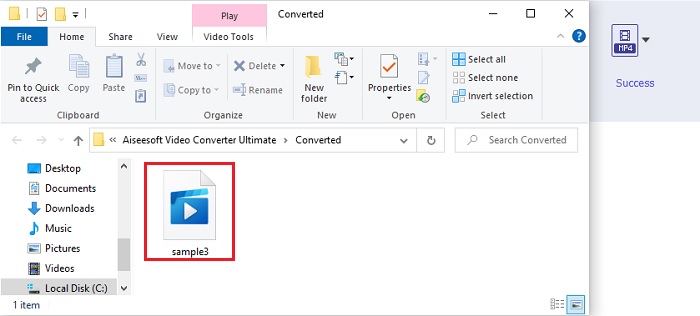
Steg 5. Vänta några sekunder på konverteringen, sedan visas en filmapp på skärmen. Klicka på den nykonverterade MP3-filen och lyssna på det finaste ljud du någonsin har hört.
2. iTunes
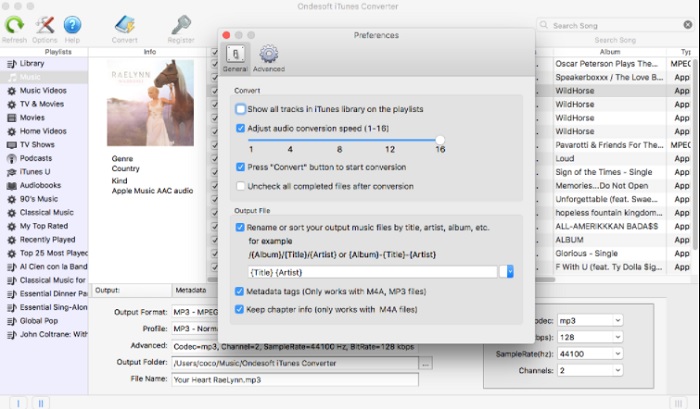
Den inbyggda mediespelaren iTunes kan också konvertera AIFF-filer till MP3 på Mac. Denna mediespelare utvecklades av Apple för att vara deras standardmusikbibliotek och spelare på alla iOS- och Mac-program. En av funktionerna du kan använda här är just konverteraren. Även om den har konverteringsfunktioner stöder den färre format än onlinetjänster gör. Men den är effektiv och säker att använda för att konvertera filer till ett nytt format som kan spelas upp. Dessutom kan denna inbyggda mediespelare inte nås på produkter som inte är från Apple, som Android eller Windows. Följ stegen nedan för att lära dig mer om iTunes konverteringsfunktion.
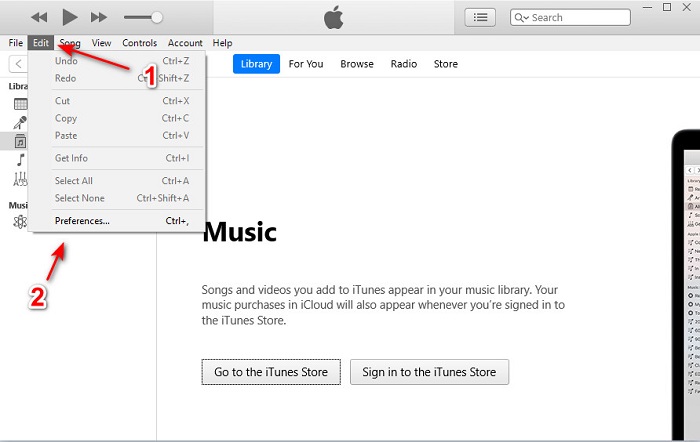
Steg 1. Öppna iTunes på din dator och klicka sedan på Edit och Preferences.
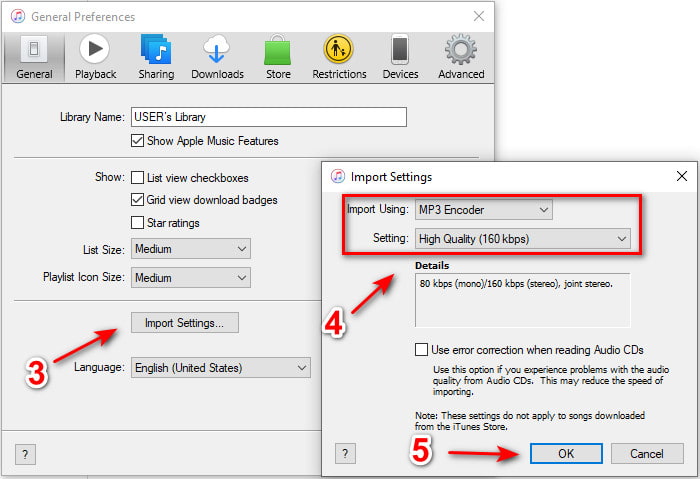
Steg 2. Under General klickar du på Import Settings. En mindre meny visas; ändra format och quality här och klicka sedan på OK för att spara.
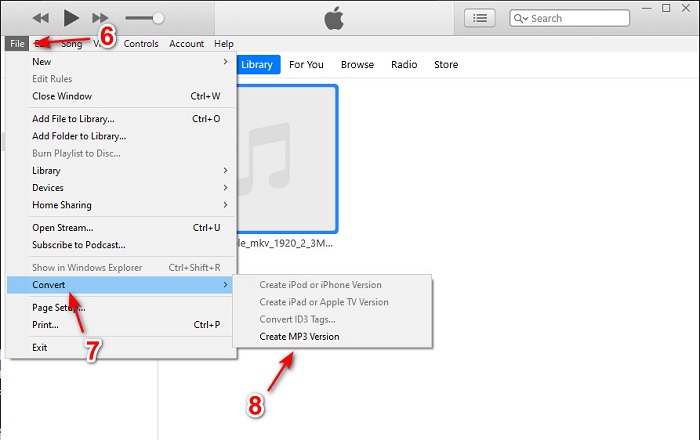
Steg 3. Dra filen till gränssnittet och klicka på den. Gå till File, Convert och klicka på Create MP3 Version för att starta konverteringen.
Del 2. Topp 2 gratis onlinekonverterare för att konvertera AIFF till MP3
1. FVC Free Audio Converter
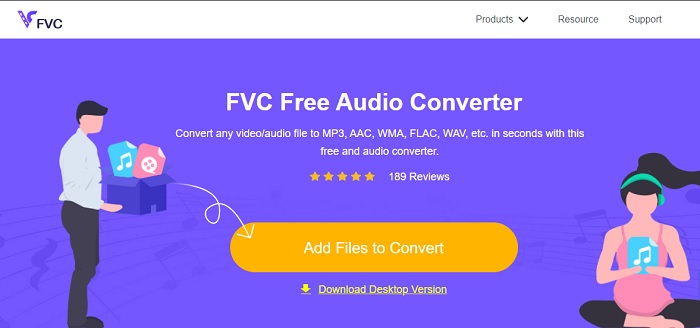
Om du konverterar AIFF till MP3 får du mindre än 320 kbps i filstorlek om du använder denna webbaserade konverterare, FVC Free Audio Converters. Denna lösning har använts av miljontals användare på webben för att konvertera filformat. Detta verktyg har dock inte de stora funktionerna som premiumversionen FVC Video Converter Ultimate erbjuder, eftersom det är gratis. Men du kan ändå uppleva en medelhög nivå av ”ultimate”-konvertering om du provar detta verktyg. Dessutom stöder det fler ljudformat än iTunes. Följ stegen nedan för att lära dig hur du använder detta webbverktyg.
Steg 1. För att komma till huvudwebbplatsen för ljudkonverteraren klickar du på denna länk.
Steg 2. Klicka sedan på knappen Add Files to Convert och tillåt verktyget att starta startprogrammet. Mer information: om det är första gången du använder detta webbverktyg måste du först ladda ner och installera startprogrammet.
Ladda ner Skrivbordsversionen för att konvertera filer i batch.
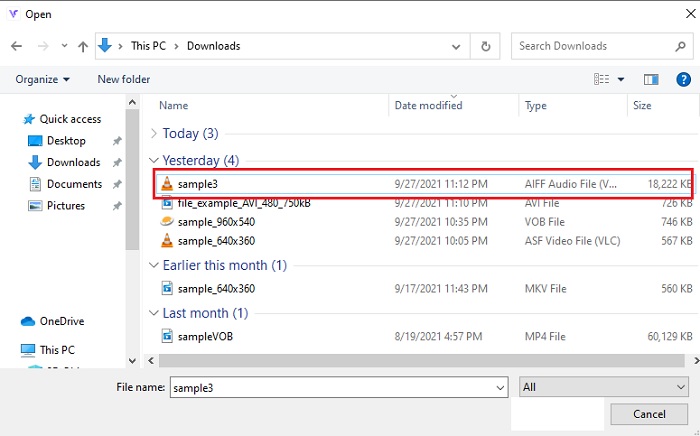
Steg 3. När du har startat webbverktyget måste du välja AIFF-filerna och klicka på open för att komma tillbaka till huvudgränssnittet för webbverktyget.
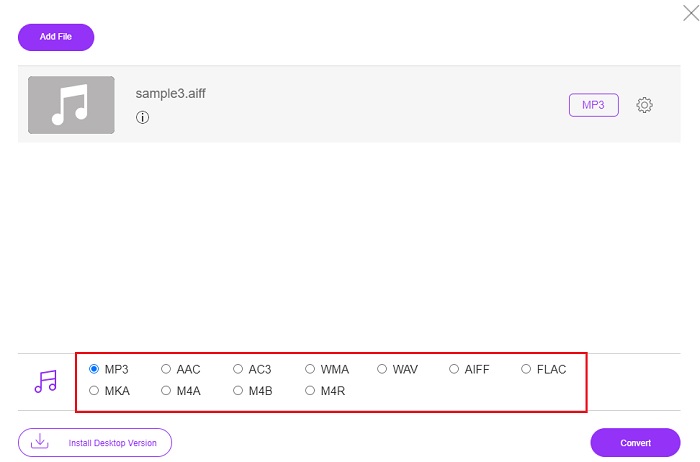
Steg 4. Välj det ljudformat du vill ha längst ned. Klicka sedan på knappen Convert och välj filens destination för att starta konverteringsprocessen.
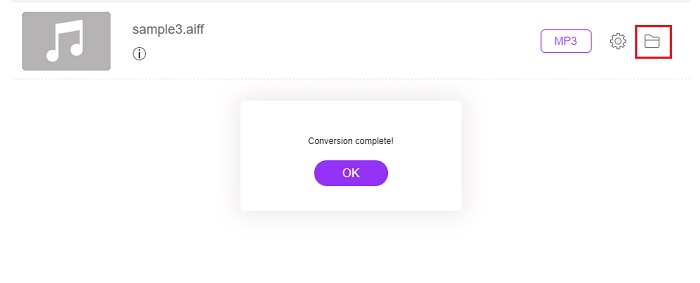
Steg 5. Låt oss hitta den konverterade filen när konverteringen är klar genom att klicka på folder. Ett fönster i filutforskaren visas på skärmen; klicka på den konverterade filen och lyssna på den.
2. Zamzar
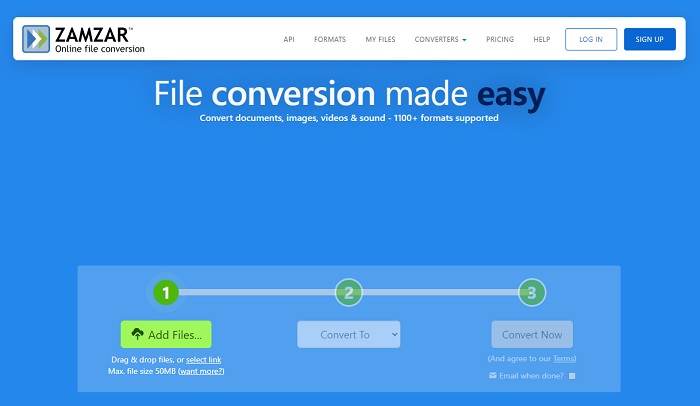
Att konvertera med Zamzar kan vara det bästa valet du gör för att konvertera filer. Detta verktyg är mycket lätt att förstå eftersom det bara visar tre grundläggande steg eller processer för att genomföra en konvertering. Men det har en filstorleksgräns och begränsat antal filer att konvertera. Dessutom är konverteringsprocessen här ganska dålig. Den tar mycket av din tid och om konverteringen väl har startat kan du inte avbryta den. Så innan du gör en ny konvertering måste du vänta tills den är klar och sedan lägga till filen igen. Läs stegen nedan och följ dem för att konvertera.
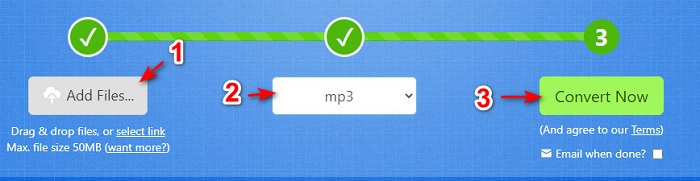
Steg 1. Sök upp Zamzars huvudsida i din webbläsare.
Steg 2. Klicka sedan på Add File för att välja den ljudfil du vill konvertera. Välj format genom att klicka på Convert to.
Steg 3. När du är redo att starta konverteringen klickar du på Convert Now för att starta processen.
Vidare läsning
Hur man konverterar WAV till MP3
Hur man konverterar M4V till MP3
AIFF kontra MP3
AIFF, Audio Interchange File Format, är utvecklat av Apple. Och det är en variant av IFF-formatet. AIFF-filer är okomprimerade, så det har högre ljudkvalitet än liknande MP3-filer. Det kan också leda till att problemet med diskutrymme inte räcker till.
MP3-formatet släpptes 1993 av Moving Picture Experts Group (MPEG). Det var standarden för att lagra musik eftersom den kunde komprimera ljud till en mycket mindre storlek än andra okomprimerade format. Det används fortfarande i stor utsträckning nuförtiden, särskilt för att distribuera ljud online.
Del 3. Vanliga frågor om AIFF till MP3
Vilken är bättre: AIFF eller MP3?
Även om samma format lagrar en ljudfil av hög kvalitet, låt oss jämföra varje format. För att göra det kort ger MP3 bra kvalitet med mindre utrymme men AIFF producerar en ljudfil av hög kvalitet med större utrymme.
Vilken är den bästa användningen av AIFF-filer?
Eftersom AIFF-filer lagrar den naturliga och kvalitetsljudfilen fortfarande är filstorleken i detta format enorm eftersom den inte är komprimerad. Men det här AIFF-formatet är det idealiska för att användas vid redigering och lägga till effekter för att få ljudet att låta bättre.
Vad är skillnaderna mellan AIF, AIFF och AIFC?
AIF-filer används oftast för att lagra ljudfiler på CD-, DVD-, Blu-ray- och AIFF-filer som används för att lagra personliga data och ljuddata, vilket betyder att de är enorma i filstorlek. Men AIFC är den komprimerade versionen av AIFF, det här formatet används oftast av mediaspelare för att spela .aiff-format av hög kvalitet.
Slutsats
Som avslutning på diskussionen är det nu lättare för oss att förstå vad en AIFF-fil är. Men detta format är stort i filstorlek, och för att åtgärda detta kan man konvertera det till det universella ljudformatet MP3. Att leta efter vilket verktyg du ska använda kan vara lite krångligt eftersom vissa kan skada dina AIFF-filer. Även om vi presenterar olika lösningar finns det fortfarande ett verktyg som är enastående när det gäller konvertering. FVC Video Converter Ultimate kan vara din hjälp för att lösa detta enkla problem. Så, vad väntar du på? Du bör nu ladda ner verktyget och uppleva den mest fenomenala konverteringen någonsin.
-
 Topp 4 metoder för att konvertera OGG till MP3 utan att förlora kvalitet
 Hur konverterar jag dina OGG-filer till MP3-format för att lyssna på på en dator eller mobil enhet? Här delar vi 5 enklaste sättet att göra det på skrivbordet eller online.
-
 Hur konverterar du M4A till MP3 med 4 gratis ljudomvandlare
 Kan du inte spela M4A och behöver konvertera den till MP3? Finns det något gratis sätt att konvertera M4A till MP3 online? Det här inlägget delar 4 gratis sätt att hjälpa dig konvertera M4A till MP3 med iTunes, online och professionella ljudkonverterare.
-
 Hur konverterar du WMA till MP3 på Mac / Windows / Online
 Är det möjligt att konvertera WMA till MP3 med Windows Media Player? Hur konverterar jag WMA till MP3 gratis? Det här inlägget delar 4 enkla metoder som hjälper dig att göra ljudkonvertering från WMA till MP3 på Mac, Windows PC och online.

