


 Video Converter Ultimate
 Skärminspelare
 Video reparation
 Säker nedladdning
5 metoder för att konvertera WMA till MP3: Skrivbord och online
WMA är ett ljudformat utvecklat av Microsoft. Det är förstås kompatibelt med Windows‑enheter, men utöver det är det ett ganska mediokert val. Vissa äldre modeller av mobila enheter och musikspelare stöder inte detta format. Om vi vill säkerställa att innehållet i den här ljudfilen kan läsas på alla enheter eller plattformar bör du prova att konvertera WMA till MP3. MP3‑filer är mindre och sparar därför också mycket lagringsutrymme på hårddisken. Och ingen plattform kan redigera och spela upp musik om den inte stöder MP3.
Att konvertera WMA till MP3 är ett mycket kostnadseffektivt alternativ, och många program och plattformar kan göra det åt oss. Efter research och faktisk användning väljer den här artikeln ut 5 av de bästa. Du hittar information om hur du använder dem och ser fördelarna och nackdelarna med varje konverterare här.

Del 1. Hur man konverterar WMA till MP3 på Win/Mac [Ingen kvalitetsförlust]
FVC Video Converter Ultimate
Om du gillar den stabila prestandan hos programvara på skrivbordet bör du absolut vara först med att prova FVC Video Converter Ultimate. Programmet är användarvänligt för både Windows‑ och Mac‑användare och stöder fler än 1 000 format, vilket gör att vi knappt stöter på kompatibilitetsproblem när vi använder det. Dess funktion för batchkonvertering och hårdvaruacceleration gör att det kan hantera flera WMA‑till‑MP3‑konverteringar med upp till 30 gånger högre hastighet. FVC Video Converter Ultimate är långt ifrån bara en formatomvandlare; det har en komplett uppsättning verktyg för redigering av video, ljud och bilder i sin verktygslåda, såsom beskärning, förbättring, komprimering, brusreducering och mycket mer. Genom att ladda ner detta program slipper vi hoppa runt mellan flera plattformar och kan lösa alla problem på en och samma gång.
Gratis nedladdningFör Windows 7 eller senareSäker nedladdning
Gratis nedladdningFör MacOS 10.7 eller senareSäker nedladdning
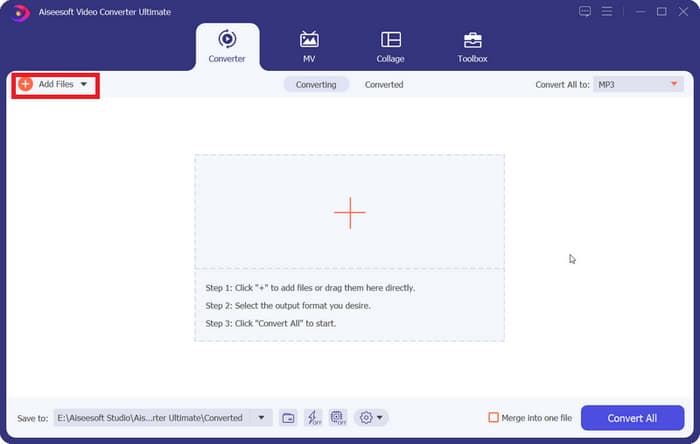
Steg 1. Ladda ner och installera FVC Video Converter Ultimate på din dator. Vi använder en Windows‑enhet som exempel. Tryck på Converter > Add Files för att ladda upp ditt WMA‑ljud.
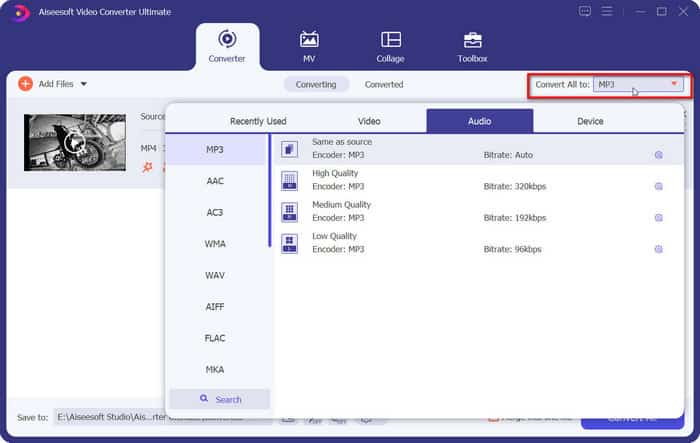
Steg 2. Gå till Convert All to, vik ut listan under denna flik och välj Audio > MP3. Det finns många olika alternativ för ljudkvalitet. Välj det som passar dig.
Om du vill trimma den tillagda ljudfilen klickar du på Cut under filnamnet.
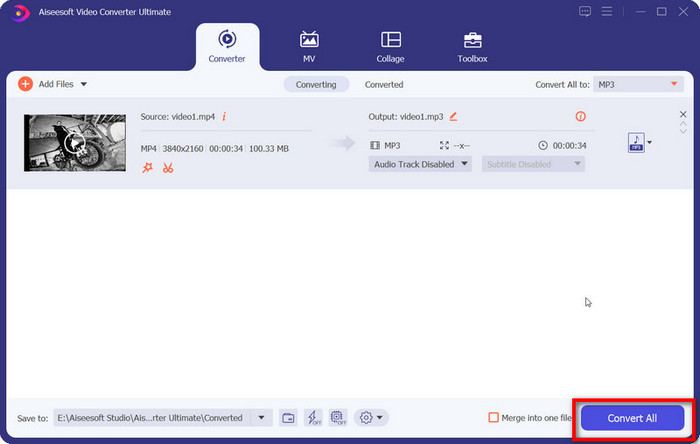
Steg 3. När du har gjort alla dessa inställningar klickar du på Convert All för att exportera din MP3‑fil.
Del 2. Hur man konverterar WMA till MP3 gratis
Hur man konverterar WMA till MP3 med VLC Media Player
Förutom FVC Video Converter Ultimate finns det ett annat skrivbordsprogram som du kan vända dig till: VLC Media Player. Även om den vanligaste användningen av den här applikationen är att öppna och spela multimediafiler, stöder den också slutförandet av vissa enkla redigeringsåtgärder, till exempel formatkonverteringar. Förutom sin utmärkta kompatibilitet har VLC Media Player fördelen att vara helt gratis och enkel att använda.
Så här konverterar du WMA-filer till MP3 med VLC Media Player.
Steg 1. Förbered din dator för VLC Media Player. I det övre vänstra hörnet väljer du Media > Convert/Save.
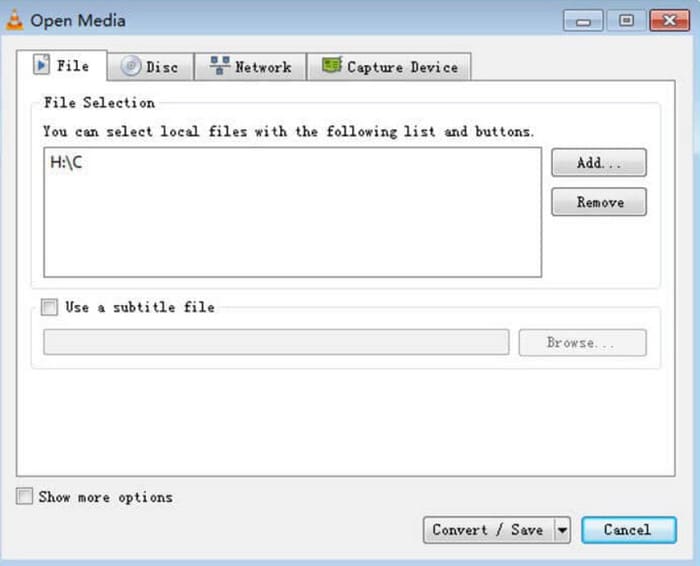
Steg 2. Fönstret Öppna media startas då. Välj File och klicka på + Add för att välja ditt förberedda WMA‑ljud. Klicka sedan på Convert/Save.
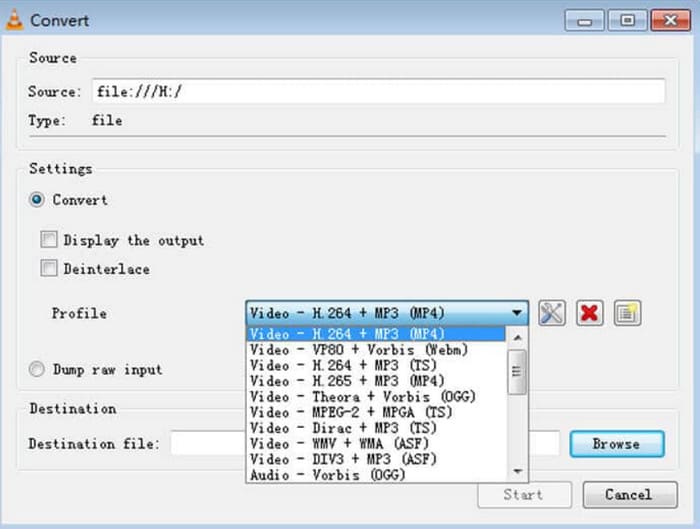
Steg 3. Gå till alternativet Profile och vik ut listan bredvid. Välj ditt önskade format och klicka på Browse för att välja en lagringsplats.
Steg 4. När du har slutfört alla inställningar ovan klickar du på Start för att starta konverteringen från WMA till MP3.
VLC Media Player stöder inte många utdataformat, och vi kan bara hitta mycket grundläggande verktyg för justering av ljudparametrar. Den fungerar bra för att helt enkelt överföra WMA till MP3, men för mer specialiserad redigering rekommenderar vi FVC Video Converter Ultimate.
med VLC Media Player
iTunes, en multimediaspelare utvecklad av Apple, kan göra mer än att spela och lagra ljudfiler. Vi kan också låta den utföra vissa grundläggande formatkonverteringsuppgifter. Även om den är erkänd som den mest kompatibla med Mac-enheter, erbjuder den också en version som Windows-användare kan ladda ner.
Några av iTunes grundläggande tjänster är gratis. Härnäst visar vi hur man konverterar WMA till MP3 med hjälp av iTunes.
Steg 1. Starta iTunes på din dator. Välj Redigera > Inställningar.
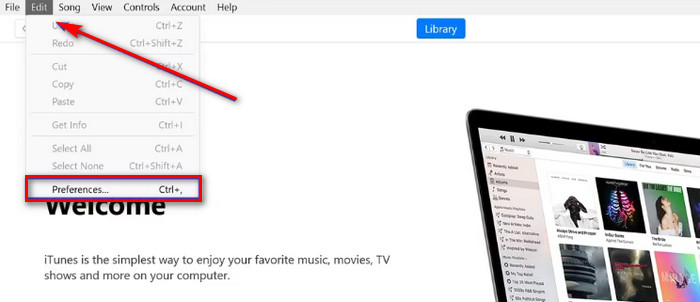
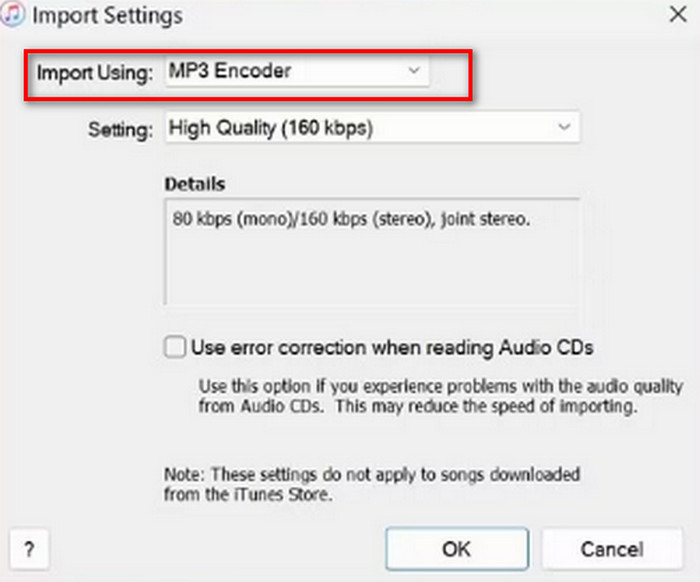
Steg 2. När fönstret General Preference öppnas väljer du General och går till Import Settings. Välj MP3 Encoder och klicka på OK för att spara ändringen.
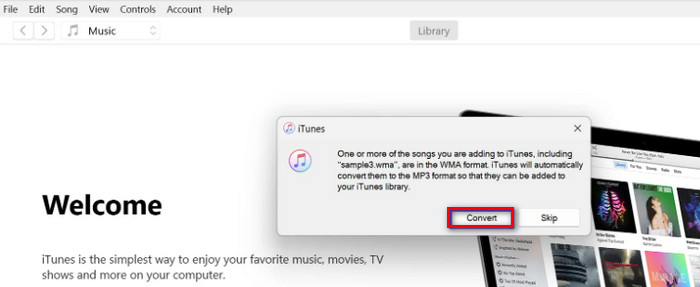
Steg 3. Gå tillbaka till File igen och tryck på Add File to Library. Ett popup‑fönster visas. Du ska klicka på Convert.
Det är viktigt att notera att iTunes också erbjuder ett fåtal professionella ljudredigeringsverktyg, och appen togs bort för Apple-enheter efter lanseringen av macOS Catalina-versionen. Se till att din enhetsmodell matchar innan du laddar ner den.
Del 3. Hur man ändrar WMA till MP3 online
FVC Free Audio Converter
Detta är rekommendationerna för användare som föredrar skrivbordsprogram. Om du tycker att det är för krångligt att ladda ner och installera programvara och i stället vill ha en plattform där du kan börja konvertera direkt i gränssnittet, prova FVC Free Audio Converter.. Den kan öppnas i webbläsaren och har ett mycket lättöverskådligt gränssnitt. Denna kostnadsfria och effektiva omvandlare är vår mest pålitliga hjälpreda när vi snabbt behöver justera ljudformat.
Så här konverterar du WMA till MP3 online med FVC Free Audio Converter.
Steg 1. Starta FVC Free Audio Converter i din webbläsare. Klicka på Add Files to Start och ladda upp din WMA‑ljudfil.
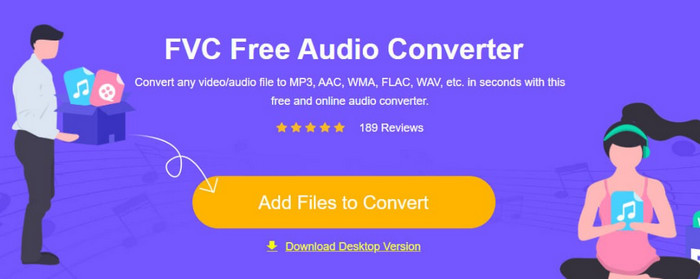
Steg 2. Välj MP3 som utdataformat. Klicka sedan på Convert för att starta processen. Om du vill justera vissa parametrar för ditt ljud klickar du på inställningsikonen till höger om ljudfilen.
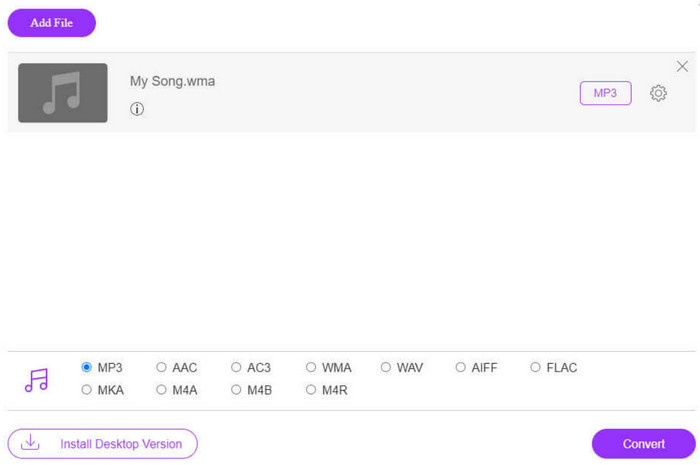
FVC Free Audio Converters konverteringshastighet är mycket snabb, men den har fortfarande färre funktioner än FVC Video Converter Ultimate. Om du vill ha en högre ljudnivå rekommenderar vi att du laddar ner skrivbordsversionen.
FreeConvert
En annan online-formatkonverterare som också är lätt att använda är FreeConverter. Den stöder över 1500 filformatkonverteringar och hanterar e-boksfiler utöver video, ljud och bilder. Plattformen påstår sig automatiskt radera källfilen inom några timmar efter att användaren har avslutat redigeringen för att säkerställa att integriteten inte äventyras.
Läs guiden nedan för att lära dig hur du konverterar WMA till MP3 med FreeConverter.
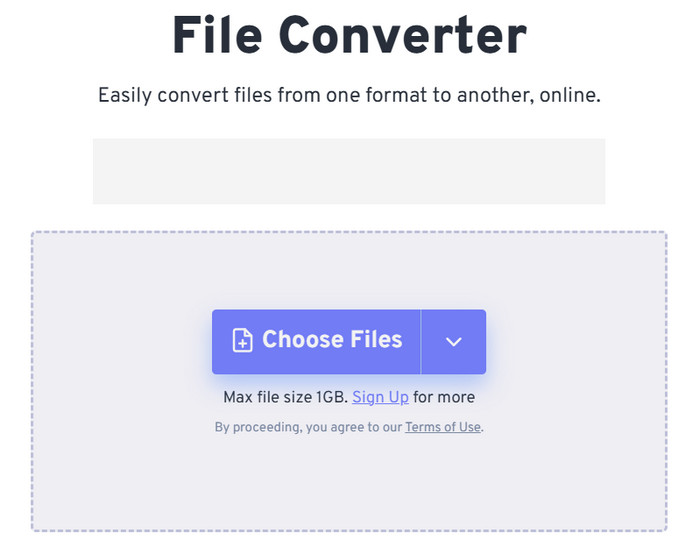
Steg 1. Besök FreeConverters officiella webbplats. Klicka på Choose Files för att lägga till ditt WMA‑ljud på plattformen.
Steg 2. Vik ut menyn för Output. Välj Audio > MP3.
Om du vill förbättra ljudkvaliteten klickar du på ikonen Advanced settings.
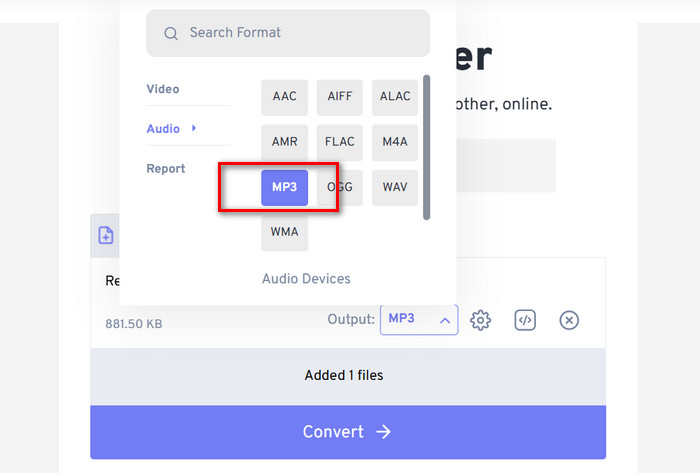
Steg 3. Klicka på Convert för att starta konverteringen.
Även om FreeConvert säger att det är helt kostnadsfritt att konvertera ljudformat får vi inte glömma att det har en filstorleksgräns. Det klarar inte ljudfiler över 1 GB, så om vår fil överskrider denna gräns måste vi betala för att kunna fortsätta konvertera med denna WMA‑till‑MP3‑omvandlare på rätt sätt.
Del 4. Vanliga frågor om att konvertera WMA till MP3
WMA-filer kontra MP3-filer, vilken är bäst?
Beroende på hur vi jämför är MP3 klart överlägsen WMA vad gäller kompatibilitet. MP3-filstorlekar är mindre än WMA, en egenskap som gör den mer lämplig för lagring och överföring av ljud. Men WMA är bättre vad gäller ljudkvalitet.
Hur spelar jag upp gamla WMA-filer?
När det gäller att välja en WMA‑ljudspelare är det bästa alternativet Windows Media Player, som följer med Windows. Naturligtvis är vissa tredjepartsspelare, såsom VLC Media Player och MPlayer, också värda att prova.
Kan YouTube Music spela WMA-filer?
Ja, WMA finns för närvarande bland de ljudformat som officiellt stöds av YouTube.
Del 4. Slutsats
Detta är en guide som lär dig hur du konverterar WMA till MP3. Även om ljudkvaliteten för WMA‑formatet är något bättre är filerna samtidigt större. Dessutom stöds detta format numera inte av så många plattformar och musikspelare. För att se till att du inte hindras när du spelar upp ljud är det nödvändigt att konvertera WMA till MP3. Här hittar du fem verktyg, inklusive tre skrivbordsprogram och två onlineplattformar. Jämför man dessa fem verktyg är FVC Video Converter Ultimate det mest mångsidiga valet.
-
 WMA Music Player – Recension av 10 bästa WMA-musikspelare 2025
 Kan Google Music spela WMA? Vad är den bästa WMA-musikspelaren? Vilken Android-musikspelare kan spela WMA-filer? Det här inlägget gör en lista över 10 bästa WMA-musikspelare som du kan spela WMA-musik på Mac, Windows PC, Android och iPhone.
-
 2 metoder för att konvertera FLV till WMA-ljud [Gratis och online]
 Vill du extrahera WMA-ljud från FLV-video? Här är två gratis WMA-ljuduttag för att konvertera FLV (Flash Video) till WMA (Windows Media Audio) med snabb omvandlingshastighet på Mac OS X och Windows 10/8/7.
-
 Topp 3 lättanvända WMA -inspelare Lämpliga för rösttalanger
 Är du en rösttalang? Den här artikeln talar om WMA -inspelare som producerar en hög kvalitet som WMA för röstinnehållsskapare.

