


 Video Converter Ultimate
 Skärminspelare
 Video reparation
 Säker nedladdning
Hur konverterar du M2TS till iPad-kompatibla format på Windows / Mac / Online
Kan du spela upp M2TS direkt på iPad? Tyvärr är svaret nej. M2TS är inte kompatibelt med iPad. Om du vill spela upp M2TS på iPad måste du installera en M2TS‑spelare på iPad, eller så kan du konvertera M2TS till iPad‑format. I den här artikeln väljer vi uppenbart det senare alternativet. Läs vidare och lär dig hur du ändrar videoformat på iPad från M2TS.

Del 1: Hur man konverterar M2TS till iPad på Windows och Mac
Vilka format stöder iPad? Egentligen accepterar iPad vanliga videoformat H.264, MP4, M4V, MOV, MPEG-4 och M-JPEG. För att sätta M2TS på iPad måste du först konvertera M2TS till iPad-videoformat.
Hur konverterar du M2TS till iPad på Windows gratis
FVC Free M2TS Converter är en M2TS‑till‑iPad batchkonverterare som är helt gratis att använda. Du kan batchkonvertera M2TS‑filer till iPad med upp till 50x snabbare hastighet än vanliga M2TS‑konverterare. Därför spelar det ingen roll om du behöver konvertera stora M2TS‑videofiler till iPad i bulk. Den kostnadsfria M2TS‑till‑iPad‑konverteraren klarar det galant.
Dessutom kan du slå ihop M2TS‑filer och lägga till teman innan M2TS‑till‑iPad‑konverteringen. Förhandsgranskningsfönstret i realtid visar dig videoeffekterna direkt. Kort sagt kan du redigera och konvertera AVCHD M2TS till iPad på Windows gratis i en enda lösning.

Gratis M2TS Converter
113 456+ nedladdningar- Konvertera M2TS till iPad H.264, MP4, MOV, MPEG-4 och andra kompatibla format.
- 50 gånger snabbare hastighet med batchkonverteringsstödet.
- Behåll den höga kvalitetsnivån när du konverterar till iPad från alla HD-videokameror.
- M2TS till iPad-omvandlaren fungerar med Windows 10/8/7 dator.
Gratis nedladdningFör Windows 7 eller senareSäker nedladdning
Gratis nedladdningFör MacOS 10.7 eller senareSäker nedladdning
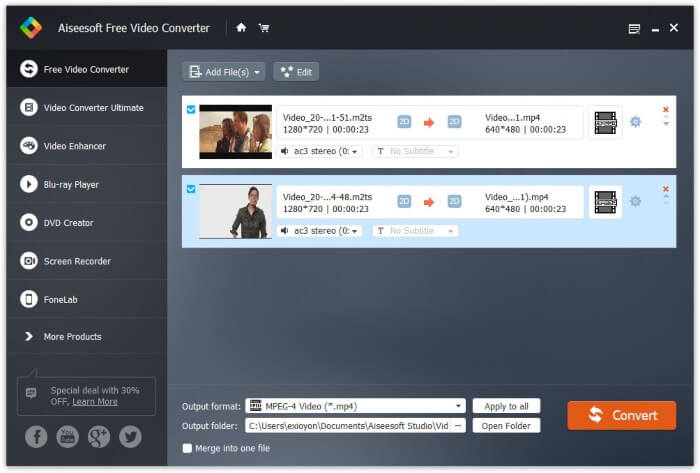
Steg 1: Ladda ner, installera och starta FVC Free M2TS Converter gratis. Dra och släpp M2TS‑filer i huvudgränssnittet.

Steg 2: Fäll ut listan Utdataformat nära kanten längst ned. För att konvertera M2TS till iPad på Windows kan du ställa in utdataformatet direkt från kategorin Apple iPad.

Steg 3: Klicka på kugghjulsikonen Inställningar för att justera videokodare, bildfrekvens med mera. Klicka till sist på Konvertera för att konvertera video från M2TS till iPad‑format.
Så här konverterar du M2TS till iPad på Mac gratis
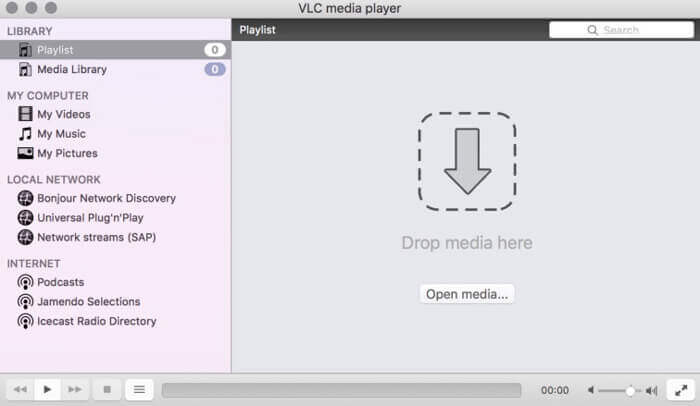
Om du vill konvertera M2TS-video till iPad på Mac gratis kan VLC Media Player vara ditt bra val. Det är en gratis och öppen källkod M2TS-spelare och omvandlare för multiplatform.
Steg 1: Öppna VLC Media Player på Mac. Välj Convert/Save från rullgardinsmenyn Media.
Steg 2: Klicka på Add för att importera en M2TS‑fil. Välj sedan filen och klicka på Open nedan för att fortsätta processen.
Steg 3: Klicka på Convert/Save längst ned för att gå vidare till nästa fönster.
Steg 4: Välj iPad‑format från rullgardinslistan Profile. Du kan klicka på ikonen Tools bredvid för att justera videoinställningar.
Steg 5: Klicka på Start för att börja konvertera M2TS‑filen till iPad på Mac via VLC.
Del 2: Hur man konverterar M2TS till iPad online
För mobilanvändare är det också ett bra val att använda en M2TS till iPad-omvandlare online. Du kan konvertera en M2TS-fil till iPad gratis utan krav på nedladdning, installation eller registrering.
Steg 1: Öppna en M2TS‑till‑iPad onlinekonverterare, till exempel FVC Free Online Video Converter.

Steg 2: Ladda ner FVC‑startprogrammet genom att klicka på Add Files to Convert och installera det.

Steg 3: Leta upp M2TS‑filen på din dator som ska konverteras. Och glöm inte att välja format.

Steg 4: Klicka på Start Converting för att konvertera M2TS till iPad gratis online.
Del 3: Vanliga frågor om konvertering av M2TS till iPad
Vad händer som plötsligt inget ljud i M2TS-filer i iMovie?
M2TS stöds inte av Apple-enheter. Du måste konvertera M2TS till Mac-format för att lösa problemet.
Hur öppnar jag M2TS-filer på iPhone och iPad?
AVCHD M2TS är inte kompatibel med iOS-enheter. Om du insisterar på att spela M2TS-videor på iPad kan du använda VLC Media Player-appen för att spela upp video.
Har du någon bra app för videospelare för iPad?
Du kan få en större skärm på iPad än iPhone. Så videoupplevelsen blir också bättre. De rekommenderade videospelarna inkluderar PlayerXtreme Media Player, KMPlayer, VLC, AirPlayer och mer. Du kan välja vilken som helst för att få videokontroller flexibelt.
Detta är allt om hur du konverterar M2TS till iPad med online‑ och offlineverktyg. Dessa M2TS‑videokonverterare är gratis och säkra att använda. Oavsett hur många M2TS‑filer du vill konvertera till iPad‑kompatibla format kan du få den snabbaste hastigheten här.
-
 Hur man konverterar M2TS till MP4 utan att minska kvaliteten
 Vill du konvertera videon från HD-videokamera till vanlig MP4? Här är fyra enkla och gratis sätt att ändra M2TS-fil till MP4 på Windows och Mac.
-
 Hur man konverterar M2TS till MKV utan att förlora kvalitet
 Vill du konvertera M2TS till MKV samtidigt som du behåller originalkvaliteten? Det här inlägget visar dig gratis och online-metoder för att ändra M2TS till MKV förlustfritt.
-
 Vad är skillnaden mellan MTS och M2TS
 Vad är MTS- eller M2TS-fil? Vad är skillnaden mellan M2TS och MTS? Hur kan jag titta på videokamerans inspelade MTS- eller M2TS-fil? Hitta alla svaren i det här inlägget.
