


 Video Converter Ultimate
 Skärminspelare
 Video reparation
 Säker nedladdning
Hur man konverterar M2TS till MP4 utan att minska kvaliteten
”När jag lägger videorna från min Sony-kamera till datorn är de M2TS-filer som inte kan delas på Facebook eller YouTube. Var kan jag hitta en videokonverterare för att konvertera filerna till MP4 och titta på min dator? ”
Ibland vill du spela upp M2TS‑filer på bärbara enheter eller ladda upp dem till YouTube eller Facebook. Då är det klokt att konvertera dem till ett vanligt videoformat som MP4. I den här artikeln delar vi 5 gratis sätt att konvertera M2TS till MP4 på Windows och Mac.

Del 1. Bästa sättet att konvertera M2TS till MP4 gratis
Alla mediaspelare har inte stöd för M2TS‑filer. För att bättre kunna njuta av M2TS‑video från HD‑videokameror är det bättre att ändra M2TS till det vanligt använda MP4‑formatet för uppspelning. FVC Free M2TS Converter är en allt‑i‑ett‑omvandlare och redigerare för M2TS. Du kan inte bara konvertera M2TS‑filer till MP4, MKV, AVI, MOV osv., utan också redigera M2TS‑filer, till exempel komprimera, slå ihop, lägga till teman med mera.
Gratis nedladdningFör Windows 7 eller senareSäker nedladdning
Gratis nedladdningFör MacOS 10.7 eller senareSäker nedladdning
Steg 1. Genom att klicka på knappen Free Download kan du snabbt ladda ner Free M2TS Converter. Installera sedan och starta programmet på din Windows‑dator. Klicka på knappen Add File(s) för att importera M2TS‑filen till programmet.
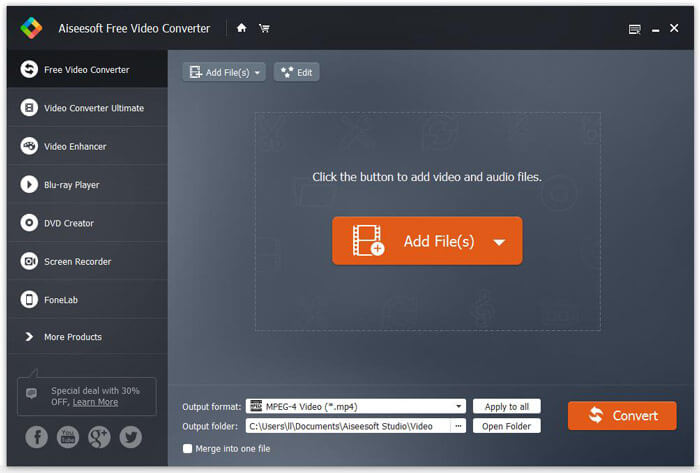
Steg 2. Klicka på rullgardinsknappen Output format och välj MPEG-4 Video (*.mp4) som utdataformat. Du kan också ställa in utdatamappen där den konverterade filen ska sparas.

Steg 3. Om du vill lägga till ett särskilt tema för videon kan du klicka på knappen Edit i den övre menyn för att välja ett passande tema. När alla inställningar är klara klickar du på knappen Convert för att börja ändra M2TS‑filen till MP4.

Del 2. Hur man ändrar M2TS till MP4 online
Om du vill konvertera M2TS till MP4 online gratis är FVC Free Online Video Converter ett utmärkt val. Som en kostnadsfri online multimedieomvandlare stöder den konvertering av nästan alla vanliga video‑ och ljudformat till MP4, FLV, MKV, MOV, M4V, MTS, TS, M2TS, WMV, ASF, VOB, MP3, AAC osv. Dessutom är den mycket enkel att använda.
Steg 1. Gå till webbplatsen för FVC Free Online Video Converter. Klicka på Add Files to Convert högst upp. Ladda sedan ner och installera FVC launcher.

Steg 2. Välj videon du vill konvertera. Om du vill ha en MP4‑video klickar du bara på MP4. Klicka sedan på Convert.

Steg 3. Du kan helt enkelt spara MP4‑videon på skrivbordet. Därefter startar konverteringen automatiskt.
Del 3. Hur man konverterar M2TS till MP4 med ConvertFiles
ConvertFiles är den webbaserade M2TS till MP4-omvandlaren som stöder 200+ videoformat, ljud, bilder, dokument, presentationer och arkiv. Följ de enkla stegen nedan för att börja konvertera M2TS-fil till MP4 online.
Steg 1. Gå till den officiella sidan för ConvertFiles. Klicka på knappen Browse för att ladda upp din lokala M2TS‑fil.
Steg 2. Klicka i rutan Input format och välj HDV Video File(.m2ts), och klicka sedan i rutan Output format för att välja MPEG-4 Video File(.mp4) som utdataformat.
Steg 3. Klicka på knappen Convert för att börja omvandla M2TS till MP4 gratis. Konverteringen kan ta några minuter. Därefter kan du klicka på nedladdningslänken för att ladda ner den konverterade MP4‑filen.
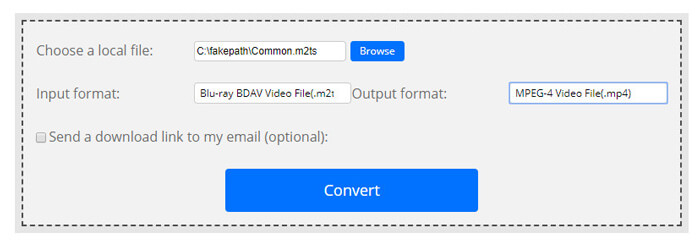
Ibland kan konverteringen misslyckas på grund av det ogiltiga inmatningsformatet. För att uppnå en hög framgång kan du prova Free M2TS Converter istället.
Del 4. Hur man omvandlar M2TS till MP4 med VLC
VLC Media Player är en öppen källkod multimediaspelare för Windows, Mac, Linux, iOS och Android. Det fungerar också som en fantastisk M2TS till MP4-omvandlare för att konvertera M2TS-filer till MP4, MOV, AVI och mer. Dessutom kan du redigera M2TS-filer som beskära, klippa ut, rotera, lägga till bildeffekter och mer.
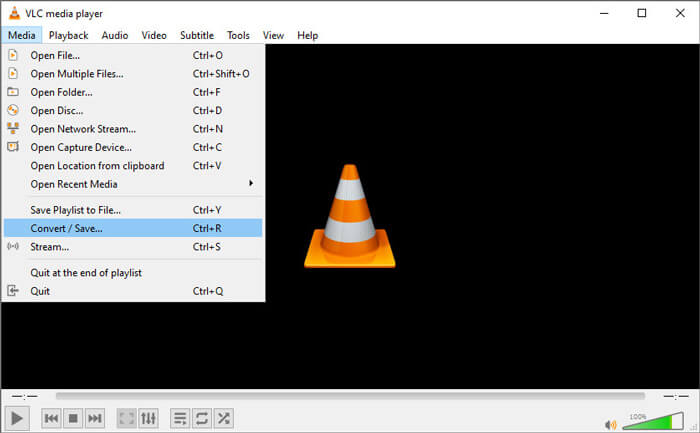
Steg 1. Ladda ner och kör VLC Media Player på din dator. Klicka på Media > Convert / Save... för att fortsätta. Klicka sedan på knappen Add... för att lägga till din M2TS‑fil.
Steg 2. Klicka på knappen Convert / Save för att gå till fönstret Convert. Klicka på rullgardinsknappen Profile och välj Video - H.264 + MP3 (MP4) som utdataformat.
Steg 3. Klicka på knappen Browse för att välja en målmapp. Klicka sedan på knappen Start för att börja konvertera M2TS till MP4.
Del 5. Hur man exporterar MP4 från M2TS med handbroms
HandBrake är en annan gratis och öppen källkodsvideokodare som kan konvertera video från nästan vilket format som helst. Du kan prova Handbrake för att konvertera M2TS-fil till MP4 med följande steg.
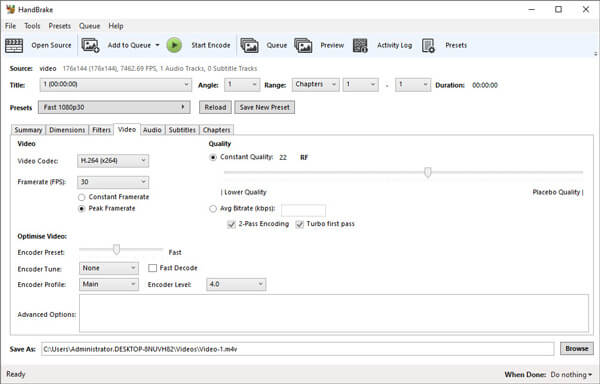
Steg 1. Ladda ner, installera och starta HandBrake gratis på din Windows/Mac. Klicka på Open Source i vänstra hörnet för att importera M2TS‑filen från din lokala mapp.
Steg 2. Du kan justera inställningarna för M2TS‑filen. Välj MP4 i rullgardinsmenyn Format under fliken Summary. På fliken Video kan du justera videokodek, videokvalitet, bildfrekvens och optimera videon.
Steg 3. Klicka på knappen Browse för att ställa in målmappen. Klicka sedan på knappen Start Encode för att börja konvertera M2TS till MP4 gratis.
Del 6. Vanliga frågor om konvertering av M2TS till MP4
Vad är skillnaden mellan M2TS och MP4?
M2TS står för MPEG-2 Transportsystem. Det är ett Blu-ray Disc Audio Video-containerfilformat och används för multiplexering av video, ljud och andra strömmar. Generellt är M2TS-filer större än MP4-filer i samma kvalitet. MP4-filer stöds på nästan alla mediaspelare, men M2TS-filer kan bara spelas på några spelare.
Hur spelar jag upp M2TS‑filer på min PC?
Du kan direkt öppna M2TS-filer i vissa populära mediaspelarapplikationer, inklusive Windows Media Player, VLC Media Player, 5K Player, SMPlayer, Splash, etc. Du kan också spela M2TS-filer med Sony Picture Motion Browser Software.
Kan VLC spela M2TS‑filer?
Ja. Du kan spela M2TS-filer med VLC Media Player på Windows och Mac. Kör bara VLC mediaspelare och klicka på Media för att öppna fil för att spela upp M2TS-filen i VLC. Om det inte fungerar för codec-problem bör du först konvertera M2TS till VLC-stödt videoformat.
Slutsats
Med de 5 gratis metoderna ovan kan du enkelt konvertera M2TS-filer till MP4. Efter jämförelse bör FVC Free M2TS Converter vara den bästa M2TS till MP4-omvandlaren. Med hårdvaruaccelerationstekniken exporterar den MP4-filer i hög kvalitet med på några minuter. Du kan prova den här gratisomvandlaren på en gång.
-
 Omfattande guide om hur man konverterar TS till MP4
 Vad är TS-filer och vill konvertera TS till MP4? I det här inlägget delar vi dig gratis och online-metoder för att konvertera TS till MP4.
-
 Hur man konverterar MTS-filer till MP4
 Vet inte hur man konverterar MTS-fil till MP4? I den här guiden hittar du 6 gratis och enkla sätt att ändra MTS-format till MP4 på Windows eller Mac utan kvalitetsförlust.
-
 2 enkla sätt att gratis konvertera MTS till MP3
 Har du behov av att extrahera MP3-ljud från MTS-fil men vet inte hur? Det här inlägget delar två enkla sätt att hjälpa dig att konvertera MTS / M2TS till MP3 med hög ljudkvalitet.
