


 Video Converter Ultimate
 Skärminspelare
 Video reparation
 Säker nedladdning
Extraordinära metoder för att konvertera MTS till M4V direkt
Vill du ha en effektiv konverterare för din enhet? Då får du en uppfattning genom att läsa den informativa beskrivningen i den här artikeln. Vi visar dig olika sätt att konvertera MTS till M4V på Mac och Windows. Du kommer också att upptäcka ett onlineverktyg du kan prova för att konvertera fler filer.

Del 1: Skillnader mellan MTS och M4V
För att se skillnaderna mellan dessa två filformat, se detaljerna i tabellen nedan.
| MTS | M4V | |
| Filtillägg | En Advanced Video Coding High Definition (AVCHD) videofils filnamnstillägg är MTS. Den har filnamnstillägget .mts och inkluderar en HD MPEG-video inspelad med specifika videokameramärken och -modeller, inklusive JVC, Sony, Canon och Sanyo. Den kan öppnas på många program och stödja HD-videor upp till 1080i x 720p. | Apple Inc. skapade det digitala videocontainerformatet M4V. Strukturmässigt är den någorlunda jämförbar med den välkända MP4, men M4V-filer kan komma med DRM. Det huvudsakliga videoformatet för videor på iTunes Store nuförtiden är M4V, som kan multiplexera ihop flera ljud- och videodata. |
| Utvecklad av | Sony/Panasonic | Apple Inc. |
| Tillhörande program | VLC Media Player Apple Final Cut Pro X Roxio Creator NXT Pro 7 | Klassisk mediaspelare KMPlayer VLC Media Player Zoom spelare |
| MIME-typ | video/mp2t | video/x-m4v |
Del 2: Utmärkta metoder för att konvertera flera MTS till M4V med Mac
Om du vill konvertera MTS till M4V med Mac kan du prova FVC Video Converter Ultimate. Detta offlineverktyg kan konvertera filer direkt eftersom det har en 30x snabbare konverteringshastighet. Dessutom erbjuder detta verktyg batchkonvertering, vilket gör det möjligt att konvertera flera filformat samtidigt. Dessutom kan nästan alla videoformat laddas upp i den här applikationen eftersom den stöder många filformat, inklusive MKV, MOV, MP4, FLV, AVI, SWF och mer. Du kan också redigera din MTS-videofil. Du kan lita på det här verktyget om du har flera MTS-filer och vill att de ska kombineras eftersom det erbjuder ett videosammanslagningsverktyg. På så sätt kan du slå samman flera MTS-videor till ett enda stycke. Om du vill justera volymen på din MTS-video kan du också använda volymförstärkningsverktyget. Med hjälp av denna offlineapplikation kan du enkelt ändra volymen på din video. Det finns fler funktioner du kan njuta av med Video Converter Ultimate.
Funktioner
◆ Den kan konvertera 100+ videofilformat.
◆ Erbjuder musikvideotillverkare med många gratis teman.
◆ Skapa ett collage med gratis mallar och filter är tillgängligt.
◆ Den erbjuder redigeringsverktyg som en videohastighetskontroll, kompressor och beskärningsfunktion.
◆ Det kan ta bort vattenstämplar från en video.
Följ de grundläggande stegen nedan för att konvertera din MTS-videofil till M4V-format med FVC Video Converter Ultimate på din Mac.
Steg 1: Ladda ner FVC Video Converter Ultimate på din Mac genom att klicka på knappen Ladda ner nedan. Starta sedan programmet.
Gratis nedladdningFör Windows 7 eller senareSäker nedladdning
Gratis nedladdningFör MacOS 10.7 eller senareSäker nedladdning
Steg 2: Klicka på Plus-ikonen i mitten av gränssnittet för att lägga till din MTS‑videofil. Du kan också släppa filen direkt i rutan.
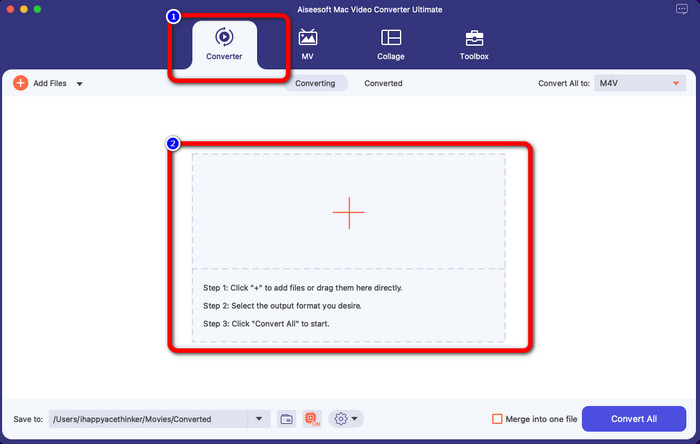
Steg 3: I nästa steg ser du knappen Konvertera alla till uppe till höger i gränssnittet. Klicka på den för att visa formatvalen och välj sedan filformatet M4V. För att lägga till flera MTS‑filer trycker du på knappen Lägg till filer uppe till vänster i gränssnittet.
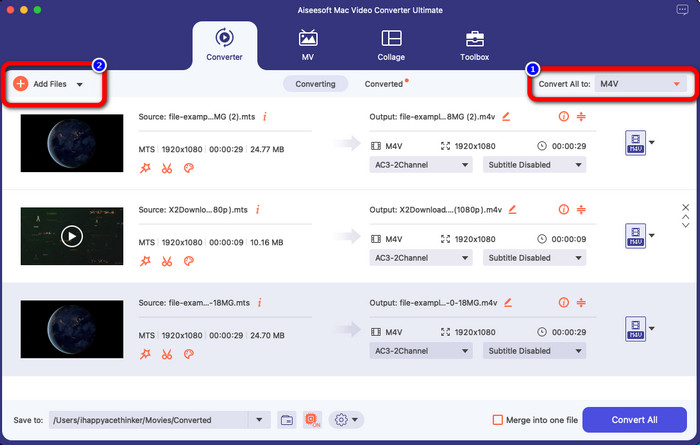
Steg 4: När du har konverterat alla MTS‑filer till M4V‑format klickar du på knappen Konvertera alla och sparar ditt slutliga resultat på den plats du vill.
Del 3: Hur man konverterar flera MTS-filer till M4V på Windows gratis
I den här delen får du veta hur du konverterar flera MTS‑filer till en M4V på Windows. För att konvertera MTS‑filer kan du använda FVC Free TS Converter. Den kan konvertera dina videofiler upp till 10× snabbare än genomsnittlig konverteringshastighet. Den erbjuder batchkonvertering, där du kan konvertera flera filer på en gång. På så sätt slipper du bli uttråkad av att konvertera filer en och en. Dessutom har den ett intuitivt gränssnitt med grundläggande funktioner, vilket gör den mer lämplig för användare. Om du vill konvertera flera MTS‑filer till M4V‑format med FVC Free TS Converter på Windows följer du de enkla stegen nedan.
Funktioner
◆ Konvertera videofilformat, som AVI, MOV, MPEG, MP4, DIVX, XVID, etc.
◆ Ger en videoförstärkare.
◆ Kan spela in på skärmen.
◆ Kan spela vilken Blu-ray-skiva som helst.
◆ Erbjuder batchkonvertering.
Steg 1: Ladda ner FVC Free TS Converter till din Windows‑dator genom att klicka på knappen Ladda ner nedan. Starta programmet efter installationsprocessen.
Gratis nedladdningFör Windows 7 eller senareSäker nedladdning
Gratis nedladdningFör MacOS 10.7 eller senareSäker nedladdning
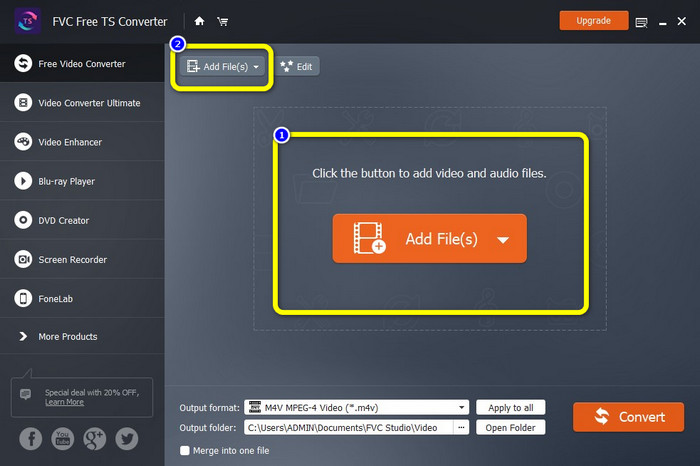
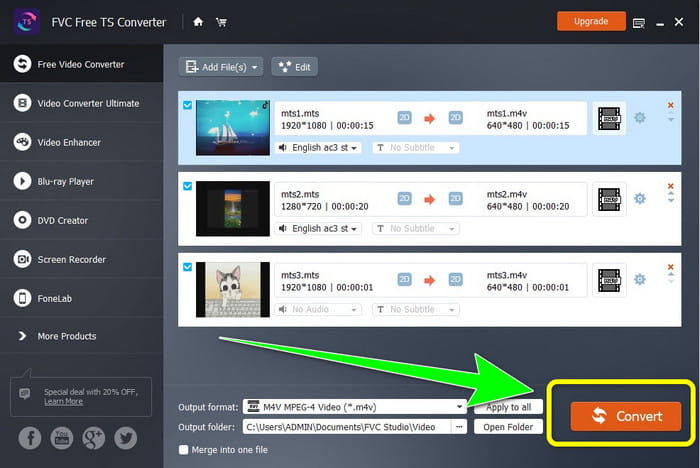
Steg 2: Efter att du har startat programmet klickar du på knappen Lägg till filer i mitten för att ladda upp MTS‑filer. Du kan också klicka på den andra knappen Lägg till filer längst upp i gränssnittet för att lägga till fler MTS‑filer du vill konvertera.
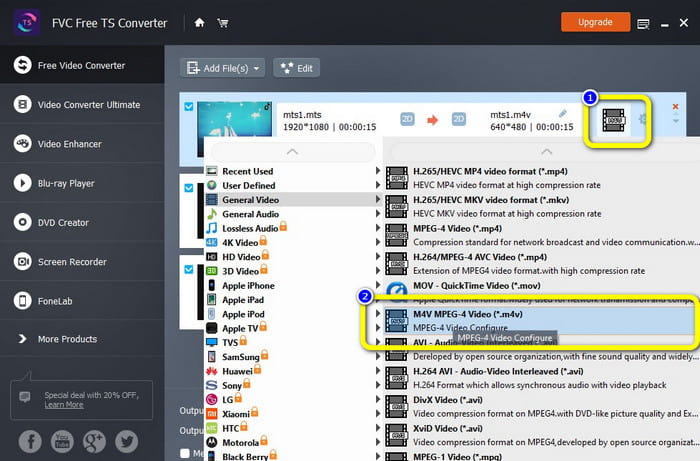
Steg 3: Klicka på formatvalen på höger sida av gränssnittet. Välj sedan filformatet M4V som ditt utdataformat. Gör samma procedur för de återstående MTS‑filerna.
Steg 4: Klicka på knappen Konvertera för att konvertera flera MTS‑filer till M4V‑format.
Del 4: Bästa sätten att konvertera MTS till M4V med hjälp av onlineapplikation
När du konverterar MTS till M4V med ett onlineverktyg är den bästa konverteraren du kan använda FVC Free Video Converter Online. Med hjälp av det här verktyget kan du enkelt konvertera din MTS‑fil till M4V. Det tar bara tre steg att konvertera filer. Dessutom är det här onlineverktyget helt gratis. Så utan vidare, låt oss konvertera din MTS till filformatet M4V. Följ stegen vi har tagit fram åt dig!
Funktioner
◆ Konvertera flera filer, som MP4, FLV, WMA, MOV, MTS, M4V, etc.
◆ Tillåter batchkonvertering.
◆ Tillgänglig på både Mac och Windows.
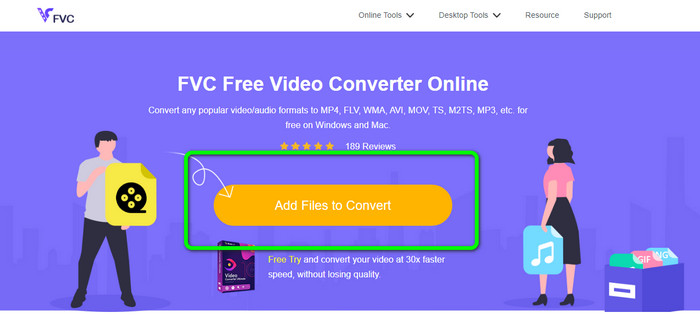
Steg 1: Besök webbplatsen för FVC Free Video Converter Online. Klicka sedan på knappen Lägg till filer för att konvertera för att ladda upp din MTS‑video.
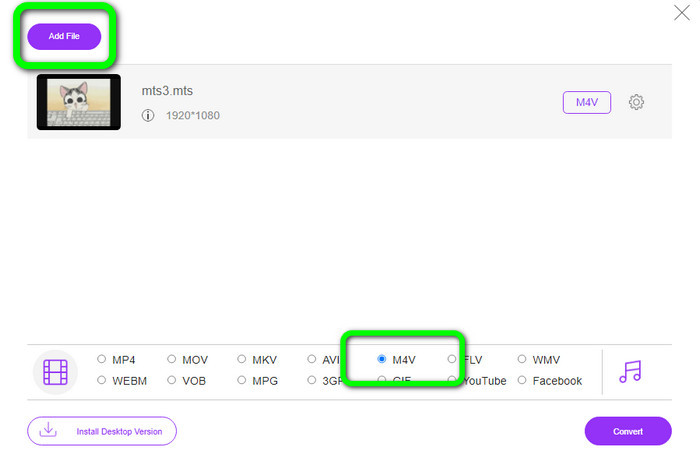
Steg 2: Välj sedan formatet M4V bland formatvalen längst ned i gränssnittet. Du kan också klicka på knappen Lägg till fil för att konvertera flera filer.
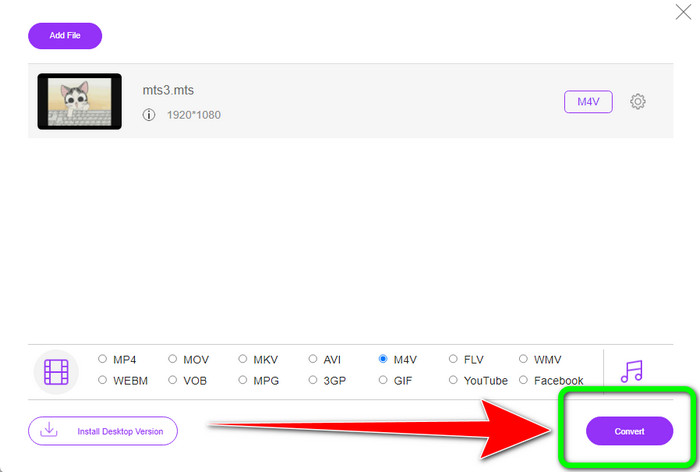
Steg 3: När du har valt ditt önskade format kan du klicka på knappen Konvertera för att spara din video i M4V‑format.
Del 5: Vanliga frågor om att konvertera MTS till M4V
1. Är MTS ett bra format?
Ja. 720p och 1080i HD-videokodekar stöds av MTS, ett högupplöst MPEG- och H.264-transportströmsvideoformat. Människor hänvisar ofta till MTS-filer som AVCHD, skapade gemensamt av Sony och Panasonic och släpptes i ett högkvalitativt format 2006.
2. Hur kan jag konvertera MTS till MP4?
Du kan använda programmen som nämns ovan. Dessa konverterare är effektiva och användbara för att konvertera MTS till MP4 och andra filformat.
3. Varför skulle du använda M4V?
M4V-filer kan ha mjuka undertexter och DRM-skydd för att stoppa piratkopiering och göra det svårare för konsumenter att distribuera filer mellan enheter.
Slutsats
De tre programmen ovan är de bästa konverterarna du kan använda på dina enheter. Om du är Windows‑användare kan du använda FVC Video Converter Ultimate. Om du använder Mac kan du prova FVC Free TS Converter. Slutligen kan du använda FVC Free Video Converter Online om du föredrar ett onlineprogram. Dessa konverterare kan konvertera MTS till M4V utan problem.
-
 MTS VS M2TS - Skillnad mellan MTS och M2TS
 Vad är MTS eller M2TS fil? Vad är skillnaden mellan M2TS och MTS? Hur kan jag titta på videokamerainspelade MTS- eller M2TS-filer? Hitta alla svar i det här inlägget
-
 Topp 5 M4V-spelare för Windows / Mac / Android / iOS du borde veta
 När du inte kan spela upp dina M4V-videor på QuickTime Player bör du lära dig mer från de 5 utmärkta M4V-spelarna för Windows, Mac, Android och iOS från den här artikeln
-
 [Löst] Hur man konverterar MTS till MKV i originalkvalitet
 Undrar du hur du kan konvertera MTS till MKV gratis? I den här artikeln listade vi de bästa gratis MTS till MKV-omvandlarna
