


 Video Converter Ultimate
 Skärminspelare
 Video reparation
 Säker nedladdning
Vad är en MTS-fil och hur man konverterar / spelar MTS-filer
Du får en inspelad video i MTS-format om du använder en Sony- eller Panasonic-videokamera. Egentligen märker du det inte förrän du inte kan spela upp MTS-filen med din mediaspelare eller enhet. Då uppstår frågan: vad är en MTS-fil?

Nu i många fält och elektroniska produkter finns det högre och högre krav på bildkvalitet för videoprocessionen. MTS är ett högupplöst videoformat för transportström som kan erbjuda högkvalitativ visuell upplevelse.
MTS är dock inte ett särskilt populärt filformat. Många vanliga mediaspelare och bärbara iOS/Android-enheter kan inte spela upp MTS-filer direkt. Med tanke på detta vill vi i det här inlägget ge en detaljerad introduktion till MTS-formatet. Dessutom visar vi dig 3 enkla sätt att konvertera och spela upp MTS-filer.
Del 1. Vad är en MTS-fil - MTS vs MP4
MTS är filtillägget för AVCHD (Advanced Video Coding High Definition), som främst används av HD-videokameror från Sony och Panasonic. Det har utvecklats gemensamt av Sony och Panasonic och är särskilt utformat för högupplösta digitala videor. MTS är ett högupplöst videoformat för MPEG- och H.264-transportström och har bra stöd för 720p och 1080i HD. Jämfört med andra format kan en MTS-fil därför erbjuda högre videokvalitet.
MTS är filtillägget för AVCHD-video på digital videokamera. När du importerar en MTS-fil till din dator, ändras filtillägget automatiskt till M2TS. MTS används också ofta för Blu-ray Disc Audio-Video (BDAV). Den har kapacitet att bära olika video-, ljud- och andra strömmar.
En MTS-fil kan ge video av hög kvalitet med relativt liten filstorlek. Men som nämnts ovan stöds MTS inte av många mediaspelare, videoredigerare, datorer och mobila enheter. Du kan lätt få ett uppspelningsfel för MTS på grund av inkompatibilitet. På grund av detta är det många som söker på internet efter MTS-spelare, hur man spelar upp en MTS-fil och hur man konverterar MTS till MP4 och liknande.
MTS vs MP4
Jämfört med MTS kan MP4 enkelt spelas av nästan alla mediaspelare, videoredigeringsverktyg och enheter. MP4 är det mest populära formatet för digital multimediabehållare för lagring av video. MP4 kan också bära ljud och text.
MP4 är kompatibel med Windows 10/8/7 / XP / Vista PC, Mac, redigeringsprogramvara, mediaspelare, iOS / Android-enheter som iPhone, iPad, iPod touch, Android-telefon, Windows-telefon och mer. MP4 kan erbjuda en hög videokvalitet med bibehållen lämplig filstorlek. Så när du får ett format som inte stöds som MTS kan du välja att konvertera det till MP4 för bättre uppspelning.
Del 2. Hur man gratis konverterar MTS till MP4 online
När du vill dela den inspelade MTS-videon till YouTube, Facebook eller andra plattformar, eller om du vill redigera och visa den på din enhet, kan du behöva konvertera MTS till MP4. Lyckligtvis finns det många MTS-videokonverterare, inklusive några gratis online som kan hjälpa dig att göra MTS-filkonvertering. Här på den här delen presenterar vi dig med en populär gratis online videoomvandlare, FVC Free Online Video Converter för att konvertera din MTS-fil.
Steg 1. Öppna först din webbläsare och gå till den officiella webbplatsen för FVC Free Online Video Converter. Här kan du gå direkt till https://www.free-videoconverter.net/free-online-video-converter/. Klicka sedan på knappen Add Files to Convert för att ladda ner och installera startprogrammet.
Steg 2. När startprogrammet har aktiverats, ladda upp den MTS-fil du vill konvertera till MP4. Klicka sedan på knappen Convert för att starta videokonverteringen från MTS till MP4.

Del 3. Gratis sätt att konvertera MTS till MP4 utan kvalitetsförlust (rekommenderas)
Med den kostnadsfria onlinevideokonverteraren ovan kan du enkelt genomföra videokonverteringen från MTS till MP4. Om du lägger större vikt vid den färdiga MP4-kvaliteten bör du prova Free MTS Converter. Den låter dig konvertera MTS till MP4 utan någon förlust av bild- eller ljudkvalitet.
Gratis nedladdningFör Windows 7 eller senareSäker nedladdning
Gratis nedladdningFör MacOS 10.7 eller senareSäker nedladdning
Steg 1. Dubbelklicka på nedladdningsknappen ovan och följ sedan instruktionerna på skärmen för att snabbt installera och köra denna kostnadsfria MTS till MP4-konverterare på din dator.
Steg 2. När du kommer till första fönstret i denna MTS-videokonverterare klickar du på Add File(s) för att ladda den MTS-fil du vill konvertera. Under detta steg kan du lägga till en eller flera filer beroende på behov.
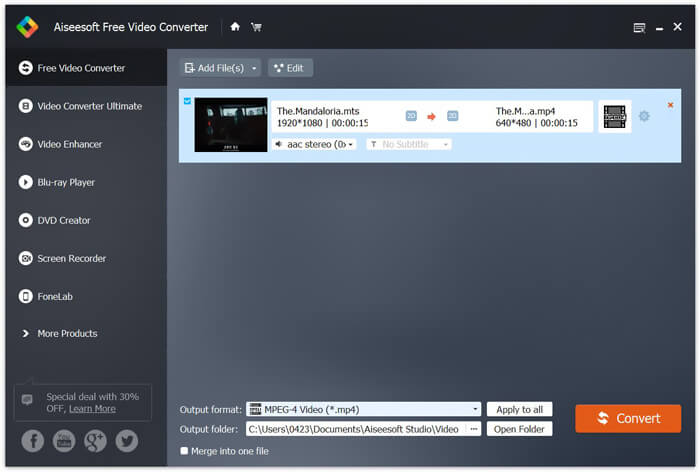
Steg 3. Klicka på Output format och välj sedan MP4 som målformat. Här kan du också välja en lämplig målmapp för den konverterade videon genom att klicka på alternativet Output folder. Därefter klickar du på knappen Convert för att starta den kostnadsfria videokonverteringen från MTS till MP4.

Free Video Converter är utformad med den senaste accelerationstekniken som garanterar dig en riktigt snabb MTS / M2TS till MP4-omvandlingshastighet. Dessutom erbjuder den också några grundläggande redigeringsfunktioner för dig att anpassa video innan den slutliga konverteringen. Du bör ladda ner gratis och prova.
Del 4. Hur man gratis konverterar och spelar en MTS-fil med VLC Player
Om du har VLC Media Player installerad på din dator kan du lita på att den gratis konverterar en MTS-fil till MP4, MOV, FLV och mer för bättre uppladdning eller uppspelning. I själva verket, som en öppen källkod mediaspelare, gör VLC Player dig att direkt njuta av MTS-fil med stor visuell upplevelse. Här i den här delen vill vi visa dig hur du spelar och konverterar en MTS-fil på VLC-spelare.
Spela en MTS-fil med VLC Player
Steg 1. Först måste du se till att du har en VLC Player på din dator. Öppna sedan den här mediaspelaren för uppspelning av MTS-filen.
Steg 2. Klicka på Media > Open File för att ladda den MTS-fil du vill spela upp. När filen har laddats kommer VLC Player automatiskt att spela upp MTS-filen åt dig.
Här borde du veta att inte alla MTS-filer kan ses med goda effekter på VLC Player.
I vissa fall är det mer troligt att du får ett MTS-spelfel. Du måste lägga till några tillägg för att göra att VLC Player stöder din MTS-fil. Du behöver till exempel ett bibliotek för AACS-avkodning för att spela en MTS-fil.
Konvertera en MTS-fil med VLC Player
Faktum är att när du får MTS-filens uppspelningsfel kan du välja att konvertera din MTS till ett populärt videoformat som MP4, MOV, FLV och AVI och så vidare. Därefter kan du enkelt titta på MTS-filen på alla enheter.
Steg 1. Öppna VLC Player på din dator. Klicka på Media > Convert/Save för att få upp popup-fönstret Open Media. Här kan du klicka på Add för att importera den MTS-fil du vill konvertera.
Steg 2. Efter importen klickar du på Convert Save för att öppna fönstret Convert. Klicka på Profile och välj sedan MP4 som målformat. Under detta steg kan du välja en lämplig målmapp för den exporterade videon genom att klicka på alternativet Browse.
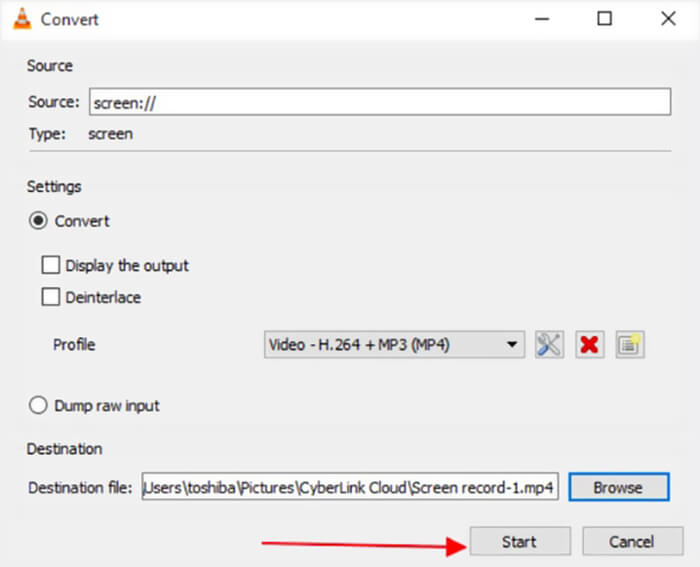
Steg 3. VLC Player erbjuder några grundläggande redigeringsfunktioner. Innan den slutliga konverteringen av MTS-filen kan du anpassa videoeffekterna efter behov. Sedan kan du klicka på Start för att påbörja den kostnadsfria videokonverteringen av MTS-filen.
Efter att ha läst den här sidan har du en tydlig förståelse av MTS-filen. Dessutom kan du lära dig hur man konverterar och spelar upp en MTS-fil. Lämna ett meddelande till oss om du fortfarande har några frågor om MTS-formatet.
-
 2 enkla sätt att gratis konvertera MTS till MP3
 Har du behov av att extrahera MP3-ljud från MTS-filen men vet inte hur? Vad är den bästa MTS till MP3-omvandlaren? Det här inlägget delar två enkla sätt att hjälpa dig att konvertera MTS / M2TS till MP3 med hög ljudkvalitet.
-
 Topp 4 gratis sätt att konvertera MTS till MOV
 Kan du inte spela MTS-filen på din dator eller iPhone / Android-telefon? Vad är en MTS-fil och hur man spelar den? Vad är den bästa MTS Video Converter? Det här inlägget delar 4 enkla och gratis sätt att hjälpa dig att konvertera MTS till MOV för bättre uppspelning.
-
 Vad är skillnaden mellan MTS och M2TS
 Vad är MTS- eller M2TS-fil? Vad är skillnaden mellan M2TS och MTS? Hur kan jag titta på videokamerans inspelade MTS- eller M2TS-fil? Hitta alla svaren i det här inlägget.
