


 Video Converter Ultimate
 Skärminspelare
 Video reparation
 Säker nedladdning
Hur du konverterar dina DAT-videofiler till FLV-format gratis
Eftersom det finns så många videoformat kan du behöva konvertera ett format till ett annat. Den här artikeln fokuserar på hur du konverterar DAT till FLV på dator och online gratis. En fil med filändelsen DAT är inte en standardfil utan en datafil som lagrar information. Därför finns det inget specifikt program som alltid kan öppna DAT-filer. Om en videofil lagras på detta sätt kan en bra DAT‑till‑FLV‑omvandlare hjälpa dig att öppna den.

Del 1: Bästa gratis sätt att konvertera DAT till FLV
Sätt 1: Konvertera DAT till FLV med Free FLV Converter
FVC Free FLV Converter är en kraftfull videokonverterare trots att den är gratisprogram. Det innebär att du kan få funktioner som liknar professionell programvara utan att betala ett öre.
Nyckelfunktioner hos den bästa kostnadsfria DAT till FLV‑omvandlaren
- 1. Batchkonvertera DAT-filer snabbt till FLV-format.
- 2. Producera högkvalitativ produktion med avancerad teknik.
- 3. Inkludera ett brett utbud av bonusverktyg, som videoredigering.
Gratis nedladdningFör Windows 7 eller senareSäker nedladdning
Gratis nedladdningFör MacOS 10.7 eller senareSäker nedladdning
Hur du konverterar DAT till FLV gratis
Steg 1: Öppna DAT-filer
Starta den bästa kostnadsfria DAT till FLV‑omvandlaren när du har installerat den på datorn. För att hålla dina data säkra bör du ladda ner den från den officiella webbplatsen. Klicka på den stora knappen Add File(s) i huvudgränssnittet, leta upp och markera DAT‑videofilerna och öppna dem. Därefter visas de i biblioteksområdet.

Steg 2: Ställ in FLV som utdataformat
Gå till området längst ned, klicka på och expandera alternativet Output format. Gå till fliken General Video i listan, bläddra nedåt och välj FLV eller ett relaterat format. Du kan också justera bildfrekvens, upplösning och andra parametrar genom att klicka på Gear-ikonen på varje titel.

Steg 3: Konvertera DAT till FLV
Klicka sedan på knappen Open Folder och ändra målmapp efter dina önskemål. Som standard sparar DAT till FLV‑omvandlaren resultatet i ditt videobibliotek. Klicka slutligen på knappen Convert för att börja konvertera DAT till FLV på din dator direkt. Det tar bara några minuter att slutföra konverteringen.

Sätt 2: Hur man konverterar DAT till FLV med VLC
VLC är ett annat sätt att konvertera DAT till FLV gratis. Mediespelaren med öppen källkod kan öppna en videofil med DAT-förlängning och konvertera den till standardvideofiler. Med tanke på det komplicerade förfarandet delar vi de grundläggande stegen nedan.
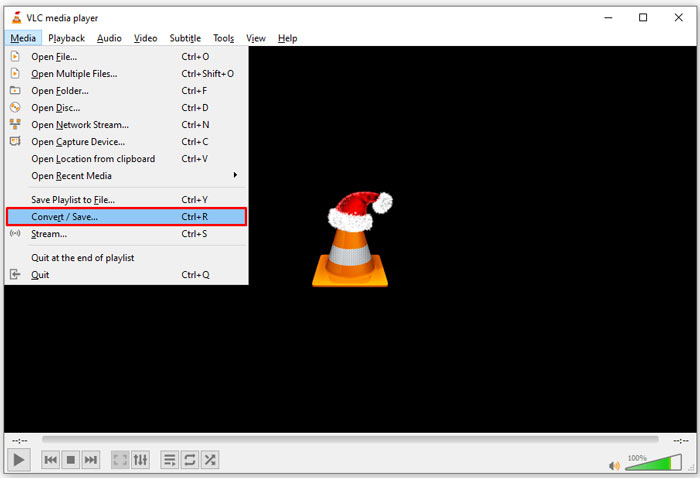
Steg 1: Öppna VLC och klicka på Convert/Save i menyn Media i det övre menybandet. Då ser du dialogrutan för att öppna media.
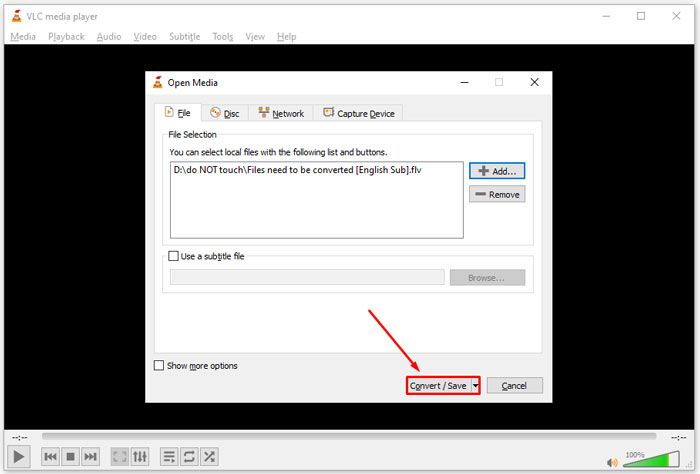
Steg 2: Klicka på knappen Add och öppna DAT‑videofilerna i VLC. Tryck på knappen Convert/Save för att fortsätta.
Steg 3: Fäll ut rullgardinslistan Profile och ställ in FLV som utdataformat. Klicka på knappen Browse för att välja en målmapp i avsnittet Destination.
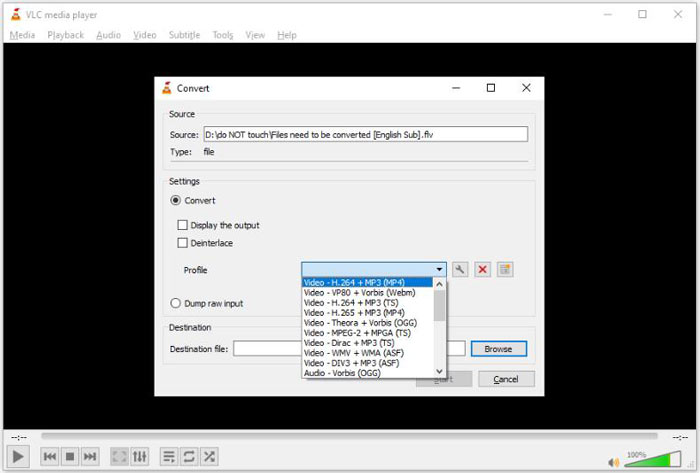
Steg 4: Klicka på knappen Start för att starta konverteringen från DAT till FLV. Det tar lika lång tid som din videofil är lång att konvertera den i VLC.
Del 2: Hur man konverterar DAT till FLV Online
FVC Free Online Video Converter är ett enkelt sätt att konvertera DAT till FLV online gratis. Jämfört med andra webbkonverterare för video låter den dig göra jobbet utan några begränsningar, som filstorlek, registrering, vattenstämpel osv.
Steg 1: Öppna en webbläsare och besök https://www.free-videoconverter.net/free-online-video-converter/. Klicka på knappen Add Files to Convert för att ladda ner startprogrammet.

Steg 2: Klicka på knappen Add File i startprogrammet och ladda upp DAT‑videofilerna från din dator. Gå sedan till formatsektionen längst ned och välj FLV.

Steg 3: Tryck på knappen Convert för att starta konverteringen av DAT till FLV online. När den är klar laddar du ner videofilerna till din hårddisk.
Här kanske du gillar:
Konvertera dina TS-filer till FLV-format
Del 3: Vanliga frågor om DAT till FLV
Kan jag konvertera DAT-filer till FLV från Internet Explorer?
Om DAT-filerna från IE lagrar videoinnehåll kan du konvertera dem till standardvideor. DAT lagrar dock inte bara videodata utan också annan information. För andra data kan du inte konvertera till videor.
Hur öppnar jag DAT-filer?
En DAT-fil är en datafil som innehåller information om det program den är associerad med. Du kan försöka öppna en DAT-fil genom att dubbelklicka på den. Ditt system kan distribuera rätt program.
Kan jag konvertera DAT till QuickTime?
Det beror på din situation. För det första måste DAT-filerna lagra videodata. Då behöver du också en videokonverterare som stöder DAT och QuickTime.
Slutsats
Den här guiden har delat tre sätt att konvertera din DAT till FLV på ditt skrivbord eller online. VLC är ett gratis sätt att göra jobbet på Windows, Mac och Linux. FVC Free FLV Converter erbjuder dock fler pro-level-funktioner med att begära någon betalning. Om du har andra frågor, vänligen lämna ett meddelande nedanför detta inlägg.
-
 MP4 till FLV | Topp 3 gratis omvandlare (online / Mac / Windows)
 Det här inlägget är den detaljerade guiden till MP4 till FLV-konvertering. Du kan ta de tre bästa gratisomvandlarna för att enkelt byta MP4 till FLV online, på Windows eller Mac-dator.
-
 3 lösningar för att konvertera MTS till FLV gratis och online
 Vill du konvertera MTS till FLV? Här är 3 gratis MTS till FLV-konverteringsprogram som du kan försöka konvertera MTS till FLV på Mac OS X och Windows 10/8/7.
-
 Topp 4 gratis sätt att konvertera FLV-videor till MP4 på skrivbordet och online
 Den här guiden delar fyra gratis metoder för att konvertera dina FLV-videofiler till MP4-format på Windows 10/8/7 / XP och Mac OS X, så att du kan njuta av videorna på alla enheter.
