


 Video Converter Ultimate
 Skärminspelare
 Video reparation
 Säker nedladdning
Hur konverterar du dina FLV-videofiler till 3GP-format gratis
This article will show you the best ways to convert FLV to 3GP. According to the survey, there are tons of video file formats on market. Developers released them for different purposes. FLV, for example, standing for Flash Video, is used to store visual contents for playing in Adobe Flash Player over the internet.
3GP är å andra sidan multimediaformatet som skapats av Third Generation Partnership Project för att spara bandbredd och dataanvändning på mobila enheter. Med ett annat ord, skulle du bättre konvertera FLV till 3GP och titta på videor på handenheten.

Del 1: Bästa sättet att konvertera FLV till 3GP på skrivbordet
FVC Free FLV Converter is a powerful video converter. As its name indicated, it enables you to convert FLV to 3GP without paying a penny. Moreover, it offers you a lot of useful functionalities, such as video and audio editing. More importantly, the user-friendly interface makes you find what you want quickly.
Viktiga funktioner i den bästa gratis FLV-omvandlaren
- 1. Konvertera FLV-videor till alla multimediaformat, som 3GP.
- 2. Batchhanterar flera videofiler samtidigt.
- 3. Omkoda FLV-filer för uppspelning på mobila enheter.
Gratis nedladdningFör Windows 7 eller senareSäker nedladdning
Gratis nedladdningFör MacOS 10.7 eller senareSäker nedladdning
Hur konverterar man FLV till 3GP gratis
Start the best free FLV converter after you install it on your machine. It is compatible with Windows 10/8/7 and Mac OS X. Click the Add File(s) button to trigger the open-file dialog. Select the FLV files that you want to convert and click Open. Then the videos will appear in the library area.

Steg 2: Ställ in utdataformat
Click and expand the Profile format dropdown menu at the bottom and you will be presented the profile box. Enter 3GP in the Search Profile box and press the Enter key on your keyboard. Then select the output format. If you want to play the videos on your mobile device, select the manufacturer and pick the right model directly.

Step 3: Convert FLV to 3GP
Set a specific directory to store the output by hitting the Open Folder button at the bottom. Finally, click on the Convert button to initiate FLV to 3GP converting. A few minutes later, you will find the 3GP files on your hard drive.

Del 2: Hur konverterar man FLV till 3GP Online
Web video converter apps are another popular way to convert FLV to 3GP for free. However, most of them have various downsides, like file size limit, watermark, security issue and more. Fortunately, FVC Free Online Video Converter can help you resolve the problem. It is free of charge without any restrictions. The output quality is great.
Step 1: Visit https://www.free-videoconverter.net/free-online-video-converter/ in a web browser and click the Add Files to Convert button to get the launcher. It won't take up local space of your computer.
Ladda ner Skrivbordsversionen för att konvertera filer i batch.
Step 2: Click the Add File menu and upload the FLV files that you wish to convert. The web app enables you to batch convert videos at one time.
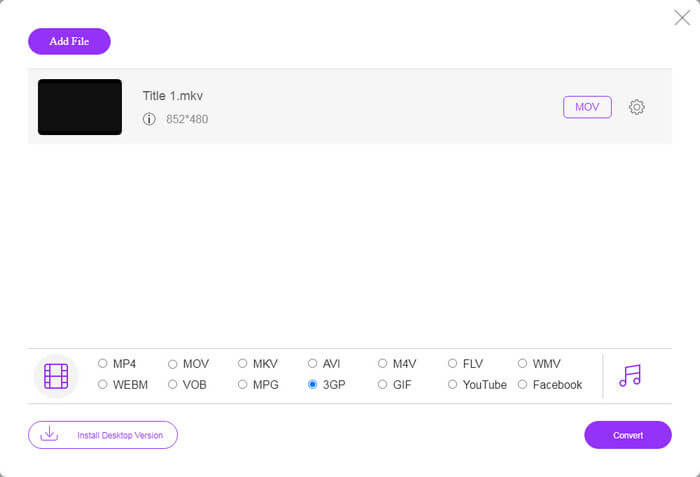
Step 3: Go to the bottom and select 3GP at the profile section. Click on the Convert button to initiate converting FLV to 3GP online. If your network works fast, it will finish in a few seconds. Then download the 3GP files to your hard drive.
Missa inte:
Del 3: Hur konverterar man FLV till 3GP med VLC
Ibland är freeware lika kraftfullt som professionell programvara. VLC är till exempel en populär mediespelare med öppen källkod. Det kan konvertera FLV till 3GP på Windows, Mac och Linux gratis. Naturligtvis är kostnaden uppenbar, till exempel svår att använda. Därför delar vi stegen nedan:
Step 1: Run the free FLV to 3GP converter on your computer. You need to install it first. The official website provides the safe installer.
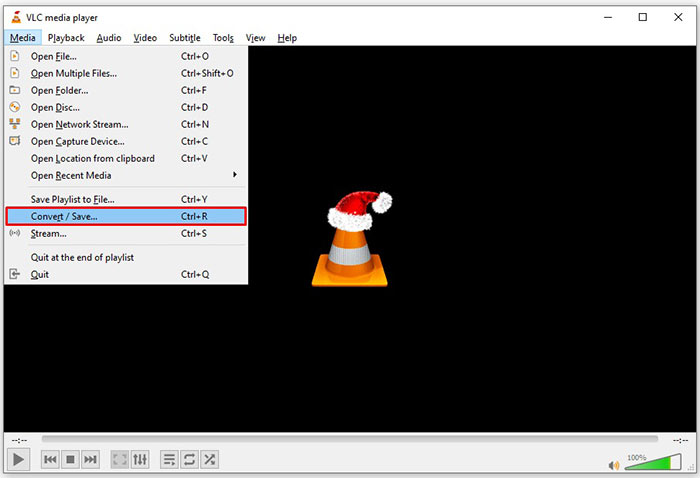
Step 2: Go to the Media menu on the top ribbon and choose Convert/Save. Then the open media dialog will pop up.
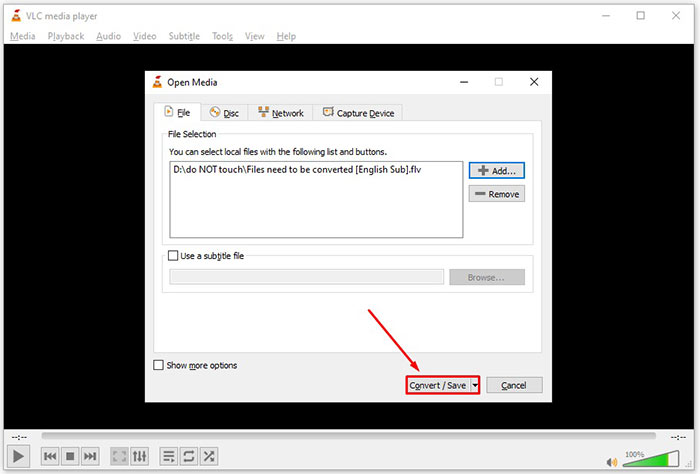
Step 3: Click the Add button, find the FLV file that you need to convert and select it, and click Open. Hit the Convert/Save button to move to the next window.
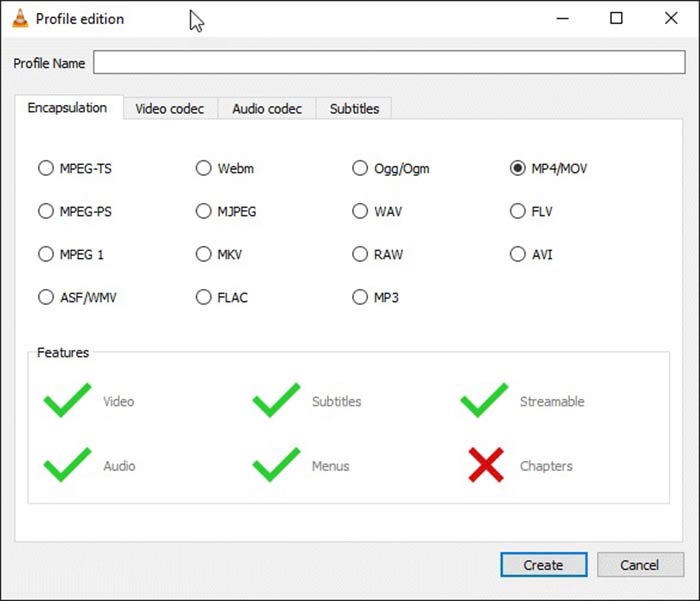
Step 4: Unfold the dropdown list next to Profile and choose 3GP or relative video format. If you want to change the video codec or other parameters, click the Profile Edit button next to the dropdown list and add 3GP.
Step 5: Click the Browse button and choose a specific folder to save the output 3GP file in the Destination section.
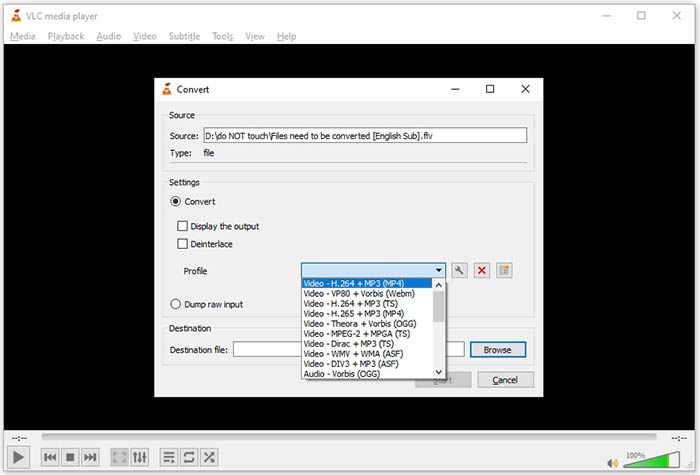
Step 6: As long as you click on the Start button, VLC will begin converting FLV to 3GP.
Det tar en stund att slutföra konverteringen eftersom VLC gör jobbet genom att spela in originalvideon. Det betyder att processen spenderar så länge som längden på din FLV-video.
FLV kontra 3GP
Adobe Flash Player använde FLV för att leverera videoinnehåll som filmer och TV-program. Numera utvecklar Adobe inte längre spelaren och rekommenderar användare avinstallera den av säkerhetsskäl. Du kan dock fortfarande använda FLV-formatet på många icke-Adobe/Macromedia-program.
The 3rd Generation Partnership Project (3GPP) producerade 3GP/3GPP-formatet som ett multimediacontainerformat. Det är faktiskt baserat på ISO-mediafilformatet. Vi använder det ofta för att spara video/ljudströmmar som överförs mellan 3G-mobiltelefoner och online.
Del 4: Vanliga frågor om konvertering av FLV till 3GP
Kommer konvertering av FLV till 3GP att skada videokvaliteten?
Generellt tappar videokonvertering kvalitet. Ett kraftfullt videokonverteringsprogram kan dock lösa problemet och optimera videokvaliteten med avancerad teknik.
Hur lång tid tar det att konvertera en FLV-video?
Det bestäms av flera faktorer, som videolängden, videokonverteringsprogramvaran du använder, din hårdvaruprestanda och mer. Om du använder en webbvideoomvandlare är din internetanslutning ett viktigt element.
Varför FLV inte spelar på min iPhone?
iPhone stöder MOV, en del av MP4, ASF och AVI. Därför kan du inte öppna FLV på iPhone direkt. Det finns dock sätt att titta på FLV på mobila enheter. Om din FLV-fil är värd för internettjänster, som Google Drive, är den inbyggda mediaspelaren tillgänglig. Dessutom kan du använda en annan mediaspelare, som VLC.
Slutsats
Den här guiden har berättat för dig tre gratis sätt att konvertera FLV-videofiler till 3GP-format på dator eller online. Om du förbereder dig för att titta på FLV-videor på mobila enheter, borde du konvertera den till 3GP eller andra mobilvänliga videoformat med FVC Free FLV Converter. Det är inte bara lätt att använda utan kan också skydda din videokvalitet. Fler frågor? Lämna ett meddelande nedan.
-
 Hur konverterar du dina FLV-videofiler till MP4 utan att betala ett öre
 Den här guiden delar fyra gratis metoder för att konvertera dina FLV-videofiler till MP4-format på Windows 10/8/7 / XP och Mac OS X, så att du kan njuta av videorna på alla enheter.
-
 Hur man konverterar dina FLV-videor till MP3-ljudfiler på skrivbordet och online
 Hur konverterar man en FLV till en MP3-fil? Allt du behöver göra är att läsa den här artikeln noggrant, hitta din favoritmetod och följa vår steg-för-steg-guide för att få vad du vill.
-
 Topp 3 sätt att konvertera FLV till MOV
 Hur konverterar man FLV till MOV? Hur konverterar jag FLV till MOV på Mac? Finns det något gratis sätt att konvertera FLV till MOV online? Det här inlägget delar 3 FLV till MOV-omvandlare för att ändra FLV-filer till MOV.

