


 Video Converter Ultimate
 Skärminspelare
 Video reparation
Ta reda på vilka som är de bästa 3 FLV till MKV-omvandlarna för att konvertera dina FLV-filer till MKV
Är du trött på att leta på internet efter det bästa sättet att konvertera FLV till MKV gratis? Det kan vara en slump, men idag har vi hittat de bästa FLV‑konverterarna du kan använda – vi väljer förstås bara de bästa. För att göra din utforskning mycket enklare bör du hålla bollen rullande genom att läsa artikeln nedan, för där får du lära dig mycket om FLV och MKV samt vilka konverterare du kan använda.

Del 1. 2 sätt att konvertera FLV till MKV gratis
1:a vägen. Använd Online Converter för att konvertera FLV till MKV
Den här online‑konverteraren är utan tvekan en av de stora transkoderna för att konvertera FLV till MKV online. FVC Free Video Converter Online är en enkel och lättbegriplig konverterare som du kan använda på nätet. Men detta verktyg är internetberoende, vilket innebär att om du inte har någon internetanslutning är det här din sista utväg för konvertering. Även om verktyget är webbaserat finns det ändå inga annonser i gränssnittet som kan irritera dig, och det är fritt från skadeprogram. Om du nu vill få praktisk erfarenhet av detta verktyg måste du följa stegen nedan.
Steg 1. Klicka på den här länken för att öppna FVC Free Video Converter Online i en ny flik.
Steg 2. Klicka på knappen Add Files to Convert för att öppna mappen på datorn du använder. Välj FLV‑filen du vill konvertera och tryck på Open för att ladda upp filen.
Ladda ner Skrivbordsversionen för att konvertera filer i batch.
Steg 3. Välj formatet MKV i formatlistan som visas nedan.
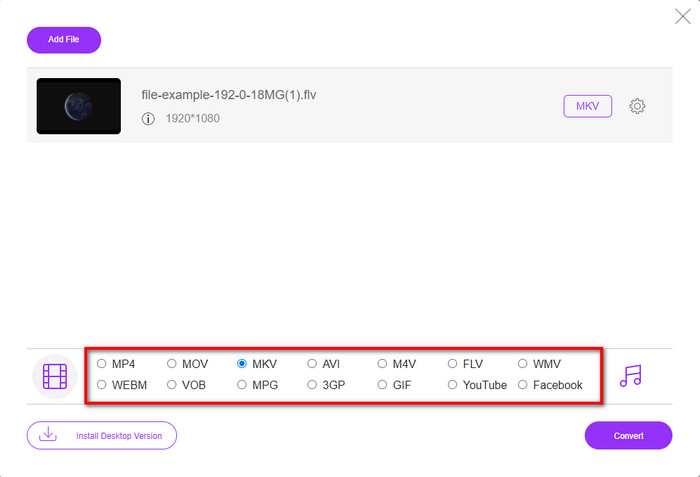
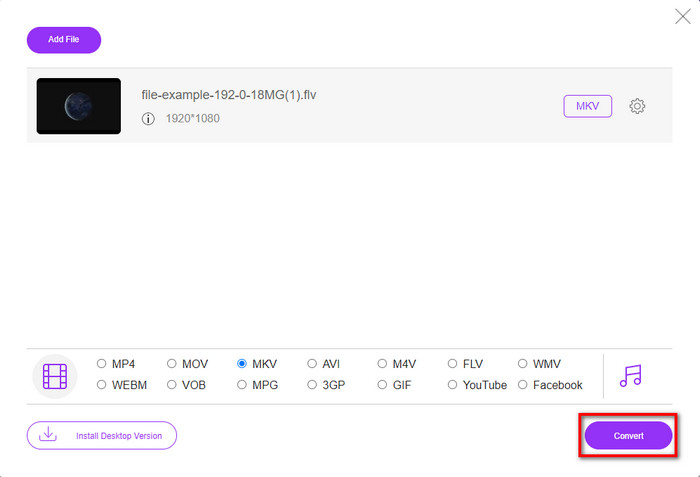
Steg 4. Starta konverteringsprocessen genom att klicka på knappen Convert, så sparas den konverterade filen automatiskt på din hårddisk efteråt.
2:a vägen. Använd gratiskonverteraren som finns att ladda ner på Windows och Mac
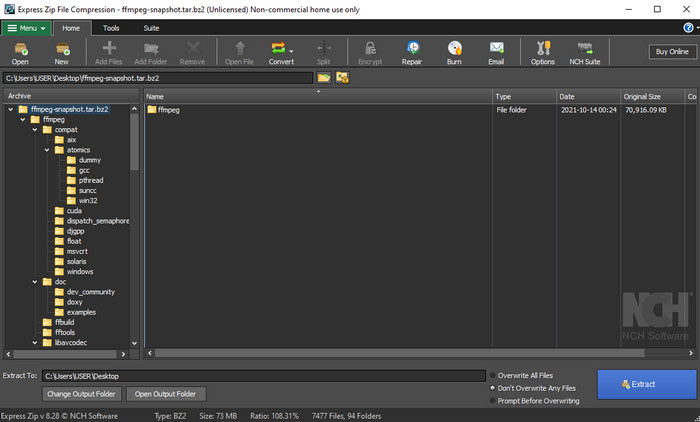
FFmpeg är inte den klassiska konverteraren du redan använder. Även om det inte är en vanlig konverterare kan den fortfarande konvertera din FLV‑fil. Det som gör detta verktyg annorlunda är att det använder ett CLI‑baserat gränssnitt, vilket innebär att innan du konverterar måste du ge kommandon genom att koda eller, enklare uttryckt, skriva. Om du tycker att den här konverteraren är intressant kan du läsa detaljerna nedan för att använda denna FFmpeg FLV till MKV genom att följa stegen.
Steg 1. Ladda ner och öppna FFmpeg.exe.
Steg 2. Öppna kommandotolken på din dator.
Steg 3. Bläddra fram FLV‑filen via CMD. Kopiera sedan den här koden och klistra in den i kommandotolken ffmpeg -i input.flv -vn -ar 44100 -ac 2 -b:a 192k output.mkv och tryck sedan på Enter på tangentbordet för att starta processen.
Del 2. Konvertera FLV till MKV med den bästa FLV till MKV-omvandlaren förlustfritt
3:e vägen. Använd Professional Converter för att konvertera FLV till WMV
Är du fortfarande inte nöjd med de två första konverterarna ovan? Då måste du prova FVC Video Converter Ultimate. Varför? Jo, den ger ett professionellt resultat även om du inte lägger ner särskilt mycket arbete på konverteringen. Den stöder också fler format för att konvertera din FLV‑fil till MKV, AVI, MOV, AVI, MP4 och över 200 andra format. Fortfarande inte imponerad? Vill du kanske lägga till lite magi i din video? I så fall har du tur som har den här konverteraren, eftersom den erbjuder avancerade videoredigeringsfunktioner du kan använda. Tvekar du eftersom verktyget kanske verkar komplicerat att hantera? Följ då stegen nedan för att uppleva och lära dig hur du använder denna FLV till MKV‑konverterare.
Steg 1. Innan du använder denna konverterare måste du först ladda ner den genom att klicka på nedladdningsknappen nedan. Följ installationsguiden efter nedladdningen och starta sedan programmet.
Gratis nedladdningFör Windows 7 eller senareSäker nedladdning
Gratis nedladdningFör MacOS 10.7 eller senareSäker nedladdning
Steg 2. För att lägga till FLV‑filen du vill konvertera trycker du på knappen +. Bläddra fram FLV‑filen i mappen som visas i gränssnittet och tryck på Open för att gå vidare till nästa steg.
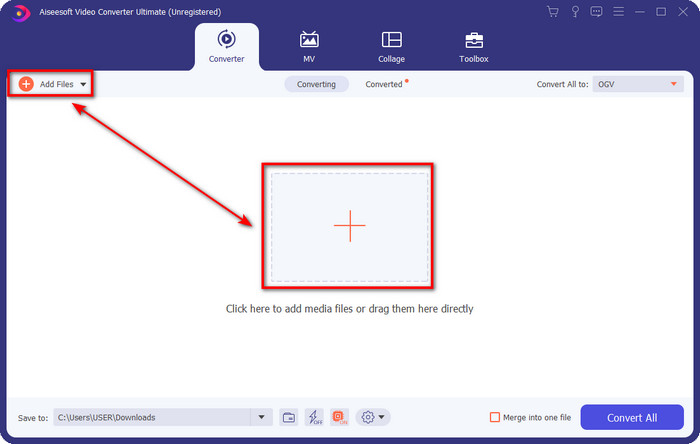
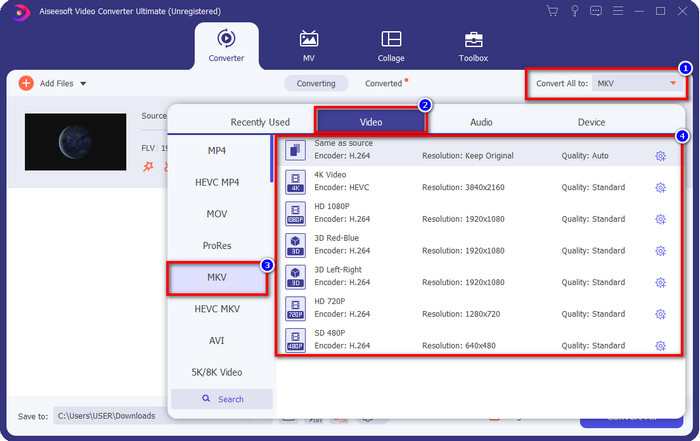
Steg 3. Därefter ändrar vi formatet till MKV genom att klicka på rullgardinsknappen uppe till höger i användargränssnittet.
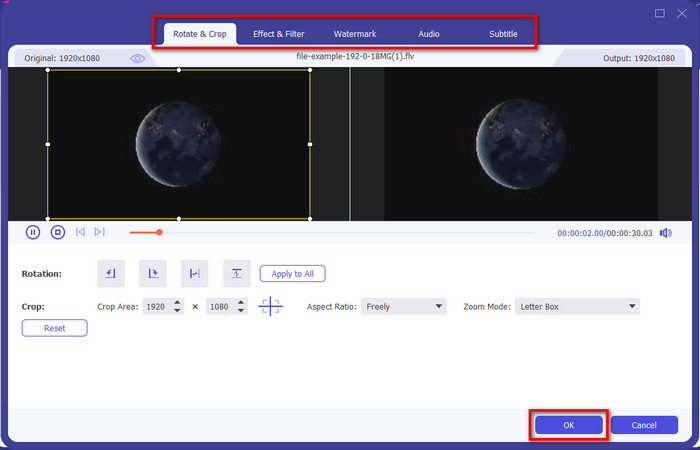
Valfritt. Om du behöver redigera videon kan du klicka på trollstavsknappen. Ett nytt gränssnitt visas där du kan Rotate, Crop, lägga till Effects, Filter, Watermark, Audio och Subtitle. Begränsa inte din fantasi, gör vad du vill, och klicka på OK för att tillämpa all magi du har skapat.
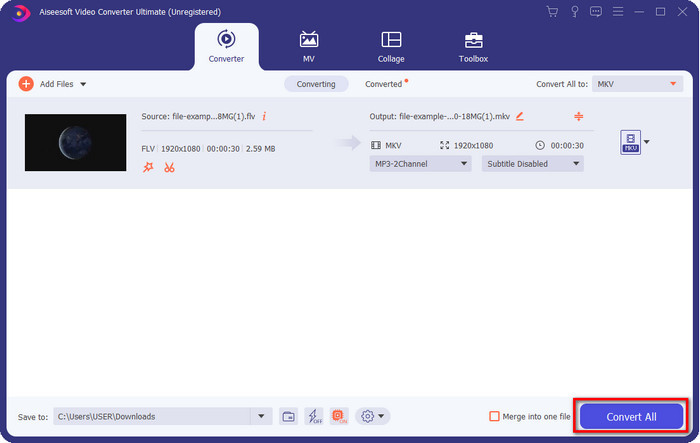
Steg 4. När allt är klart klickar du på Convert All för att konvertera FLV till MKV‑format. Processen tar mindre än en minut, så du behöver inte vänta särskilt länge. En mapp visas på skärmen med den konverterade FLV‑filen.
Relaterat:
Del 3. Vad är skillnaden mellan FLV och MKV
FLV och MKV är kända för att vara bland de bästa containrarna alla känner till. Men före allt annat, låt oss jämföra och se mer detaljerad information om de två formaten.
FLV är känt på alla webbplatser eftersom det är populärt på webbsidor, främst för att Adobe skapat det. Dessutom spelar .flv videoströmmar online eftersom de är mycket lättare att ladda än det andra formatet. Dessutom behöver det här formatet en plug-in-play innan du kan se eller titta på videon i det här formatet, eller så kan du enkelt ladda ner Flash Player. Även om formatet är utmärkt har plug-in-spelen det använder redan tagit fart, vilket betyder att formatet inte är det bästa valet. Men många mediaspelare stöder fortfarande detta format och användare som fortfarande använder det.
MKV är känt för att vara det mest framtidslika formatet som finns. Det här formatet skulle inte vara som vilket annat format som helst om vi skulle jämföra det. Till exempel är strukturen byggd i detta format inte densamma som MP4 eller AVI, men den är annorlunda. Designen och dess unika mediefillagring gör den mer imponerande. Nuförtiden är det svårt att välja vilket format som är föråldrat, och ett är MKV.
Om vi gräver mer i detaljer kommer vi att hitta många anledningar till varför du behöver konvertera FLV till MKV. Även om de två formaten innehåller medieinnehåll är MKV kraftfullare än FLV. Så om du vill ha den unika MKV-kraften måste du konvertera din fil till detta format.
FLV kontra MKV
Adobe Flash Player använde FLV för att leverera videoinnehåll som filmer och TV-program. Numera utvecklar Adobe inte längre spelaren och rekommenderar användare avinstallera den av säkerhetsskäl. Du kan dock fortfarande använda FLV-formatet på många icke-Adobe/Macromedia-program.
Matroskas multimediacontainerformat, som släpptes 2002, är ett format med öppen källkod som kan innehålla ett antal video-, ljud-, bild- och undertextspår. Så du kan enkelt använda den för att lagra korta videoklipp, TV-program och filmer. Det är ganska populärt för anime-fansubning.
Del 4. Vanliga frågor om FLV till MKV-konvertering
Är det säkert att konvertera FLV till MKV online?
Tja, konverteringsformat bör vara säkert om du använder ett webbverktyg. Men inte alla onlinekonverterare är säkra att konvertera ditt filformat. Eftersom det finns vissa tendenser kommer det att uppstå många oväntade fel när du använder fel omvandlare. Till exempel är kvalitetsförlust ett utbrett problem, virus vid nedladdning av filen efter konvertering, flera popup-annonser, infektiös skadlig programvara och många fler. Så om du vill ha en säker konverteringsprocess online måste du istället använda FVC Free Video Converter Online.
Tar det tid att konvertera FLV?
Konverteringsprocessen kommer att bero på många faktorer, och en av dem är verktyget du använder och filstorleken. Om du har en stor FLV-fil måste du använda FVC Video Converter Ultimate, speciellt i en brådska. Eftersom det här verktyget ger en blixtsnabb process behöver du ingen internetanslutning för att använda det. Och nu, m om du letar efter en omvandlare som kan bearbeta ditt format snabbare, då är det ultimata verktyget valet.
Varför kan jag inte öppna min FLV-fil?
Det finns flera anledningar till att du inte kan öppna dina FLV-filer. Notera; denna följande detalj är en av de hundrade anledningarna till att du inte kan öppna filen FLV. Först och främst kan du inte öppna en FLV om filen är knäckt eller har ett virus i den. För det andra, det vanligaste problemet med videofilen stöds inte i appen du använder. För det tredje, om du laddar ner en FLV-fil på internet, kommer det att finnas ett fall att filen förlorar viss viktig information för att spela upp den. Även om detta är ett problem, kan vi fortfarande hjälpa till med detta genom att konvertera din FLV till ett annat format. Men kom ihåg att du inte kan återställa FLV genom att ändra formatet om det är skadat eller ofullständigt.
Slutsats
Vi har lärt oss det vi behöver för att konvertera FLV till MKV på flera sätt. Verktygen ovan är utmärkta att använda när vi ska konvertera formatet till en ny version. Nu ligger det i dina händer att välja vilket format och vilket verktyg du tycker passar bäst för att omvandla ditt format. Vilket som helst av de tre verktygen ovan garanterar din framgång, men om du vill ha ett professionellt resultat och verkligen ta fram det bästa i din videofil bör du välja FVC Video Converter Ultimate. Ingen ytterligare förklaring behövs, eftersom detta verktyg fyller alla dina behov.
-
 3 lösningar på hur man konverterar FLV till PSP utan förlust
 Hur konverterar man FLV till PSP? Här får du steg-för-steg-guiden för att konvertera Flash-videor till PSP-format (WMV, MP4, AVI, FLV, etc.) på Windows och Mac.
-
 2 metoder för att konvertera FLV till WMA-ljud [gratis och online]
 Vill du extrahera WMA-ljud från FLV-video? Här är två gratis WMA-ljuduttag för att konvertera FLV (Flash Video) till WMA (Windows Media Audio) med snabb omvandlingshastighet på Mac OS X och Windows 10/8/7.
-
 [Löst] Hur man konverterar FLV-videor till animerade GIF-filer gratis
 Om du vill skapa GIF-filer från FLV-videosegmenten för bättre sändning kan du enkelt lära dig mer om hur du konverterar FLV-videor till GIF-filer från den här artikeln.

