


 Video Converter Ultimate
 Skärminspelare
 Video reparation
 Säker nedladdning
3 gratis sätt att konvertera FLV för att spela på Xbox
FLV används i stor utsträckning på nyhets- och videotjänster. När du laddar ner vissa onlinemedier från YouTube, Hulu eller Facebook får du oftast FLV-filer. FLV-formatet kan stödjas av många spelare, enheter, plattformar och webbläsare. Men det kan inte spelas upp på Xbox.
Xbox är mer än bara en spelkonsol – den låter dig också spela upp video och musik via ett USB-minne eller en extern hårddisk. Xbox är kompatibel med många populära mediaformat. Men som nämnts ovan kan du inte spela FLV direkt på Xbox. När du vill titta på FLV-filer på Xbox måste du konvertera FLV till ett Xbox-kompatibelt format.

Det här inlägget visar 3 kostnadsfria sätt att konvertera FLV till Xbox. När du vill titta på FLV-filer på din Xbox One, Xbox 360, nya Xbox Series X eller Xbox Series S kan du använda dem för att konvertera FLV till ett format som stöds av Xbox.
Del 1. Hur man gratis konverterar FLV till Xbox Online
Många videokonverterare kan hjälpa dig att konvertera FLV till Xbox-format som AVI eller MP4. Om du har att göra med några små FLV-videoklipp, bör du först prova den gratis FLV till Xbox-omvandlaren online.
Free Online Video Converter är en lättanvänd videokonverterare som gör att du kan konvertera FLV till MP4, AVI, WMV, MOV eller något annat format som stöds av Xbox-konsolen. Jämfört med andra onlinetjänster kräver den inget konto eller inloggning. Dessutom finns det ingen filstorleksbegränsning för din FLV-konvertering. Guiden nedan visar hur du använder den.
Steg 1. Den här webbaserade FLV till Xbox-konverteraren fungerar i alla webbläsare som Chrome, Safari, IE och Firefox. Öppna en webbläsare och gå till sidan för Online FLV till Xbox-konverterare.
Steg 2. När du kommer dit klickar du på Add Files to Convert och sedan på Download-knappen för att installera ett startprogram för FLV-konverteringen. När startprogrammet är klart visas ett popup-fönster där du kan lägga till din FLV-fil.

Steg 3. Du ser att flera populära videoformat, bland annat MP4, AVI, MOV, FLV, WMV, MKV med flera, listas under den inlästa FLV-filen. Du kan välja ett Xbox-kompatibelt format som MP4 eller AVI.
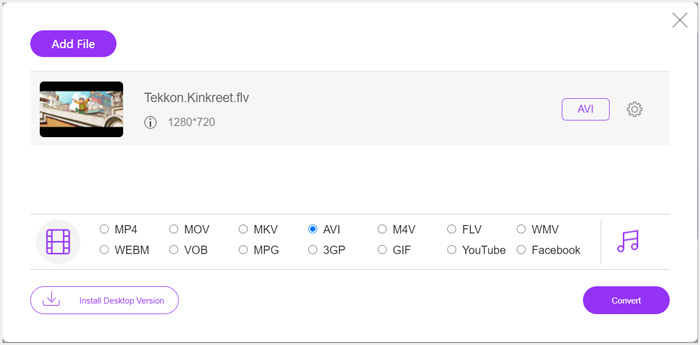
Steg 4. Om du vill anpassa fler inställningar för utgående video och ljud kan du klicka på ikonen Settings bredvid utdataformatet. Därefter kan du klicka på knappen Convert för att börja konvertera FLV till Xbox. Den färdiga videon sparas automatiskt på din dator så snart konverteringen är klar.
Del 2. Konvertera FLV till Xbox Online med FreeConvert
FreeConvert är en annan populär video- och ljudkonverterare som kan hjälpa dig att konvertera FLV till Xbox-kompatibla MP4, AVI eller WMV. Den har en särskild FLV to Xbox Video Converter så att du direkt kan konvertera dina FLV-filer till Xbox.
Steg 1. Öppna webbläsaren och gå till sidan FLV to Xbox Video Converter.
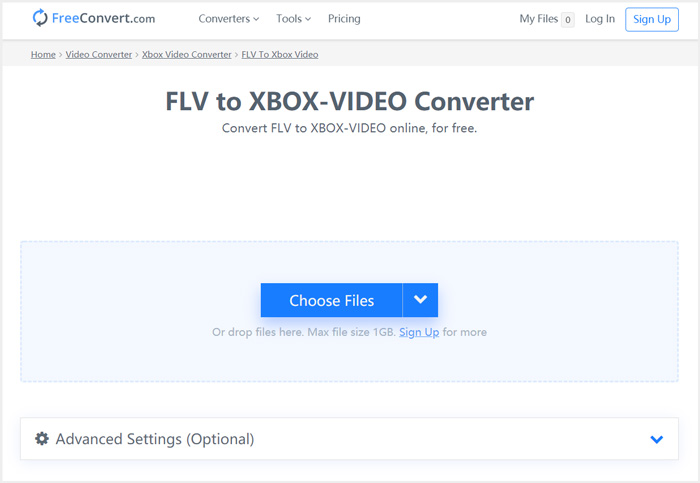
Steg 2. Klicka på knappen Choose Files för att bläddra efter och ladda upp din FLV-fil. Du kan också lägga till filer via URL, Google Drive och Dropbox.
Steg 3. Du kan klicka på Add More Files för att ladda upp andra FLV-filer du vill konvertera. Målformatet sätts som XBOX som standard. Du kan helt enkelt klicka på knappen Convert to Xbox Video för att starta FLV till Xbox-konverteringen.
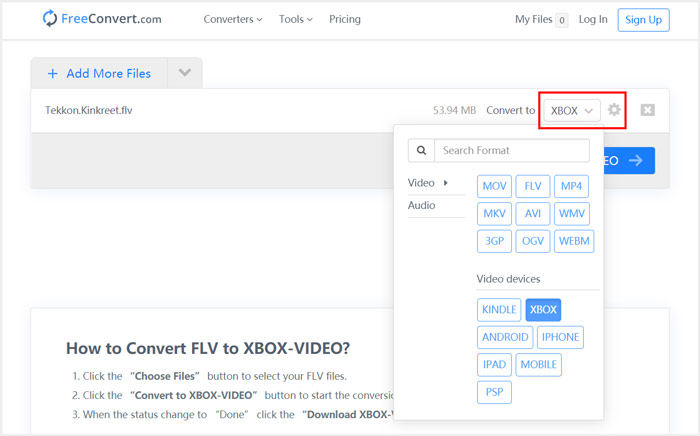
Följ liknande steg, så kan du spela valfri musik på Xbox efter att du har konverterat filerna till format som är kompatibla med Xbox.
Den här FLV to Xbox Video Converter börjar ladda upp och konvertera din video. När konverteringen är klar kan du klicka på knappen Download för att spara filen på din Mac eller Windows-dator. Eller så kan du välja att spara den på Google Drive eller Dropbox. Du kommer att se vissa annonser när du använder den här kostnadsfria FLV till Xbox-konverteraren.
Del 3. Bättre sätt att gratis konvertera FLV till Xbox på Mac och Windows PC
Förutom webbaserade FLV-konverterare kan du också använda andra kostnadsfria videokonverterare för att konvertera och spela upp dina FLV-filer på Xbox-spelkonsolen. Här presenterar vi den kraftfulla Free FLV Converter. Den är särskilt framtagen för olika typer av FLV-konverteringar.

- Konvertera valfritt FLV till Xbox-format som MP4, AVI, WMV, MOV och mer.
- Erbjud en serie teman för att redigera och anpassa FLV-filen.
- Avancerade flerkärniga processorer och GPU-accelerationer för att konvertera FLV till Xbox i snabb hastighet.
- Konvertera en eller flera FLV-filer till Xbox utan förlust av bild- eller ljudkvalitet.
Gratis nedladdningFör Windows 7 eller senareSäker nedladdning
Gratis nedladdningFör MacOS 10.7 eller senareSäker nedladdning
Steg 1. Börja med att dubbelklicka på nedladdningsknappen för att installera programmet kostnadsfritt på datorn. Öppna det och klicka på Add Files för att importera din(a) FLV-fil(er).

Steg 2. Välj MP4 eller AVI som målformat i rullgardinsmenyn Output format. För fler inställningar kan du klicka på ikonen Settings bredvid utdataformatet för att öppna fönstret Profile Settings.
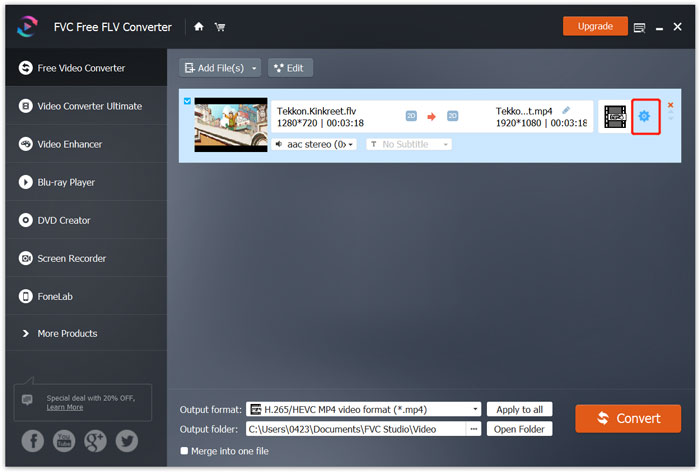
Den listar också en särskild Xbox-kategori i Output format så att du direkt kan konvertera FLV till ett format som stöds av Xbox One eller Xbox 360. Men då behöver du uppgradera till en betalversion.
Steg 3. Klicka på knappen Convert för att starta videokonverteringen från FLV till MP4 eller ett annat Xbox-kompatibelt videoformat.
Del 4. Vanliga frågor om att spela FLV på Xbox
Fråga 1. Vilka format kan Xbox One stödja?
Som en av de mest populära spelkonsolerna är XBox kompatibel med många video- och ljudformat som ofta används, inklusive MP4, AVI, M4V, MOV, WMV, MKV, H.264 AVCHD, WAV, WMA, 3GP-video, 3GP-ljud, AAC , MP3 och mer.
Fråga 2. Hur spelar jag upp videor på Xbox?
Om du har appen Movies & TV på din Xbox One eller Xbox 360, när du castar video till Xbox eller ansluter din externa enhet till Xbox, kan du enkelt använda den för att titta på videor.
Fråga 3. Vilken spelare kan spela FLV-filer?
När du vill spela FLV-filer på din Mac, Windows PC eller bärbar iOS / Android-enhet är VLC Media Player alltid ett bra alternativ för att göra det. Det erbjuder stationära och mobila appar där du kan spela FLV-filer på din dator eller telefon.
Slutsats
Kan du inte spela FLV-filer på din Xbox-spelkonsol? För att göra det bör du först konvertera FLV till Xbox-fil som stöds. Du hittar tre gratis metoder för att konvertera och spela FLV på Xbox från det här inlägget.
-
 Topp 10 FLV-spelare för Windows, Mac, iOS och Android 2021
 FLV-spelare hjälper dig enkelt att komma åt dina FLV-filer på din Windows-, Mac-, Android-, iOS-enhet. Kolla in de bästa FLV-filspelarna du kan ladda ner just nu.
-
 Handledning för att komprimera GIF och minska filstorleken med hög kvalitet
 Här är två enkla sätt att komprimera GIF på din dator eller mobiltelefon. Du kan använda FVC Free Online Video Compressor och Photoshop minska GIF-filstorleken i olika aspekter.
-
 Topp 4 gratis sätt att konvertera FLV-videor till MP4 på skrivbordet och online
 Den här guiden delar fyra gratis metoder för att konvertera dina FLV-videofiler till MP4-format på Windows 10/8/7 / XP och Mac OS X, så att du kan njuta av videorna på alla enheter.
