


 Video Converter Ultimate
 Skärminspelare
 Video reparation
Offline- och onlinekonverteringsprocess: Det bästa sättet att konvertera OGV till FLV
När du använder OGV‑videor kan det här förlustkomprimerade videoformatet irritera dig eftersom de blir suddiga efter justeringar. Saker och ting blir dock bättre om du först konverterar OGV till FLV‑format innan du delar dem online; den enda utmaningen blir att hitta ett kraftfullt men ändå lättanvänt videokonverteringsprogram. Som tur är har vi det bästa verktyget för både offline‑ och onlineanvändning för att enkelt konvertera OGV till FLV-format. Följ bara stegen i den här artikeln för din bekvämlighet.

Del 1. Hur man enkelt konverterar OGV till FLV [Offline]
Ärligt talat finns det många videokonverterare online, men bara ett fåtal av dem kan hantera en OGV‑konvertering. Eftersom formatet ifråga inte är vanligt bland de flesta videokonsumenter bryr sig inte konverterarna om att ta med det i sin formatlista. Det är av den här anledningen som Video Converter Ultimate blir så användbart. Det stöder OGV som indata fullt ut och gör att du snabbt kan konvertera OGV‑videofiler till FLV‑format. Det är också värt att notera att det kan omvandla dina OGV‑videor och redigera dem med praktiska verktyg. Allt du behöver finns i Video Converter Ultimate. Därför ger vi dig de allra enklaste stegen att följa:
Steg 1: Innan du kan använda programvaran måste du först installera den på din dator. Du kan göra detta genom att klicka på en av knapparna för gratis nedladdning nedan, beroende på vilket operativsystem du använder. Vänta tills .exe‑ eller .dmg‑filen har laddats ner klart och öppna den sedan för att starta installationsprocessen. Slutligen kan du starta programvaran direkt efter att du är klar genom att klicka på Starta nu.
Gratis nedladdningFör Windows 7 eller senareSäker nedladdning
Gratis nedladdningFör MacOS 10.7 eller senareSäker nedladdning
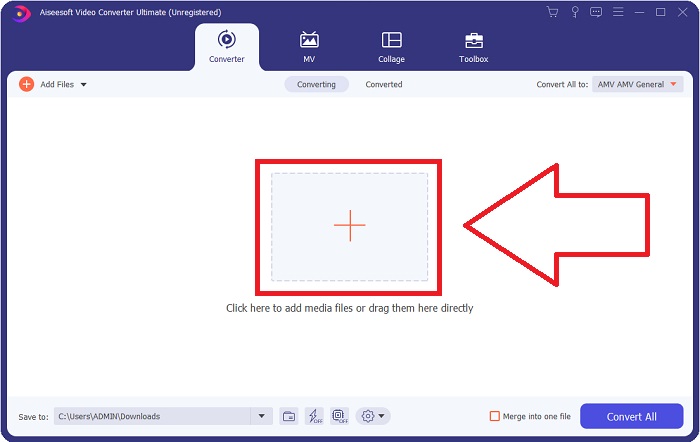
Steg 2: När ett fönster har dykt upp befinner du dig i ett gränssnitt med en +-knapp i mitten. För att importera videofilen du vill konvertera klickar du på den eller drar och släpper själva filen i programmet.
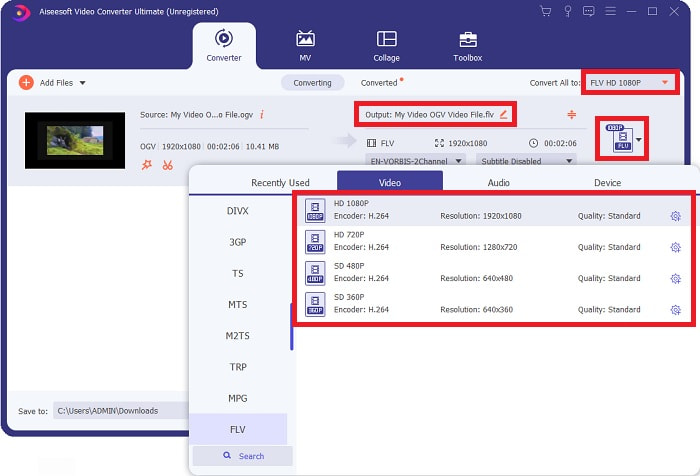
Steg 3: Till höger visas vilket filformat din video har just nu. Klicka på det, så ser du alla format du kan välja mellan. I det här fallet bläddrar du ner och väljer FLV, eller så kan du helt enkelt söka efter det i sökfältet nedanför. Nu kan du även på höger sida av fliken välja vilken videokvalitet du vill ha för din konverterade fil.
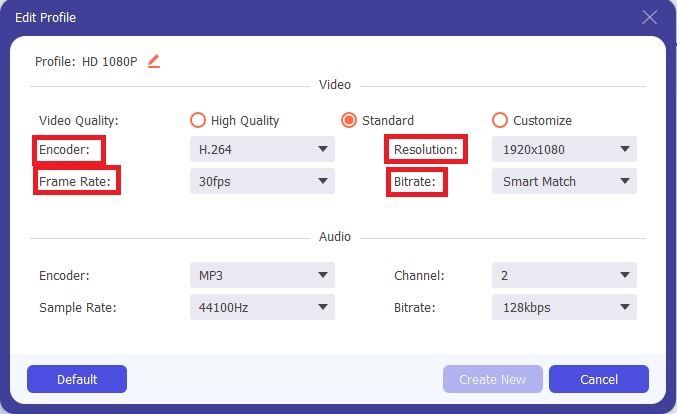
Steg 4: Om du letar efter fler alternativ hittar du dem genom att klicka på kugghjulsikonen bredvid den videokvalitet du valt. Med detta kan du ytterligare justera videoupplösningen och andra alternativ som bildfrekvens, samplingsfrekvens, bithastighet och kodare. När du är nöjd klickar du bara på knappen Skapa ny nere i högra hörnet för att spara ändringarna.
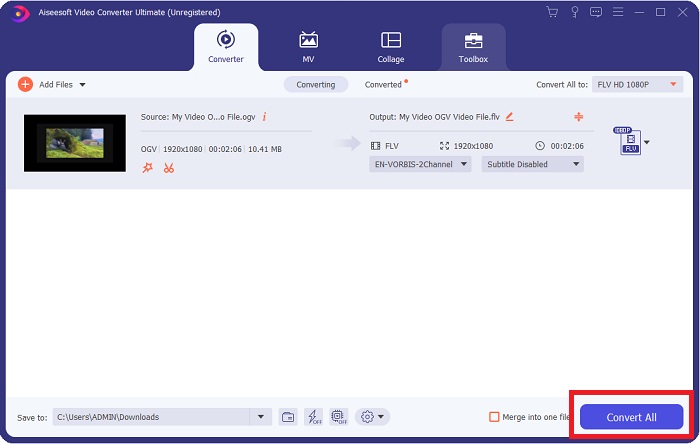
Steg 5: När du är klar med alla justeringar kan du starta själva konverteringen genom att klicka på knappen Konvertera alla nere i högra hörnet och vänta tills den är klar.
Del 2. En annan metod tillgänglig för att konvertera OGV till FLV [Online]
Om tiden inte räcker till och du behöver konvertera din OGV‑fil till FLV så snabbt som möjligt behöver du inte oroa dig, för vi har dig fortfarande täckt. Du kan använda den webbaserade motsvarigheten till den nämnda programvaran, som fortfarande ger dig högsta möjliga bekvämlighet med en smidig konverteringsprocess. FVC Free Video Converter Online är ett webbverktyg som enkelt kan göra om OGV‑filer till FLV och ändå erbjuda samma alternativ för upplösning och ljudkvalitet. För att använda det följer du dessa steg:
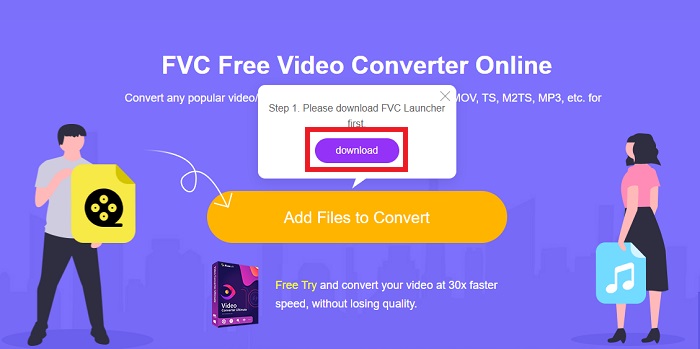
Steg 1: Klicka på den här länken, så skickas du vidare till själva onlinekonverteraren. Mitt på sidan finns en knapp med texten Lägg till filer att konvertera. Du måste klicka på den för att ladda ner startprogrammet som krävs för att du ska kunna importera videofilen du vill konvertera.
Steg 2: När du är klar kan du nu ladda upp din fil genom att klicka på samma knapp igen. Ett gränssnitt visas om uppladdningen lyckas. Därifrån kan du nu välja FLV bland de andra formaten som erbjuds längst ned i fönstret.
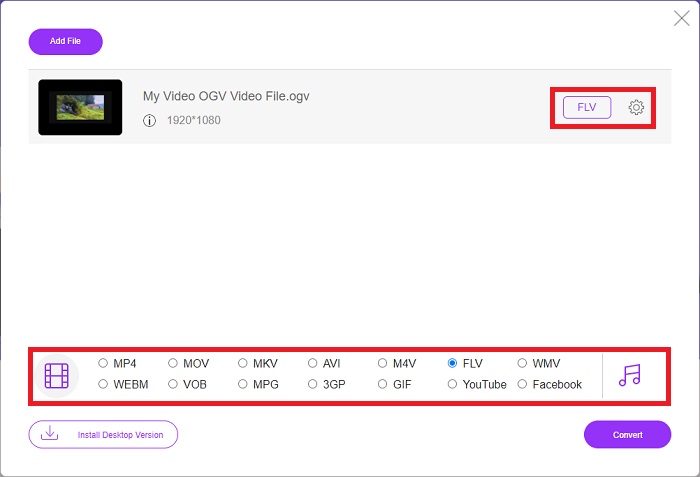
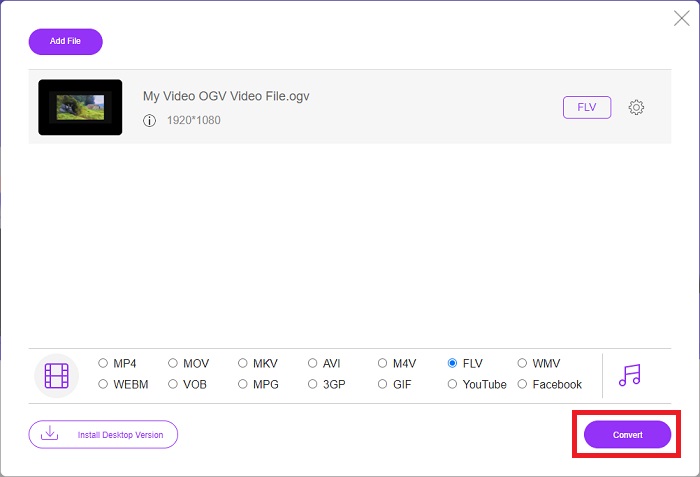
Steg 3: På samma sätt hittar du också en kugghjulsikon längst till höger där du kan redigera din video ytterligare. Genom att klicka på den kan du hitta video‑ och ljudinställningar så att du kan justera kodare, upplösning, bildfrekvens och mer. Klicka på OK och klicka sedan på knappen Konvertera nere i högra hörnet för att starta konverteringsprocessen.
Del 3. Utökad kunskap om OGV och FLV
Om du vill veta mer om de två filerna som jämförs, ger vi dig här all nödvändig information du kanske vill läsa:
Ogg Vorbis videokodningsmetoden kan oftast länka till filer med filtillägget .ogv. Ogg Vorbis är ett öppen källkod, icke-patenterat ljudkomprimeringsformat. Behållarformatet för ljud-, video- och informationsfiler är känt som Ogg, medan ljudkomprimeringstekniken Vorbis är uppkallad efter. OGV-filformatet är en behållare för videofiler. Videoströmmar länkade med en eller flera videocodec, såsom Theora och DivX, kan hittas i OGV-filer. Användare kan spela upp det inspelade materialet i innehållsfilen på flera medieenheter med hjälp av dessa filer.
Å andra sidan är en videofil lagrad i Adobe Flash Video (FLV) containerformat en FLV-fil. Adobe Flash Player använder den främst för att erbjuda videoinnehåll online som filmer och TV-avsnitt. Det är också viktigt att notera att det är ett öppet format som stöds av en mängd icke-Adobe/Macromedia-appar. För en mer specifik jämförelse av de två gjorde vi en tabell just för dig.
| Ogg Vorbis (OGV) | Adobe Flash Video (FLV) | |
| Filtillägg | .ogv | .flv |
| Utvecklaren | Xiph.Org Foundation | Adobe Systems Incorporated |
| Stödprogram | MPlayer Classic, VLC Media Player, Jriver Media Center, MPUI | RealPlayer, Apple QuickTime Player, Mplayer, VLC Media Player |
| Fördelar | OGG har fördelen av att vara patentfri, allmänt erkänd och stöds av de flesta webbläsare. Som ett resultat, om du vill ladda upp en film till din webbplats, är detta format ett bra alternativ. | Det fina med Flash är att det kan hjälpa webbplatser som vill införliva rörelse och interaktivt innehåll. Förfarandet är enkelt och kan i slutändan ha en betydande inverkan. Alla använde också Flash för rudimentära spel i sin bästa tid. |
| Nackdelar | Trots dess utbredda användning har OGG-videoformatet några nackdelar. Safari och Internet Explorer, till exempel, stöder det bara delvis; Användare kanske inte ser din video korrekt i dessa webbläsare. | Nackdelen är förstås att FLV-formatet har blivit mer impopulärt de senaste åren. Att skapa FLV-innehåll kan ta lång tid och vara dyrt. En annan nackdel är att Flash-material inte kan spelas på iOS-enheter, vilket kraftigt begränsar dess förmåga att locka nya följare. |
Del 4. Vanliga frågor om OGV- och FLV-konvertering
Är OGG och OGV samma sak?
Det är en lämplig delmängd av Ogg-videomedietypen video/Ogg med filtillägget. ogv. Andra Ogg-appar använder filtillägget. ogv med mediatypen application/ogg since. ogx är en superuppsättning av video/ogg.
Är FLVs kvalitet bättre än MP4?
MP4 sägs innehålla högkvalitativ digital kodning för både video och ljud. Allmänhetens uppfattning om FLV är mindre tydlig, även om fördelarna och nackdelarna med FLV sällan fokuserar på filformatets kvalitet. Med högre grad av komprimering har MP4 mindre kvalitetsförlust. Här kan du se hur du kan konvertera FLV‑filer till MP4.
Är FLV förlustfri eller förlustfri som OGV?
FLV-filformatet för Flash Video stöder två versioner av skärmdelnings-codec (Skärmvideo), som är en screencast-kodningsmetod. Dessa format är baserade på bitmappsbrickor och är förlorade när färgdjupen reduceras och komprimeras med Zlib.
Slutsats
Oavsett hur mycket tid du har på att konvertera dina videofiler, kommer både programvaran och dess motsvarighet till onlineverktyg att leverera det mest bekväma för dig. Så kort och gott är Video Convert Ultimate och Free Video Converter de som måste vara det första du tänker på när det kommer till videokonvertering för att du ska spara tid på att surfa på internet och hitta den bästa. Här överlämnar vi det bästa till dig.
-
 Bästa sätten att konvertera VOB till FLV [Gratis och online ingår]
 Vill du konvertera en VOB-fil till en FLV-fil? Du kan enkelt slutföra uppgiften med antingen stationära eller online-omvandlare. Läs den här guiden och lär dig hur du omvandlar VOB till FLV enkelt och snabbt.
-
 Topp 4 gratis RMVB till FLV Converter-appar på skrivbordet eller online
 Den här artikeln kommer att berätta de bästa RMVB till FLV-omvandlare och webbappar som kan konvertera RMVB (RealMedia Variable Bitrate) -filer till FLV-video.
-
 Hur man komprimerar en OGV-fil utan att förlora kvalitet
 Kan du inte skicka stora OGV-filer till andra? Tja, den här artikeln kommer att presentera dig 2 enkla sätt att hjälpa dig att enkelt komprimera OGV-filer.
