


 Video Converter Ultimate
 Skärminspelare
 Video reparation
Välj den bästa GIF till AVI-konverteraren som är tillgänglig på PC och Mac
Konvertering av ditt GIF till AVI-filformat blev möjligt med hjälp av dessa otroliga verktyg. Utan kvalitetsförlust och på något sätt för att göra det bättre. Men vissa av omvandlarna du kan använda kan inte ge dig den bästa kvaliteten du vill använda. Så du får inte vara orolig om du vill ersätta din GIF med ett AVI-format. Konvertera din video till ett AVI-format utan kvalitetsförlust genom att följa steget nedan och välj vilken som är den bästa konverteraren du ska använda.

Del 1. Det fria och professionella att konvertera GIF till AVI med detaljerade steg
1. Free Way - FVC Free Video to GIF Maker
FVC Free Video to GIF Maker är den bästa kostnadsfria GIF till AVI‑omvandlaren från FVC. Du kan också gratis konvertera valfri video eller ljudfil till ett nytt format med hjälp av detta verktyg. Det här verktyget erbjuder en av de bästa omvandlarna utan kostnad. Även om de flesta viktiga funktionerna i premiumversionen inte är gratis, är det fortfarande lika bra på själva konverteringen. För att lära dig hur du använder detta kostnadsfria verktyg måste du följa stegen nedan för att se hur du konverterar din GIF.
Steg 1. Installera verktyget på din dator.
Gratis nedladdningFör Windows 7 eller senareSäker nedladdning
Gratis nedladdningFör macOS 10.7 eller senareSäker nedladdning
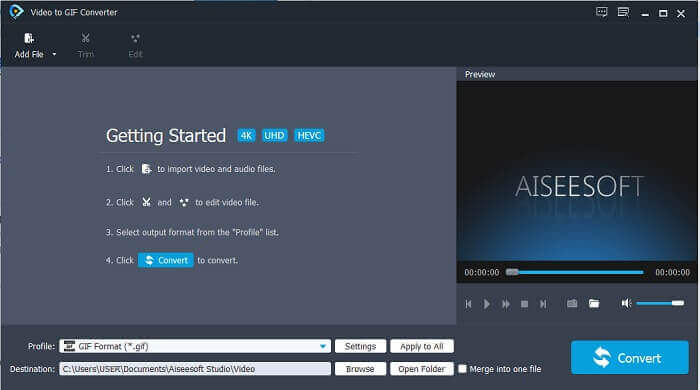
Steg 2. Detta är ett exempel på gränssnittet du ser när du redan har laddat ner verktyget.
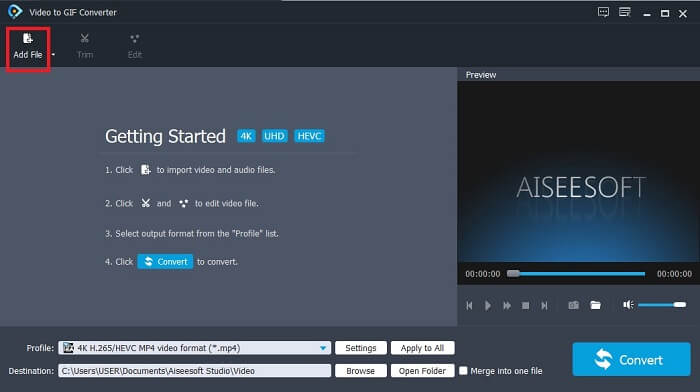
Steg 3. Klicka på Add File och välj den GIF‑fil du vill konvertera. Om filen redan är vald klickar du på Open för att lägga in den i gränssnittet.
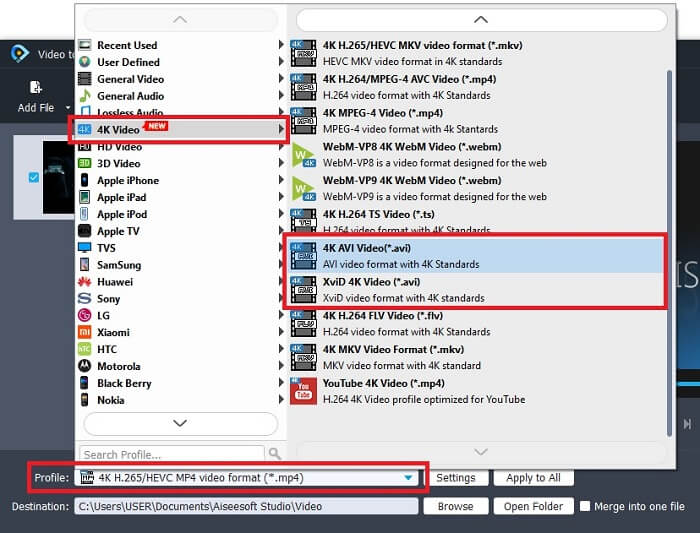
Steg 4. Ändra formatet till AVI under Profile. I 4K Video klickar du på formatet AVI. Om allt är klart klickar du på Convert för att starta konverteringen.
Steg 5. Konverteringen av GIF-filen tar inte särskilt lång tid. Sedan kan du njuta av ditt färdiga resultat.
2. Professionellt sätt - Video Converter Ultimate
Kanske frågar du dig själv hur man gör om en GIF till AVI eller tvärtom. Och du undrar om det finns ett särskilt verktyg som ger ett riktigt bra konverteringsresultat. Det måste vara Video Converter Ultimate eftersom det stöder fler format än det kostnadsfria verktyget och andra premiumomvandlare. Dessutom erbjuder det fler funktioner som du kan använda för att förbättra din video eller ljudfil. Bara genom att använda denna ultimata omvandlare kan du väcka din GIF till liv. Lär dig hur du konverterar ditt GIF‑format till AVI utan kvalitetsförlust och förbättrar videon om den blir lite suddig. Följ stegen nedan för att lära dig rätt sätt att konvertera din favorit‑GIF‑fil.
Steg 1. Klicka på nedladdningsknappen som motsvarar ditt operativsystem. Installera det på din hårddisk och ändra inställningarna innan du startar verktyget.
Gratis nedladdningFör Windows 7 eller senareSäker nedladdning
Gratis nedladdningFör MacOS 10.7 eller senareSäker nedladdning
Steg 2. Om verktyget redan körs i ditt program ser du detta lilla Ultimate‑gränssnitt på skärmen, vilket betyder att det har startats.
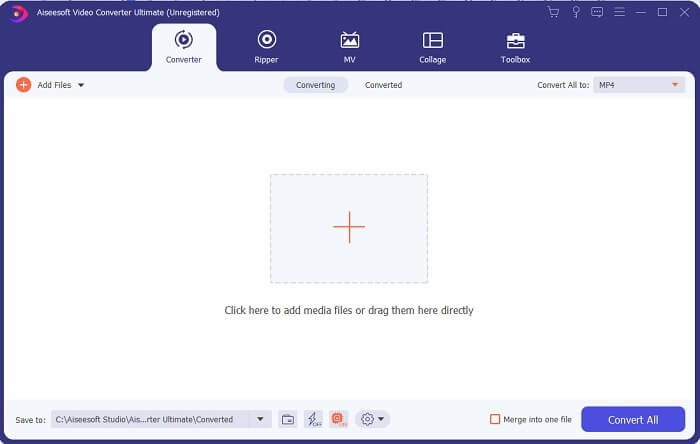
Steg 3. Klicka på knappen med plus-tecknet för att lägga till filen, eller dra filen dit.
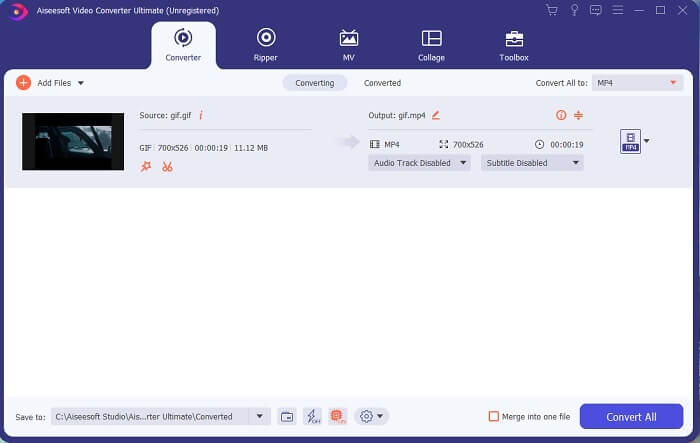
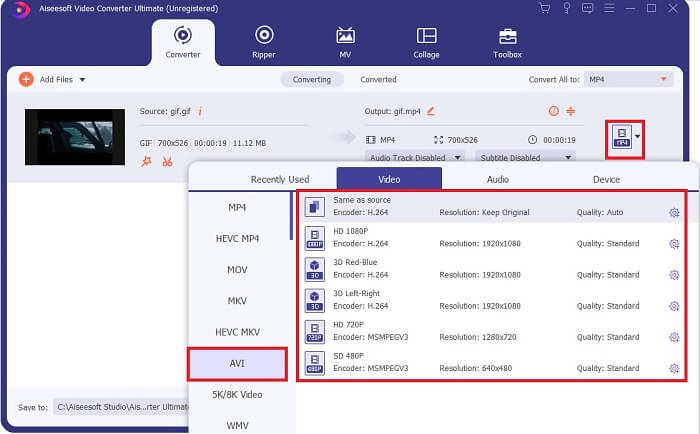
Steg 4. Klicka på drop‑down-knappen för att ändra formatet och göra det till AVI. Du kan också välja kodare, upplösning och kvalitet på utdata. När allt är klart klickar du på Convert All för att starta konverteringsprocessen.
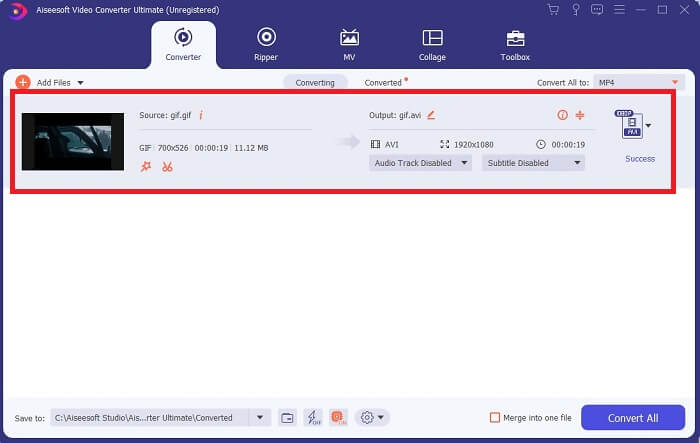
Steg 5. Detta verktyg erbjuder upp till 30 gånger snabbare konvertering än det kostnadsfria verktyget och 100 gånger snabbare än det andra verktyget, så räkna med att du inte behöver vänta länge. När konverteringen är klar öppnas en filhanterare automatiskt i ditt gränssnitt.
Bonusverktyg och steg för att förbättra videon
Alla premiumomvandlare erbjuder inte den här typen av funktion. I vissa fall, när du konverterar GIF till AVI, blir resultatet lite suddigt eftersom GIF har en lägre bildfrekvens än AVI. Men det finns ett sätt att förbättra din video till ett bättre resultat. Följ dessa steg för att förbättra videon som du redan har konverterat.
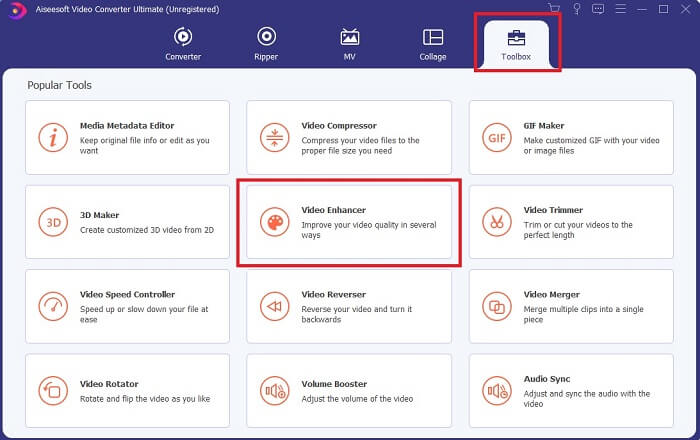
Steg 1. I programmets Toolbox klickar du på Video Enhancer.
Steg 2. Klicka på plus-knappen och välj videon du vill förbättra. Klicka på Upscale Resolution för att förbättra videokvaliteten; du kan markera de andra alternativen för att ytterligare höja kvaliteten. Klicka sedan på Enhance för att starta processen.
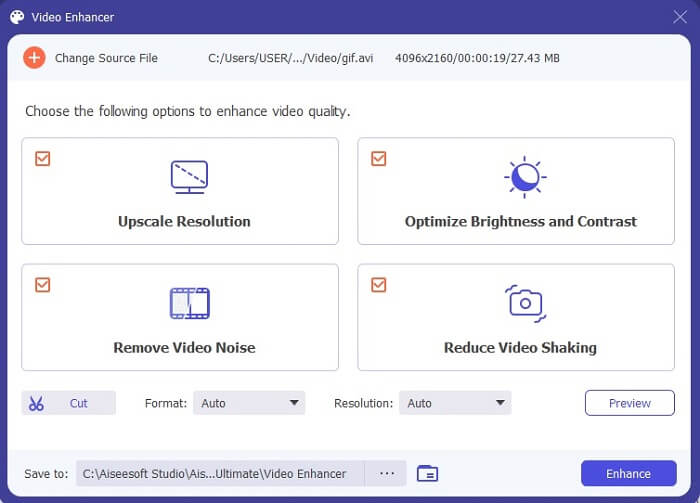
Steg 3. Förbättringen av videon blir klar direkt. Efter förbättringen öppnas filhanteraren automatiskt och videon spelas upp så att du kan se en mycket bättre version.
Del 2. Topp 3: Bästa onlineomvandlare tillgängliga på webben.
1. CloudConvert
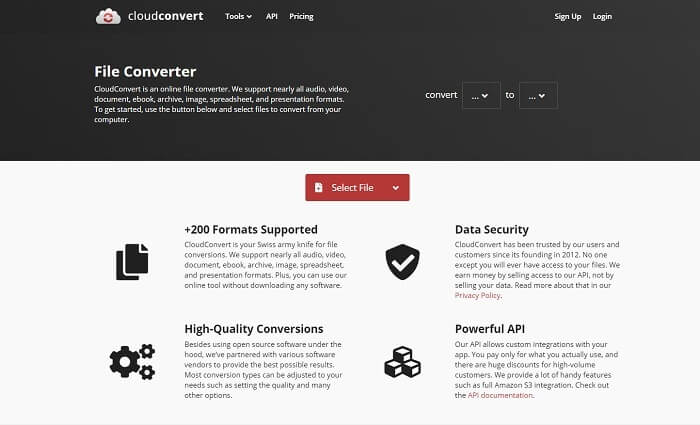
Den bästa GIF till AVI‑omvandlaren online är Cloud Convert. Detta verktyg stöder nästan alla olika format för video, ljud, dokument, e‑böcker, kalkylblad, presentationer och även bilder. Du kan använda det utan att installera något, eftersom det är ett onlineverktyg – vilket också innebär att om du inte har internetanslutning kan du inte använda det, till skillnad från de två andra verktygen nedan. Denna webbplats är betydligt mer informativ än AnyConv. Dessutom har den ett mycket bättre gränssnitt som är väldigt användarvänligt.
2. AnyConv
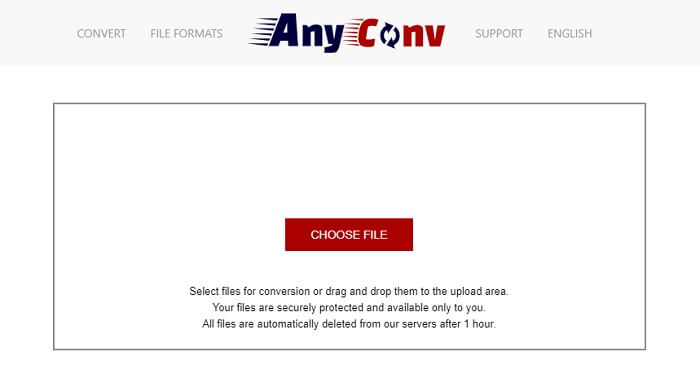
Det säkraste sättet att konvertera din video är att använda AnyConv. Du kan skapa ditt animerade GIF till AVI-format enkelt. Det är känt som den säkraste omvandlaren eftersom det bara är du som kan komma åt dina konverterade filer. Och alla filer som har konverterats med detta onlineverktyg raderas automatiskt efter konverteringen. Webbplatsen är dock lite knapphändig med information, så användningen kan bli förvirrande på grund av bristen på vägledning.
3. online-convert.com
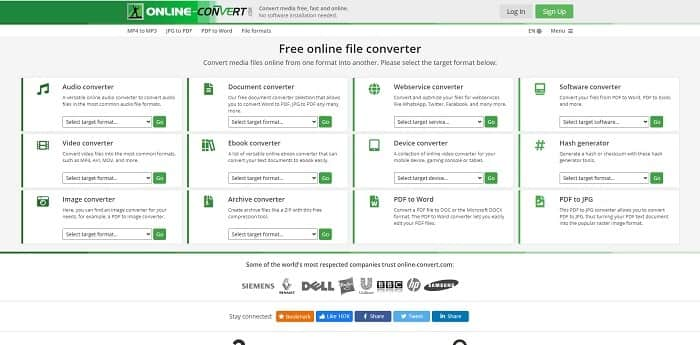
Ett annat verktyg du kan använda som omvandlare är online-convert.com. Detta verktyg låter användare eller kunder som du konvertera valfri video, ljudfil, bild och mer. Det är också möjligt att konvertera webbtjänster, enheter och programvara med detta verktyg. Du kan även använda det för att konvertera AVI till en animerad GIF eller tvärtom. Webbsidan är informativ och ger en kort beskrivning av varje verktyg och hur man använder dem på rätt sätt. Men gränssnittet är ganska tråkigt på grund av den gröna färgkänslan det ger användaren.
Del 3. Vanliga frågor om GIF till AVI
Vilken är den bästa GIF-beskäraren som finns tillgänglig i alla programvaror? och hur gör man det?
GIF‑beskäraren ger dig möjligheten att beskära din GIF mer exakt. Klicka på denna länk för att få mer information.
Är AVI-formatet komprimerat eller okomprimerat?
Det är allmänt känt att AVI ger ett videoformat med högre kvalitet än MPEG eller MOV. Men formatet är okomprimerat, så räkna med att en enskild fil blir stor. Även en video på en minut kan ta mer än 1,5 GB eller ännu mer lagringsutrymme. Vill du komprimera dina stora AVI‑filer, klicka här för att läsa mer.
Vem utvecklade AVI?
Utvecklaren av AVI-formatet är Microsoft; dess första release var november 1992.
Slutsats
För att avsluta detaljerna är det känt att valet av rätt verktyg för rätt jobb är ett måste, särskilt vid konvertering. Eftersom att konvertera en fil till ett nytt format är lite känsligt, vilket betyder att om du använder fel omvandlare förvänta dig att förlora en del data. Men om du använder Ultimate Converter kan du konvertera alla filer även utan internetanslutning och dataförlust också. Det här verktyget är det rätta valet för dig att använda eftersom det inte bara är bra på att göra ett jobb och det är också det bästa bland resten.
-
 5 bästa alternativen för att spela in GIF -format med GIF -inspelare för PC och Mac
 Vilken är den bästa GIF -inspelaren du ska använda för att spela in GIF? Listan nedan ger bevis på vilken som är den bästa skärminspelaren.
-
 Hur man konverterar MPG till GIF-format [Online & Offline]
 Vill du uttrycka en mycket bättre känsla? Då måste du använda GIF istället. Denna text kommer att lära dig hur du konverterar en MPG-fil till GIF för att uttrycka din känsla mycket bättre.
-
 [2021 Uppdaterad] 9 bästa GIF-redigerare för PC, Mac, iOS och Android
 Behöver du lägga till en personlig touch på din GIF så att den kan bli mer uttrycksfull? Fortsätt läsa den här artikeln för att veta hur man redigerar och det bästa verktyget för jobbet.
