


 Video Converter Ultimate
 Skärminspelare
 Video reparation
Hur man konverterar GIF till WebM med detaljerade steg och verktyg [Gratis & Costly]
GIF-bilder blev populära tack vare det roliga innehåll de ger oss. I stället för att använda stillbilder för att göra våra textmeddelanden roligare använder vi GIF-filer, som ger rörelse och överdrivna känslor. Men alla plattformar stöder inte GIF, eftersom formatet är mer än 30 år gammalt. Och i vissa fall, när du lägger till en GIF-fil på din webbplats, stöds inte kvaliteten ordentligt. Därför är det bästa sättet att dela GIF-filer att konvertera dem till WebM-format. WebM-formatet är mycket mer komprimerat, tar mindre plats och ger hög kvalitet, vilket är idealiskt för alla. Den här typen av format är på lång sikt det bästa alternativet till GIF, eftersom det, precis som GIF, kan lagra både stillbilder och animationer. För att ta reda på vilka som är de bästa GIF till WebM-konverterarna, läs vidare nedan och välj det som passar dig bäst.

Del 1. Hur man konverterar GIF till WebM för gratis webb och skrivbord
1. FVC gratis video till GIF Maker
För att slutföra jobbet effektivt måste du välja rätt verktyg. Och om uppgiften är att konvertera GIF till WebM kan du vilja prova FVC Free Video to GIF Maker. Att skapa en GIF blir enkelt om du använder den här programvaran, likaså att konvertera GIF-filer. Inlärningsprocessen för hur du använder verktyget är alltså enkel. Det är tack vare den träffsäkra steg-för-steg-guiden från FVC. Både nybörjare och proffs kan därför enkelt använda det och få ett utmärkt resultat. För att lära dig hur du använder verktyget följer du stegen nedan som tagits fram särskilt för dig.
Steg 1. Installera detta kostnadsfria verktyg på din hårddisk. Välj rätt operativsystem för ditt program.
Gratis nedladdningFör Windows 7 eller senareSäker nedladdning
Gratis nedladdningFör macOS 10.7 eller senareSäker nedladdning
Steg 2. Klicka på ikonen för verktyget du har laddat ner för att starta det. Om verktyget redan körs i bakgrunden ska gränssnittet se ut exakt så här.
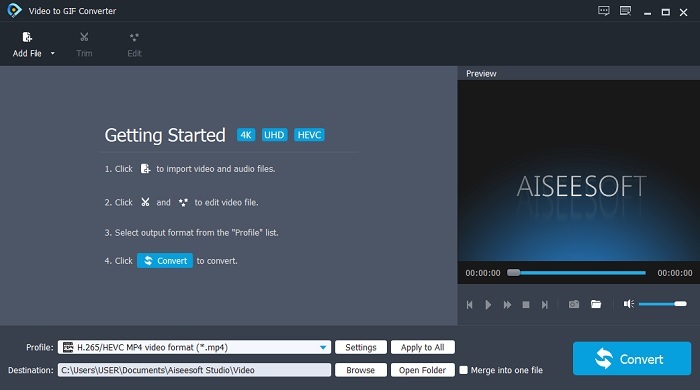
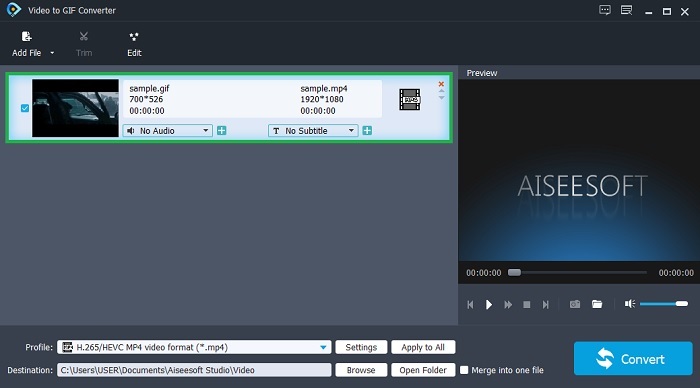
Steg 3. Klicka på Add File och välj den GIF du vill konvertera. I gränssnittet kan du även redigera eller trimma videon.
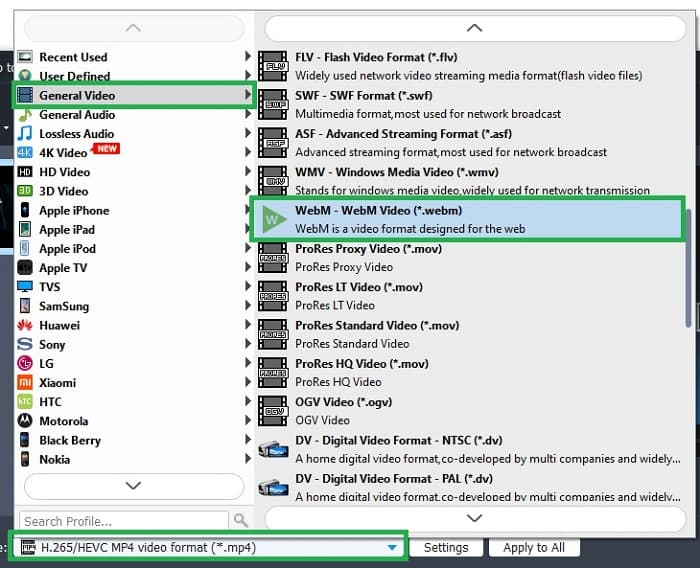
Steg 4. I rullgardinsmenyn väljer du WebM-fil eller något annat format du vill konvertera till. När du är redo att starta konverteringsprocessen klickar du på Convert.
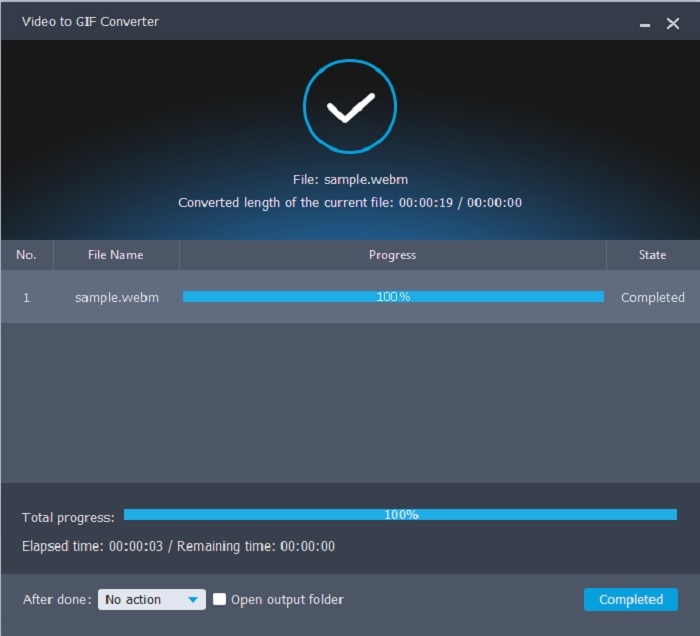
Steg 5. Konverteringsprocessen tar mindre än en minut. När konverteringen är klar kan du kontrollera slutresultatet i filhanteraren.
Fördelar
- Det är bra på att skapa och konvertera GIF-filer.
- Verktyg på plats så att inlärningsprocessen hur man använder det här verktyget är väldigt lätt i alla åldrar.
- Inget internet behövs för att använda verktyget.
Nackdelar
- De flesta av de viktigaste funktionerna i det ultimata verktyget är inte tillgängliga här.
- Det måste installeras på ditt skrivbord.
2. OnlineConverter.com
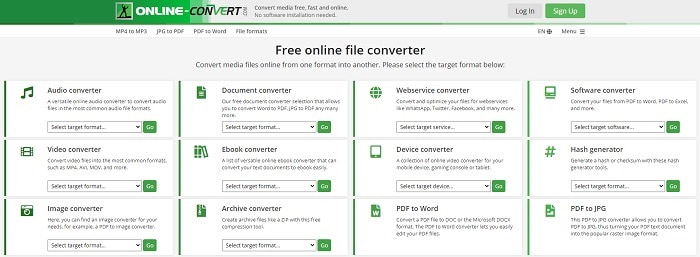
Gör om din .webm till .gif med hjälp av OnlineConverter.com. Om du vill ha ett verktyg som enbart fokuserar på konvertering bör du prova detta. Verktyget stöder olika typer av konverteringar, som dokument, e-bok och arkiv. Nackdelen är dock att det inte har några redigeringsfunktioner, inte ens de mest grundläggande. Så om du vill veta hur du använder det här verktyget följer du stegen nedan.
Steg 1. Sök upp verktygets huvudsida i din favoritsökmotor.
Steg 2. Klicka på videokonverteraren och lägg in filen.
Steg 3. För att starta konverteringen klickar du på Start conversion och väntar tills konverteringen är klar.
Fördelar
- Enkel åtkomst som kan användas av alla online.
- Inga ytterligare filer behövs för att använda.
- Den stöder också olika konverteringar.
Nackdelar
- Processen att konvertera via online tar mer tid än de skrivbordsbaserade verktygen.
- Den har några annonser och ett tråkigt webbgränssnitt.
3. Convertio
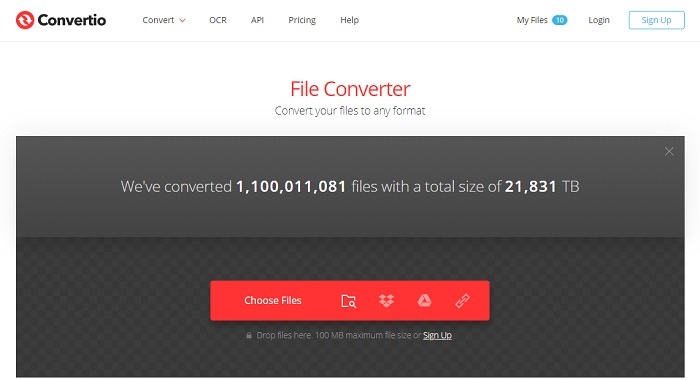
Om du vill veta hur man gör om WebM till GIF eller tvärtom, kan du med hjälp av det här webbaserade Convertio konvertera nästan vad som helst. Om konvertering är ett problem för dig kan detta vara lösningen. Även om onlinetjänsten har annonser och saknar redigeringsfunktioner är den ändå en av de bästa konverterarna du kan hitta på nätet. Om du vill prova det här verktyget följer du stegen nedan.
Steg 1. Gå till Convertios huvudsida online och klicka på länken.
Steg 2. När du är på huvudgränssnittet väljer du den GIF du vill konvertera.
Steg 3. För att starta processen klickar du på Convert.
Fördelar
- Lätt att använda på grund av hur man använder den.
- Den stöder också olika plattformar.
- Kan lätt nås över internet.
Nackdelar
- Har stor chans att förlora data vid konvertering om internet har blivit avbrutet.
- Annonser på själva hemsidan som kan vara lite irriterande.
Del 2. Bästa sättet att förvandla GIF till WebM med hjälp av Ultimate Tool
Video Converter Ultimate
Men du kan överväga att använda denna Video Converter Ultimate utvecklad av FVC. Om gratisversionen av det här verktyget ger dig det bästa resultatet är detta verktyg mycket mer än så. Det kan förbättra videokvaliteten och även lägga till effekter i den. Om du gillar att förbättra ljudkvaliteten kan du också använda det här verktyget för att förbättra den. Så om du vill ta din konvertering till nästa nivå måste du använda det här verktyget som ditt personliga val. Eftersom det är det rätta verktyget som ger en ultimat slutresultat för att imponera på dina vänner, familj eller vem som helst. Läs de detaljerade stegen nedan för att veta hur du använder detta ultimata verktyg för att skapa en ultimat output.
Steg 1. För att börja använda verktyget måste du ladda ner rätt program till din dator. Klicka på Download-knappen och följ installationen och ändra inställningarna om det behövs. Klicka på Finish för att starta verktyget.
Gratis nedladdningFör Windows 7 eller senareSäker nedladdning
Gratis nedladdningFör MacOS 10.7 eller senareSäker nedladdning
Steg 2. Ett mini-gränssnitt som detta visas på din skärm.
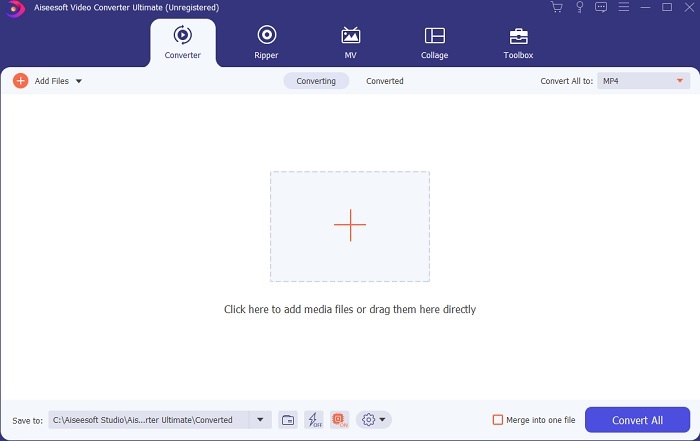
Steg 3. Klicka på plus-tecknet i mitten av gränssnittet för att lägga till filen. Om du vill konvertera många GIF-filer är det bättre att dra och släppa filerna till gränssnittet.
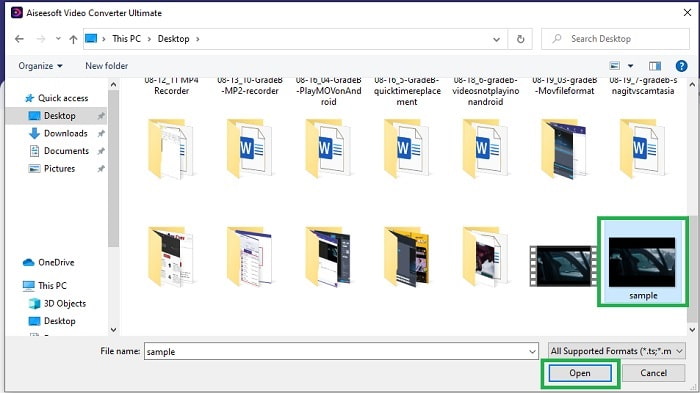
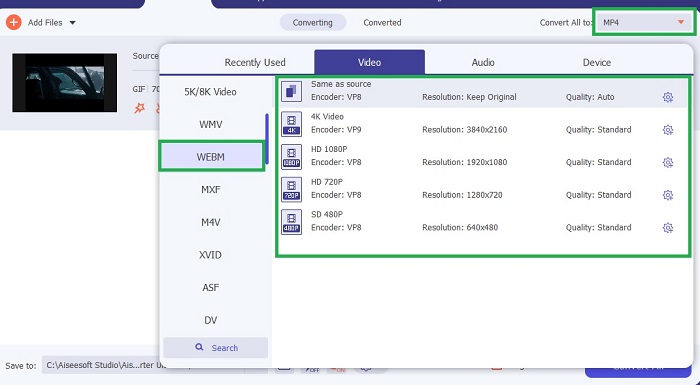
Steg 4. Välj det format du vill ha efter att du fällt ut menyn Convert All to. När du är redo klickar du på Convert All för att starta konverteringsprocessen.
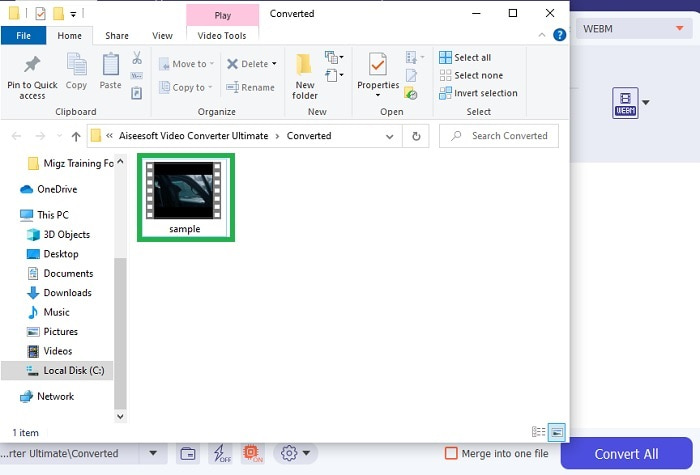
Steg 5. Konverteringsprocessen kommer inte att ta särskilt mycket av din tid, eftersom den är 30 gånger snabbare än gratisverktyget och 100 gånger snabbare än andra verktyg. När processen är klar öppnas ett fönster i filhanteraren på skärmen och du kan klicka på videon för att spela upp den. Du kan också förbättra resultatet senare via verktygsfältet om du vill.
Fördelar
- Ger fler funktioner för att förbättra din konverterade video.
- Den tillhandahåller alla format som du känner till eller inte.
- Konverteringsprocessen är supersnabb snarare än några konverteringsverktyg som finns här.
Nackdelar
- Du måste ladda ner ytterligare filer innan du startar verktyget, annars kommer det inte att starta.
- Det är ett verktyg för att betala före användning.
Del 3. Vanliga frågor om GIF till WebM
Varför är min WebM inte spelbar över webben?
Det är mycket enkelt: din webbläsare är för gammal. Inga WebM-filer kan spelas upp i gamla webbläsare, till exempel Internet Explorer. Klicka här för att lära dig mer om tillgängliga WebM-spelare.
Vilket är bättre, GIF eller WebM?
Om du vill innehålla videor med ljud är WebM ett mycket bättre format. Men om statiska bilder är GIF-format ditt val.
Vem utvecklade WebM-formatet?
De första är On2, Xiph och Matroska och senare utvecklar Google den.
Slutsats
Det står nu mycket tydligare för oss att konvertering från GIF till WebM är ett måste, särskilt om du vill ha en liten filstorlek men ändå hög videokvalitet. Och det bästa verktyget för konvertering är med hjälp av Video Converter Ultimate. Ännu viktigare är att det också stöder konvertering från WebM till GIF enkelt och snabbt. Om du tvivlar på gratisverktyget är det bättre att använda detta premiumverktyg. Förutom att vara säkert kan det leverera 100× framgång vid både konvertering och redigering. Det här verktyget är din självklara lösning, så enkelt är det. Använd den bästa konverteraren som ger utmärkta resultat.
-
 Välj den bästa GIF Cropper online och offline för att beskära GIFs [2021]
 Att välja det bästa beskärningsverktyget är ett måste och några av GIF-tillverkarna tillhandahöll inte denna funktion. Men vilket är det bästa GIF-beskärningsverktyget att använda och hur använder man det?
-
 5 bästa alternativen för att spela in GIF -format med GIF -inspelare för PC och Mac
 Vilken är den bästa GIF -inspelaren du ska använda för att spela in GIF? Listan nedan ger bevis på vilken som är den bästa skärminspelaren.
-
 Hur man konverterar MPG till GIF-format [Online & Offline]
 Vill du uttrycka en mycket bättre känsla? Då måste du använda GIF istället. Denna text kommer att lära dig hur du konverterar en MPG-fil till GIF för att uttrycka din känsla mycket bättre.
