


 Video Converter Ultimate
 Skärminspelare
 Video reparation
 Säker nedladdning
Hur man konverterar ICO till PNG direkt [fullständiga metoder]
ICO är en bildfil för datorikoner, särskilt på Microsoft Windows. Den används för att innehålla en ikonfil. ICO är dock inte populärt i andra program och på andra enheter. Så om du vill visa dina bilder i andra program måste du konvertera dem till ett annat format. Om du föredrar en bildfil med mindre filstorlek är PNG ett av de bästa alternativen för dig. PNG-formatet har en mindre filstorlek och du kan visa bilder i nästan alla program. I det fallet har den här artikeln den bästa lösningen för dig. Med hjälp av bildkonverterare får du lära dig de bästa metoderna för att konvertera ICO till PNG.

Del 1. ICO vs. PNG
| Filformat | ICO | PNG |
| Filnamnstillägg | .ico | .png |
| Fullständiga namn | Ikon | Bärbar nätverksgrafik |
| Utvecklad av | Microsoft | PNG Development Group |
| Beskrivning | ICO är en typ av bildfil som kan lagra bildikoner. Microsoft Windows operativsystem använder filtillägget ICO för att lagra ikonfiler. Den innehåller bitmappsbilder. Dessutom använder webbplatser ICO-filer som sina favoriter. Bilder med 24-bitars färger stöds. Dessutom sparar Windows endast ikoner för körbara filer i ICO-format. Bilder i Windows ICO-filer varierar i storlek från 16×16 till 256×256 pixlar. Äldre ICO-filer kan bara lagra 48×48-pixlar bilder. | En rasterbildsfiltyp är en bärbar nätverksgrafik eller PNG. GIF-formatet har utvecklats till detta. Oliver Fromme utvecklade PNG-formatet 1995 för att utföra uppgifter som GIF-filer inte kan. Till skillnad från GIF är PNG-formatet patentfritt och ger ett bredare spektrum av färger. PNG är ett av de mest använda bildformaten just nu. Du kan öppna PNG i vilket bildredigeringsprogram som helst utan licens eftersom ett patent inte skyddar filen. Detta format använder sig också av förlustfri komprimering. |
Del 2. Konvertera ICO till PNG gratis online
FVC Free Image Converter är ett av de bästa webbaserade verktygen för att konvertera ICO till PNG. Denna webbaserade bildkonverterare kan konvertera alla bildfilformat till JPG. Inmatningstyperna som appen kan hantera inkluderar JPG, PNG, JPEG, TIFF, BMP, WEBCO, ICO och fler. Den erbjuder också en lättöverskådlig layout och tydliga alternativ. På så sätt kan både experter och nybörjare konvertera fotografier med detta program. Dessutom är den enklare att använda eftersom det bara krävs några få enkla steg för att konvertera bilder. Alla webbläsare stöder FVC Free Image Converter. Det gäller Safari, Microsoft Edge, Internet Explorer, Google Chrome och Mozilla Firefox. Dessutom erbjuder FVC Free Image Converter helt kostnadsfri bildkonvertering. Detta verktyg är webbaserat, så du behöver inte ladda ner någon programvara eller några insticksmoduler. Bilder kan enkelt konverteras för användning i webbläsare.
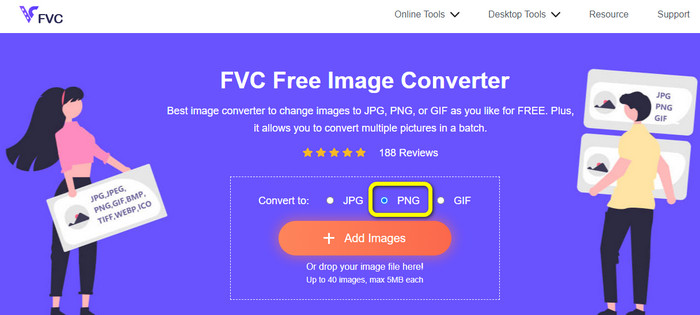
Steg 1: Gå till webbplatsen för FVC Free Image Converter. Gå sedan till alternativet Convert to och välj filformatet PNG.
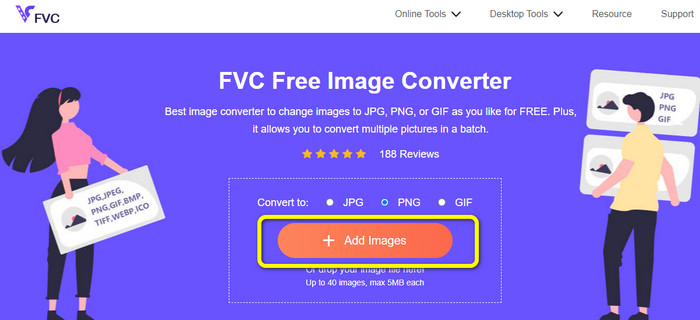
Steg 2: Klicka sedan på knappen Add Images. Din dators filer visas på skärmen. Välj ICO-filen du vill konvertera och klicka på Open. Klicka på knappen Add Images igen för att lägga till fler filer och genomföra en batchkonvertering.
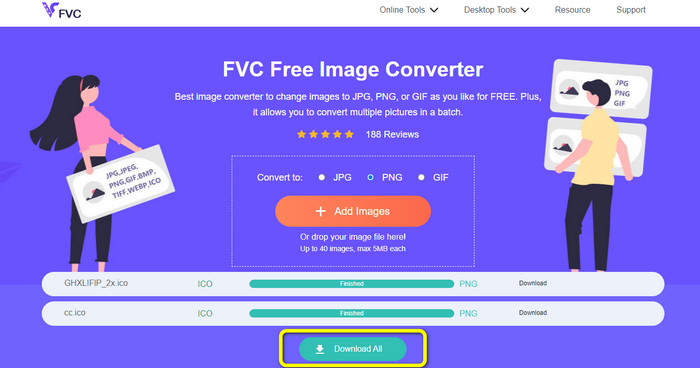
Steg 3: Din bild konverteras automatiskt till PNG. Efter konverteringsprocessen klickar du på knappen Download All för att spara bilderna. När processen är klar kan du öppna din konverterade bild.
Del 3. Hur man enkelt konverterar ICO till PNG på Mac
Förhandsgranskning är ett förinstallerat program på Mac. Förutom att visa bilder kan du även konvertera bildfiler. På så sätt kan du omedelbart konvertera ICO-filer till PNG-format. Dessutom går konverteringsprocessen snabbt. Du kan konvertera bilder på bara några sekunder, vilket gör det bekvämt för alla användare. Programmet erbjuder dessutom batchkonvertering. Så du kan konvertera flera bildfiler på en gång. Utöver konvertering finns det fler funktioner du kan dra nytta av. Programmet kan ändra storlek på och beskära foton. Konverteringsprocessen är dock utmanande, särskilt för icke-professionella användare. Alternativen är förvirrande att följa. Om du vill konvertera ICO till PNG med det här programmet är det nödvändigt att be proffs om hjälp. Följ stegen nedan för att konvertera ICO till PNG på Mac.
Steg 1: Gå till din mapp och klicka på ICO-bildfilen. Högerklicka på bilden och gå till Öppna med > Förhandsgranskning (standard).
Steg 2: Gå till Arkiv i menyraden i Förhandsgranskning och välj Exportera.
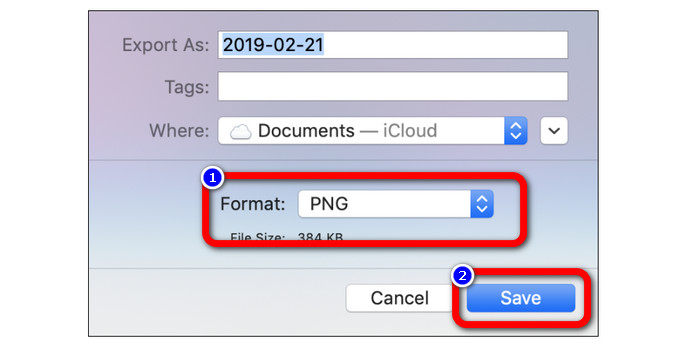
Steg 3: Välj sedan ditt önskade utdataformat, vilket är PNG, från formatalternativen. Klicka sedan på knappen Spara. På så sätt konverteras din bild från ICO till PNG-format.
Del 4. Hur man konverterar ICO till PNG på Windows
En av de bästa offline-bildkonverterarna är Video Converter Ultimate. Du kan snabbt konvertera från ICO till PNG med denna utmärkta konverterare. Dessutom kan du konvertera många filer tack vare dess höga konverteringshastighet. Den erbjuder också batchkonvertering för att konvertera många filer samtidigt. Video Converter Ultimate stöder även olika bildformat, bland annat PNG, BMP, WEBP och TIF. Denna offline-bildkonverterare har ett användarvänligt gränssnitt och enkla konverteringsrutiner. Användare på alla nivåer kan enkelt omvandla bilder med denna metod. Konverteringsprocessen i denna konverterare är också snabb. På kort tid kan du konvertera många bilder. Dessutom är konverteraren tillgänglig både på Mac och Windows-PC.
Steg 1: Installera Video Converter Ultimate på din Windows-dator. Starta sedan programmet efter installationsprocessen. Klicka på knappen Download nedan för att snabbt komma åt konverteraren.
Gratis nedladdningFör Windows 7 eller senareSäker nedladdning
Gratis nedladdningFör MacOS 10.7 eller senareSäker nedladdning
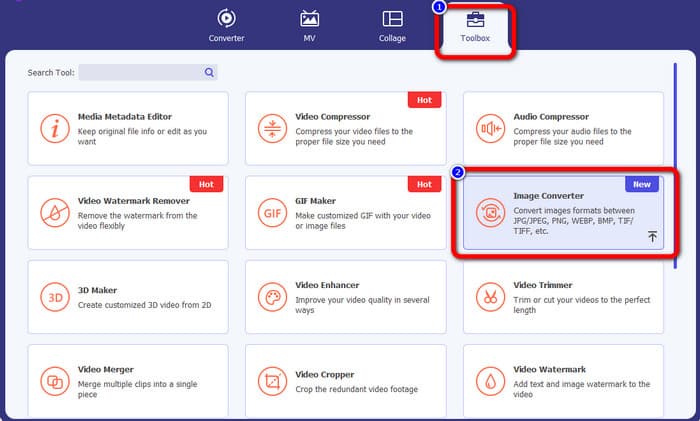
Steg 2: När du har startat programmet går du till menyn högst upp och väljer panelen Toolbox. Klicka sedan på funktionen Image Converter. Ett nytt gränssnitt visas på skärmen.
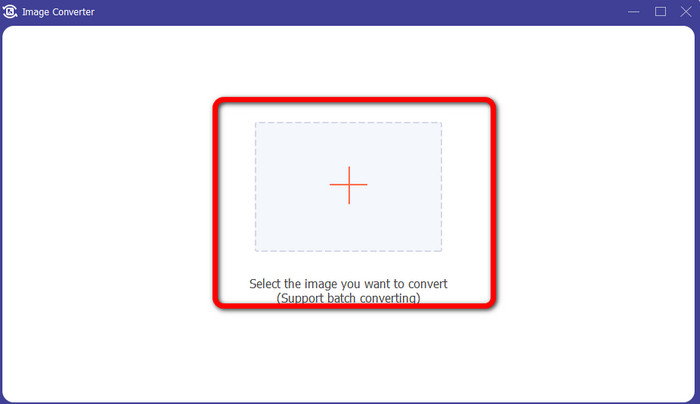
Steg 3: När det nya gränssnittet visas klickar du på ikonen Plus. När mappfönstret visas klickar du på ICO-bilden du vill konvertera och klickar på Open.
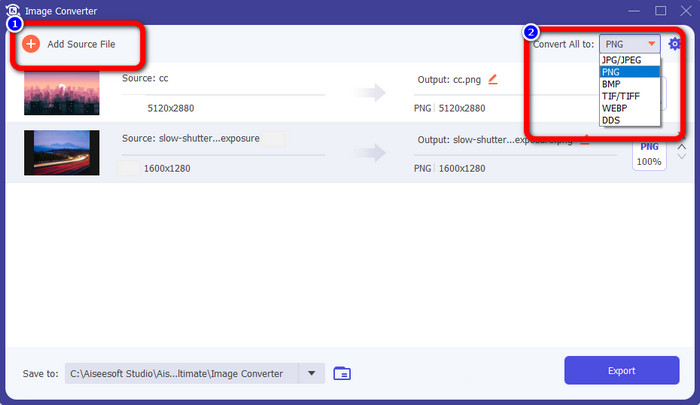
Steg 4: Om du vill lägga till fler filer för att göra en batchkonvertering klickar du på Add Source File. Gå till det övre högra hörnet av gränssnittet och klicka på alternativet Convert All to. Välj PNG-format som önskat utdataformat.
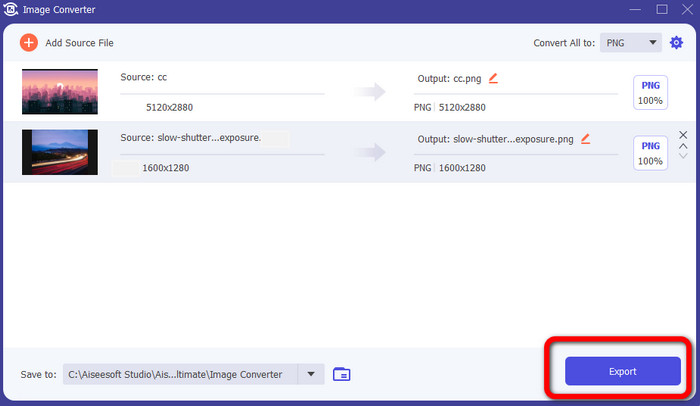
Steg 5: Avsluta slutligen konverteringsprocessen genom att klicka på knappen Export. Därefter sparas dina filer på den plats du har angett av denna bildkonverterare.
Del 5. Vanliga frågor om att konvertera ICO till PNG
1. Hur kan jag spara en ICO till PNG i Photoshop?
Tyvärr kan du inte spara ICO som PNG i Photoshop. Det beror på att Photoshop inte har stöd för bildfilformatet ICO. Om du vill spara ICO i PNG-format kan du använda en bildkonverterare som FVC Free Image Converter. Den här onlinekonverteraren låter dig enkelt konvertera ICO till PNG.
2. Är det möjligt att använda PNG som en ICO?
Ja det är det. För ytterligare information kan ICO-filerna vara PNG-filer. ICO kan innehålla en PNG-fil och bitmapp + alfa samtidigt.
3. Vilken är den bästa ICO till PNG-omvandlaren jag kan använda?
Den bästa ICO till PNG-konverteraren är FVC Free Image Converter. Den här konverteraren kan konvertera din fil direkt. Dessutom kan du använda den här konverteraren gratis.
Slutsats
Nu har du lärt dig de enklaste sätten att snabbt konvertera ICO till PNG. Men om du letar efter en bildkonverterare som är gratis och enkel att använda, välj FVC Free Image Converter.
-
 De mest enkla metoderna för att konvertera SVG till PNG
 Vet hur du ändrar din bildfil från SVG till PNG med hjälp av användbara bildkonverterare. Läs den här guideposten för att lära dig allt du behöver veta om konvertering
-
 Fullskaliga sätt att konvertera JPG till PNG online och offline
 Letar du efter användbara metoder för att konvertera JPG till PNG-filformat? Den här guideposten har svaret du behöver. För att upptäcka dessa metoder, läs artikeln
-
 Fullständig information om skillnaderna mellan JPEG vs. JPG vs. PNG
 Det här inlägget kommer att ge dig tillräckligt med information om skillnaderna mellan JPEG vs. JPG vs. PNG. Dessutom kommer du att lära dig hur du konverterar bilder till dessa filer
