


 Video Converter Ultimate
 Skärminspelare
 Video reparation
 Säker nedladdning
Konvertera PSD till JPG/PNG: Anmärkningsvärda sätt du inte får missa
PSD är ett filformat från Adobe. Vissa användare kan öppna denna bildfil i Adobe Photoshop, Corel och PaintShop Pro. Men förutom de nämnda programmen kan du inte öppna PSD-formatet i andra program på ett enkelt sätt. Det beror på att vissa program/redigerare inte stöder PSD-format. I så fall är en av de bästa lösningarna att konvertera det till andra filformat. Som tur är är JPG- och PNG-format mycket vanliga nuförtiden. Nästan alla webbläsare, program och redigerare stöder dessa två format. I den här guiden kommer vi därför att erbjuda dig de bästa sätten att konvertera PSD till JPG eller PNG.

Del 1. Jämför PSD, JPG och PNG
| Filformat | PSD | JPG / JPEG | PNG |
| Filtillägg | .psd | .jpg | .png |
| Fullständiga namn | Photoshop-dokument | Förenade Fotografers Expert Grupp | Bärbar nätverksgrafik |
| Utvecklad av | Adobe | Förenade Fotografers Expert Grupp | PNG Development Group |
| Beskrivning | Adobe Photoshops ursprungliga filformat kallas a PSD fil. Troligtvis har du stött på filer med filtillägget.psd. Främst om du någonsin har använt Adobe Photoshop; du kan lägga märke till dem. Konstnärer och designers använde ofta detta filformat. | Ett bildfilformat är en JPG eller JPEG-fil. JPG-bildfiler är av samma filtyp, oavsett om de har filtillägget .JPG eller .JPEG. JPG-filer kan öppnas med dina webbläsare, som Chrome eller Firefox, Viewer och Paint. | En bärbar nätverksgrafik (PNG) fil är en av dessa. Kompressionsmetoden är förlustfri. Det betraktas vanligtvis som GIF-bildformatets ersättning. PNG-filer stöder dock inte animationer som GIF-filer kan. |
| Kompression | Förlust mindre | Förlorad | Förlust mindre |
| Tillhörande program/webbläsare | Adobe Photoshop, GIMP, XnView, Google | IrfanView, Paint, Adobe Photoshop, GIMP, Microsoft, FastStone Image Viewer, Google Chrome, Internet Explorer | FastStone Image Viewer, Adobe Photoshop, GIMP, Microsoft, Paint, Google Chrome, Internet Explorer |
Del 2. Utmärkta sätt att konvertera PSD till JPG/PNG Online
Hur man konverterar PSD till JPG/PNG på FVC Free Image Converter
FVC Free Image Converter är ett utmärkt onlineverktyg som du kan använda för att konvertera PSD till JPG/PNG. Denna bildkonverterare online kan på ett professionellt sätt konvertera din PSD till JPG. Programmet kan ta emot indataformat som EPS, JPG, PNG, TIFF, BMP med flera. Dessutom har det en lättanvänd layout och precisa inställningar. På så sätt kan både erfarna och nya användare konvertera foton med detta verktyg. Det är dessutom enklare att använda eftersom det bara krävs några få steg för att konvertera bilder. Alla användare kan använda FVC Free Image Converter eftersom det är tillgängligt i alla webbläsare. Dessutom erbjuder FVC Free Image Converter gratis fotokonvertering. Detta är en webbaserad applikation, så du behöver inte ladda ner någon programvara eller några insticksmoduler. Till skillnad från andra konverterare visas inga påträngande annonser under konverteringen av bildformat. Det garanterar också hög kvalitet på bilden. De konverterade bilderna behåller utseendet hos originalbilderna. FVC:s bildfilskonverterare stöder också batchkonvertering. Du kan konvertera ett stort antal bilder på en gång. Denna bildkonverterare kan bearbeta upp till 40 bilder.
Konvertera PSD till JPG
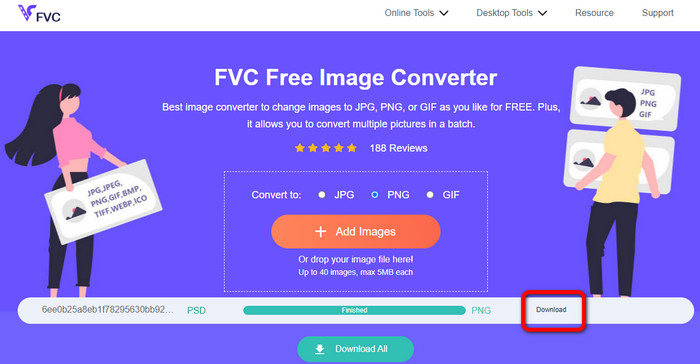
Steg 1. Öppna din webbläsare och gå till webbplatsen för FVC Free Image Converter. Välj filformatet JPG bland formatalternativen.
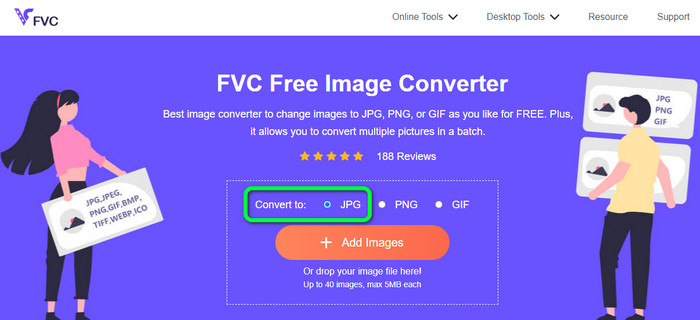
Steg 2. När du har valt önskat utdataformat klickar du på knappen Add Images. När datorns filhanterare visas väljer du PSD-bilden och öppnar den. Efter uppladdningen konverteras PSD-filen automatiskt till JPG.
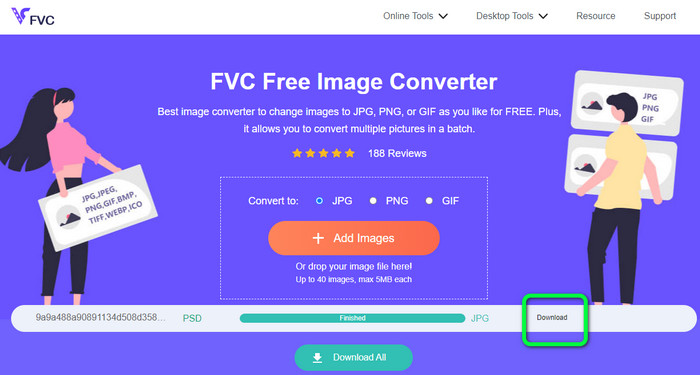
Steg 3. Efter konverteringsprocessen sparar du din konverterade bild genom att klicka på knappen Download.
Konvertera PSD till PNG
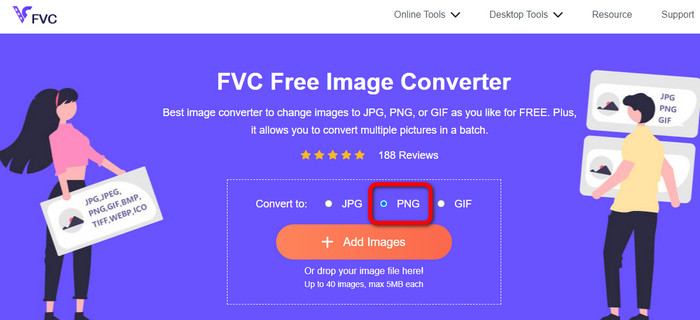
Steg 1. När du är på den officiella webbplatsen för FVC Free Image Converter, välj PNG-formatet.
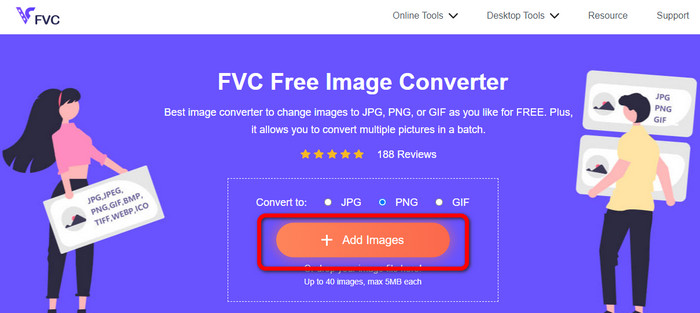
Steg 2. Klicka på knappen Add Images för att ladda upp PSD-bilden. Du kan också släppa bildfilen direkt i rutan. Vänta sedan på uppladdnings- och konverteringsprocessen.
Steg 3. Som sista steg klickar du på knappen Download för att spara slutresultatet.
Hur man konverterar PSD till JPG/PNG på Zamzar
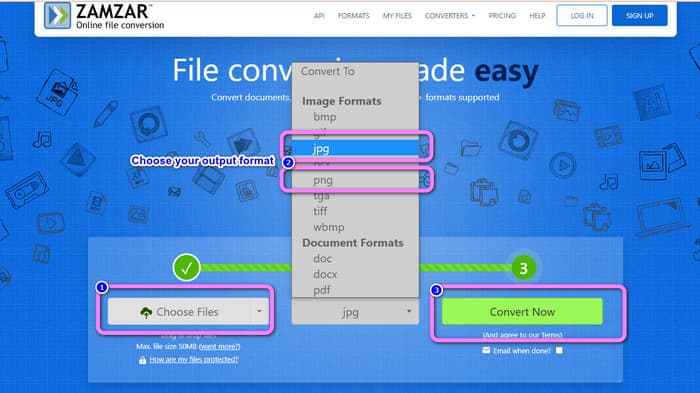
Zamzar är en annan fantastisk online-bildkonverterare för att konvertera PSD till JPG/PNG. Möjligheten att ladda upp bilder på upp till 50 MB är utmärkt. Du kan också ladda upp en bildfil från datorn. Du kan komma åt Dropbox, Drive eller en annan webbplats genom att ange dess URL. Detta verktyg har ett lättanvänt gränssnitt som gör det användarvänligt för alla. Med det här programmet kan du ladda upp bilder i formaten CR2, ARW, PNG, 3FR, JPG, GIF, TIFF och andra. För att göra det enklare för alla användare kan du dessutom konvertera din bildfil till flera olika format. Du kan konvertera den till BMP, EPS, PDF, PNG, JPG och WBMP. Däremot är konverteringsprocessen extremt långsam. De konverterade bilderna kan inte heller sparas. Dessutom är varje session begränsad till två bildkonverteringar. Använd stegen nedan för att konvertera PSD till JPG/PNG.
Steg 1. Gå till webbplatsen för Zamzar. Klicka på knappen Choose Files. Öppna PSD-filen från din mapp.
Steg 2. Gå till alternativen Convert to. Välj önskat utdataformat, till exempel PNG eller JPG.
Steg 3. Det sista steget är att klicka på knappen Convert Now. Vänta på konverteringsprocessen. Spara sedan den konverterade filen för att ha den på skrivbordet. Klicka här för att se hur du konverterar EPS till JPG eller PNG.
Del 3. Användbar metod för att konvertera PSD till JPG/PNG offline
Hur man konverterar PSD till JPG/PNG på Video Converter Ultimate
Video Converter Ultimate är ett effektivt program för att konvertera PSD till JPG/PNG-format. Programmet erbjuder ett lättbegripligt gränssnitt, vilket gör det perfekt för alla användare. Dessutom har det enkla procedurer som du kan följa. På så sätt blir det busenkelt att konvertera PSD-bilder till JPG/PNG. Förutom JPG och PNG stöder det även olika andra bildfilformat. Det stöder BMP, WEBP, TIF, EPS med flera, vilket är praktiskt. Du kan också använda detta program både på Windows- och Mac-datorer. Dessutom kan du konvertera många filer i en enda process med dess funktion för batchkonvertering. På så sätt kan du konvertera så många bilder du vill. Följ de enkla stegen nedan för att konvertera PSD till JPG/PNG.
Steg 1. Klicka på knappen Download nedan för att få åtkomst till Video Converter Ultimate. Versioner för både Windows och Mac finns tillgängliga. Starta sedan programmet efter installationsprocessen.
Gratis nedladdningFör Windows 7 eller senareSäker nedladdning
Gratis nedladdningFör MacOS 10.7 eller senareSäker nedladdning
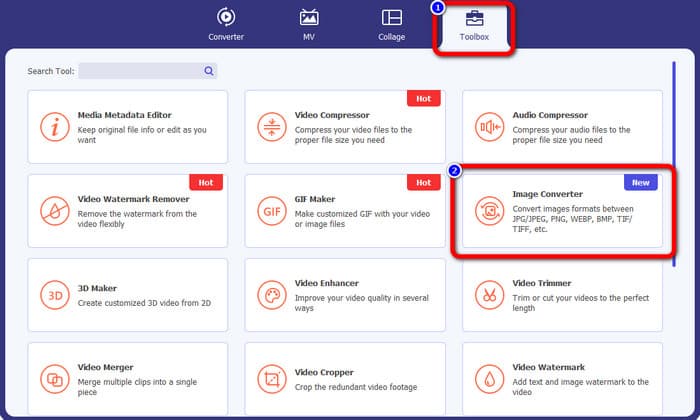
Steg 2. Gå till panelen Toolbox och klicka på verktyget Image Converter.
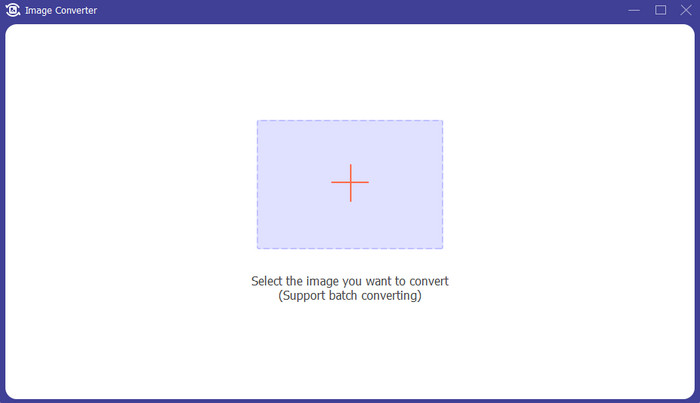
Steg 3. Klicka på +-ikonen för att lägga till PSD-bildfilen. Du kan lägga till fler bilder samtidigt.
Steg 4. När du har lagt till PSD-bilderna går du till formatalternativen och väljer önskat utdataformat.
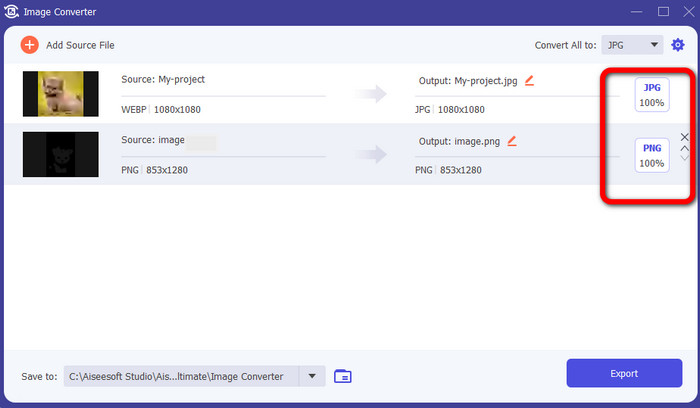
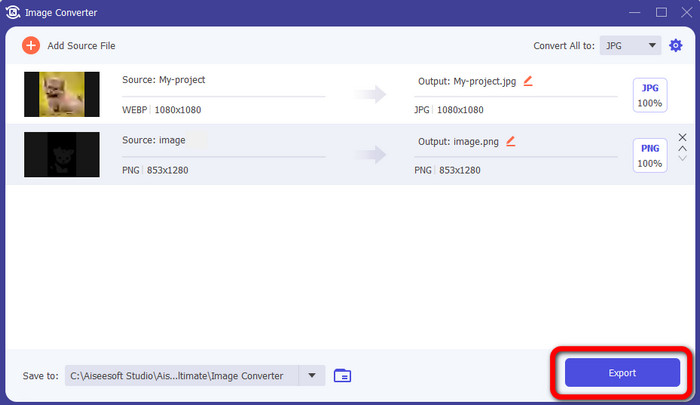
Steg 5. Avslutningsvis klickar du på knappen Export för att spara dina konverterade bilder.
Hur man konverterar PSD till JPG/PNG i Photoshop
Photoshop är också ett annat program du kan använda om du vill konvertera PSD till JPG och PNG. Det erbjuder dessutom effektiva metoder för konvertering. Photoshop finns dessutom både för Windows- och Mac-datorer. Du kan också använda Photoshop för att göra bilder skarpare. Eftersom programmet hör till avancerade redigeringsverktyg måste du dock köpa det för att få tillgång till fler kraftfulla funktioner. Photoshop erbjuder bara en 7-dagars testversion. Dessutom är dess gränssnitt svårt att förstå.
Steg 1. Ladda ner Photoshop och starta det på din dator. För att visa din bild väljer du File > Open, eller så högerklickar du på projektets PSD-fil i filhanteraren och väljer Open with > Photoshop.
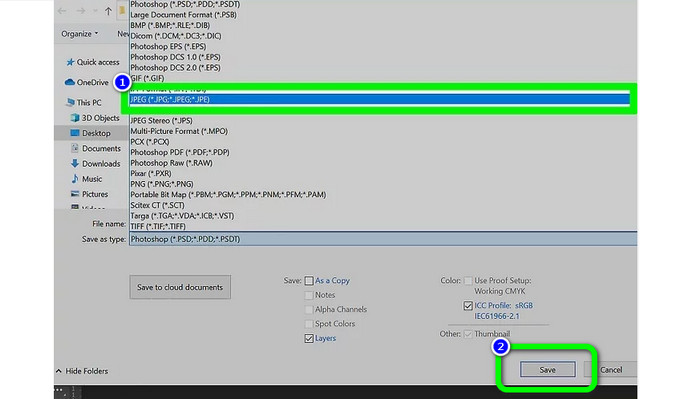
Steg 2. Klicka sedan på fliken File i det övre vänstra hörnet av fönstret. Välj sedan alternativet Save as.
Steg 3. Gå till alternativet Save as. Välj sedan JPEG/JPG i formatlistan. När du är klar med att välja JPG/JPEG-formatet klickar du på knappen Save.
Del 4. Vanliga frågor om att konvertera PSD till JPG eller PNG
1. När skulle du använda PSD?
Många användare använder PSD-filer när de arbetar med högkvalitativ grafikdata. Den innehåller enorma och intrikata bilder eller annan högupplöst grafik och konstverk.
2. Kan du skriva ut en PSD-fil?
Tyvärr inte. Om du vill skriva ut en PSD-fil måste du konvertera den till andra format som PDF.
3. Är en PSB en PSD?
En PSD-fil i större format är en PSB-fil. Photoshop Big, eller PSB, är förkortningen för en Photoshop-kompatibel fil som kan innehålla mer data än en vanlig PSD.
Slutsats
PSD-filer är ett trevligt bildformat. Du kan dock inte öppna dem i andra webbläsare eller program. Så om du vill öppna dem måste du först konvertera filen till mer allmänt använda format som JPG och PNG. Om du vill konvertera PSD till JPG eller PNG använder du FVC Free Image Converter. Det har en enkel metod som passar dig.
-
 Lär dig de enklaste metoderna för att snabbt konvertera WebP till JPG
 Låt oss alla lära oss effektiva sätt att enkelt konvertera webbbilder till JPG. Den här artikeln ger dig utmärkta bildkonverterare som du kan använda för att konvertera bildfiler.
-
 Perfekta metoder för att enkelt konvertera WebP till PNG
 Var kunnig om de anmärkningsvärda metoderna för att konvertera WebP till PNG. Den här guideposten ger dig de mest användbara bildkonverterare du kan prova.
-
 Ultimata metoder för hur man perfekt konverterar WebP till GIF
 Vill du konvertera WebP till GIF men har ingen aning om vad du ska göra? Lyckligtvis kommer det här inlägget att presentera flera sätt på hur man konverterar WebP till GIF direkt.
