


 Video Converter Ultimate
 Skärminspelare
 Video reparation
 Säker nedladdning
3 sätt att enkelt komprimera foton för e-post [Guide]
E-post är en bra plattform för att skicka meddelanden med fotobilagor och andra filer som behövs. Vissa användare stöter dock på svårigheter med att skicka stora filfoton eftersom de leder till långsamma uppladdningstider, misslyckade leveranser eller överskridande av storleksgränserna för bilagor som e-postleverantörer har infört. För att undvika dessa problem är det viktigt att ändra storlek på dina foton innan du skickar dem.
Med detta sagt kommer vi i den här artikeln att gå igenom 3 metoder för hur du komprimerar foton för e‑post, så att dina fotobilagor blir lätta att skicka och ta emot utan att göra avkall på kvaliteten.

Del 1. Fördelar med att komprimera foton för e-post
Att komprimera bilder har i allmänhet många fördelar, inklusive för e-postanvändning. Följande är de saker du kan njuta av när du ändrar storlek på foton för e-post:
• Eftersom bildkomprimering innebär att bilden storleksändras till en mindre storlek kan du enkelt skicka flera fotobilagor i ett mejl jämfört med okomprimerade foton.
• Ofta har e‑postleverantörer gränser för hur stora bilagor du får skicka. Genom att komprimera dina foton för e‑post kan du hålla dig inom dessa gränser och säkerställa att ditt mejl levereras utan problem. Detta är särskilt användbart när du skickar mejl till flera mottagare eller när du bifogar andra typer av filer tillsammans med dina foton.
• När foton komprimeras innebär det helt enkelt att de tar upp mindre utrymme, vilket gör att du kan utnyttja din lagringskvot för e‑post bättre.
• Stora e‑postbilagor kan ibland flaggas av e‑postservrar, vilket kan leda till leveransfel eller att mejlen markeras som skräppost. Att komprimera dina foton för e‑post hjälper till att undvika dessa problem, så att dina bilagor når sina avsedda mottagare utan komplikationer.
• I vissa situationer där användare läser sina mejl i mobilen är komprimerade foton enklare att ladda ned och visa på mobila enheter jämfört med okomprimerade bilder.
Del 2. Komprimera foton för e-post genom att konvertera bildformat
Om du vill komprimera bilder för e-post är den första metoden du kan prova att använda ett bildkonverteringsverktyg. Med detta kommer den att konvertera din bild till ett format som du önskar där konverteringsprocessen också optimerar ditt foto till en önskvärd och mer hanterbar storlek.
FVC Free Image Converter är ett kostnadsfritt konverteringsverktyg som gör det möjligt för användare att konvertera sina foton till olika bildformat, som JPG, PNG och GIF. Så om du skickar en bildfil via e‑post i ett format som innehåller mer data och därför ger en större filstorlek, kan du verkligen dra nytta av detta verktyg. Dessutom är det perfekt när du vill skicka flera stora filer, eftersom det kan batchkonvertera upp till 40 bilder på en gång. Så här använder du verktyget för att komprimera dina foton för e‑post:
Steg 1. Sök först efter FVC Free Image Converter i din webbläsare för att komma åt onlinetjänsten.
Steg 2. Välj sedan det utdataformat du föredrar under alternativet Convert to. Klicka därefter på knappen Add Images för att importera de bilder du vill konvertera.
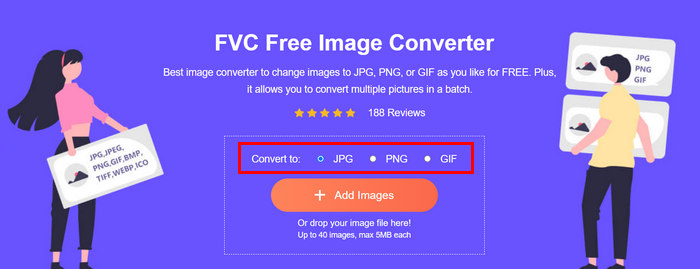
Steg 3. När du är klar klickar du på knappen Download All.
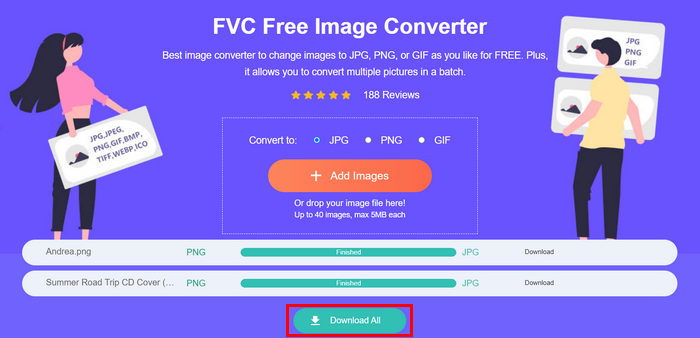 Med FVC Free Image Converter-verktyget är det garanterat att dina konverterade bilder nu är komprimerade och har minskat storleken, vilket är perfekt för e-postanvändning.
 Del 3. Krympa foton för e-post med onlinekomprimeringsverktyg
FVC Free Image Compressor är ett kostnadsfritt onlineverktyg som gör det enkelt att komprimera foton för e‑post. Användarna behöver bara ladda upp eller importera sina bildfiler och låta verktyget automatiskt komprimera dem. Om du är orolig för kvalitetsförlust använder detta verktyg den bästa optimeringen och avancerade komprimeringsalgoritmer. Det säkerställer att bildernas kvalitet bibehålls när du komprimerar dem för e‑post.
Dessutom, om du måste batchkomprimera en bild, låter det här verktyget dig komprimera 40 bilder samtidigt. Slutligen stöder den olika populära bildformat som JPEG, PNG, SVG och animerade GIF-filer.
Steg 1. Gå till deras officiella webbplats i din webbläsare.
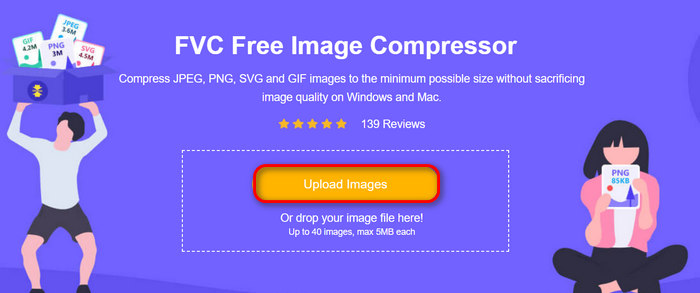
Steg 2. Klicka sedan på Upload Images för att importera de bilder som du vill komprimera för webben. Observera att det här verktyget automatiskt komprimerar dina foton när du har valt dem och klickat på ”Öppna”.
Steg 3. När dina bilder har komprimerats kan du förhandsgranska dem genom att kontrollera deras nya storlek efter komprimeringen. Klicka till sist på Download All för att spara din bild.
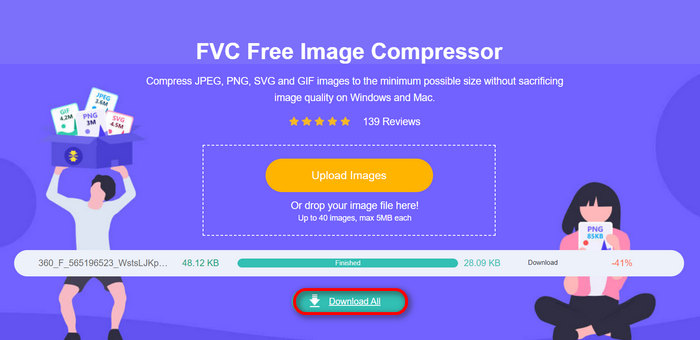
Den här metoden kan verkligen hjälpa dig att komprimera foton för e-post utan att behöva utstå komplexa steg och prenumerationsavgifter. Dessutom gör dess användarvänliga och intuitiva gränssnitt det till ett idealiskt verktyg för alla användarnivåer. Så om du vill optimera dina foton för e-postanvändning, prova den här metoden nu.
Del 4. Ändra storlek på foton för e-post till en specificerad storlek
Om du vill ändra storlek på foton för e-post till en viss storlek kan du prova IMGonline-verktyget. Med detta bildkomprimeringsverktyg kan du ändra storlek på din bild till en storlek du väljer. Så här gör du:
Steg 1. På deras webbplats klickar du på knappen Choose File för att lägga till det foto du vill komprimera.

Steg 2. Ställ sedan in inställningarna för JPEG‑komprimering. Ange den storlek du vill ha, i KB eller MB, beroende på vad du föredrar.

Steg 3. I menyn Size Reducing in Megapixel väljer du hur mycket du vill komprimera ditt foto eller hur du vill begränsa komprimeringen av ditt foto.
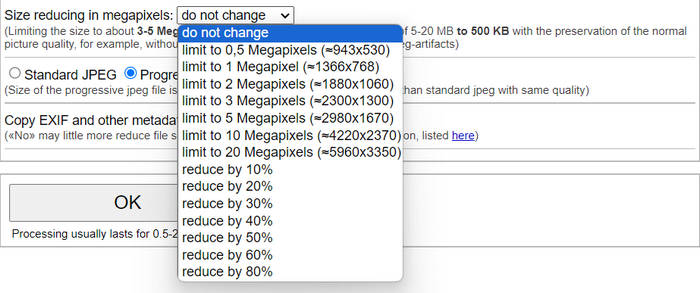
Steg 4. Välj därefter mellan Standard JPG eller Progressive JPG.

Steg 5. När du är klar klickar du bara på knappen OK.
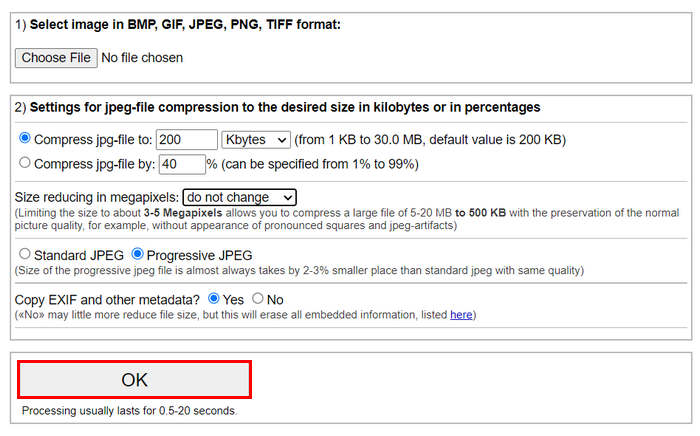
I förhållande till att välja mellan standard JPG och progressiv JPG, tänk på att storleken på den progressiva jpeg-filen alltid tas av 2-3% mindre plats än standard jpeg med samma kvalitet.
Del 5. Vanliga frågor om komprimering av foton för e-post
Vilken storlek ska jag ändra storlek på mina foton för e-post?
När det kommer till den idealiska storleken för att skicka foton i e-post, även om det inte finns några begränsningar, rekommenderas det i allmänhet att ändra storleken på dina foton till maximalt 1024x768 pixlar. Att hålla din bildstorlek under 1 MB hjälper också till att undvika problem med begränsningar för bilagor och gör det lättare för mottagarna att ladda ner och visa bilderna.
Hur komprimerar jag bilder för Gmail?
Att komprimera bilder för Gmail kan göras på olika sätt. Ett av de enklaste sätten är att använda onlinekomprimeringsverktyg som FVC kostnadsfria bildkomprimeringsverktyg. För att använda det behöver du bara ladda upp dina bildfiler så komprimeras de automatiskt.
Vilken bildtyp är bäst för e-post?
De bästa bildtyperna för e‑post är JPEG och PNG. JPEG används i stor utsträckning tack vare sin goda komprimeringsgrad och balansen mellan filstorlek och kvalitet, vilket gör det idealiskt för foton och bilder med många färger. PNG föredras för bilder som kräver transparens eller innehåller text, logotyper eller grafik med skarpa kanter, eftersom det bevarar en högre kvalitet för dessa element, även om filstorleken kan bli större jämfört med JPEG.
Slutsats
Det är verkligen viktigt att veta hur man komprimerar foton för e‑post för att undvika långsamma uppladdningstider, misslyckade leveranser och begränsningar för bilagestorlek. Genom att följa de metoder som har beskrivits utförligt i den här artikeln kan du se till att dina fotobilagor är hanterbara och snabba att skicka och ta emot.
Vad väntar du på? Börja optimera dina e-postbilagor idag med dessa tre enkla sätt.
-
 Alltför komprimerat foto: Så här fixar du dem enkelt
 Undrar du vad du ska göra när din bild är alltför komprimerad? Läs den här artikeln och lär dig varför det här bildproblemet uppstår och lär dig två metoder för hur du åtgärdar dem.
-
 Ändra storlek på bild till 100KB: 3 bästa sätten för effektiv komprimering
 Letar du efter ett verktyg som hjälper dig att ändra storlek på bilden till 100KB? Läs den här artikeln och lär dig 3 metoder för hur du kan krympa dina bilder till önskad filstorlek.
-
 Hur man komprimerar bilder i Word [Windows och Mac]
 Undrar du hur du kan utnyttja ditt Word för bildkomprimering? Den här guiden kommer att lära dig hur du komprimerar bilder i Word för sömlös komprimering.
