


 Video Converter Ultimate
 Skärminspelare
 Video reparation
 Säker nedladdning
Handledning för att ta bort vattenstämpel från PNG gratis/online/utan registrering
Nuförtiden är PNG, eller Portable Network Graphics, ett av de vanligaste bildformaten vi har. Det går dock inte att bortse från att oavsett vilket bildformat du använder så finns vattenstämplar överallt. Du kan stöta på vattenstämplar på dina PNG‑bilder, JPG‑bilder osv. Om det är fallet har vi den bästa lösningen för dig. Den här artikeln erbjuder olika metoder för att ta bort vattenstämplar från dina PNG‑bilder. Det bästa du kan göra nu är alltså att fokusera på att läsa artikeln, ta till dig all information och själv sätta den i praktik!

Del 1. Hur man tar bort vattenstämpel från PNG online gratis
Du kan använda FVC Free Watermark Remover för att ta bort vattenstämplar från din PNG‑bild, eftersom den stöder PNG‑formatet. Det är enkelt att ta bort störande element från ett PNG‑foto. Verktyget är tillgängligt i nästan alla webbläsare, som Google Chrome, Microsoft Edge, Mozilla Firefox osv. Dessutom har den här vattenstämpelborttagaren flera verktyg du kan använda för att ta bort vattenstämplar. Du kan använda penselverktyget, lasso och polygonalverktyget för att markera den vattenstämpel du vill ta bort. Om vattenstämplarna är små kan du även zooma in och ut. På så sätt ser du vattenstämplarna tydligare. FVC Free Watermark Remover har också ett mycket enkelt gränssnitt, så du kan använda applikationen effektivt. Men det finns mer. Det här onlineverktyget erbjuder två enkla sätt att ta bort vattenstämplar från dina PNG‑bilder. Du kan använda vattenstämpelborttagningsverktygen om vattenstämpeln sitter i mitten av fotot. Om vattenstämpeln i stället sitter vid kanten eller hörnet av bilden kan du använda beskärningsverktyget. Som du ser är FVC Free Watermark Remover mycket praktiskt för alla användare.
Funktioner
◆ Erbjud ett verktyg för att ta bort vattenstämplar för att ta bort vattenstämplar och andra oönskade föremål från ett foto.
◆ Den har en funktion för beskärningsverktyg.
◆ Det kan exportera originalkvaliteten på fotot.
Fördelar
- Lämplig för en icke-professionell användare.
- Programvaran är 100% gratis.
- Erbjuder två sätt att ta bort vattenstämplar.
- Stöder populära bildfilformat, som PNG, JPG, BMP, etc.
- Ingen installation och konto krävs.
- Kan ta bort flera vattenstämplar.
Nackdelar
- En internetanslutning krävs för att använda programvaran.
Om du vill använda FVC Free Watermark Remover, följ de enkla stegen nedan för att ta bort vattenstämplarna från dina PNG-bilder.
Använd det här verktyget om vattenstämplarna finns i mitten av ditt foto.
Steg 1: Om du vill lägga till din PNG‑bild med en vattenstämpel klickar du på knappen Upload Image. Din mapp visas då på skärmen. Välj PNG‑bilden.
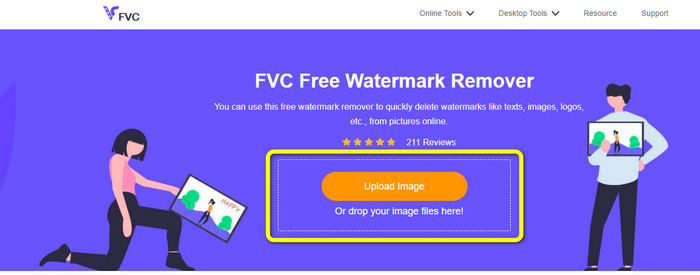
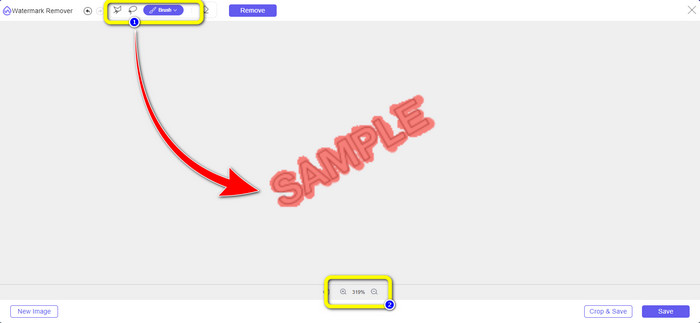
Steg 2: När du har lagt till PNG‑bilden med vattenstämpel kan du använda något av de tre verktygen Lasso, Polygonal och Brush. Med penselverktyget kan du justera penselstorleken. Du kan också använda plus‑ och minusknapparna längst ned i gränssnittet för att zooma in eller ut i bilden.
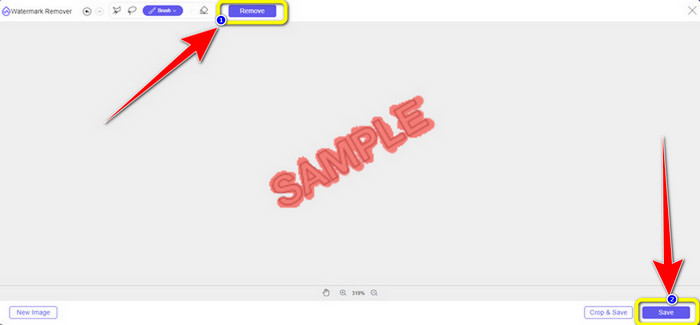
Steg 3: När du är klar med att markera vattenstämplarna med penselverktyget klickar du på knappen Remove för att ta bort dem. Efter att du klickat väntar du någon sekund på att borttagningen slutförs och klickar sedan på Save.
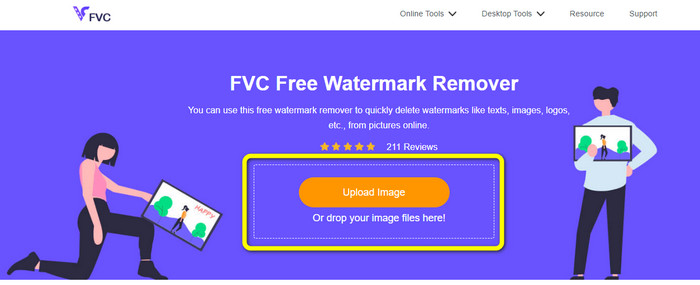
Steg 4: Om du vill beskära en bild för att ta bort en vattenstämpel laddar du upp bilden du vill beskära genom att klicka på knappen Upload Image. Du kan också släppa din bildfil i den gula rutan.
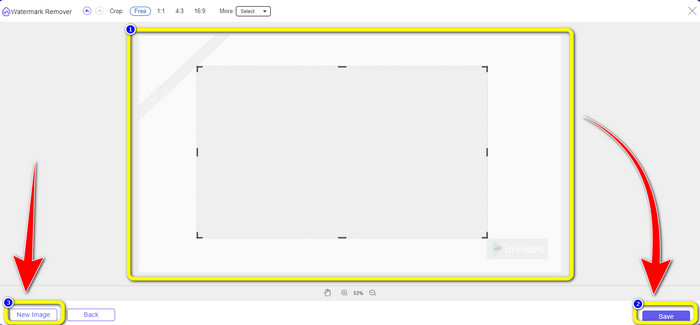
Steg 5: När du har laddat upp din PNG‑bild klickar du på knappen Crop. Därefter kan du beskära bilden med vattenstämpel.
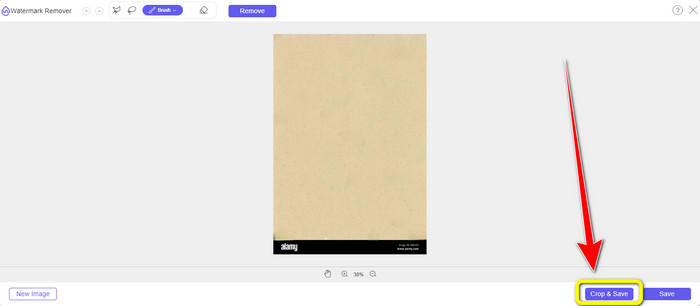
Steg 6: Efter beskärningen kan du klicka på knappen Save för att ladda ned bilden till din dator. Om du vill beskära en annan bild klickar du dessutom på knappen New image. Du kan också använda det här verktyget för att ta bort vattenstämplar från JPG.
Del 2. Ta bort vattenstämpel från PNG online med Watermarkremover.io
Watermark Remover.io är ett onlineverktyg som kan ta bort vattenstämplar från ett foto. Det här verktyget stöder även PNG‑bildformatet, så du kan använda det för att ta bort vattenstämplar från PNG‑bilder på bara några sekunder. Det krävs dessutom bara två steg för att ta bort vattenstämplarna, så du behöver inte längre kämpa med en krånglig process. Watermark Remover.io har dock begränsade funktioner, särskilt i gratisversionen. Under en månad kan du bara ladda upp 50 bilder. Det ger också 10 000 grundläggande transformationer och 25 GB lagring, vilket inte är tillfredsställande för användare. Du måste köpa en prenumeration för att kunna ladda upp fler än 50 bilder och få fler grundläggande transformationer.
Funktioner
◆ Ta bort oönskade föremål från ett foto, som vattenstämplar, logotyper, text, klistermärken, etc.
Fördelar
- Har enkla steg, vilket är perfekt för nybörjare.
- Den stöder olika bildfilformat, såsom PNG, JPG, WEBP, etc.
Nackdelar
- Köp ett abonnemang för att uppleva fler fantastiska funktioner.
- En snabb internetanslutning rekommenderas starkt.
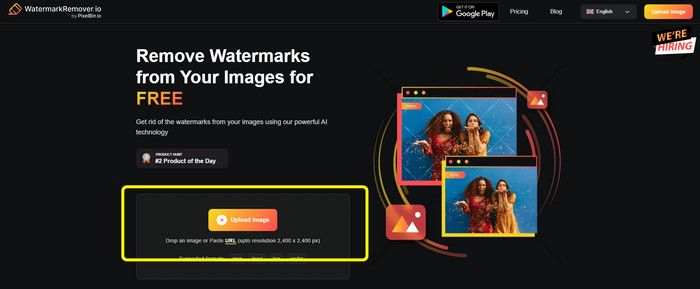
Steg 1: Gå till webbplatsen för Watermark Remover.io. Klicka sedan på knappen Upload Image för att lägga till din PNG‑bild med en vattenstämpel. Du kan klistra in bildlänken genom att klicka på knappen URL.
Steg 2: Programmet tar automatiskt bort vattenstämpeln efter att du lagt till din fil. När processen är klar kan du klicka på knappen Download Image för att spara filen utan vattenstämpel.

Del 3. Ta bort vattenstämpel från PNG online enkelt med Inpaint
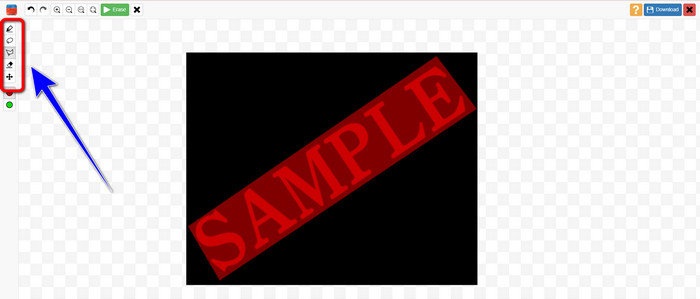
Ett annat onlineverktyg du kan använda för att ta bort vattenstämplar från PNG-bilder är Inpaint. Med hjälp av denna vattenstämpelborttagare kan du enkelt rengöra och förbättra dina bilder. Den erbjuder också tre användbara verktyg för borttagning av vattenstämplar som du kan använda. Dessa verktyg är Marker, Lasso och Polygonal. Med hjälp av dessa verktyg kan du markera de irriterande vattenstämplarna och radera dem. Dessutom kan du återställa dina gamla foton och göra dem nya. Du kan göra många saker om du försöker använda denna onlineprogramvara. Att använda Inpaint online har dock många begränsningar. Du kan bara ladda upp en bild med en maximal filstorlek på 10 Mb. Den har också en maximal upplösning på 4,2 megapixlar. Om du vill ha en högre upplösning och obegränsad filstorlek måste du använda den nedladdningsbara versionen av Inpaint.
Funktioner
◆ Eliminera onödiga element från foton, som vattenstämplar, logotyper, text, etc.
Fördelar
- Den stöder WEBP, PNG och JPG.
- Perfekt för nybörjare.
Nackdelar
- Gratisversionen har många begränsningar.
- Ladda ner Inpaint-skrivbordsversionen för att uppleva fler funktioner.
- Den fungerar inte utan en internetanslutning.
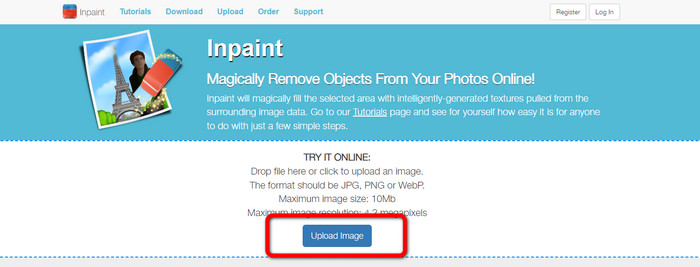
Steg 1: Besök webbplatsen för Inpaint. Klicka sedan på knappen Upload Image för att importera din PNG‑bild med en vattenstämpel.
Steg 2: På vänster sida av gränssnittet kan du klicka på olika vattenstämpelborttagningsverktyg för att markera vattenstämplarna, till exempel Polygonal, Marker och Lasso.
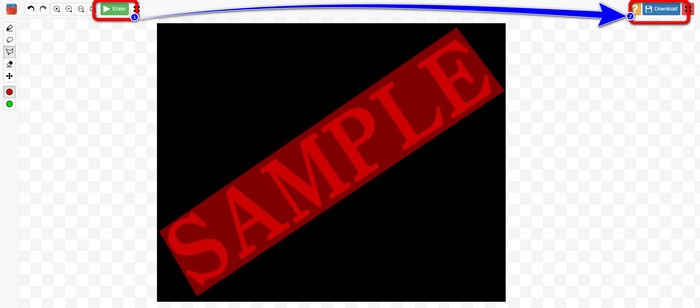
Steg 3: Du kan klicka på Erase button uppe till vänster när du har markerat alla vattenstämplar. Vänta på borttagningsprocessen och välj knappen Download uppe till höger på skärmen.
Del 4. Hur man tar bort vattenstämpel från PNG i Photoshop
Efter att ha lärt dig metoderna ovan för att ta bort vattenstämplar online, bör du också överväga att använda Photoshop, som specialiserar sig på bildredigering och är ett bra alternativ för att radera vattenstämplar. Det här verktyget är dyrt, men du kan använda dess pennverktyg för att hitta den vattenstämpel du vill ta bort exakt.
Funktioner
• Stöder lager, masker, filter, blandningslägen och icke-förstörande redigering.
• Skapa logotyper, affischer, webbgrafik, UI-mockups och mer.
• Verktyg som lagningspensel, klonstämpel och innehållsmedveten fyllning.
• Inkluderar automatiskt objektval, himmelsersättning och neurala filter.
Fördelar
- Branschstandard för professionell bildredigering
- Extremt kraftfull och mångsidig
- Regelbundna uppdateringar med nya funktioner
- Brett utbud av handledningar och communitysupport
- Sömlös integration med andra Adobe-appar (som Illustrator, Lightroom, Premiere Pro)
Nackdelar
- Dyra prenumerationsbaserade priser
- Brant inlärningskurva för nybörjare
- Kan vara resurskrävande på äldre datorer
Så här använder du Photoshop för att ta bort ett vattenmärke:
Steg 1: Välj Remove‑verktyget till vänster.
Steg 2: Justera penselstorleken och dra över den vattenstämpel du vill ta bort.
Steg 3: Du kommer nu att se att vattenstämpeln har tagits bort.
Del 5. Vanliga frågor om att ta bort vattenstämplar från PNG
Vilket är det enklaste sättet att ta bort vattenstämplar från en PNG-bild?
Det bästa sättet är att använda FVC Free Watermark Remover. Det krävs inga komplicerade procedurer, så du kan utan ansträngning ta bort alla vattenstämplar från din PNG‑bild.
Är det olagligt att ta bort PNG-vattenmärken?
Om du använder den för kommersiellt eller annat offentligt bruk är svaret ja. Om du inte äger bilden eller har tillstånd är det vanligtvis olagligt och upphovsrättsbrott att ta bort vattenstämplar. Du kan bara ta bort vattenstämplar från dina egna bilder eller om licensen tillåter det.
Vilket är det bästa sättet att ta bort vattenstämplar från en PNG-fil utan att den blir suddig?
Det bästa sättet att ta bort vattenstämplar från en PNG utan att bli suddiga är att använda verktyg som Photoshops Content-Aware Fill eller Clone Stamp, som smidigt blandar vattenstämpelområdet med omgivande pixlar. AI-baserade onlineverktyg som FVC Free Watermark Remover erbjuder också snabba och rena resultat.
Slutsats
Att ta bort vattenstämplar från PNG‑bilder kan vara en utmaning, men det här inlägget ger fyra enkla metoder som hjälper dig att göra det. Oavsett om du vill använda en professionell lösning som Photoshop eller ett pålitligt, kostnadsfritt verktyg som också fungerar bra, som FVC Image Upscaler, kan de alla ge ett tillfredsställande resultat. Bland dessa alternativ rekommenderar vi att du använder FVC Free Watermark Remover eftersom det är mer lättillgängligt och passar bättre för nybörjare.
-
 Kompletta guider för att enkelt ta bort iFunny vattenstämplar
 Upptäck den mest exceptionella iFunny vattenstämpelborttagaren för dig. Lär dig också dessa enkla metoder för att ta bort iFunny-vattenstämplar från dina foton
-
 Online- och offlinemetoder för hur man tar bort Alamy-vattenstämplar
 Om du vill hitta en utmärkt Alamy vattenstämpelborttagare kan du läsa det här inlägget för att lära dig om de tre effektiva metoderna för att radera Alamy vattenstämplar.
-
 Ärlig recension av Inpaint Watermark Remover and Alternative
 Vill du veta hur man använder Inpaint för att ta bort en vattenstämpel? Att läsa den här artikeln är det rätta valet. Du kommer också att lära dig de bästa alternativen du kan använda.
