


 Video Converter Ultimate
 Skärminspelare
 Video reparation
 Säker nedladdning
Hur man snabbt avpixlar en bild med 3 bästa lösningarna att använda
Avpixla bild är lösningen du behöver när du vill ge en makeover till en bild som har blivit pixlig, eller om din bild är bitmappad med små rutor. Många användare tycker att det är krångligt att modifiera, justera, ändra och förbättra en bild; ärligt talat stämmer det – men det hör till det förflutna. Med den avancerade teknik vi har tillgång till har den här uppgiften blivit enkel att lösa när du använder rätt verktyg.
Har du inte rätt verktyg för att ta bort pixeleringen på ditt foto? Lyckligtvis kommer den här artikeln att ge dig de tre bästa mjukvarorna vi hittade som kan hjälpa dig att redigera bildens pixelering och en handledning om var och en för att lösa problemet.

Del 1. Hur man avpixlar en bild online med bästa valfotoredigeraren [rekommenderas]
FVC Free Image Upscaler är ett helt automatiserat onlineverktyg som du kan använda för att avpixla bilder gratis direkt på nätet. Du kan öppna det i vilken webbläsare som helst du har tillgång till – du behöver inte ladda ner något startprogram för att köra det, så du kan använda verktyget direkt när du går in på sidan. Även om denna programvara är webbaserad är dess kapacitet och prestanda för att ta bort pixlighet i klass med de mest professionella bildredigerare du kan använda, både online och offline. Du kanske tror att det blir krångligt att använda verktyget, men det blir det inte. Fortfarande inte övertygad? Läs eller följ då handledningen nedan för en genomgång av hur du enkelt använder det här verktyget.
Steg 1. Du kan öppna det här webbaserade verktyget i valfri webbläsare på din enhet genom att söka på namnet eller klicka på den här länken för att öppna huvudwebbplatsen.
Steg 2. När du väl är i webverktyget klickar du på Add Image för att ladda upp den pixliga bilden. En filutforskare visas på skärmen; leta upp bilden som är sparad på din lokala disk och tryck sedan på Open för att ladda upp den.
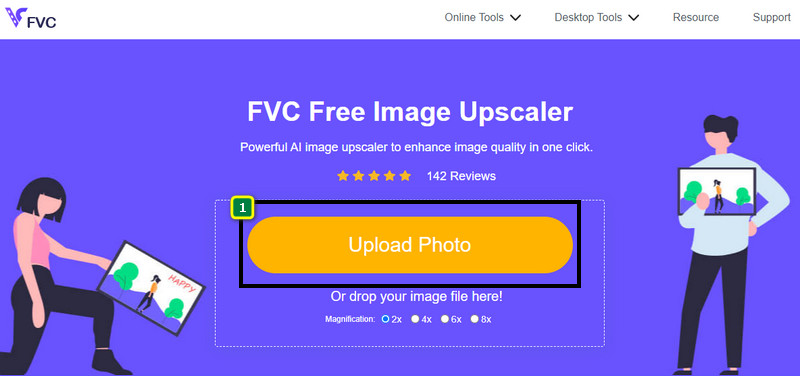
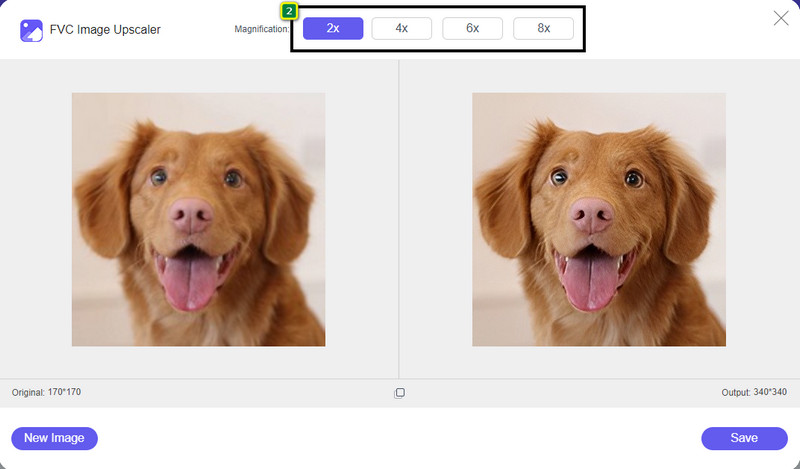
Steg 3. Välj sedan den förstoringsgrad du vill använda på bilden för att jämna ut utseendet så att den inte längre ser bitmappad ut med små rutor.
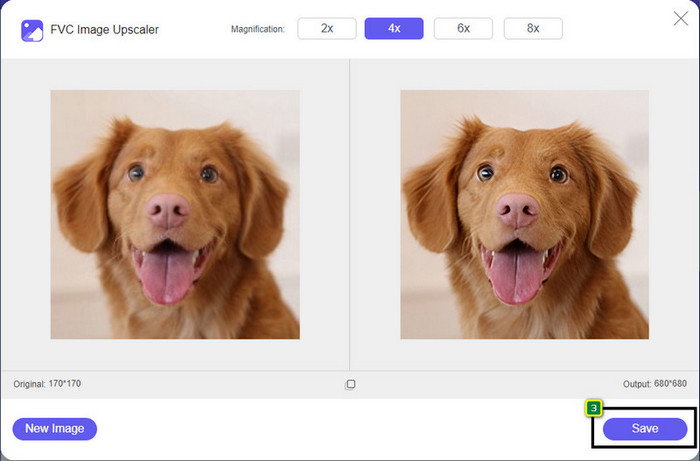
Steg 4. Så enkelt är det – klicka på Save för att ladda ner den avpixlade versionen till din lokala disk.
Del 2. Hur man avpixlar en bild offline på två sätt på Windows och Mac [Lätt]
Pixbim - Unpixelate Photos on Windows
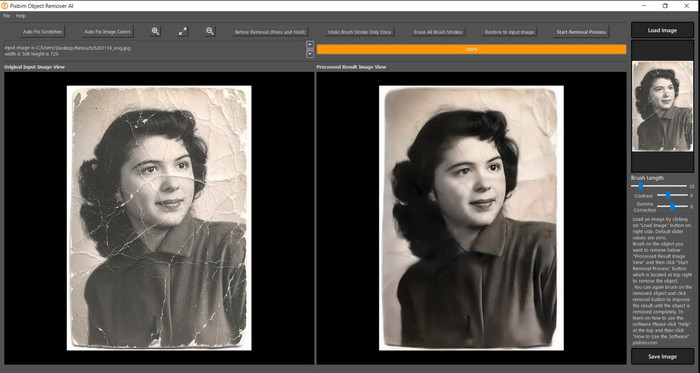
Pixbim är ett av de kraftfullaste, AI-stödda programmen för att avpixla bilder som du kan ladda ner till Windows för att lösa det här problemet. Den här redigeraren förtjänar att nämnas i den här artikeln eftersom den åtgärdar pixliga bilder snabbt och effektivt. Med hjälp av AI justeras parametrarna åt dig, så du slipper krångel när du använder programmet. På grund av dess funktioner och möjligheter måste du köpa en licensnyckel för att fortsätta använda det efter testperioden. Det kan bli dyrt för många som vill ha det på sina datorer.
Steg 1. När du har laddat ner programmet behöver du starta det så att vi kan gå vidare till nästa steg.
Steg 2. Klicka på Load Image för att lägga till den pixliga bild du vill förbättra här.
Steg 3. Justera därefter parametrarna genom att dra reglagen efter de värden du vill uppnå.
Steg 4. När du är klar med justeringarna sparar du resultatet för att exportera bilden.
Movavi Photo Editor [Windows och Mac]
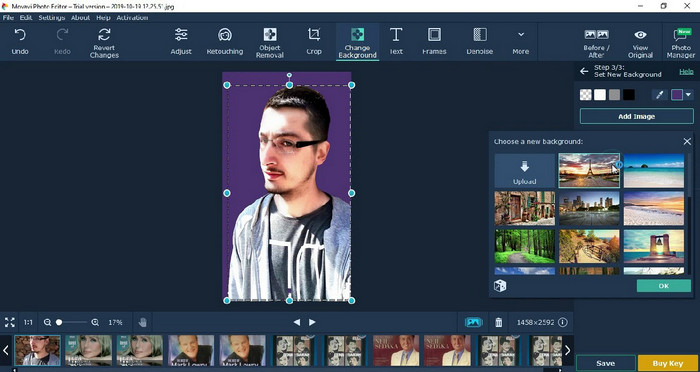
Många användare har redan testat Movavi Photo Editor tack vare dess mångsidighet vid bildredigering. Precis som Pixbim kan det återskapa förlorade pixlar i bilden med hjälp av neurala nätverk i dess AI. Med den här redigeraren i din hand kan du göra både grundläggande och avancerad bildredigering, som att beskära, rotera, lägga till filter, fixa pixlar och mycket mer. Men du får inte tillgång till allt detta om du inte köper premiumversionen till din dator.
Den har ett nästan liknande pris som Pixbim, vilket är ganska dyrt för många. Men om du har en budget för att köpa en editor kan det vara den du behöver. Lär dig hur du avpixlar bilder med den här appen genom att följa stegen.
Steg 1. Ladda ner programmet till Windows eller Mac OS.
Steg 2. Starta programmet och ladda sedan upp fotot du vill avpixla här.
Steg 3. Nu när du har laddat upp bilden klickar du på Magic Enhance för att låta AI automatiskt förbättra bilden.
Steg 4. Exportera bilden och njut av resultatet.
Del 3. Vanliga frågor om hur man upppixlar en bild
Varför finns det en vattenstämpel på den exporterade unpixelate-bilden?
När du använder en gratis testversion av programmet finns det en chans att det lämnar en vattenstämpel när den exporteras. Så om du vill exportera en bild utan vattenstämpeln kan du köpa programmets licens eller använda FVC Free Image Upscaler, för det kommer inte att lämna ett vattenstämpel på den exporterade bilden.
Vad är skillnaden mellan suddiga och pixlade?
Många artiklar har bevisat att suddiga och pixlade inte är samma sak på grund av vissa faktorer. Suddiga bilder är anledningen till att du fångar en höghastighetsrörelse eller tar en bild med en skakig kamera. När du förstorar en ögonblicksbild när den är pixlad startar den en pixelering och du kommer att se en bitmapp med en liten kvadrat.
Vad är faktorn som gör bilden pixlad?
Några skäl förvandlar bilder till pixlar; en vanlig orsak är när du förstorar en rasterbild. Rasterformat, som PNG, JPG, GIF och mer, är sammansatta av små rutor som skapar utseendet på objektet som lagras i dessa behållare. Vanligtvis, när du förstorar bilden, kommer du att se att det finns rutor, så kallade pixlar, som innehåller färgdata som blir visuellt presenterade. Det kan vara ett problem för många redaktörer, särskilt när pixelering sker.
Hur kan jag fixa bildbruset?
Det här är ett annat vanligt problem du kan stöta på med bilder du tagit, och lösningen du kan behöva finns i den här artikeln. Klicka på den här länken för att enkelt läsa, lösa och lära dig hur du tar bort bildbrus.
Slutsats
Så enkelt är det – du kan nu lätt avpixla en bild med hjälp av de bästa bildredigerarna du kan ladda ner eller använda direkt på webben. Fallet är löst! Om du någon gång råkar ut för problem med pixlighet kan du luta dig mot den här artikeln för hjälp. De bästa verktygen du kan behöva finns här och är redo att hjälpa dig, som till exempel FVC Free Image Upscaler. Det är bäst att justera genom att åtgärda pixligheten i utseendet så att den inte syns för alla. Säg adjö till pixlighet när du använder den här online-bildredigeraren.
-
 7 Image Upscaler du kan använda för att förbättra och förbättra varje bild [2022]
 Är du i behov av bilduppskalaren? Lyckligtvis täcker den här artikeln den bästa programvaran du kan komma åt och ladda ner på ditt skrivbord.
-
 5 bildupplösningsförbättrare du måste använda denna 2022 [senaste valen]
 Vet du inte vilken bildupplösningsförstärkare du ska använda? Läs den här artikeln när vi granskar fem verktyg för att använda och förbättra upplösningen på bilder.
-
 4 appar för att öka bildupplösningen på dina mobila enheter [Bästa valet]
 Du behöver appar för att öka din fotoupplösning om du vill uppnå 1080p, 4k eller liknande. Med listan nedan kan du göra det enkelt!
