


 Video Converter Ultimate
 Skärminspelare
 Video reparation
3 olika sätt att omvandla MPG-filer till MOV på ditt skrivbord eller online
Converting a format is essential, especially if we were going to talk about compatibility and the purpose of the format. Like MPG, this format stores data from DVDs such as metadata interleave, audio, and video. But ripping this format from DVDs and playing it on Quicktime or editing it on iMovie can't be uploaded because the format is unsupported. However, you can convert your .mpg into a supported format like MOV format. This article will suggest some of the best converter software you can use to convert MPG to MOV on Mac for free and without adjusting its quality.

Del 1. Hur man konverterar MPG till MOV på Mac och Windows
First on the list is the crème-de-la-crème of all the converters you can use and learn how to convert MPG to MOV on Mac or PC. FVC Video Converter Ultimate provides the highest quality and fastest conversion that you can make in less than a minute. Moreover, download this if you don't have any experience converting files and don't want to be disappointed on the first try. But, if you are the type of user who wants to add special effects, crop, merge, and do more, check out the Toolbox of this converter. Other than that, if you're looking for trustworthy and easy-to-use software and achieve phenomenal output instantly, then follow the instructions below.
Step 1. Download the MPG to MOV converter for free on your Mac or PC. After that, install the File and do the quick set-up.
Gratis nedladdningFör Windows 7 eller senareSäker nedladdning
Gratis nedladdningFör MacOS 10.7 eller senareSäker nedladdning
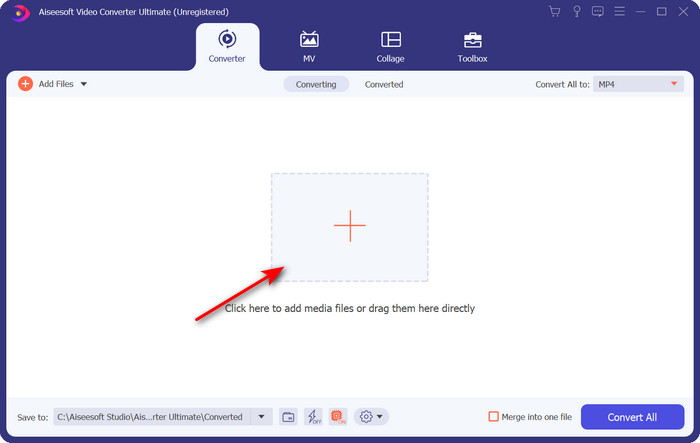
Step 2. To insert the file, click + sign located at the middle part of the interface. Find the .mpg File on the folder that will show next, then click Open and proceed.
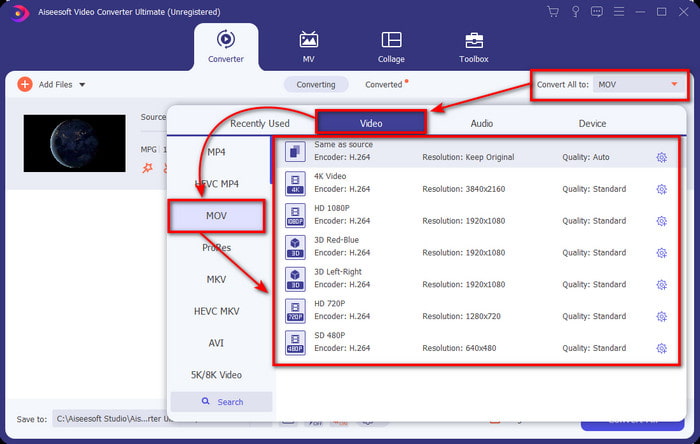
Step 3. Hit the drop-down button and choose the MOV format or any format available on the list.
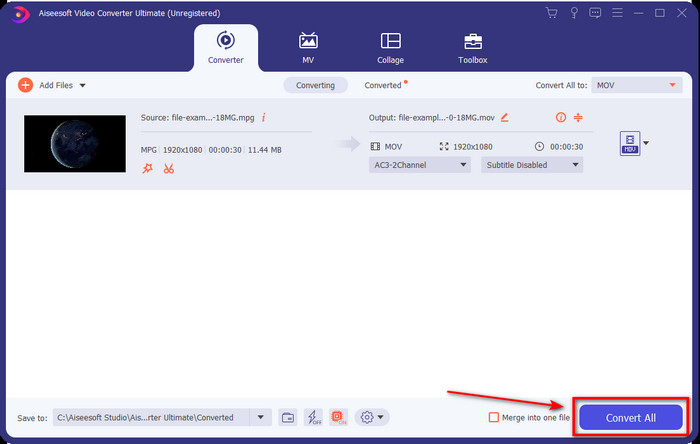
Step 4. Once you are ready to start the converting process, click Convert All.
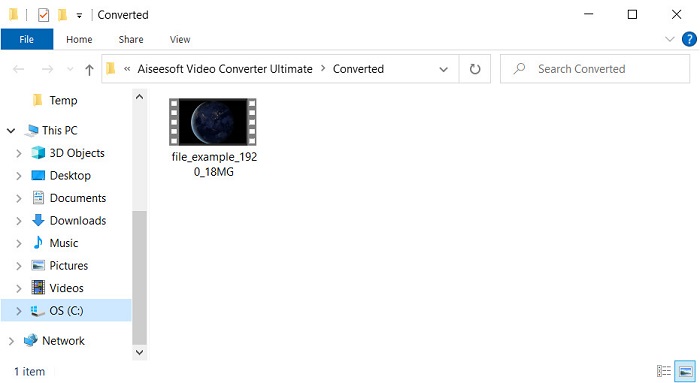
Step 5. Your .mov will be ready after a few seconds, and if the folder opens on your display, click the first file to watch or edit on your Apple device.
Del 2. Konvertera MPG till MOV med Quicktime
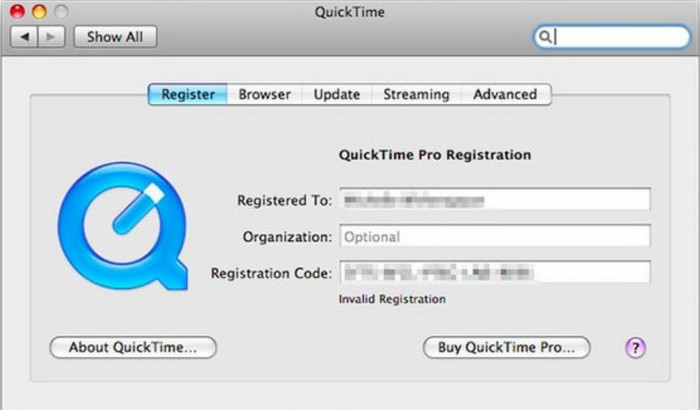
Quicktime Player is a native media player made for Apple devices to play almost any video and audio format. But did you know that you can also use this as a converter? But the converter this tool provides is not as detailed as the first converter mentioned above. Yet, if you have an Apple device and want to convert MPG to MOV with the Quicktime Player, then follow the steps below.
Step 1. Open the Quicktime Player on your Mac, click File under it, click Open File, locate the .mkv file on the folder, and press Open.
Step 2. Re-click File, but now click the Export As choose the available pixels on the list.
Step 3. To start converting the file on Quicktime, click Save.
Del 3. Konvertera MPG till MOV med gratis online MPG till MOV Converter
Want to know the best MPG to MOV converter free online if you don't want to risk downloading software? Then FVC Free Video Converter Online is the one. It is simple, available in all browsers, malware-free, and a reliable online tool. All of the things a simple converter should have are available here. Furthermore, this software supports numerous media formats and does convert without logging your account. Want to use this tool? Then follow the simple steps.
Step 1. Tick this link to go to the official website of FVC Free Video Converter Online.
Step 2. Once you are now on the web interface, click the Add Files to Convert. Find the .mpg file you want to convert on the folder, then press Open.
Ladda ner Skrivbordsversionen för att konvertera filer i batch.
Step 3. After uploading the file, choose the MOV format in the sub menu.
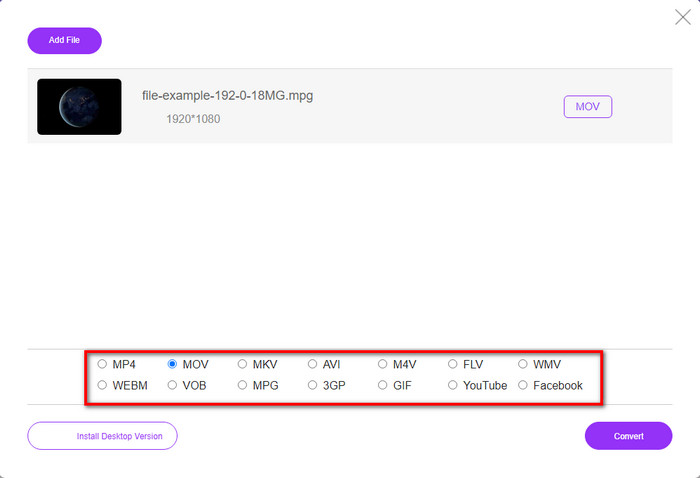
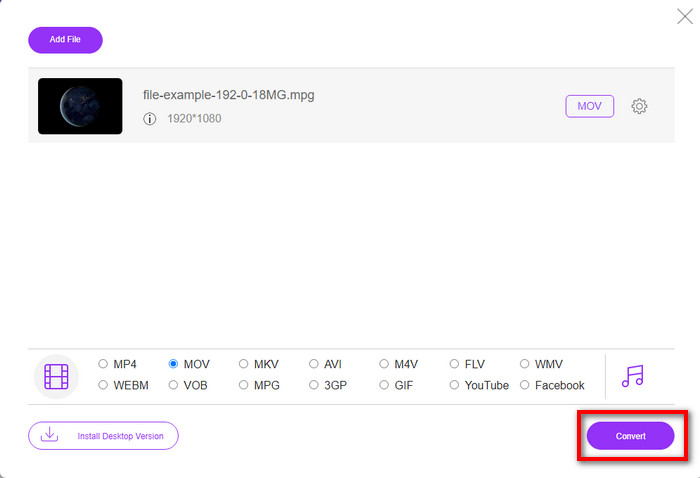
Step 4. Since you already clicked the MOV, let's download it now by hitting the Convert.
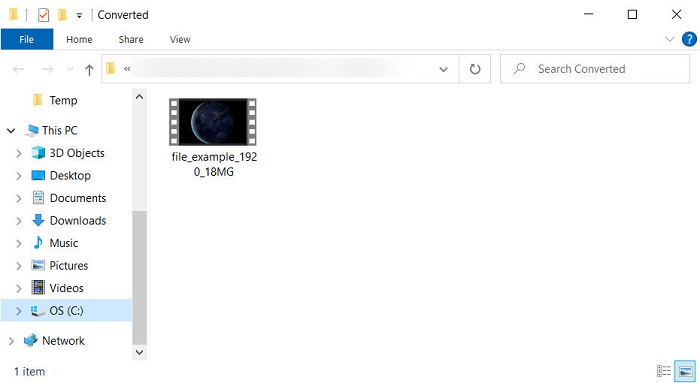
Step 5. After converting, a folder will show with a .mov file.
Del 4. Omfattande kunskap om MPG till MOV och varför vi behöver konvertera det
MPG är ett välkänt medieformat som använder MPEG som ett digitalt standardvideoformat. Denna typ av fil använder vanligtvis MPEG-1 och MPEG-2 som mediafilkodare. Den använder dessa två kompressorer för att stödja alla brister i kompressorn, speciellt för att lagra videor med högre upplösning. Som det sa tidigare kan detta format innehålla tre element: ljud, video och metadata i en ström för snabbare distribution av filmer på webben.
Men MOV kan lagra en högkvalitativ video och kristallklart ljud som vanligtvis används för att redigera videon. Till skillnad från MPG kan detta multiplexmediaformat hålla reda på olika mediadata som video, ljud och undertexter. Men kodaren och avkodaren för detta format som vanligtvis används är MPEG-4.
Det skulle vara bäst att vända din MPG till MOV eftersom när du överför filen till Apple-enheter kommer den inte att spelas upp på Quicktime eller redigera på iMovie. Även om Quicktime Player och iMovie stöder MPEG-1 och MPEG-4, stöds inte andra MPEG-filer, som MPEG-2 som en .mpg använder. För att göra den kompatibel på Apple-enheter är anledningen till att du behöver konvertera filen till MOV.
MPG kontra MOV
Tillverkad av MPEG (Moving Picture Experts Group), är MPG ett vanligt digitalt videoformat för att lagra video-, ljud- och metadatainformation. Det är ganska användbart när du skapar filmer för delning på Internet. Dessa filer i MPG innehåller vanligtvis MPEG-1 eller MPEG-2 video/ljudkomprimering.
MOV-formatet kan användas för att lagra en film, TV-program, kort videoklipp eller hemmafilm. Den sparas faktiskt i QuickTime File Format (QTFF), som introducerades av Apple 1991. MOV-filer används ofta när folk vill spara en video med hög kvalitet.
Del 5. Vanliga frågor om MPG- och MOV-konvertering
Hur lång tid skulle det ta att konvertera MPG?
Det finns två faktorer som kan påverka din konverteringsprocess. För det första, om du använder en onlinekonverterare beror det på hur snabbt ditt internet är. Denna process skulle ta längre tid jämfört med den andra icke-baserade omvandlaren. Och den sista, ju större filstorlek desto längre tid tar det att konvertera den. Så om din .mpg-filstorlek är stor skulle du vanligtvis vänta på att den ska ta slut.
Kan jag spela .mpg-filer på VLC?
VLC är en av de stora mediaspelarna som du kan ladda ner på alla enheter för att spela upp videor i det ospelbara formatet på din inhemska mediaspelare. Du kan också spela här, alla formaten MPEG-1, MPEG-2, MPEG-3 och MPEG-4.
Påverkar komprimering av MPG kvaliteten?
Compressing a file shouldn't affect the quality because what you did was making it small. But when you compress your .mpg too much the quality of it will change a bit. So, to avoid this you will need to read this top 7 video compressors you can use.
Slutsats
För att sammanfatta all detaljerad information som nämns ovan kan du konvertera din MPG till MOV om du vill använda videon på Apple-enheter. Även om programvara som Quicktime och iMovie stöder MPEG-1 och MPEG-4 stöds fortfarande inte MPEG-2 och MPEG-3. Så för att göra det kompatibelt på dina Apple-enheter är det idealiskt att konvertera det. Alla de nämnda verktygen här är mycket effektiva och lätta att använda om du konverterar filen.
-
 FLV till MPG - Hur konverterar man FLV till MPG på Mac, PC och gratis online
 Hur konverterar man FLV till MPEG? Kan jag konvertera FLV till MPG gratis? Detta inlägg delar 3 gratis videokonverterare som hjälper dig att konvertera FLV till MPG utan kvalitetsförlust.
-
 Hur man konverterar MPG till GIF-format [Online & Offline]
 Vill du uttrycka en mycket bättre känsla? Då måste du använda GIF istället. Denna text kommer att lära dig hur du konverterar en MPG-fil till GIF för att uttrycka din känsla mycket bättre.
-
 [2022] Heta val av MPG till AVI Converter för att hjälpa dig att konvertera MPG till AVI
 Har du någonsin undrat över att konvertera din MPG till en AVI-videofil bara för att spela upp den på din videospelare? Här är den bästa artikeln du kan hitta som talar om problemet ovan.

