


 Video Converter Ultimate
 Skärminspelare
 Video reparation
Topp gratis och lättanvända omvandlare som konverterar WMV till MOV du inte bör missa
Microsoft Windows Media Audio (WMA) och Microsoft Windows Media Video (WMV) är komprimerade ljud- och videoformat som utvecklats av Microsoft i ASF-behållaren. Så snart WMV- eller WMA-filer kodas med Windows Media Video- och Windows Media Audio-codecs får de filtillägget .asf. Dessa två videoformat från Microsoft kan bara spelas upp i vissa utvalda videospelare eller konverteras med ett begränsat antal program eller nätbaserade konverterare. Men om du letar efter pålitliga och säkra verktyg för att konvertera WMV till MOV är den här artikeln perfekt för dig. Fortsätt läsa för att få veta mer.

Del 1. Kort introduktion av WMV och MOV
WMV-filtillägget representerar Windows Media Video-filer, komprimerade med ett eller flera av Microsofts videokomprimeringsformat. Till exempel använder vissa tredjepartsprogram det för att lagra korta animationer eftersom det är ett typiskt format för att lagra videon i Windows. Även om de liknar Windows Media Video-filer, innehåller Windows Media Audio-filer endast ljuddata och innehåller inte video. WMA-tillägget används för dessa filer.
QuickTime File Format (QTFF) är dock ett multimediabehållarformat, och en MOV-fil är en filmfil som sparats i QuickTime File Format (QTFF). En eller flera spår lagras, där varje spår innehåller olika mediedata (som video, ljud och text) (undertexter). MOV-filer används ofta för att lagra filmer och andra videofiler, och de är lätta att hitta.
Del 2. Bästa sättet att konvertera WMV till MOV på Mac och Windows
Den här artikeln rekommenderar Video Converter Ultimate för Mac-användare som vill konvertera WMV till MOV. Både Windows- och Mac-versioner av programmet kan laddas ner gratis. Det är programvara som kan användas av många olika typer av användare tack vare sitt användarvänliga gränssnitt och lättillgängliga verktyg. Programmet innehåller en videokonverterare som stöder många olika videoformat och kan konvertera filer på mindre än en minut, till skillnad från andra program och webbresurser. Dessutom har programmet flera extra funktioner som kan hjälpa dig att förbättra din video ytterligare. Förutsatt att du har läst genom beskrivningen av programmet, låt oss börja:
Steg 1. Högerklicka på ikonen Gratis nedladdning nedan för att påbörja nedladdningen. Programmet kan köras både på Windows- och Macintosh-datorer. När nedladdningen är klar kan du installera och börja använda programmet direkt genom att klicka på alternativet Starta nu.
Gratis nedladdningFör Windows 7 eller senareSäker nedladdning
Gratis nedladdningFör MacOS 10.7 eller senareSäker nedladdning
Steg 2. När du har laddat ner programmet ska du starta det. Den här informationen visas i ett fönster när programmet öppnas för första gången. Lägg in videofilen du vill konvertera för att starta konverteringsprocessen.
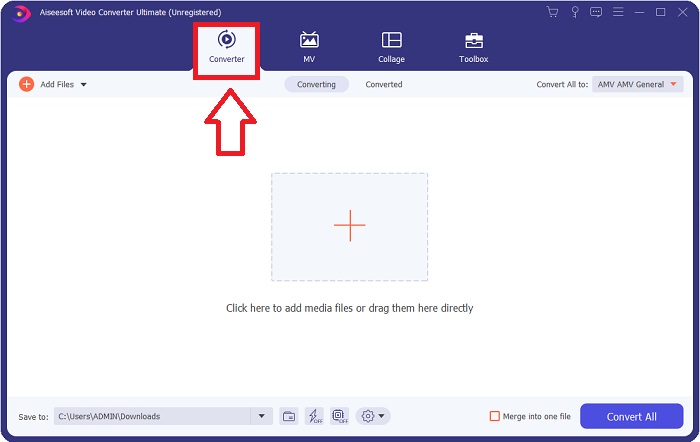
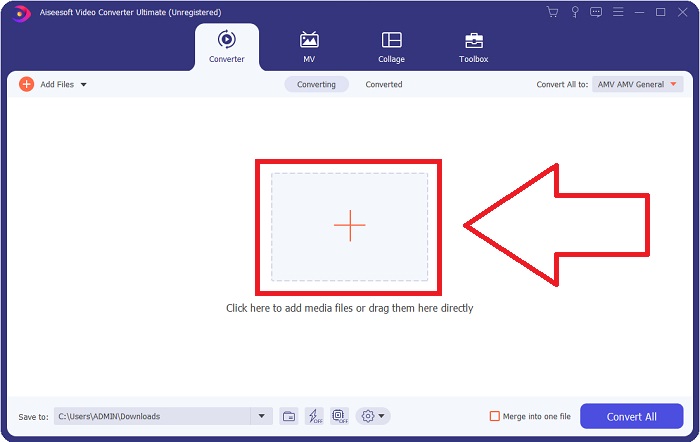
Steg 3. Börja med att läsa in filerna du vill konvertera i konverteraren, och dra och släpp sedan videofilen du vill konvertera till +-symbolen för att starta konverteringsprocessen.
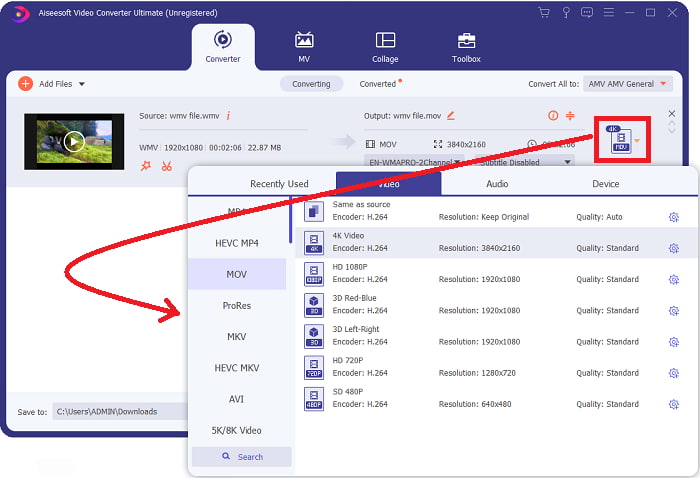
Steg 4: En meny med alternativ visas uppe till höger på skärmen, där du kan välja vilket videoformat du vill använda. Välj MOV som videoformat i rullgardinsmenyn som visas. Du kan välja mellan olika videokvaliteter beroende på vilken MOV-fil du har valt. Om önskad video-utdata inte finns kan du justera kvalitetsinställningarna i Windows. Du kan ändra bildfrekvens och ljudkvalitet genom att klicka på kugghjulsikonen uppe till höger. Använd knappen Skapa ny för att spara dina ändringar när du är klar.
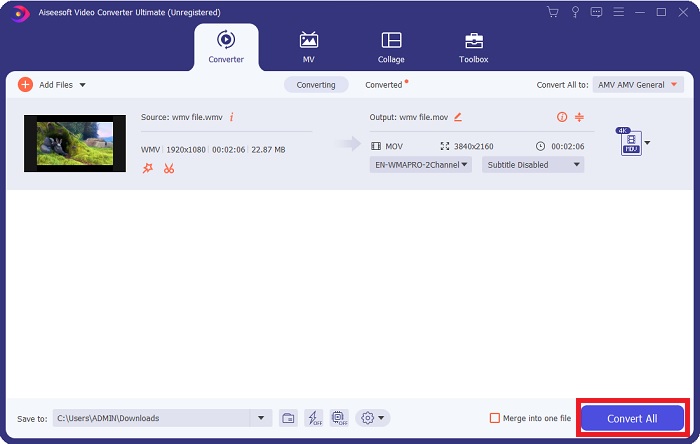
Steg 5. När du har redigerat videon färdigt och den är redo att konverteras klickar du på Konvertera alla för att påbörja överföringen av filerna.
Del 3. Annat effektivt sätt att konvertera WMV till MOV på Mac och Windows
Metod 1. Använd Free Video Converter Online
Med FVC Free Video Converter Online kan du konvertera ett brett urval av multimediafiler gratis. Om du har en högupplöst video kan du enkelt konvertera den till format som MP4, FLV och WMV utan att förlora kvalitet. Utan kvalitetsförlust går det att konvertera ett stort antal video- eller ljudfiler samtidigt. Med detta kostnadsfria videokonverteringsverktyg får användarna tillgång till ett omfattande antal redigeringsalternativ, så att de kan finjustera sina videor. Låt oss därför gå igenom alla steg:
Steg 1: Klicka på länken för att gå till startsidan för FVC-konverterns webbplats. Börja sedan konvertera dina filer online.
Steg 2: För att hämta startprogrammet till din dator klickar du på knappen Lägg till filer för konvertering till höger på skärmen. Det startas automatiskt nästa gång du laddar ner det. Öppna filen i din mapp och starta nedladdningsprocessen igen.
Ladda ner Skrivbordsversionen för att konvertera filer i batch.
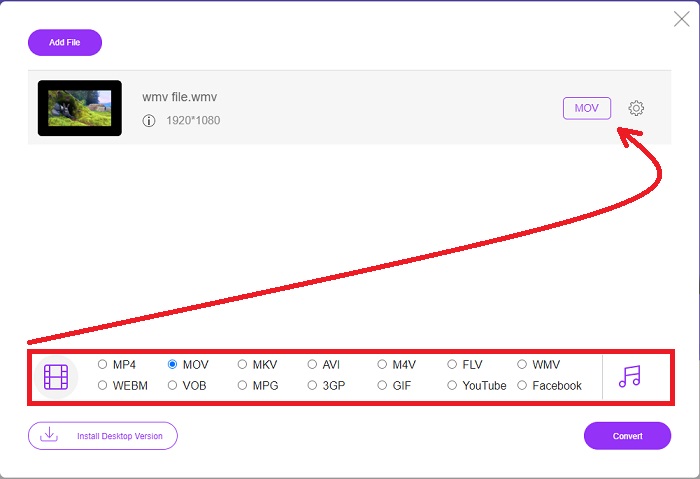
Steg 3: Välj formatet MOV nedan för att förbereda konverteringsprocessen innan den börjar.
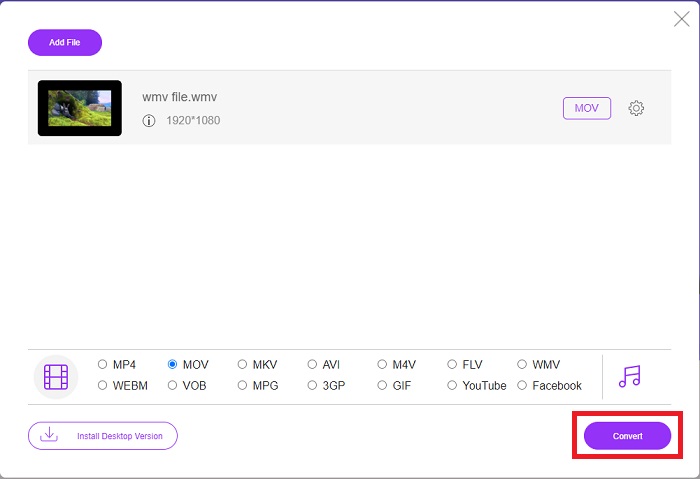
Steg 4: När du har bestämt dig för vilket format du vill konvertera till klickar du på Konvertera för att starta konverteringsprocessen.
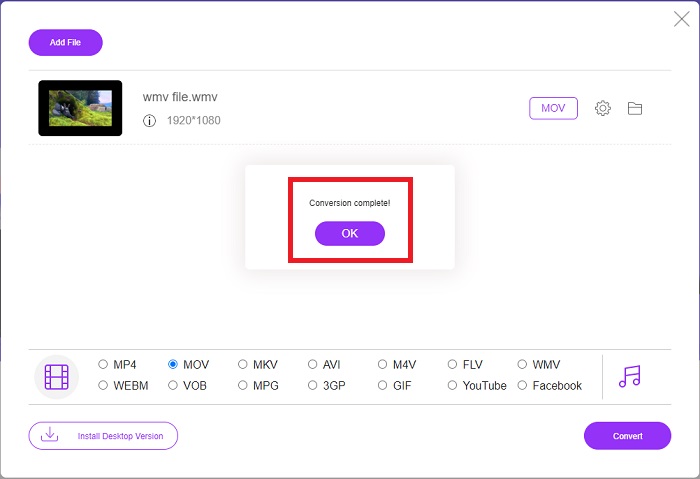
Steg 5: Efter några minuter bör du se en mapp som innehåller den konverterade filen, som du sedan kan öppna och börja titta på.
Metod 2. Använd Video Converter
Försöker du hitta en gratis WMV till MOV-omvandlare? Den snabbaste metoden är att använda en webbtjänst för att konvertera dina WMV-filer till MOV-format. När du är klar med dina videor kan du överföra dem till vilken enhet som helst och njuta av dem senare med hjälp av det här onlinemediekonverteringsverktyget! Så här går det till.
Steg 1: Genom att klicka på knappen Lägg till ditt media kan du importera din WMV-fil från din dator, Dropbox eller Google Drive för att konvertera den till MOV.
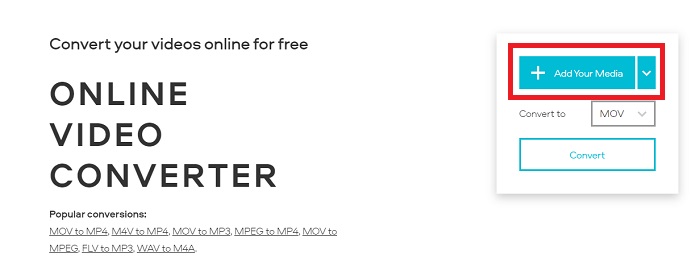
Steg 2: Välj MOV som önskat utdataformat. Använd de avancerade inställningarna för att förbättra den övergripande kvaliteten på din video.
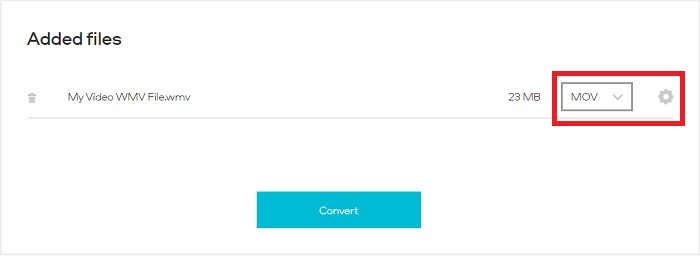
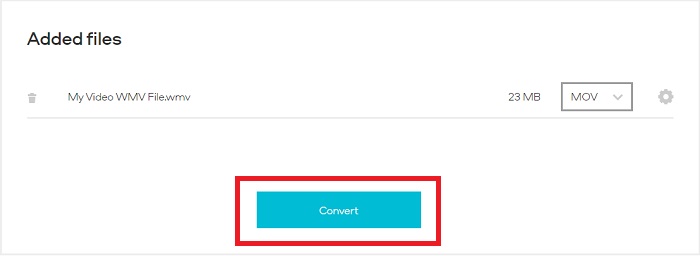
Steg 3: När alla justeringar är gjorda kan du klicka på knappen Konvertera.
WMV kontra MOV
Producerat av Microsoft var WMV ett av de vanligaste videoformaten på 2000-talet. Den kan ses över webben och spelas upp av olika mediaspelare på Windows. Och det är också standardvideofilformatet för Windows Media Player. Men det har tagits över av andra format nyligen.
MOV-formatet kan användas för att lagra en film, TV-program, kort videoklipp eller hemmafilm. Den sparas faktiskt i QuickTime File Format (QTFF), som introducerades av Apple 1991. MOV-filer används ofta när folk vill spara en video med hög kvalitet.
Del 4. Vanliga frågor om att konvertera WMV till MOV
Är MOV och WMV samma sak?
MOV-filer använder MPEG-4-kodning för att spela med QuickTime för Windows, utvecklat av Apple för QuickTime Player. Förutom att stödjas av Facebook och YouTube fungerar MOV bra för tv-tittande. WMV-filer (Windows Media Viewer) är jämförbara med MOV (Mozillas videoformat) i kvalitet och storlek. Microsoft skapade WMV för användning i Windows Media Player.
Vilka är fördelarna och nackdelarna med MOV?
MOV-filer används främst för redigering och inte särskilt mycket i praktiskt bruk. Förutom QuickTime Player stöds formatet bara av ett fåtal multimediaprogram. Professionella videoredigerare drar nytta av denna fördel. En nackdel är det begränsade stödet i faktiska enheter.
Används WMV fortfarande?
Det utvecklades av Microsoft och används ofta i Windows Media Player. WMV-videoformatet gör att WMV-filer är mindre och mer komprimerbara än MP4-filer. Därför är formatet populärt för videoströmning online. iPhone och Mac kan köra Windows Media Player, som är inkompatibelt med Apple-enheter.
Slutsats
Som visats ovan finns det många olika konverterare som kan laddas ner eller användas på internet när som helst. Men vad gäller effektivitet och att välja de bästa konverterarna är det Video Converter Ultimate som denna slutsats pekar på. Med sin förmåga att snabbt konvertera video- och ljudformat, sitt stöd för många olika format utan kostnad och tillgänglighet för både Windows och Mac är det ett utmärkt val. Vad väntar du på? Ladda ner det nu!
Gratis nedladdningFör Windows 7 eller senareSäker nedladdning
Gratis nedladdningFör MacOS 10.7 eller senareSäker nedladdning
-
 Topp 3 sätt att konvertera FLV till WMV på Windows och Mac
 Letar du efter det bästa sättet att konvertera FLV till WMV utan att förlora kvalitet på PC eller Mac? Du har tur eftersom vi delar här tre metoder för att göra jobbet enkelt.
-
 2 enklaste sätten att konvertera WMV-filer till FLV på PC / Mac
 Hur kan du konvertera WMV till FLV? Först måste du läsa vår rekommendation och hitta din favoritmetod och sedan följa vår guide för att göra jobbet snabbt.
-
 [2 Lösningar] Hur man konverterar WMV-videor till GIF-filer gratis
 Om du vill klippa de underbara delarna av WMV -videorna och göra GIF -filer från dem, kan du lära dig om 2 enkla metoder för att överföra WMV -videor till GIF -filer i den här artikeln.

