


 Video Converter Ultimate
 Skärminspelare
 Video reparation
Lättåtkomlig XviD Converter: Hur man konverterar XviD-filer till MOV-format
XviD-filer är den mest kända kodeken som används för att konkurrera med DivX. Denna kodek använder också MPEG-4 ASP, som innehåller funktioner som b-bilder, luma‑maskning, global och kvarts‑pixel rörelsekompensation, trellis‑kvantisering, anpassade kvantiseringsmatriser och H.263. Just därför blev XviD en mer populär kodare än DivX. Anta att du överför en fil som använder XviD‑kodeken till din iOS‑enhet. Om filen inte spelas upp ska du inte bli förvånad, eftersom kodeken inte stöder mobila enheter som iOS och andra enheter. Även om det verkar olösligt finns det alltid en lösning på varje problem; vi erbjuder en lösning genom att konvertera filen som använder XviD till AVI‑format. Om du vill veta hur man konverterar XviD‑filer till MOV, följ då den här artikeln.

Del 1. Introduktion av XviD och MOV
Som vi nämnde tidigare kan din fil bli mindre om du använder XviD för att komprimera den utan att skada kvaliteten, och du kan dekomprimera den snabbt. Även om XviD är en icke‑proprietär kompressor är den här kodekens kompatibilitet begränsad när det gäller bärbara enheter och särskilt redigering. Så om du vill titta på eller redigera videon med XviD‑kodek är det nödvändigt att konvertera filen till MOV. Varför MOV? Därför att detta format kan innehålla metadata, mediafiler som ljud, video och text eller undertexter. Inte nog med det, formatet kan även spela upp videor på iOS‑enheter och andra enheter. Så nu, för att lösa ditt problem med din XviD‑fil, låt oss ta reda på hur man konverterar XviD till MOV med hjälp av verktyget nedan.
Del 2. Bästa omvandlaren för att konvertera XviD till MOV på Windows och Mac
FVC Video Converter Ultimate
Letar du efter den bästa XviD till MOV‑konverteraren som kan konvertera filen på ett ögonblick? Då är FVC Video Converter Ultimate det enda verktyg du behöver. Förutom den 30× snabbare konverteringen som erbjuds användarna kan du redigera, slå ihop, klippa och göra mer med din video så att den ser mer fenomenal ut än andra. Även om verktyget tillhandahåller avancerade funktioner behöver du ändå inte bygga en superdator för att ladda ner och använda det.
Utöver det innehåller denna programvara även hårdvaruacceleration och snabb konvertering för att göra din konverteringsupplevelse snabbare och bättre. Och nu, om du vill lära dig hur man konverterar Xvid-filer till MOV med hjälp av det här verktyget, låt oss gå vidare till handledningen nedan.
Steg för hur man konverterar XviD till MOV med FVC Video Converter Ultimate:
Steg 1. Den här programvaran kan laddas ner på alla PC‑ eller Mac OS‑enheter, så du behöver trycka på nedladdningsknappen nedan. Efter att du laddat ner programvaran klickar du på filen för att installera, gör inställningen snabbt och klicka på Start Now för att öppna verktyget direkt.
Gratis nedladdningFör Windows 7 eller senareSäker nedladdning
Gratis nedladdningFör MacOS 10.7 eller senareSäker nedladdning
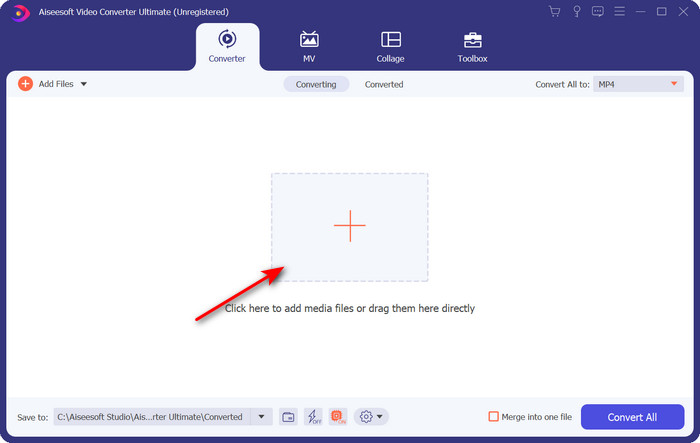
Steg 2. För att infoga .xvid‑filen måste du klicka på +-knappen, lokalisera den i mappen och klicka på Open. Om .xvid‑filen däremot är fler än två rekommenderar vi att du drar och släpper filerna till gränssnittet.
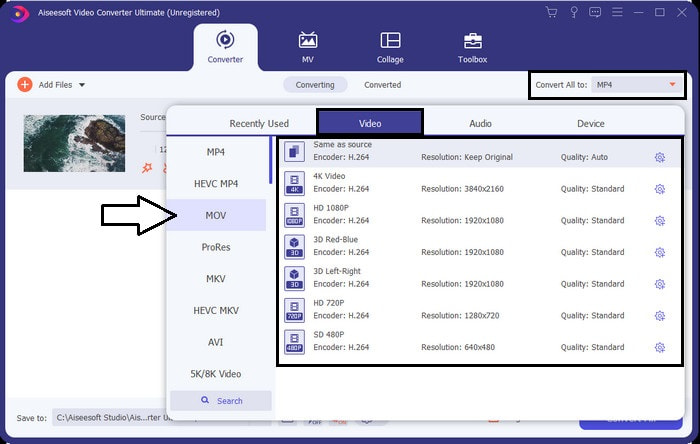
Steg 3. Klicka på rullgardinsmenyn uppe till höger i gränssnittet och leta upp MOV‑formatet i listan.
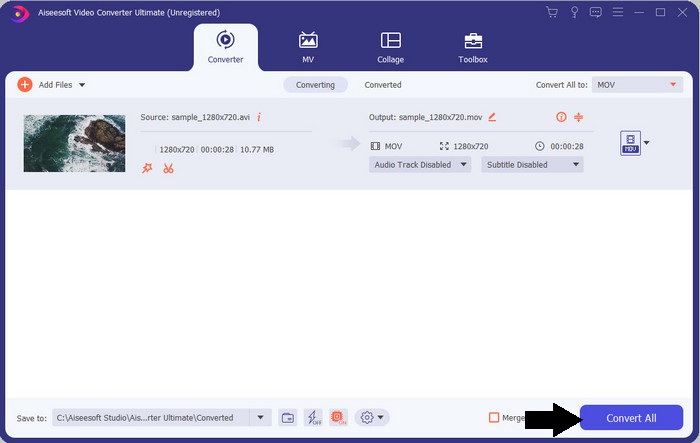
Steg 4. Låt oss börja omvandla dina XviD‑filer till MOV genom att klicka på Convert All.
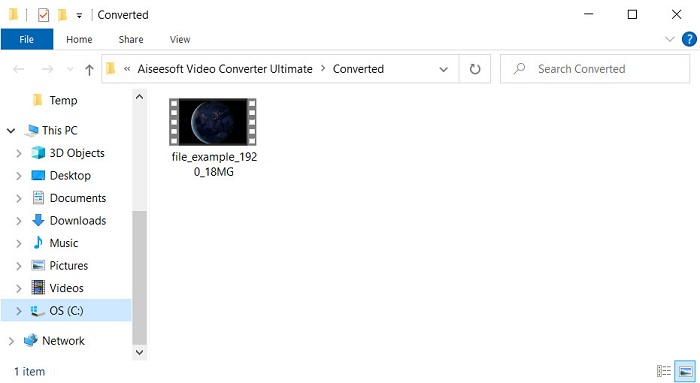
Steg 5. Vänta några sekunder tills processen är klar. En fillista eller mapp visas på skärmen med .mov‑filen; klicka på filen för att spela upp den i din lokala mediaspelare och njut.
Del 3. Bästa onlinekonverteraren för att konvertera Xvid till MOV
FVC gratis videokonverterare online
Vill du slippa besväret med att ladda ner programvara på din hårddisk eftersom lagringsutrymmet är fullt och du bara vill konvertera en enskild fil online? FVC Free Video Converter Online är tillgänglig i alla webbläsare. Att konvertera XviD‑filen med hjälp av detta verktyg blir klart inom en minut. Dessutom behöver du varken skapa ett konto för att få tillgång till det eller stå ut med annonser i gränssnittet. Det här verktyget är den renaste online‑konverteraren du kan använda på webben. Du kan dock inte använda det om du inte har internetanslutning, eftersom verktyget är nätverksberoende. Verktyget stöder också ett medelstort urval av format som du kan välja och använda. Om du dessutom inte vill ladda ner en konverterare måste du använda denna XviD till MOV‑konverterare online.
Steg för hur man konverterar XviD‑filer till MOV‑format online med hjälp av FVC Free Video Converter Online:
Steg 1. För att gå till huvudwebbsidan för online‑konverteraren måste du klicka på denna länk.
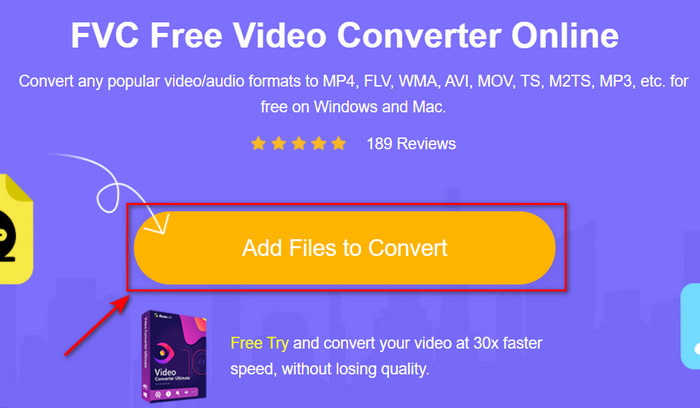
Steg 2. Tryck på Add Files to Convert för att starta verktyget, sedan visas en mapp där du kan hitta XviD‑filen du vill konvertera, och klicka på Open för att fortsätta.
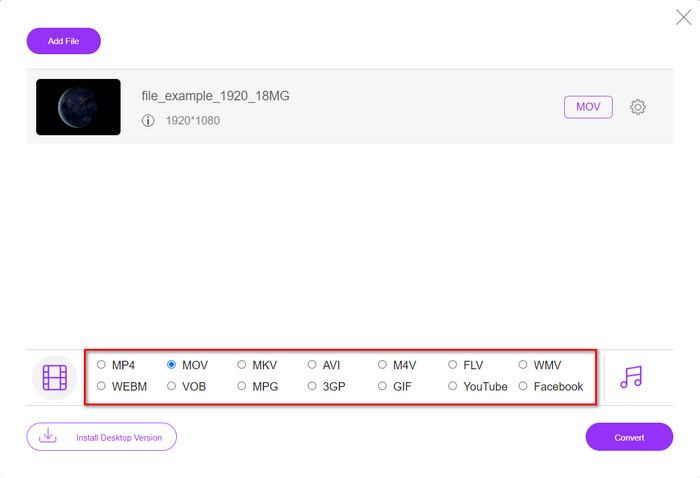
Steg 3. Ett nytt gränssnitt visas efter att du lagt in XviD‑filen, välj MOV‑formatet eller något annat format du vill ha nedtill.
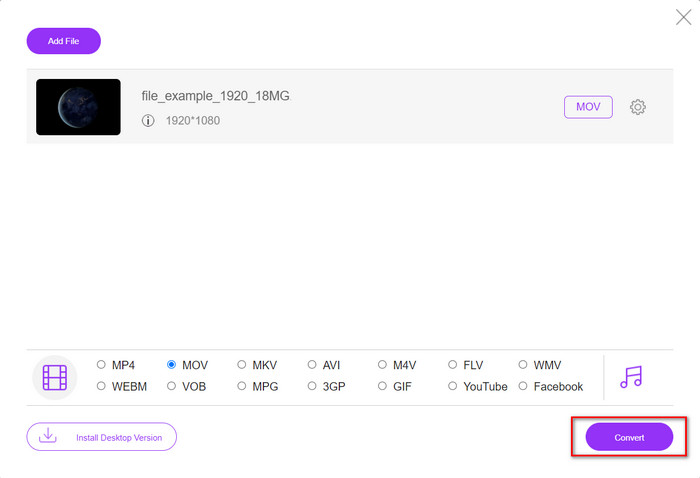
Steg 4. För att starta formatändringen klickar du på Convert.
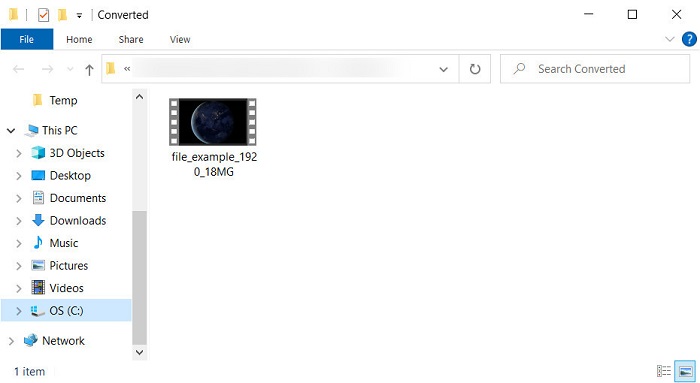
Steg 5. Att konvertera filen tar mindre tid än med andra online‑konverterare; därefter visas en mapp med den konverterade filen du har skapat.
Del 4. Vanliga frågor om XviD till MOV-konvertering
Var kan jag titta på XviD-videor?
Du kan använda VLC Media Player för att spela upp XviD‑filer. Om du inte vill ladda ner något kan du använda Windows Media Player som finns på alla Windows‑datorer. För Mac‑användare är QuickTime alternativet. Men om du vill titta på en högupplöst XviD‑video kan du läsa den här artikeln där vi har samlat alla möjliga XviD‑spelare du kan använda för att titta på XviD‑filer.
Är XviD gratis eller inte?
XviD är gratis, och det är tillgängligt för alla som vill använda och komprimera sin fil för snabb överföring via webben eller spara lite utrymme. Det är allt tack vare GPLs gratisprogramvarulicens, så den gjordes för att vara gratis.
Varför kan jag inte redigera XviD-videor?
En av huvudorsakerna till att du inte kan redigera videor med den här typen av codec är att det inte stöds. I så fall stöder minimala videoredigerare endast denna typ av codec på grund av dess komplexitet. Så anta att du vill redigera en video i detta format, måste du överväga att konvertera den först. I så fall är det ett måste att ha en multifunktionsomvandlare som kan konvertera XviD-filer till MP4, AVI, MOV eller liknande. Sedan efter att ha konverterat filen laddar du upp den nästa i redigeraren för att göra den redigering du vill.
Slutsats
Efter att ha läst den här artikeln har vår kunskap om XviD vuxit, och nu kan vi se XviD ur olika perspektiv. Så om du vill spara eller spela upp en video på din iOS‑enhet måste du först konvertera filen till MOV. Som vi tidigare diskuterat presterar de två nämnda konverterarna mycket bra när det gäller att konvertera filen till MOV‑format. Även om båda verktygen verkar helt utmärkta är hastigheten och prestandan hos FVC Video Converter Ultimate oöverträffad och bättre än något annat skrivbords‑ eller webbverktyg som finns. Men om du vill ha en kostnadsfri och säker konvertering online, välj FVC Free Video Converter Online.
-
 Hur man konverterar AVI till MOV med enkla steg och verktyg
 Vill du veta hur man konverterar AVI till en spelbar MOV? Du måste följa den här artikeln för att veta hur du gör det och tips för att få en framgångsrik konvertering.
-
 Importera och konvertera AVI till iMovie-format som stöds [2021]
 Har du problem eftersom du inte kan importera din AVI-fil till iMovie? Om du läser den här artikeln har du redan valt rätt lösning för detta problem.
-
 Hur konverterar jag TS till AVI / MKV / MOV / WMV online och gratis på Win / Mac
 Vill du snabbt konvertera TS-filer till AVI / MKV / MOV / WMV? Den här artikeln visar online- och offlinevideoomvandlare med komplett guide. Kanske kan du få den bästa gratis TS-omvandlaren här.
