


 Video Converter Ultimate
 Skärminspelare
 Video reparation
 Säker nedladdning
Matchlösa och perfekta sätt att konvertera AMV till MP4
Vill du kunna njuta av att titta på din AMV‑video i alla program? Då behöver du konvertera din AMV‑fil till MP4‑format. Men oroa dig inte! Vi ger dig den bästa lösningen för att konvertera dina videofiler. I den här artikeln har vi redan testat de omvandlare du kommer att få se. På så sätt behöver du inte oroa dig för om programmen är säkra. Dessutom presenterar vi de funktioner du kan dra nytta av när du använder programvaran. Om vi har väckt ditt intresse och du är en av dem som vill konvertera AMV till MP4, läs då den här artikeln och ta till dig kunskapen om videokonvertering.

Del 1: Introduktion till AMV och MP4
AMV
Filändelse: .amv
Utvecklad av: MTV
Filkategori: Videoformat
Beskrivning: Videor som sparas i filformatet Actions Media Video, som stöds av vissa kinesiska bärbara mediaspelare, kallas AMV-filer. De innehåller en komprimerad film med låg upplösning (96x96 till 320x240 pixlar). Både skrivbordsprogramvaran som följer med AMV‑mediaspelare och VideoLAN VLC Media Player kan spela upp AMV‑filer.
Associerade program: K-Lite Codec Pack, VideoLAN och VLC Media Player
AMV
Filändelse: .mp4
Utvecklad av: Moving Picture Experts Group (MPEG)
Filkategori: Videoformat
Beskrivning: AAC- och MPEG-4-videostandarderna definierar tillsammans MP4-tillägget. Alla mediatyper, inklusive ljud, video, undertexter och 2D- och 3D-grafik, kan finnas i behållaren. Nästan alla spelare kan spela MP4-filer på Windows, men på Mac måste du installera ett plugin-program eller konvertera MP4-filen till ett annat format. En grupp som heter The Moving Picture Experts.
Associerade program: Apple, QuickTime Player, VLC Media Player, Microsoft, Windows Media Player och VideoLAN.
Del 2: Utmärkta procedurer för att konvertera AMV till MP4 offline
Vi har den bästa lösningen för dig om du vill konvertera AMV till MP4 med ett nedladdningsbart verktyg. Du kan använda Video Converter Ultimate. Det stöder över 100 videoformat, inklusive AVI, MKV, WMV, MOV, FLV, M4V, SWF, MTS, M2TS och fler. Detta verktyg har ett intuitivt gränssnitt med enkla metoder, vilket passar alla typer av användare. Med det här verktyget kan du konvertera flera filer samtidigt eftersom det tillåter batchkonvertering. Men vänta, en av de mest anmärkningsvärda funktionerna vid konvertering är dess ultrasnabba konverteringsprocess, som är 30x snabbare än andra omvandlare. Du kan dessutom redigera dina AMV‑videor med detta verktyg. För att upptäcka fler funktioner i programmet, läs informationen nedan.
Funktioner
◆ Konvertera olika videoformat, som MP4, AMV, WMV, AVI, MKV, FLV, SWF, MOV och 100+ fler.
◆ Det erbjuder en batchkonverteringsprocess för att konvertera flera filer samtidigt.
◆ Den tillhandahåller videoredigeringsverktyg, såsom en videoförstärkare, trimmer, beskärare, rotator, färgkorrigering och mer.
Följ de enkla instruktionerna nedan för att konvertera AMV till MP4 med FVC Video Converter Ultimate.
Steg 1: Du måste först ladda ner Video Converter Ultimate på din Windows‑ eller Mac‑dator. Klicka på Ladda ner-knappen nedan. Installera sedan och öppna programvaran.
Gratis nedladdningFör Windows 7 eller senareSäker nedladdning
Gratis nedladdningFör MacOS 10.7 eller senareSäker nedladdning
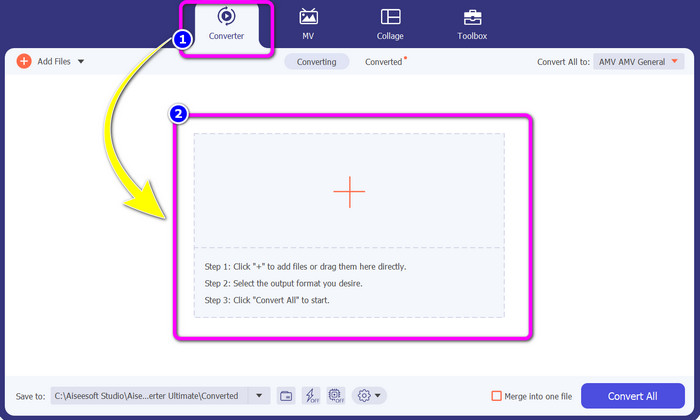
Steg 2: Välj panelen Converter och klicka på knappen med Plus-symbolen. Din mapp visas på skärmen, och du väljer den AMV‑video du vill konvertera.
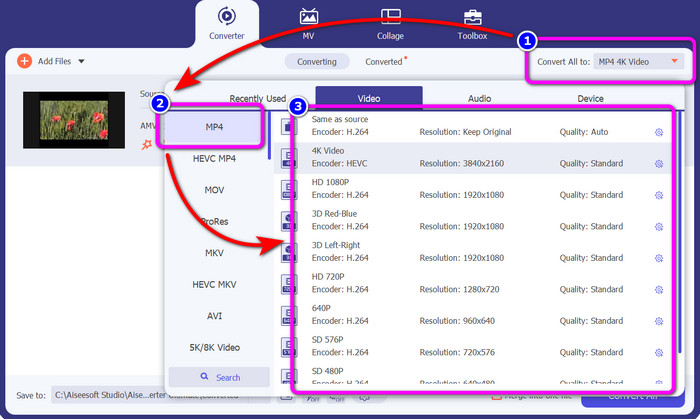
Steg 3: Tryck på knappen Convert All. När formatalternativen visas väljer du önskat utdataformat, MP4-filen. Sedan kan du välja upplösning för din video upp till 4K‑upplösning. Välj den upplösning du föredrar, eller välj samma upplösning som din originalvideo.
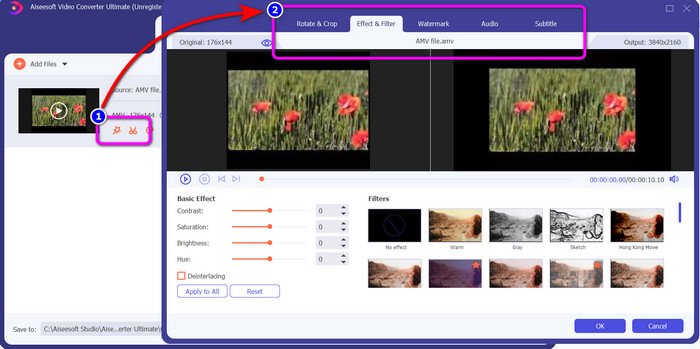
Steg 4: Om du vill redigera din video klickar du på ikonen Edit. Därefter kan du redigera din video genom att ändra, lägga till eller ta bort vattenstämplar, lägga på effekter eller filter samt rotera och beskära dina videor. Klicka sedan på OK. På så sätt kan du förbättra din video.
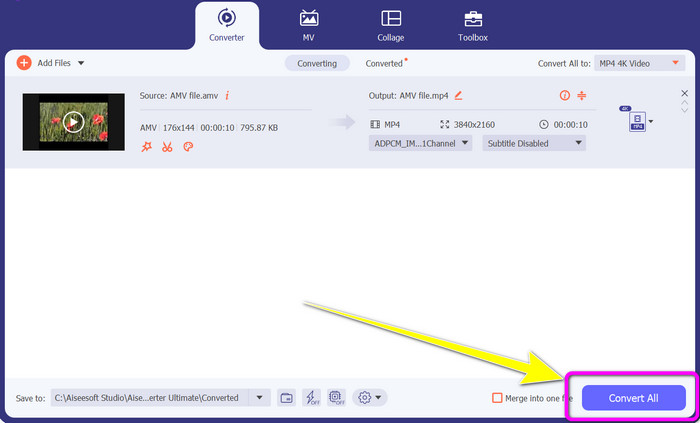
Steg 5: När du har redigerat din video klickar du på knappen Convert All för att starta konverteringsprocessen. Spara sedan din slutliga fil på datorn. Öppna den konverterade videon på datorn för att se slutresultatet. Klicka här för att få reda på hur du konverterar DV till MP4.
Del 3: Enklaste sättet att konvertera AMV till MP4 online gratis
Ett annat sätt att konvertera AMV till MP4 online är att använda FVC Free Video Converter Online. Det här verktyget har enkla steg och ett enkelt gränssnitt, vilket gör det tillgängligt för både erfarna och ovana användare. Du kan konvertera videor med bara några få klick. Dessutom stöder denna omvandlare många videoformat, såsom AVI, MP4, M4V, FLV, MOV, WMV, MKV och fler. Du kan också göra en batchkonvertering för att konvertera flera filer samtidigt. Dessutom kan du ändra upplösningen på din video medan du konverterar filerna. Det är också möjligt om du vill justera videons bithastighet och bildfrekvens. Du kan använda denna onlineapplikation gratis och ladda ner dina videor utan oönskade objekt, såsom vattenstämplar, logotyper, klistermärken, text med mera. Den är också tillgänglig i alla webbläsare, inklusive Google Chrome, Safari, Internet Explorer, Microsoft Edge osv.
Funktioner
◆ Konvertera olika videoformat, inklusive MP4, AMV, FLV, AVI, MOV, VOB, MKV och mer.
◆ Erbjuder batchkonverteringsprocess för snabbare procedur.
◆ Redigera videons bithastighet, bildfrekvens och upplösning.
◆ Konvertera ljudformat som MP3, FLAC, WAV, AAC, AC3, etc.
◆ Justera ljudets bithastighet och samplingshastighet.
Använd de enkla procedurerna nedan för att konvertera AMV till MP4 med FVC Free Video Converter Ultimate.
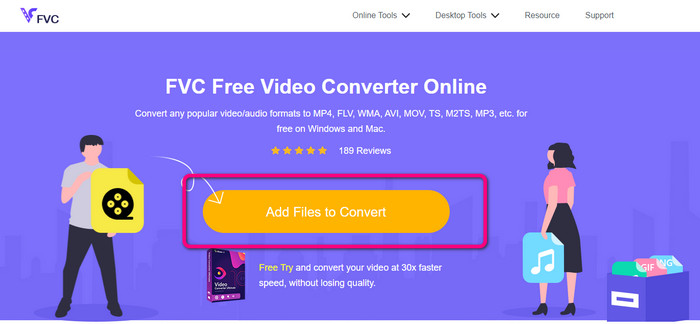
Steg 1: Gå till din webbläsare och öppna webbplatsen för FVC Free Video Converter Online. Tryck på knappen Add Files to Convert för att ladda upp den AMV‑video du vill konvertera.
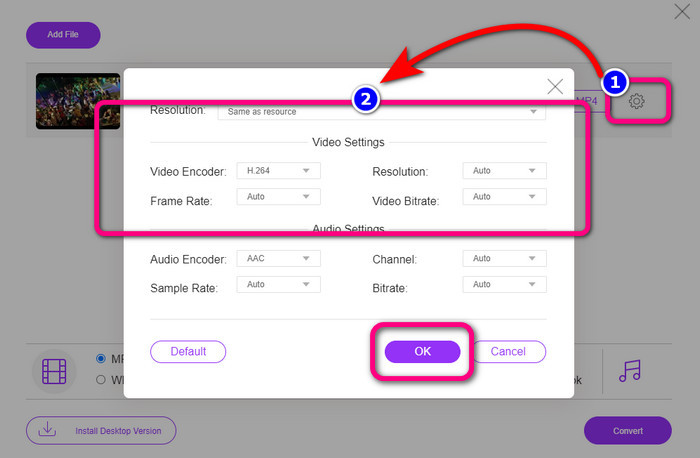
Steg 2: När du har lagt till AMV‑videon klickar du på ikonen Setting för att justera videons bildfrekvens, bithastighet och upplösning. Tryck sedan på OK.
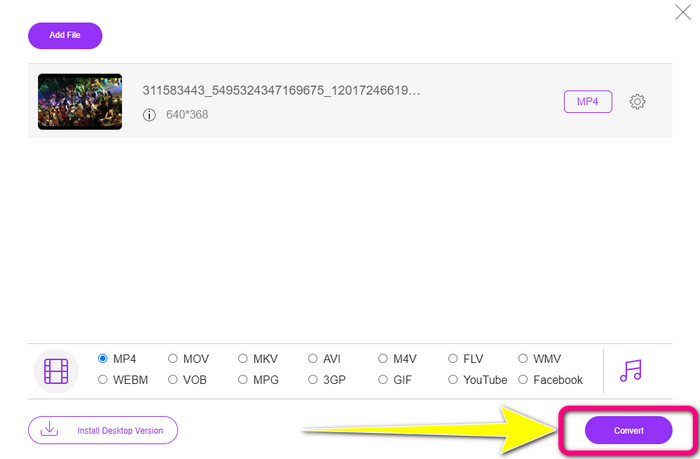
Steg 3: Gå till den nedre delen av gränssnittet och välj filformatet MP4. Klicka sedan på knappen Convert. Du kan också använda detta verktyg för att konvertera AMV till MKV.
Del 4: Vanliga frågor om att konvertera AMV till MP4
1. Är AMV detsamma som WMV?
De är inte samma sak. AMV är ett MP4- och S1 MP3-spelare-kompatibelt videofilformat. Jämfört med andra videoformat som WMV är den mindre i storlek. Det kräver inte mycket processorkraft för att spela.
2. Vad är bättre, AVI eller AMV?
Du kan använda AVI-filen om du vill spela upp din video var som helst. AMV-filformatet är dock ett bra val om du föredrar en mindre filstorlek.
3. Hur konverterar jag videofiler till MP4?
Du kan använda Video Converter Ultimate. Den stöder nästan alla videoformat, och du kan konvertera videofiler snabbare.
Slutsats
Att konvertera AMV till MP4 är enkelt om du använder de två omvandlarna som nämnts ovan. Både avancerade och ovana användare kan använda verktygen, eftersom de båda erbjuder ett intuitivt gränssnitt och enkla arbetsmetoder. Så använd Video Converter Ultimate och FVC Free Video Converter Online redan nu!
-
 Framgångsrika metoder för att konvertera DIVX till MP4 direkt
 Hur konverterar jag DIVX till MP4? Om du letar efter den bästa lösningen är du i rätt artikel. Vi kommer att visa dig hur du enkelt konverterar DIVX till MP4
-
 Hur man konverterar F4V till MP4 med de mest effektiva metoderna
 Är dina F4V-videor inte av bra kvalitet? Förvandla den sedan till en MP4-fil. Det här inlägget kommer att erbjuda det bästa sättet att konvertera F4V till MP4 online och offline
-
 Fem populära metoder för att konvertera Xvid till MP4-format
 Ta en glimt av dessa fantastiska metoder för hur man konverterar Xvid till MP4-filformat i den här artikeln. Du kommer också att lära dig de bästa apparna du kan använda för att konvertera
