


 Video Converter Ultimate
 Skärminspelare
 Video reparation
 Säker nedladdning
Detaljerade metoder för hur man konverterar DIVX till MP4
DIVX är ett av de populära videoformaten, men tyvärr stöds inte detta format av andra vanliga program som Windows Media Player, Apple QuickTime Player och fler. Det bästa sättet att spela upp din DIVX-videofil är att konvertera den till ett format som stöds av nästan alla program, som MP4. Om du alltså vill konvertera ditt DIVX till MP4-filformat, gå till den här artikeln. Även om det kan verka svårt att konvertera filer, visar vi dig de enklaste metoderna du kan prova för att konvertera din DIVX-fil till MP4-format.

Del 1: Bästa sättet att konvertera DIVX till MP4 på Mac
Det mest effektiva sättet att konvertera DIVX till MP4 på Mac är att använda Video Converter Ultimate. Det här programmet är värt att använda tack vare sina imponerande funktioner. Du kan löpande konvertera många filer, batch efter batch, direkt eftersom det har en batchkonverteringsprocess. Dessutom är det barnlek att konvertera DIVX till MP4 tack vare det intuitiva gränssnittet och de grundläggande instruktionerna för konvertering. Utöver detta kan du konvertera fler videoformat. Det stöder över 100 format, inklusive AVI, FLV, MOV, AVI, M4V, MKV, WMV, VOB och fler. Video Converter Ultimate erbjuder också en snabb konverteringsprocess med en hastighet som är 30x snabbare än andra konverterare. Med denna snabba konvertering kan du vara säker på att det bara tar kort tid att konvertera ett stort antal filer.
Dessutom är denna omvandlare inte partisk när det gäller användare. Alla kan använda den, även om du är en avancerad användare eller nybörjare. Dessutom kan den här applikationen förbättra din DIVX-video eftersom den har många videoredigeringsverktyg, såsom en videoförstärkare, beskärare, färgkorrigering och mer. Dessutom, om du vill skapa en underbar musikvideo med en kombination av bilder och video, kan du göra det. Denna musikvideotillverkare erbjuder många teman som du kan använda, som Glad, Neat, Romantic, Snow Night, Stripes and Waves, Bröllop, Sport, gamla tider och mer.
Funktioner
◆ Konvertera videor till olika filer, som MP4, DIVX, M4V, AVI, MOV, FLV, MKV, VOB och mer.
◆ Batchkonvertering är tillgänglig.
◆ Redigera videor med en videoförstärkare, kompressor, vattenstämpelborttagare, trimmer, cropper, etc.
◆ Konvertera bildformat, som BMP, JPG, PNG, TIF och mer.
Följ den enkla instruktionen nedan för att konvertera DIVX till MP4 på Mac med FVC Video Converter Ultimate.
Steg 1: Ladda ner FVC Video Converter Ultimate på din Mac genom att klicka på knappen Ladda ner nedan. Starta sedan programmet efter installationsprocessen.
Gratis nedladdningFör Windows 7 eller senareSäker nedladdning
Gratis nedladdningFör MacOS 10.7 eller senareSäker nedladdning
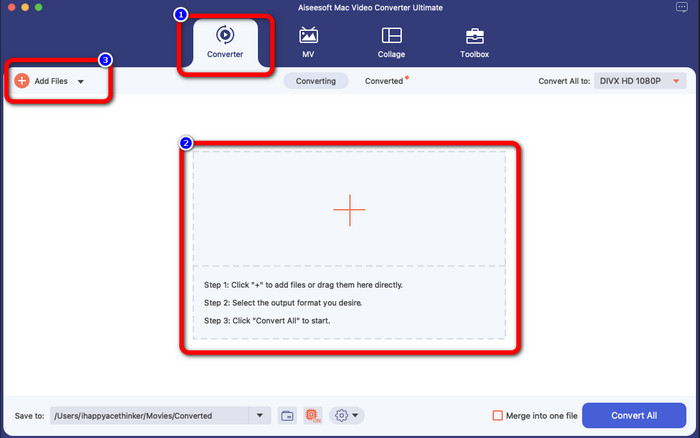
Steg 2: När du har startat programmet visas huvudgränssnittet på skärmen. Gå till panelen Converter och klicka på Plus-ikonen eller knappen Add File för att infoga DIVX-videofilen. Du kan också dra filen in i rutan.
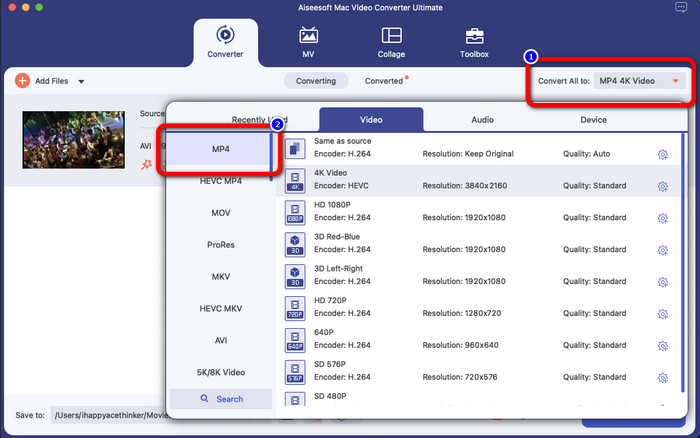
Steg 3: Ändra sedan utdataformatet och klicka på knappen Convert All to. Formatvalen visas på skärmen och du väljer MP4-fil-formatet. Du kan välja den upplösning du föredrar, upp till 4K Video.
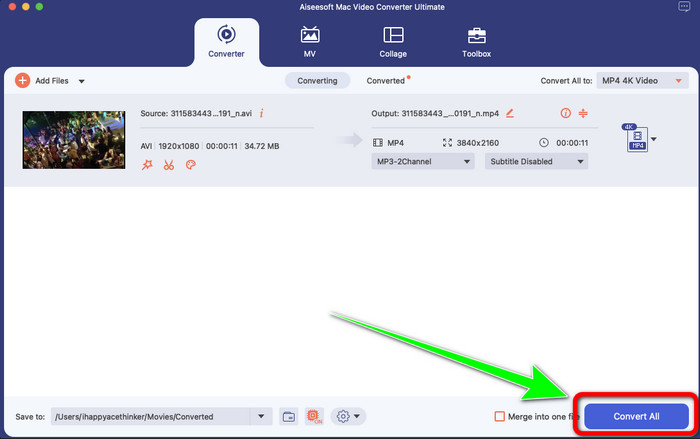
Steg 4: När du har ändrat utdataformatet klickar du på knappen Convert All för att starta. Sedan startar konverteringsprocessen. Därefter är din video konverterad från en DIVX-fil till MP4-format.
Del 2: Enkelt sätt Konvertera DIVX till MP4 på handbromsen
Vill du använda handbromsen för att konvertera DIVX till MP4? Då behöver du inte oroa dig längre. I den här delen kommer vi att lära dig hur du konverterar dina filer med hjälp av handbromsen som din konverterare på din dator. Detta verktyg är tillförlitligt för att konvertera många filer till andra format, såsom M4V, MP4, MKV, WEBM och mer. Men att använda det här verktyget måste förtydligas eftersom det har många alternativ som du kan hitta i gränssnittet. I det här fallet kan vi säga att denna omvandlare inte är lämplig för nybörjare. Det finns också tillfällen som även om du vill konvertera filerna till MP4, sparar den videon som en M4V-fil. Kanske är det fel av någon anledning. Men följ ändå de enkla stegen nedan för att konvertera DIVX till MP4 med handbromsen.
Steg 1: Ladda ner programmet Handbrake på din dator. När du är klar med installationen öppnar du programmet.
Steg 2: Klicka på alternativet File för att lägga till DIVX-videofilen.
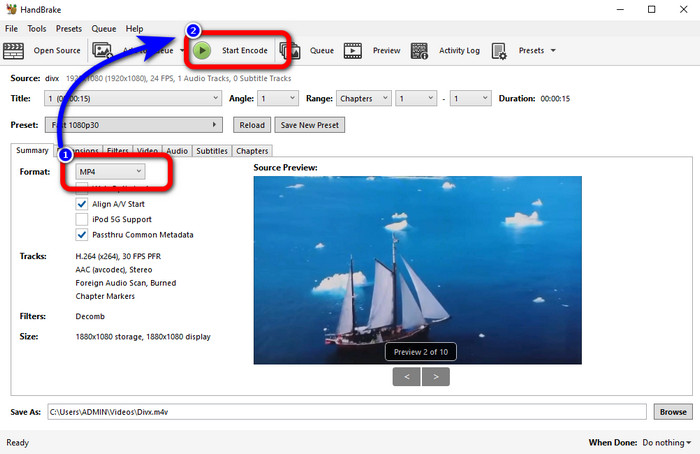
Steg 3: Välj alternativet Format och välj MP4-formatet. Klicka sedan på knappen Start Encode för att fortsätta med konverteringsprocessen. Och det var allt, nu kan du redan spela upp din video i MP4-filformat. Med den här programvaran kan du också konvertera DIVX till 3GP.
Del 3: Enkelt steg för att konvertera DIVX till MP4 via VLC
En annan offline-omvandlare du kan använda är VLC Media Player. Denna applikation kan enkelt konvertera DIVX till MP4. Detta är inte bara bra för att spela upp videor utan också för att konvertera. Med hjälp av detta offlineverktyg kan du konvertera filer till andra filformat, som MPEG, AVI, ASF, WMV och mer. Den här omvandlaren är dock olämplig för nya användare eftersom den har komplicerade filkonverteringsprocedurer. Dessutom är det svårt och tidskrävande att ladda ner applikationen. Använd stegen nedan för att konvertera DIVX till MP4 med VLC.
Steg 1: Ladda ner och installera VLC på din dator.
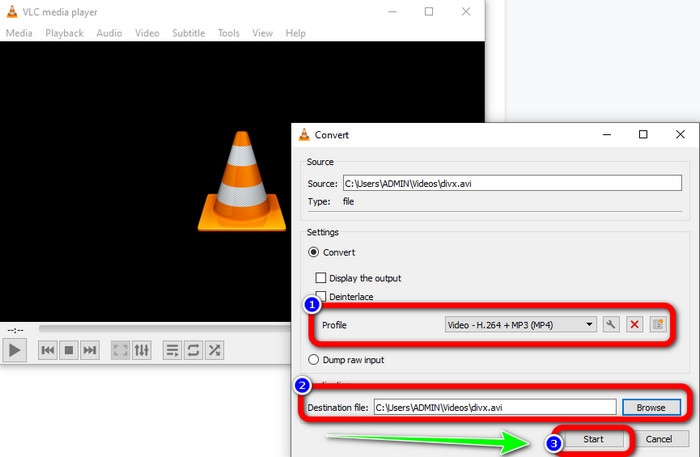
Steg 2: Gå till menyn Media och välj knappen Convert/Save för att lägga till den DIVX-videofil du vill konvertera.
Steg 3: Längst ner i gränssnittet klickar du på knappen Convert/Save igen.
Steg 4: Gå vidare till alternativet Profile och välj MP4-filformatet. Klicka också på knappen Destination file för att ange önskad plats. Klicka till sist på knappen Start för att konvertera DIVX-filen till MP4-format. Du kan också använda detta verktyg för att konvertera MP4 till DIVX.
Del 4: Effektivt sätt att konvertera DIVX till MP4 Online
Efter att ha gått igenom alla konverterare du kan använda offline, visar vi dig i den här delen den bästa DIVX till MP4-konverteraren online. Denna utmärkta konverterare är FVC Free Video Converter Online. Den kan enkelt konvertera din DIVX-fil till MP4-format eftersom den har ett lättöverskådligt gränssnitt och enkla steg. Detta verktyg stöder olika videoformat, såsom FLV, WMA, AVI, MOV och fler. Dessutom kan du konvertera din DIVX-fil utan att förlora videokvalitet, vilket är perfekt för användare. Följ de detaljerade guiderna nedan för att på ett enkelt sätt konvertera dina filer med hjälp av FVC Free Video Converter Online.
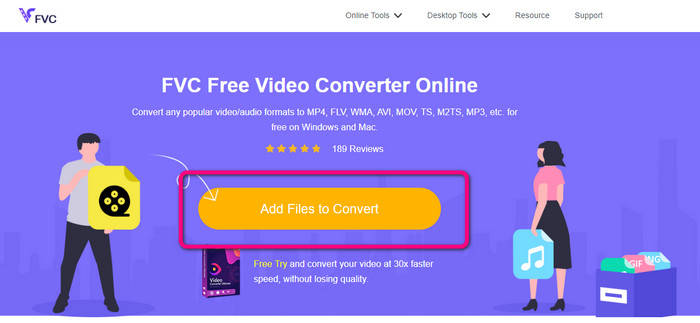
Steg 1: Gå till din webbläsare och besök FVC gratis videokonverterare online hemsida. Klicka sedan på Lägg till fil för att konvertera knappen för att ladda upp DIVX-filen.
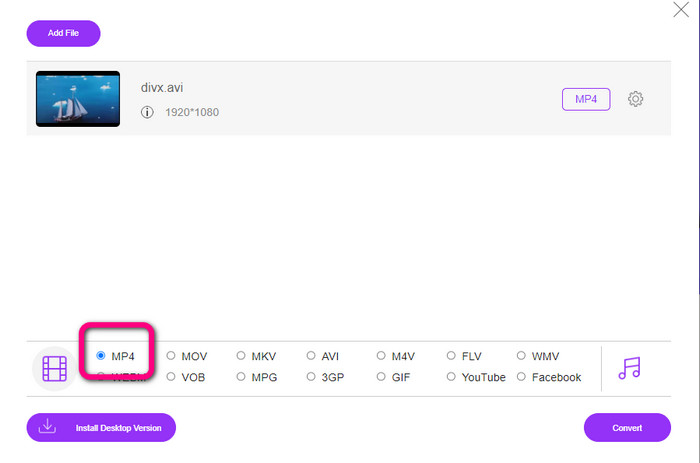
Steg 2: Längst ner i gränssnittet väljer du filformatet MP4 från formatalternativen.
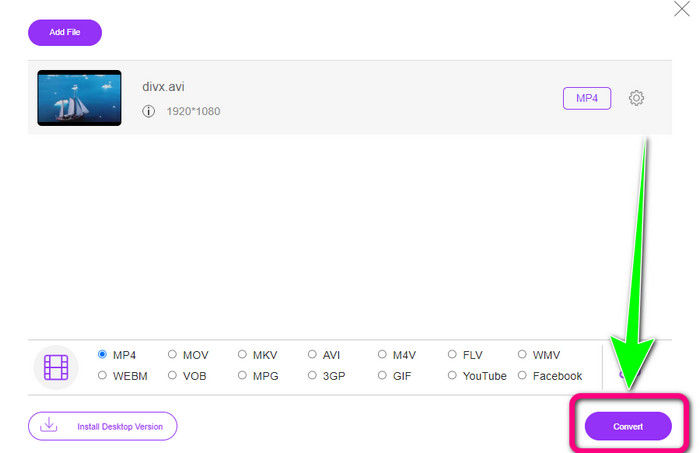
Steg 3: Som sista steg klickar du på knappen Convert för att starta konverteringsprocessen. Spara sedan din MP4-video på din enhet.
Del 5: DIVX vs. MP4
| DIVX | MP4 | |
| Filtillägg | .divx/.avi | .mp4 |
| Beskrivning | DivX, LLC utvecklade DIVX video codec. Denna codec är kompatibel med Windows-program. Den kan även användas på spelkonsoler, bilstereo med mera. Det finns också tre DIVX-codec, HEVC Ultra HD, H.264/MPEG-4 AVC DivX Plus High Definition Video-codec och MPEG-4 Part 2. | Det är en videobehållare baserad på QuickTime MOV. Men MP4 stöder MPEG-funktioner. Dessutom stöder MP4 ljud, video och undertexter. Dessa codec-kombinationer gör MP4 flexibel. |
| Utvecklad av | DivX Network Inc. | Internationella organisationen för standardisering |
| MIME-typ | video/divx | video/mp4 |
| Tillhörande program | Xbox 360 Bilradio DVD/BLU-ray-spelare Väckarklockor | VLC Media Player Apple QuickTime Player 5KPlayer Windows mediaspelare |
Del 6: Vanliga frågor om att konvertera DIVX till MP4
1. Vem använder DIVX?
De som använder DIVX är de DIVX-certifierade konsumentelektronikenheterna, inklusive bärbara videospelare, DVD- och Blu-ray-spelare.
2. Är MP4 bättre än DIVX?
Ja. DIVX är redan föråldrad jämfört med den populära filen nu, som är MP4. MP4-formatet är ett av de mest använda formaten, så det rekommenderas starkt att använda MP4-formatet.
3. Varför är MP4 så populärt?
MP4-formatet är populärt eftersom det stöds av nästan alla enheter, som Mac, Linux, Windows och olika mobila enheter. På så sätt omvandlar alla användare sina videor till MP4-format, vilket gör dem mer tillgängliga och tillgängliga för alla.
Slutsats
Genom att läsa den här artikeln har du fått viktiga insikter om hur man konverterar DIVX till MP4. Det finns fyra konverterare du kan prova. Men vissa andra konverterare är komplicerade att använda, vilket inte passar nybörjare. Om du därför vill konvertera filer enklare kan du använda två rekommenderade konverterare: FVC Video Converter Online och Video Converter Ultimate.
-
 3 bästa sätten att snabbt konvertera MPG till MP4
 Vill du konvertera ditt MPG till MP4-filformat? I den här artikeln listar vi de bästa och snabbaste MPG-omvandlarna åt dig!
-
 AMV Converter - De 3 bästa metoderna för att konvertera MP4 till AMV på Win / Mac
 Vilka är de bästa MP4 till AMV-omvandlarna för att förvandla videoklippen till Amine Music Video, du kan lära dig mer om tre mest effektiva metoder för att enkelt få önskade videor från artikeln.
-
 WebM till MP4 | Gratis konvertera WebM till MP4 (online och skrivbord)
 Hur tittar jag på WebM-filer utan webbläsare? Du måste konvertera WebM till MP4. Här är topp 10 gratis WebM till MP4-konverterare för att ändra WebM till MP4 online och på Mac och Windows-dator
