


 Video Converter Ultimate
 Skärminspelare
 Video reparation
 Säker nedladdning
DVR till MP4: Gör ditt medieliv till en vind med enkel konvertering
Kliv in i en värld av bekvämlighet och frihet med de bästa lösningarna för DVR till MP4-konvertering. Säg farväl till krånglet och välkomna en sömlös omvandling av dina DVR-inspelningar till det mångsidiga MP4-formatet. Njut av problemfri åtkomst och öppna en värld av möjligheter för ditt DVR‑innehåll. Börja sedan konvertera till MP4 redan i dag och lås upp din mediakollektions fulla potential med ett leende. Oavsett om du vill dela kära minnen eller titta på dina favoritprogram på språng gör vårt användarvänliga arbetssätt det hela busenkelt.

Del 1. Bästa sättet att konvertera DVR till MP4
FVC Video Converter Ultimate är en mångsidig och användarvänlig videokonverterare som gör att du kan omvandla dina videor utan ansträngning. Den erbjuder snabba konverteringshastigheter, möjlighet till batchkonvertering, anpassningsbara utdata-inställningar och till och med möjlighet att extrahera ljud från videor. Lär känna det här verktyget bättre genom att ta en titt på dess viktigaste funktioner.
Nyckelfunktioner
◆ Redigeringsverktyg: Programvaran erbjuder grundläggande redigeringsverktyg som gör att du kan trimma, beskära, lägga till vattenstämplar eller använda videoeffekter för att förbättra dina videor före konvertering.
◆ Högkvalitativ utdata: Bevara den orörda kvaliteten på dina videor eller välj en mängd olika kodningsalternativ för att garantera optimal utskriftskvalitet för ditt konverterade innehåll.
◆ Stöd för flera språk: Programvaran stöder olika språk, vilket gör den tillgänglig för användare över hela världen.
Steg 1. Hämta rätt installationsfil
Först och främst måste du skaffa rätt installatör. Nedan finns installationsprogram för Windows- och Mac-datorer. När du skaffat verktyget installerar du det på din dator. Starta sedan den på din dator.
Gratis nedladdningFör Windows 7 eller senareSäker nedladdning
Gratis nedladdningFör MacOS 10.7 eller senareSäker nedladdning
Steg 2. Ladda upp en DVR-fil
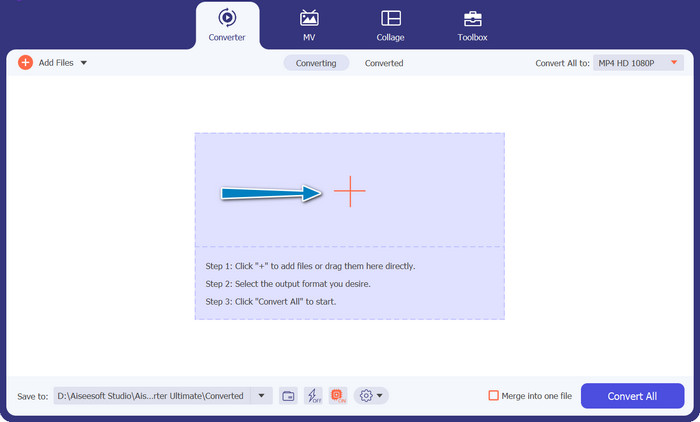
Klicka nu på knappen med Plus-symbolen i huvudgränssnittet och välj den DVR-fil du vill använda från en mapp på datorn. Därefter bör du se dess miniatyrbild.
Steg 3. Välj ett utdataformat
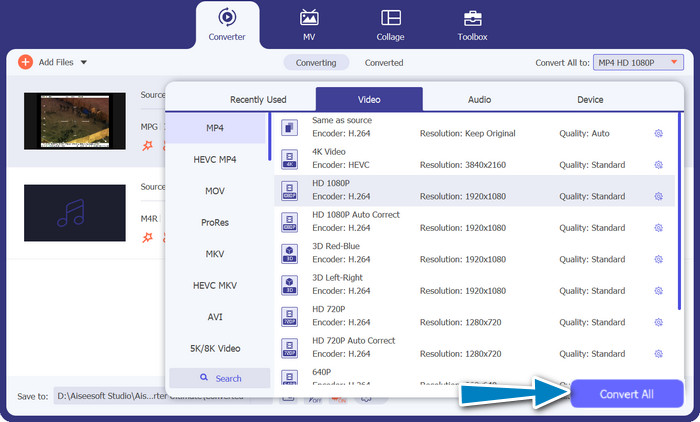
Vik sedan ut menyn rullgardinslista för att se alla tillgängliga format. Gå till fliken Video och leta upp formatet MP4. Därefter kan du välja den kvalitet du föredrar för din videokonvertering.
Steg 4. Starta konverteringsprocessen
När du har laddat upp en fil och valt ett utdataformat klickar du på knappen Convert All längst ned i programmets gränssnitt för att starta konverteringsprocessen.
Del 2. Bästa sättet att konvertera DVR till MP4 online gratis
Har du hört talas om Free MP4 Video Converter Online? Det är ett utmärkt verktyg som kan hjälpa dig att konvertera dina videor till det populära MP4-formatet. På så sätt kan du vara säker på att dina videor fungerar på alla enheter och plattformar. Och det bästa av allt? Det är superenkelt att använda! Följ stegen för hur du använder denna online DVR till MP4‑konverterare och upptäck fler av dess funktioner.
Nyckelfunktioner
◆ Kostnadsfritt: FVC Free MP4 Converter Online är tillgänglig utan kostnad, vilket gör det till ett ekonomiskt val för att konvertera dina videor till MP4-format.
◆ Obegränsad användning: Det finns inga begränsningar för antalet videor du kan konvertera med FVC Free MP4 Converter Online, så att du kan konvertera så många videor du behöver utan några begränsningar.
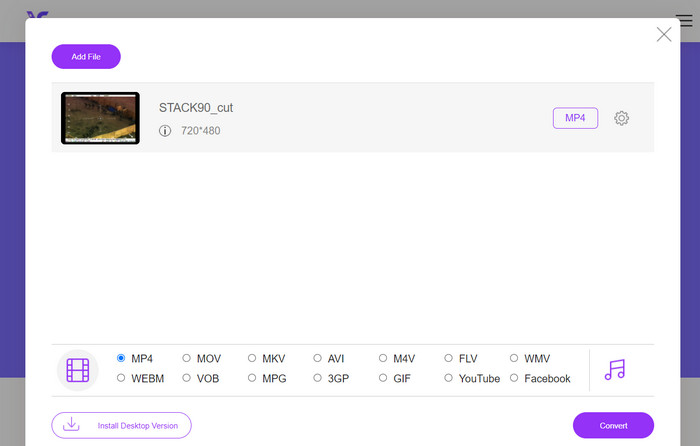
Steg 1. Först och främst behöver du besöka programmets webbplats genom att klicka på länken i beskrivningen av verktyget ovan. Klicka sedan på knappen Add Files to Convert på huvudsidan för att ladda upp DVR‑filer.
Steg 2. Därefter väljer du den fil du vill konvertera från din dator. När uppladdningen är klar ställer verktyget automatiskt in utdataformatet som MP4.
Steg 3. Till sist klickar du på knappen Convert för att starta konverteringsprocessen. Vänta sedan tills processen är slutförd.
Del 3. Konvertera DVR till MP4 på ett annat sätt
FFmpeg är ett kraftfullt kommandoradsverktyg som kan konvertera DVR till MP4 och utföra andra multimediauppgifter. Det behöver viss teknisk förståelse för att kunna användas, men det kan anpassas på många sätt och används ofta för att bearbeta multimedia.
Nyckelfunktioner
◆ Kommandoradsgränssnitt: FFmpeg fungerar genom kommandoradskommandon, vilket ger avancerade användare flexibiliteten att utföra komplexa konverteringsoperationer.
◆ Avancerad bearbetning: Den erbjuder avancerade funktioner som videofiltrering, skalning, beskärning och ljudmanipulering, vilket gör det möjligt för användare att finjustera sina konverteringar.
Steg 1. Ladda ner och installera FFmpeg från den officiella webbplatsen (https://ffmpeg.org/) enligt ditt operativsystem.
Steg 2. Starta sedan Kommandotolken eller ett terminalfönster på datorn.
Steg 3. Navigera därefter till den katalog där FFmpeg är installerat, eller ange hela sökvägen till FFmpeg-programfilen i kommandot.
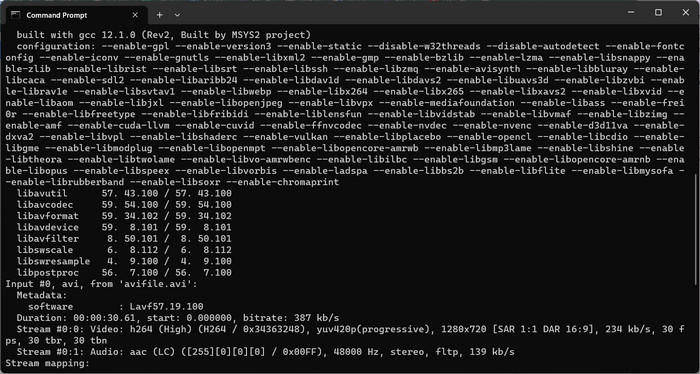
Steg 4. Använd FFmpeg-kommandoradssyntaxen för att ange den inmatade DVR-filen och önskat utdataformat (MP4). Till exempel: ffmpeg -i input.dvr output.mp4.
Steg 5. Tryck slutligen på Enter för att köra kommandot. FFmpeg startar då konverteringsprocessen och visar förloppet i kommandotolken.
Vidare läsning:
Ultimata och kostnadsfria sätt att konvertera DV till WMV [online och offline]
Enkel metod för hur du konverterar MTV till MP4
Del 4. Jämförelse av de 3 sätten
För att hjälpa dig att välja mellan FVC Video Converter Ultimate, Free MP4 Video Converter Online och FFmpeg som din DVR till MP4-omvandlare, har vi sammanställt följande tabell.
| Video Converter Ultimate | Gratis MP4 Video Converter online | FFmpeg | |
| Formatstöd | Brett utbud av format | Begränsade format | Brett utbud av format |
| Anpassning | Avancerade utdatainställningar | Grundläggande utgångsinställningar | Omfattande anpassning |
| Användargränssnitt | Desktopprogramvara | Webbaserat gränssnitt | Kommandoradsverktyg |
| Prestanda | Effektivt och snabbt | Beroende på internethastighet | Beroende på systemspecifikationer |
| Integritet | Lokal filkonvertering | Online filkonvertering | Lokal filkonvertering |
Del 5. Vanliga frågor om DVR till MP4-konvertering
Hur öppnar jag en DVR-fil?
Windows Media Center kan fånga och spela upp DVR-filer sparade i DVR-MS-formatet på din persondator.
Kan VLC spela upp DVR-filer?
VLC kanske kan spela upp DVR-filer, men bara om den har lämpliga ljud- och videoavkodare inbyggda. DVR-filer kan spela upp ljud och video i MPEG-2- respektive AAC-format. VLC kräver MPEG-2-videoavkodaren och AAC-ljudavkodaren för att spela upp DVR-filer effektivt.
Kan jag konvertera DVR-filer till andra videoformat än MP4?
Ja, beroende på vilken programvara du använder kan du ofta konvertera DVR-filer till olika andra videoformat, inklusive AVI, MKV, MOV eller WMV. Denna flexibilitet gör att du kan välja det format som bäst passar dina uppspelnings- eller delningsbehov.
Finns det risk för dataförlust eller kvalitetsförsämring under konverteringsprocessen?
När du använder ansedd och pålitlig programvara är risken för dataförlust eller kvalitetsförsämring minimal. Det rekommenderas dock alltid att göra en säkerhetskopia av dina ursprungliga DVR-filer innan du utför några konverteringar, bara för säkerhets skull.
Kan FFmpeg konvertera DVR-filer till andra format än MP4?
Ja, FFmpeg är ett kraftfullt kommandoradsverktyg som stöder olika video- och ljudformat. Med lämpliga kommandon kan du konvertera DVR-filer till format som AVI, MKV eller MOV, bland annat.
Slutsats
Genom att välja rätt verktyg för dina behov kan du effektivt konvertera DVR-filer till MP4 samtidigt som videokvaliteten bibehålls. Oavsett om du föredrar skrivbordsprogram eller en onlinekonverterare ger dessa alternativ dig flexibiliteten att konvertera DVR‑filer och förbättra din multimedieupplevelse.
-
 Hur komprimerar du DV-fil utan att förlora kvalitet på Windows / Mac
 När du vill dela DV-videor som tagits med din Sony-kamera kan du lära dig mer om hur du komprimerar DV till e-post eller SNS utan att förlora kvaliteten gratis.
-
 De 2 bästa sätten att konvertera DV-filer till MOV gratis på skrivbordet och online
 Har du problem med att konvertera dina DV-filer till MOV på din Mac? Om det är ditt problem kan vi lösa det tillsammans om vi läser den här artikeln.
-
 Hur man konverterar DV till MP4-filformat [Problem löst]
 Intresserad av att konvertera DV till MP4 med offline- och onlinekonverterare? Då är du på rätt väg. Vi ger dig de bästa lösningarna du vill ha.
