


 Video Converter Ultimate
 Skärminspelare
 Video reparation
 Säker nedladdning
3 bästa metoderna för att enkelt konvertera H. 264 till MP4 [2024]
Har du svårt att spela upp dina videor i H.264-format på grund av inkompatibilitetsproblem? Tja, du är inte ensam. Många användare upplever samma problem och väljer att konvertera filen till ett format som stöds brett av olika enheter som MP4.
Så om du är en av dem och letar efter sätt att konvertera den här filen för att få en sömlös uppspelningsupplevelse på din enhet, kommer den här artikeln att ge dig de bästa metoderna för att enkelt konvertera H.264 till MP4. Redo att göra dina videor universellt kompatibla? Då sätter vi igång!

Del 1: Är H.264 samma som MP4
Både H.264 och MP4 är videoformat, men de tjänar olika syften. H.264, även känd som AVC (Advanced Video Coding), är en videokomprimeringsstandard som vanligtvis används för att spela in, komprimera och distribuera högupplöst videoinnehåll. Å andra sidan är MP4 (MPEG-4 Part 14) ett containerformat som kan lagra olika typer av data, inklusive video, ljud, undertexter och stillbilder.
Medan H.264 specifikt hänvisar till videokomprimeringsteknik, omfattar MP4 ett bredare utbud av multimediainnehåll. I enklare termer är H.264 som den kodningsmetod som används för att komprimera videodata, medan MP4 är som behållaren som innehåller den komprimerade videon tillsammans med andra multimediakomponenter.
Del 2: Snabbt och enkelt sätt att konvertera H.264 till MP4
Det snabbaste och enklaste sättet att konvertera H.264 till MP4 är att använda FVC Video Converter Ultimate. Det här skrivbordsprogrammet är utformat för att hantera olika video- och ljudfiler som MP4, MKV, MOV, AVI, FLV, WMV, WEBM, M4V, TS, MXF, MPG, 3GP, VOB och fler. Med detta har du flera alternativ för vilket format du vill konvertera din H.264-fil till. Dessutom har det även en anpassad profil som du kan använda för att redigera utdata-inställningar som videokodek, upplösning, bildhastighet, bitrate och mer. Slutligen kan du räkna med en snabb konverteringsprocess och förlustfri kvalitetsutdata, eftersom det stöder upp till 4K-upplösning med 30× konverteringshastighet jämfört med andra konverteringsverktyg.
Steg 1. Ladda först ner programvaran och installera den på din dator.
Gratis nedladdningFör Windows 7 eller senareSäker nedladdning
Gratis nedladdningFör MacOS 10.7 eller senareSäker nedladdning
Steg 2. På fliken Converter klickar du på knappen Add Files och importerar dina H.264-filer.
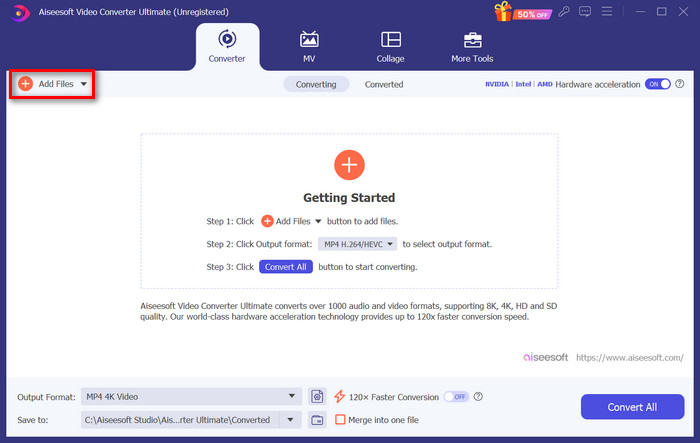
Steg 3. När H.264-videofilen har importerats väljer du MP4 i formatlistan genom att klicka på knappen Output format.
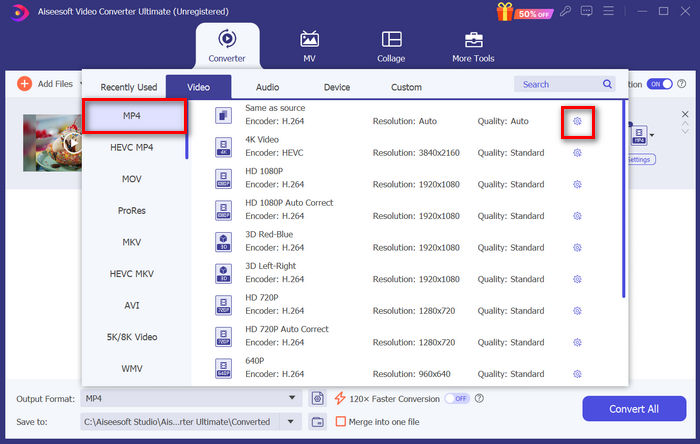
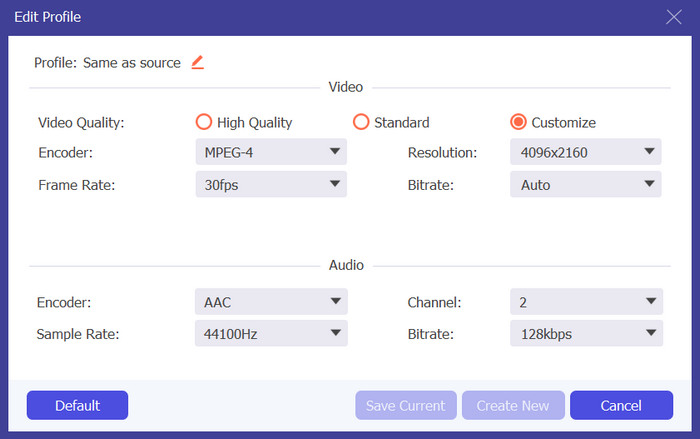
Om du samtidigt vill anpassa den anpassade profilen går du till Settings dialog box. Där kan du redigera videokodek, kvalitet, filnamn osv. När du är klar klickar du bara på knappen Create New för att spara.
Steg 4. När allt är klart klickar du bara på knappen Convert All.
Med FVC Video Converter Ultimate kan konvertering av H.264 till MP4 göras snabbt utan att det tar särskilt mycket tid eller ansträngning. Dessutom kan du konvertera andra format som H.265 och AVCHD till MP4. Utöver det kan du vara säker på att bibehålla hög utmatningskvalitet genom hela processen.
Del 3: Konvertera H.264 till MP4 med FFmpeg
FFmpeg är ett kommandoradsverktyg som används för att hantera multimediafiler och erbjuder funktioner från uppspelning till konvertering och redigering. Med sina mångsidiga funktioner tillåter detta verktyg användare att effektivt konvertera H.264 till MP4-format, vilket ger en bekväm lösning för dem som är bekväma med kommandoradsgränssnitt.
Steg 1. Först måste du hämta FFmpeg-körfilerna till din dator.
Steg 2. Öppna sedan kommandoradsfönstret i mappen med körfilerna. Ett terminalfönster öppnas.
Steg 3. Därefter lägger du till H.264-filen som du vill konvertera till MP4.
Steg 4. Till sist anger du kommandot: ./ffmpeg.exe -i inputfilename.mkv outputfilename.mp4 och trycker på Enter.
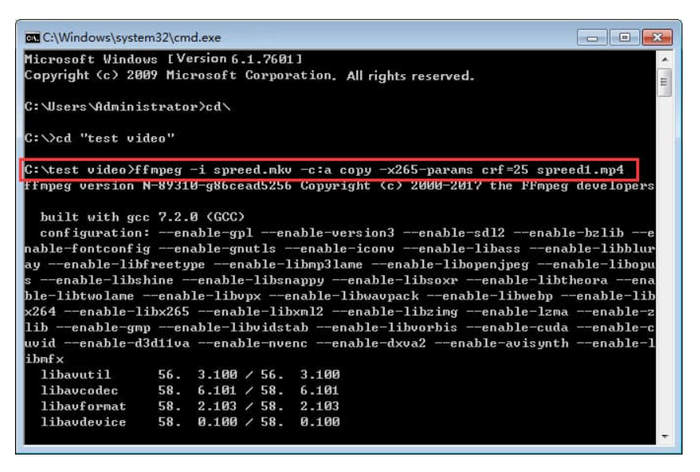
Om du är bekant med kommandorader kan FFmpeg fungera bäst för dig när du konverterar H.264 till MP4. Men om inte, kommer du att tycka att det här verktyget är svårt att navigera, vilket är en av dess brister när det kommer till användbarhet för nya användare.
Del 4: Konvertera H.264 till MP4 online
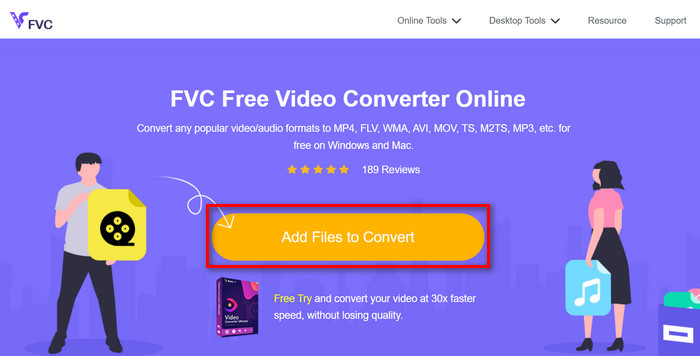
Om du letar efter ett verktyg för att konvertera H.264 till MP4 online är det bästa verktyget du kan använda FVC Free Video Converter Online. Det här verktyget erbjuder ett snabbt och mycket intuitivt sätt att konvertera H.264-filer till det format du vill ha, eftersom du bara behöver importera filen och välja önskat format, och resten sker nästan automatiskt.
Steg 1. Först måste du importera H.264-filen som du vill konvertera genom att klicka på knappen Add Files to Convert
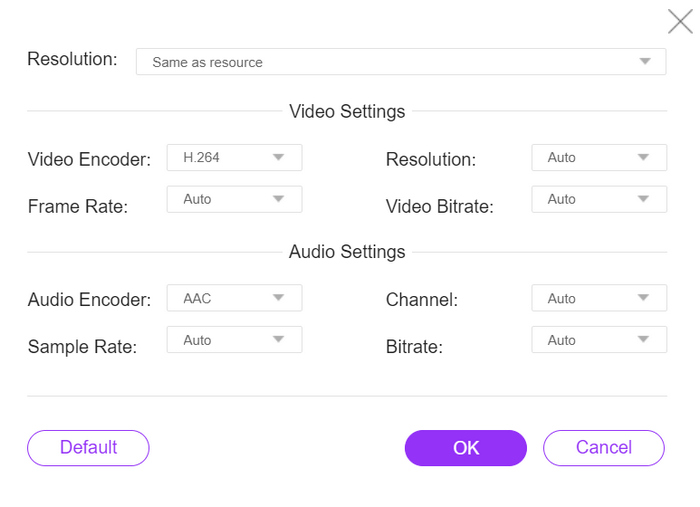
Steg 2. Välj nu MP4 som utdataformat. Om du också vill ställa in upplösning, videokodare, bitrate osv. manuellt klickar du bara på kugghjulsikonen vid sidan av utdataformatet. När du är klar klickar du på knappen OK.
Steg 3. För att slutligen starta konverteringsprocessen klickar du bara på knappen Convert.
Du har inget att oroa dig för när det gäller utdatakvaliteten för den konverterade H.264-filen, eftersom det här verktyget stöder en videoupplösning på upp till 1080P. Dessutom tar omvandlingshastigheten inte så lång tid eftersom den är 30× snabbare jämfört med andra omvandlingsverktyg.
Del 5. Vanliga frågor om att konvertera H.264 till MP4
H264 vs mp4, vilket är bättre?
När det kommer till kompatibilitet verkar MP4 vara bra, med tanke på att människor ofta väljer att konvertera H.264 till MP4 för förbättrat enhetsstöd och uppspelningsupplevelse. Men båda formaten har sina styrkor och tjänar olika syften effektivt.
Kan jag behålla originalkvaliteten på min H.264-video när jag konverterar till MP4?
Ja, du kan behålla den ursprungliga kvaliteten på din H.264-video när du konverterar till MP4, speciellt om du använder ett välrenommerat konverteringsverktyg som FVC Video Converter Ultimate eller FFmpeg. Dessa verktyg erbjuder alternativ för att justera inställningar som upplösning, bithastighet och codec för att säkerställa utdata av hög kvalitet.
Vilka videospelare är kompatibla med H.264-format?
Många videospelare kan spela H.264-format, inklusive som VLC Media Player, Windows Media Player och QuickTime Player.
Slutsats
Klart! Nu har du alla verktyg och metoder för att konvertera H.264 till MP4 utan ansträngning. Oavsett om du föredrar ett skrivbordsprogram, ett kommandoradsverktyg eller en online-omvandlare är valet ditt. Börja redan idag och säkerställ kompatibilitet med alla enheter!
-
 Bästa gratis MPG till MP4-omvandlare 2024 (djupgående granskning)
 Varför behöver du ändra MPG till MP4? Få svaret i det här inlägget och känn den högt rankade MPG-omvandlaren till MP4 på marknaden.
-
 Ljud till MP4: Konvertera valfri ljudfil till MP4-format
 Konvertera dina favoritlåtar, podcaster och inspelningar till MP4-format för en unik blandning av ljud och bild. Upptäck hur du konverterar WMA till MP4 eller annat ljud till videoformat.
-
 Topp 5 bästa FLV till MP4 Converter gratis och betald (2024 recensioner)
 Fortsätt med det här inlägget och lär dig mer om uppdateringarna angående FLV- och MP4-filer. Dessutom har vi tagit fram den mest pålitliga FLV-omvandlaren till MP4.
