


 Video Converter Ultimate
 Skärminspelare
 Video reparation
 Säker nedladdning
3 Effektiva metoder för att konvertera MP4 till AMV på din Windows och Mac med lätthet
När du vill skicka några stora MP4-videor till din smartphone, till exempel en stor film, kanske det inte finns tillräckligt med lagringsutrymme. För att konvertera MP4 till AMV-fil kan du använda den avancerade komprimeringsalgoritmen för att få en mycket mindre video. Oavsett om du behöver konvertera videorna online eller justera och redigera videorna med en viss storlek, kan du lära dig mer om de tre mest effektiva MP4 till AMV-omvandlarna från artikeln.

Del 1: Hur man konverterar MP4 till AMV Online
Om du bara behöver konvertera en enkel MP4 till AMV utan krångel är FVC Free Online Video Converter en mångsidig onlinevideokonverterare som är kompatibel med MP4, AMV, AVI och många andra filer. Den låter dig också justera video- och ljudinställningar och till och med konvertera filer utan vattenstämpel eller andra begränsningar.
- 1. Konvertera MP4 till AMV, AVI, MKV och fler andra videor med originalkvalitet.
- 2. Justera bildhastigheten, videokvaliteten, videokodeken, ljudkvaliteten och mer.
- 3. Ge ett enkelt användargränssnitt för att konvertera AMV-filerna endast i tre steg.
- 4. Det är en säker och stabil metod för att konvertera filerna utan vattenstämpel.
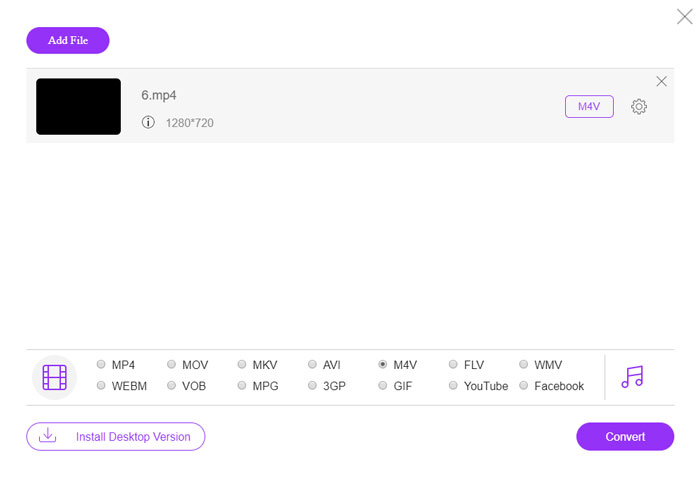
Steg 1. Gå till den webbaserade MP4 till AMV-konverteraren i valfri webbläsare. Du kan klicka på knappen Add File to Convert för att installera videokonverteraren första gången. Du kan också ladda MP4-filerna till programmet.

Steg 2. Välj AMV som utdataformat längst ned. Självklart kan du också justera video- och ljudinställningar, såsom videokodare, videoupplösning, videobithastighet, bildfrekvens med mera för att få en önskad video.

Steg 3. Därefter kan du klicka på knappen Convert för att börja konvertera MP4 till AMV. Det tar några sekunder att få den önskade filen, och sedan kan du överföra videon till din smartphone.
Del 2: Så här konverterar du MP4 till AMV med VLC Media Player
VLC Media Player är en av de mest populära MP4 till AMV-omvandlarna. Det ger också några grundläggande funktioner för videokonvertering och redigering. Dessutom kan du också förhandsgranska AMV-videon efter konvertering. Kolla in den detaljerade processen enligt nedan.
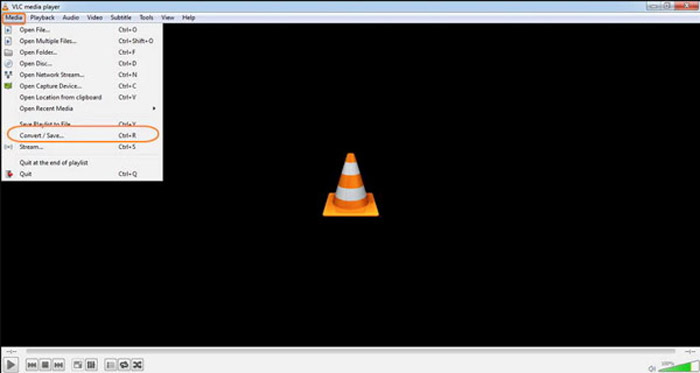
Steg 1. Öppna VLC Media Player på din dator, gå till menyn Media och välj alternativet Convert/Save. Klicka på alternativet Add till höger om listan File Selection på fliken File och bläddra fram MP4-filerna.
Steg 2. Klicka på knappen Convert/Save för att fortsätta. Gå till fönstret Convert, där du kan välja AMV som utdataformat. Klicka på knappen Edit Selected Profile för att justera video- och ljudinställningarna.
Steg 3. Klicka på alternativet Browse och välj en plats och ett filnamn för utdatafilen. Därefter kan du klicka på knappen Start för att konvertera MP4-filer till AMV på din dator.
Del 3: Bästa metoden för att konvertera MP4 till AMV med lätthet
FVC Video Converter Ultimate är en allt-i-ett MP4 till AMV-konverterare för både Windows och Mac. Den konverterar inte bara videoformat, utan låter dig också justera olika video- och ljudparametrar, lägga till undertexter/ljudspår och till och med redigera de konverterade videofilerna enkelt.
- 1. Konvertera MP4 till AMV och fler andra videoformat med originalkvalitet.
- 2. Justera bildhastigheten, videokvaliteten, bithastigheten, videokodeken och fler andra.
- 3. Ge flera videoredigeringsfunktioner för att rotera, klippa, justera filter etc.
- 4. Avancerad hårdvaruacceleration för att konvertera videon med 70 gånger snabbare hastighet.
Gratis nedladdningFör Windows 7 eller senareSäker nedladdning
Gratis nedladdningFör MacOS 10.7 eller senareSäker nedladdning
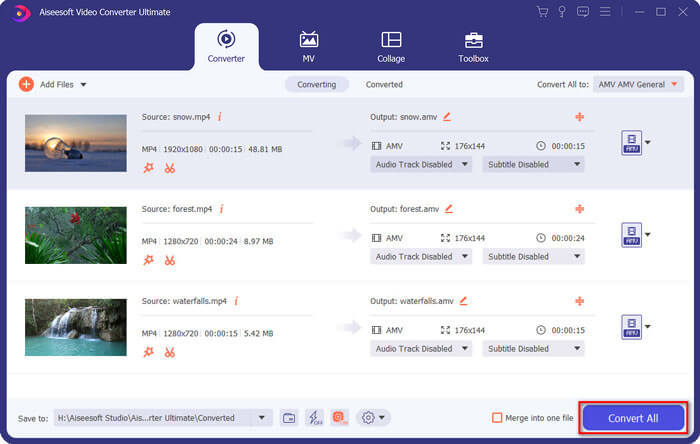
Steg 1. Ladda ner och installera MP4 till AMV-konverteraren och starta programmet på din dator. Välj knappen Convert och klicka på alternativet Add File för att ladda MP4-filerna, eller dra direkt flera MP4-filer till programmet.

Steg 2. Klicka på formatikonen på höger sida om videofilen och välj AMV som utdataformat. Du kan också klicka på Gear-ikonen för att justera video- och ljudinställningar eller till och med redigera videon/justera filter enkelt.

Steg 3. När du är nöjd med den färdiga AMV-filen, till exempel videostorleken, kan du klicka på knappen Convert All för att starta MP4 till AMV-konverteringen. Därefter kan du överföra AMV-filerna till en annan enhet.
Del 4: Vanliga frågor om konvertering av MP4 till AMV-filer
1. Vad är AMV-filformatet?
AMV-filen är känd som Anime Music Video-filen. Det används vanligtvis av bärbara mediaspelare från och i Kina. AMV-videoformatet har låg upplösning, som har en videoupplösning mellan 94x64 och 160x120. När du konverterar MP4 till AMV kan du enkelt skicka fler videor till din smartphone.
2. Hur spelar jag AMV-filer på smartphone och dator?
När du konverterar MP4 till AMV-filer, hur spelar du videofilerna på din smartphone eller dator? Egentligen kan du helt enkelt ta AMV som en variant av AVI-format, som fungerar på de flesta mediaspelare. Om du behöver spela upp AMV-filerna på dina iOS-enheter kan du istället använda VLC Media Player eller annan mediaspelare.
3. Vad är skillnaderna mellan AMV och MP4?
MP4 är ett av de mest använda videoformaten som kan användas för online-streamingtjänster och enheter. AMV är en variant av Motion JPEG, med fasta snarare än variabla kvantiseringstabeller. När du konverterar MP4 till AMV kan du komprimera videon och spara mer lagringsutrymme, särskilt för att överföra videor till enheter.
Slutsats
Vad är det bästa valet att konvertera MP4 till AMV? Lär dig bara mer information om de bästa metoderna från artikeln. Om du behöver konvertera och komprimera videor online utan extra programvara är FVC Free Online Video Converter den ultimata lösningen du kan ta hänsyn till.
-
 AVI VS MP4 - Vilket är bättre (kvalitet / kompression / filstorlek ...)
 Vilket är ett bättre videoformat, AVI eller MP4? Om du vill få en detaljerad jämförelse kan du kolla in den här AVI VS MP4-artikeln. Du kan känna till skillnaderna och likheterna mellan AVI och MP4 i många aspekter.
-
 Topp 10 MP4-spelarprogramvara för Windows och Mac (gratis och betald)
 Läs och få din bästa MP4-spelare från rekommendationerna från den 10 senaste MP4-videospelarprogramvaran. Du kan spela MP4-videofiler på Windows och Mac smidigt utan fördröjning.
-
 Hur konverterar du MP4 till WMV för Mac / Windows
 Detta inlägg delar hur du konverterar MP4-video till WMV-format på Mac eller Windows. Vi kommer också att erbjuda dig flera alternativ, inklusive skrivbordsprogramvara och webbaserade omvandlare online. Redo att känna till de bästa MP4 till WMV-konverteringsverktygen?
