


 Video Converter Ultimate
 Skärminspelare
 Video reparation
 Säker nedladdning
Så här konverterar du MP4 till M4A på Windows / Mac (gratis och online)
MP4 är ett utbrett filformat som används med flera stationer och videospelare. MP4-filer kan lagra video, ljud och annat innehåll. Nu föredrar många att lyssna på ljudspåret till MP4-videon. För att bevara kvaliteten är det en bra idé att konvertera MP4 till M4A. M4A står för MPEG 4 Audio. De flesta program kan spela M4A-filer, inklusive iTunes, QuickTime, Windows Media Player och mer.

Du kanske undrar hur man extraherar ljudet från en MP4‑fil. Det finns många sätt att göra om en MP4‑fil till en M4A‑fil. Läs det här inlägget för att ta reda på hur du kan konvertera MP4 till M4A för framtida lyssning på dina mobila enheter.
Del 1. Bästa gratis online sätt att konvertera MP4 till M4A utan kvalitetsförlust
FVC Free Online Video Converter är en kostnadsfri MP4‑till‑M4A‑konverterare som kan konvertera MP4‑formatet inte bara till M4A utan även till andra format som MP3, WAV, M4R, WMA, AIFF, AC3 osv. Den låter dig göra batchkonvertering så att du kan konvertera flera MP4‑videor till M4A på en gång. Dessutom kan detta kostnadsfria onlineverktyg även hjälpa dig att konvertera MP4‑video till MOV, AVI, FLV och andra videoformat.
Steg 1. Öppna https://www.free-videoconverter.net/free-online-video-converter/ i din webbläsare. Klicka på knappen Add Files to Convert och ladda sedan ner och installera dess startprogram.

Steg 2. Ladda upp MP4‑videon du vill konvertera och klicka sedan på Open för att fortsätta.
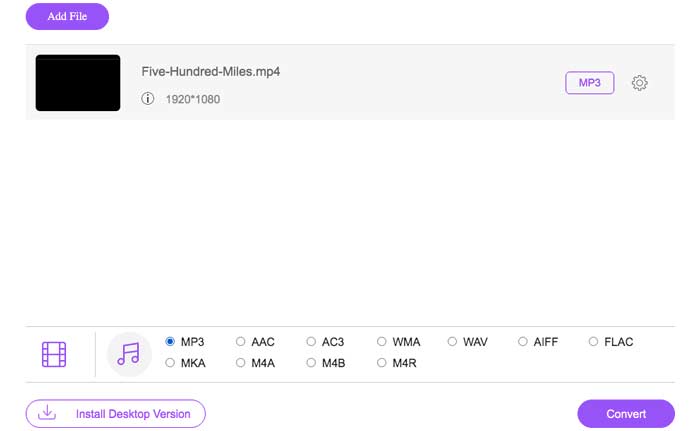
Steg 3. När du har laddat upp dina videofiler till detta verktyg klickar du på ikonen Audio och väljer formatet M4A som utdataformat.
Steg 4. Avslutningsvis klickar du på knappen Convert nere till höger. Vänta en stund, så får du ditt M4A‑ljud från MP4‑filen.
Del 2. Hur man konverterar MP4 till M4A med Free Audio Converter
FVC Free Audio Converter är freeware som gör att du enkelt kan konvertera MP4 -filer till M4A. Den kan ändra alla video- eller ljudfiler till M4A, MP3, WAV, etc. Du kan ladda ner och installera den på din Windows -dator för att starta konverteringen.
Gratis nedladdningFör Windows 7 eller senareSäker nedladdning
Gratis nedladdningFör MacOS 10.7 eller senareSäker nedladdning
Steg 1. Starta denna ljudkonverterare på din dator. Klicka på knappen Add File(s) för att ladda upp MP4‑filerna till programmet.

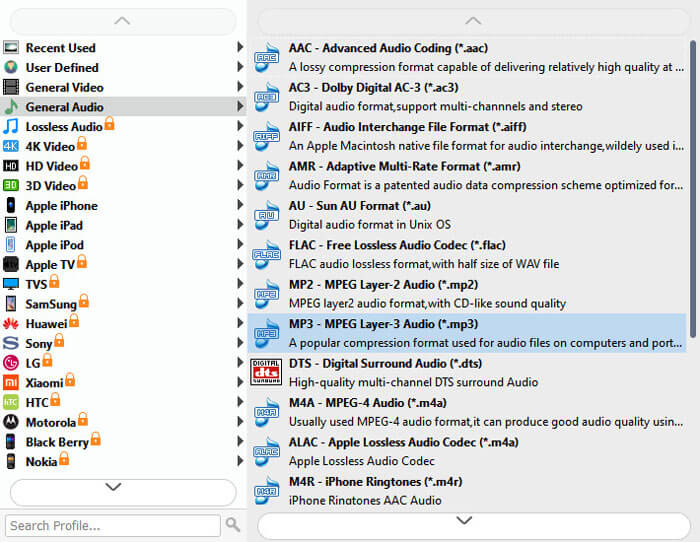
Steg 2. Leta reda på alternativet Output formats och välj M4A som utdataformat i rullgardinslistan.
Steg 3. Klicka på knappen Convert för att börja göra om MP4‑filer till M4A.
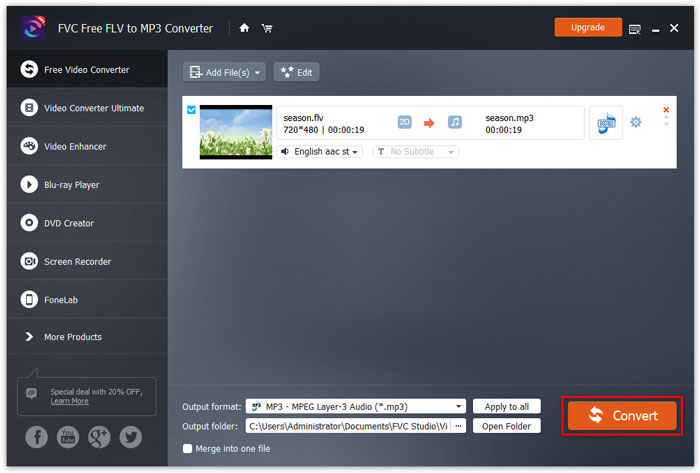
Förutom M4A kan du använda det för att konvertera MP4 till MP3, AAC eller andra ljudformat.
Del 3. Hur man konverterar MP4 till M4A med iTunes
För att konvertera MP4 till M4A med iTunes för Windows eller Mac måste du ändra iTunes-importinställningarna och sedan använda menyalternativet Konvertera för att göra en M4A-kopia.
Steg 1. Öppna iTunes på din Windows‑PC eller Mac.
Steg 2. Välj Edit och klicka sedan på Preferences i menyraden. Gå sedan till fliken General och klicka på Import Settings.
Steg 3. Hitta och klicka på menyn bredvid Import Using och välj sedan den kodningsmetod du vill konvertera videon till. Klicka sedan på OK.
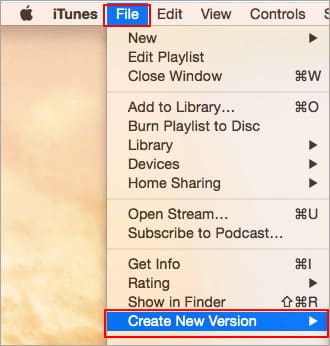
Steg 4. Markera låtarna i ditt bibliotek som du vill konvertera. Välj sedan File, klicka därefter på Create New Version och skapa sedan en M4A‑version.
De konverterade ljudfilerna visas i ditt bibliotek bredvid originalfilerna.
Del 4. Vanliga frågor om konvertering av MP4 till M4A
1. Vad är M4A-fil?
En fil med filändelsen M4A är en MPEG-4 ljudfil. M4A finns ofta i Apples iTunes Store som format för nedladdningar av låtar.
2. Hur öppnar jag M4A-filer?
Program som öppnar M4A-filer inkluderar iTunes, QuickTime, Windows Media Player etc. Android-surfplattor och telefoner, iPhone, iPad och iPod touch stöder också uppspelning av M4A-filer.
3. Hur slår man samman MP4-filer online?
FVC Free Online Video Merger kan hjälpa dig att slå ihop eller sammanfoga olika MP4‑ eller andra videoformat som MOV, AVI, FLV med flera online.
4. Kan Windows Media Player konvertera MP4 till M4A?
Nej. Windows Media Player stöder endast konvertering av videofiler till MP3 eller WAV.
Slutsats
Ovanstående tre sätt kan hjälpa dig att förvandla MP4 till M4A gratis utan mycket ansträngning. Om du föredrar att göra omvandlingen online bör FVC Free Online Video Converter vara ett utmärkt val. Om dina MP4-filer är stora, kommer FVC Free Audio Converter eller iTunes att vara mer tillförlitliga för att konvertera MP4-filer till M4A.
-
 Hur konverterar du MP4 till WMV för Mac / Windows
 Detta inlägg delar hur du konverterar MP4-video till WMV-format på Mac eller Windows. Vi kommer också att erbjuda dig flera alternativ, inklusive skrivbordsprogramvara och webbaserade omvandlare online. Redo att känna till de bästa MP4 till WMV-konverteringsverktygen?
-
 Hur man konverterar WMV till MP3 på skrivbordet och online
 Du kan hitta valfri gratis videokonverteringsprogramvara från FVC studio. Alla video- / ljudformat stöds, inklusive MP4, MOV, TS, AVI, WMV, FLAC, MP3, etc.
-
 Hur konverterar man AVCHD till MP4-videor gratis på Windows / Mac / Online
 Det finns 5 enkla sätt att konvertera AVCHD till MP4-videor på din dator. Du kan batchkonvertera AVCHD-videor till MP4 utan att förlora kvalitet med någon omvandlare här.
