


 Video Converter Ultimate
 Skärminspelare
 Video reparation
 Säker nedladdning
Hur kan jag konvertera MP4 till WAV online gratis
MP4 är ett väldigt vanligt videoformat som människor använder i vardagen. Samtidigt är WAV också ett utmärkt alternativ för att lagra okomprimerat ljud. Men ibland kanske du vill konvertera MP4 till WAV för att lyssna på dina enheter. I ett sådant läge behöver du en professionell konverterare som kan extrahera ljuddelen från videon utan att försämra ljudkvaliteten.
Idag ska vi därför jämföra MP4 och WAV mer ingående och presentera de bästa MP4 till WAV‑konverterarna, både online och offline.

Del 1. MP4 vs WAV
För att vara ärlig finns det inte mycket att jämföra mellan MP4 och WAV. När allt kommer omkring är de två olika format som används i olika situationer, ett för att lagra videor och ett för att spara ljud. Men båda är filtyper och de kan innehålla digitalt ljud. Baserat på det listar tabellen nedan några av deras skillnader.
| MP4 | WAV | |
| Innehåller | Video, ljud och undertexter | Endast ljud |
| Filnamnstillägg | .mp4, .m4a, .m4p, .m4b, .m4r och .m4v | .wav och .wave |
| Utvecklad av | Internationella organisationen för standardisering | IBM och Microsoft |
| Egenskaper | Komprimerad och förlorad (för mest tid) | Okomprimerad och förlustfri |
Del 2. Bästa MP4 till WAV Converter Online
Nu har du lärt dig fördelarna med dessa två format. Det är dags att hitta en användbar MP4 till WAV-omvandlare som kan tillgodose alla dina konverteringsbehov.
Här rekommenderar vi ett webbaserat konverteringsverktyg som heter FVC Free Audio Converter, som kan hjälpa dig att enkelt omvandla MP4‑videofiler till WAV online gratis. Det bästa med den här onlinekonverteraren är att du kan köra den på alla operativsystem, som Windows och Mac OS, utan att ladda ner något stort program. Allt du behöver är en webbläsare och en stabil internetuppkoppling. Sedan kan du utan krångel göra om MP4‑videor som musikvideor och pratshower till WAV‑filer.
Gratis nedladdningFör Windows 7 eller senareSäker nedladdning
Gratis nedladdningFör MacOS 10.7 eller senareSäker nedladdning
Följ dessa steg nedan och du kan också hantera omvandlingen som ett proffs.
Steg 1. Klicka på länken ovan för att gå till den officiella webbplatsen för FVC Free Audio Converter. Klicka på knappen Add Files to Convert. Därefter behöver du ladda ner och installera ett enkelt startprogram.
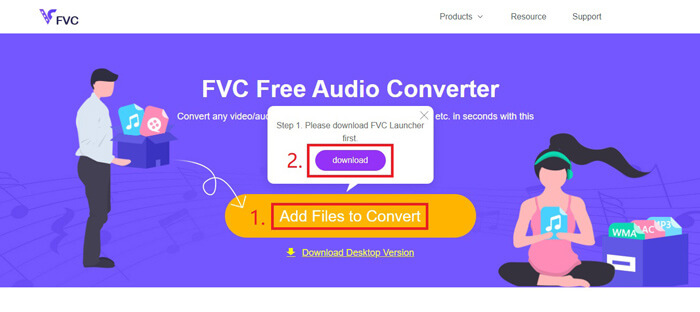
Steg 2. Efter installationen öppnas fönstret Open automatiskt. Då kan du välja den MP4‑video du vill konvertera.
Steg 3. Eftersom du vill ha en WAV‑fil behöver du ändra utdataformatet till WAV. Klicka på Convert och välj en plats där WAV‑filen ska sparas.
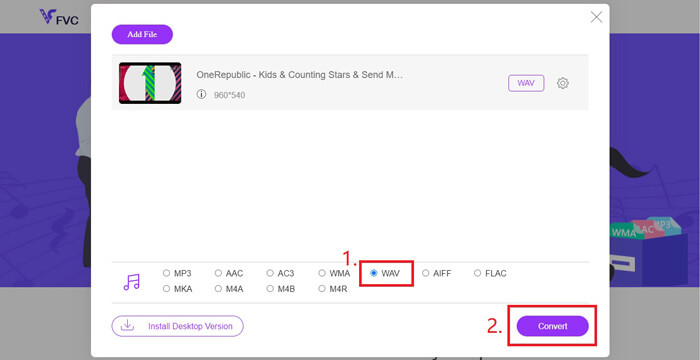
Steg 4. Vänta en stund, så sparas den konverterade filen automatiskt på din dator.
Del 3. Konvertera MP4 till WAV med Audacity
Många undrar hur man konverterar MP4 till WAV med Audacity. Vi gjorde därför en undersökning och kom fram till att den här metoden kan vara lite komplicerad. Audacity kan nämligen inte öppna MP4‑filer direkt utan det valfria FFmpeg-biblioteket. Som tur är löste vi problemet genom att använda inspelningsfunktionen i Audacity.
För dem som inte är bekanta med Audacity är det en öppen källkod och freeware för plattformsljud som utvecklats av volontärer. Normalt används den för redigering och inspelning av ljud med flera spår. För att exportera WAV-fil från MP4 med Audacity måste du följa stegen nedan.
Steg 1. Leta upp MP4‑videofilen som du vill konvertera och spela upp den med mediaspelaren på din dator. För att vara säker på att inget innehåll missas, pausa videon när du öppnar den och spola sedan tillbaka till början.
Steg 2. Nu kan du starta Audacity. Först behöver du stänga av mikrofonen genom att dra inspelningsvolymen till 0. Justera sedan volymen för systemljudet som du vill. Klicka på knappen Record.
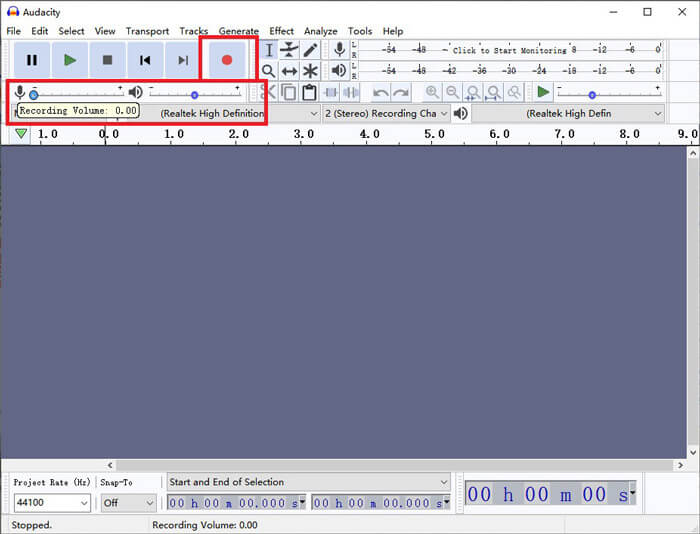
Steg 3. Gå tillbaka till mediaspelaren och spela upp MP4‑videon. Audacity kommer att spela in ljuddelen från videon. När MP4‑videon är slut kan du stänga mediaspelaren.
Steg 4. Gå tillbaka till Audacity och klicka på ikonen Stop. Gå sedan till File i menyraden högst upp. Välj Export och därefter Export as WAV.
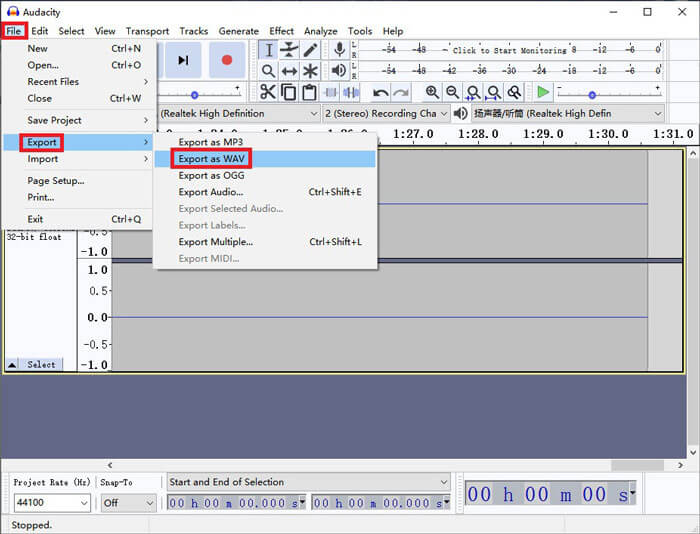
Steg 5. Ge ljudfilen ett namn innan du sparar den på datorn.
Del 4. Vanliga frågor om konvertering av MP4 till WAV
1. Hur konverterar jag MP4 till WAV i iTunes?
Öppna iTunes och gå till Edit i menyraden högst upp. Välj sedan Preferences. I fönstret General Preferences letar du upp Import Settings. Ändra sedan Import Using från AAC Encoder till WAV Encoder. Klicka på OK. Högerklicka på videofilen du vill konvertera och välj Create WAV Version.
2. Hur konverterar man MP4 till WAV i Windows Media Player?
Öppna MP4‑filen med Windows Media Player. Klicka på ikonen Menu för att gå till startsidan i Windows Media Player. Klicka på Organize och välj Options. Gå sedan till fliken Rip Music och ändra utdataformatet till WAV. Här kan du också ändra platsen där ljudfilen ska sparas. Klicka på knappen OK för att starta konverteringen från MP4 till WAV.
3. Vilket är bättre, MP4 eller WAV?
Om du bara vill jämföra ljudkvaliteten är WAV uppenbart bättre än MP4, eftersom en ljudfil i WAV‑format är okomprimerad och förlustfri. Av samma anledning kan en WAV‑fil dock vara större än en MP4‑fil, även om de innehåller samma ljud. Om du vill veta mer om MP4‑video behöver du åtminstone jämföra det med andra videoformat, till exempel AVI VS MP4 eller MOV VS MP4.
Slutsats
Inklusive metoderna som vi nämnde i vanliga frågor har du nu fyra sätt att göra om MP4 till WAV. Om du bara vill använda ett tidsbesparande konverteringsverktyg för att konvertera ljud, kommer FVC Free Audio Converter att göra ett utmärkt jobb utan extra krångel.
Om du tycker att den här artikeln är till hjälp kan du dela den med dina vänner. Lämna gärna dina åsikter.
-
 Hur konverterar du MP4 till WMV för Mac / Windows
 Detta inlägg delar hur du konverterar MP4-video till WMV-format på Mac eller Windows. Vi kommer också att erbjuda dig flera alternativ, inklusive skrivbordsprogramvara och webbaserade omvandlare online. Redo att känna till de bästa MP4 till WMV-konverteringsverktygen?
-
 Hur konverterar du MP4 till MP3 på Windows / Mac / iPhone / Android / Online
 Om du vill extrahera MP3-ljud från MP4-video kan du läsa den här artikeln och få 8 lösningar. Det finns online- och offline-sätt att enkelt konvertera MP4 till MP3 på din telefon eller dator.
-
 Hur man konverterar WMV till MP3 på skrivbordet och online
 Du kan hitta valfri gratis videokonverteringsprogramvara från FVC studio. Alla video- / ljudformat stöds, inklusive MP4, MOV, TS, AVI, WMV, FLAC, MP3, etc.
