


 Video Converter Ultimate
 Skärminspelare
 Video reparation
 Säker nedladdning
Gratis och online sätt att konvertera RMVB till MP4
RMVB (RealMedia Variable Bitrate) är en RealMedia-videofil som inte stöds av alla program. Många vill ändra filformatet från RMVB till MP4 för att enkelt kunna spela upp filerna på mobiltelefoner. Den här guiden visar dig tre kostnadsfria och webbaserade sätt att snabbt konvertera RMVB-filer till MP4 så att du kan fortsätta njuta av dina videor utan krångel.

Del 1. Hur man konverterar RMVB till MP4 med RMVB till MP4 Converter
För att konvertera RMVB till MP4 på din Windows 10-dator eller Mac är en RMVB till MP4-omvandlare ett snabbt och tillförlitligt val. Free RMVB to MP4 Video Converter är en funktionell och gratis videokonverterare för snabb konvertering från RMVB till MP4. Den stöder även konvertering från RMVB till AVI, FLV, MOV och andra format. Nedan följer stegen för att ändra RMVB till MP4.
Gratis nedladdningFör Windows 7 eller senareSäker nedladdning
Gratis nedladdningFör MacOS 10.7 eller senareSäker nedladdning
Steg 1. Innan du börjar behöver du ladda ner och installera detta gratisprogram på din dator. Starta sedan Free RMVB to MP4 Converter och importera RMVB-filerna till programmet genom att klicka på knappen Add File(s). För övrigt kan du göra batchkonvertering på en gång, så att du kan konvertera flera RMVB-filer samtidigt.
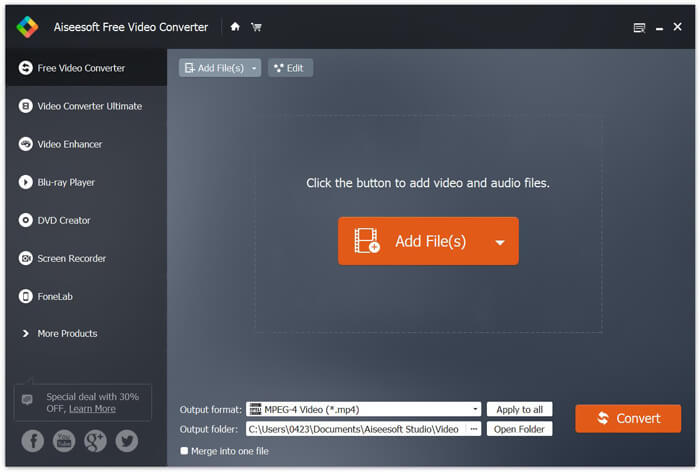
Steg 2. När du har lagt till filerna i programmet går du till Output format och väljer sedan formatet MP4.

Steg 3. Klicka på knappen Convert. Vänta några minuter så får du dina önskade MP4-filer.
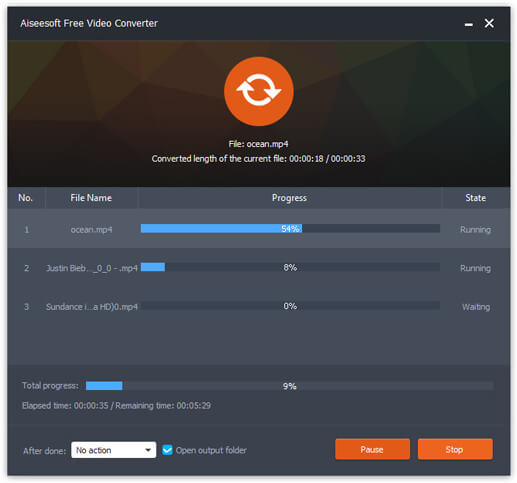
När du har fått MP4-filerna kan du spela upp dem på din dator eller dina mobila enheter. Dessutom kan du också använda denna Free RMVB to MP4 Converter för att göra om RM till MP4 eller konvertera WMV till MP4.
Del 2. Hur man konverterar RMVB till MP4 med VLC
VLC fungerar också som ett praktiskt videokonverteringsverktyg och du kan enkelt konvertera dina RMVB-filer till MP4 i hög kvalitet. Låt oss se hur man använder VLC för att göra det här jobbet.
Steg 1. För att börja behöver du ladda ner och installera programmet VLC Media Player på din dator och sedan köra det.
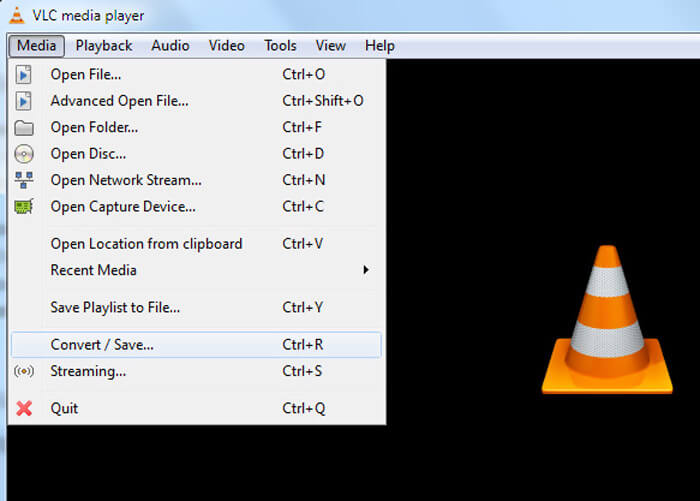
Steg 2. Gå till Media-fliken och välj sedan Convert/Save för att fortsätta.
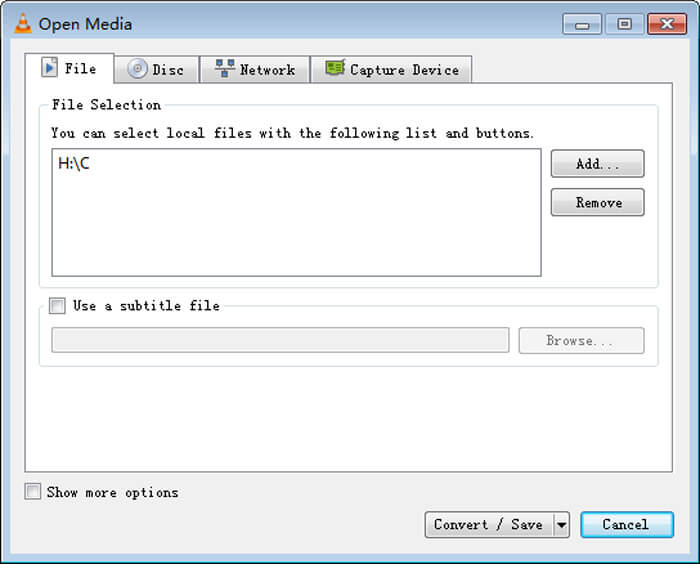
Steg 3. När du ser fönstret Open Media måste du lägga till dina RMVB-filer i VLC genom att klicka på knappen Add… under alternativet File. Klicka sedan på knappen Convert/Save längst ned i fönstret.
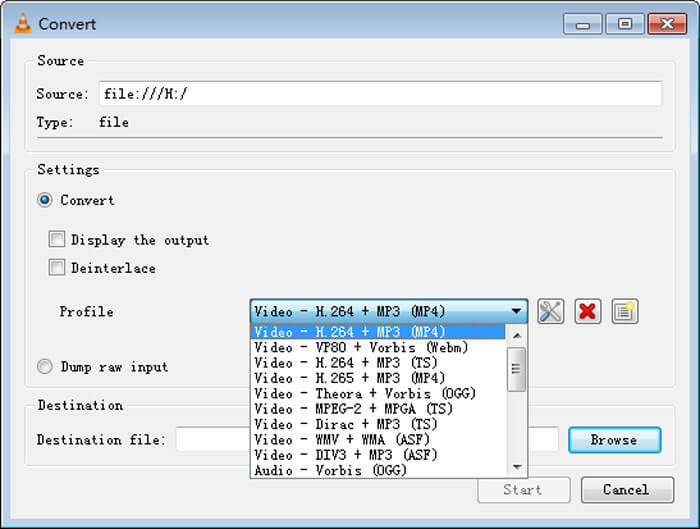
Steg 4. Därefter kommer du till fönstret Convert. Här behöver du hitta Settings, gå till Profile och sedan välja MP4 som utdataformat i rullgardinsmenyn. Till sist klickar du på Start för att konvertera din RMVB till MP4 för enkel uppspelning.
Del 3. Hur man ändrar RMVB till MP4 online
Det webbaserade videokonverteringsverktyget stöder också snabb konvertering av RMVB-videor till MP4. Free Online Video Converter är en webbaserad videokonverterare som kan konvertera alla populära video- eller ljudfiler till MP4, MOV, FLV, AVI, MP3, AAC och mycket mer – helt gratis. Den gör det möjligt för användare att enkelt ändra filer från RMVB till MP4 direkt i webbläsaren.
Steg 1. Gå till https://www.free-videoconverter.net/free-online-video-converter/ och klicka på knappen Add Files to Convert för att aktivera startprogrammet.
Ladda ner Skrivbordsversionen för att konvertera filer i batch.

Steg 2. Importera därefter dina RMVB-filer till detta onlinverktyg. Välj sedan formatet MP4 under fliken Video. När du är redo att göra konverteringen klickar du på knappen Convert för att starta konverteringen. När konverteringen är klar sparas de konverterade filerna automatiskt på din dator.

RMVB kontra MP4
RMVB, en nyare variant av standardformatet Real Media (.RM), är ett Real Media-videofilformat komprimerat med en variabel bithastighet. Det är ett populärt format för asiatiska filmer och anime. RMVB-filer är mindre i storlek och har lägre bithastigheter men bättre kvalitet.
MP4-formatet släpptes av Moving Picture Experts Group (MPEG) 2001 och kan hjälpa dig att spara video-, ljud-, undertext- och bilddata i separata spår. Det är en förkortning för MPEG-4 Part 14. Dessutom är det ett av de mest populära formaten som används för att streama och dela videor.
Del 4. Vanliga frågor om RMVB till MP4
Vad är en RMVB-fil?
RMVB (RealMedia Variable Bitrate) är ett Real Media-videofilformat med variabel bithastighet. Det var en gång populärt för att distribuera asiatisk anime, filmer, avsnitt, torrent etc. på nätet eftersom filstorleken är mindre och kvaliteten är mycket bättre.
Hur öppnar jag en RMVB-fil?
RealPlayer stöder uppspelning av RMVB-filer i Windows, Mac OS X och Linux. Eller så kan du använda VLC för att spela RMVB-filer.
Kan handbroms konvertera RMVB till MP4?
HandBrake är ett utmärkt verktyg för att konvertera video till arbete på ett antal enheter som stöds. Det är ett utmärkt val för alla att förvandla RMVB till MP4.
Så det är så du konverterar RMVB-filer till MP4. Har du stött på något problem genom att följa stegen ovan? Låt oss gärna veta dina tankar.
-
 3 enkla steg för att bränna video _TS-filer / mapp till DVD på Mac / Windows
 Hur konverterar jag och bränner TS-filer till DVD-skiva? Den här steg-för-steg-guiden visar hur du kopierar TS-filer och mappar till DVD på Windows / Mac så att du kan titta på TS-filer på DVD-spelare eller TV.
-
 6 enkla sätt att konvertera TS till AVI / MKV / MOV / WMV på Windows / Mac
 Vill du snabbt konvertera TS-filer till AVI / MKV / MOV / WMV? Den här artikeln visar online- och offlinevideoomvandlare med komplett guide. Kanske kan du få den bästa gratis TS-omvandlaren här.
-
 Så här konverterar du MP4 till M4A på Windows / Mac (gratis och online)
 Hur konverterar jag MP4 till M4A online? Kan jag extrahera ljudet från MP4-filer? Läs det här inlägget så får du alla svar om konverteringen från MP4 till M4A.

