


 Video Converter Ultimate
 Skärminspelare
 Video reparation
 Säker nedladdning
WTV till MP4 Converter: Hur man konverterar WTV till MP4
WTV, som efterträdare till DVR-MS-format, är utvecklat av Microsoft för att lagra TV-innehåll inspelat av Windows Media Center. Kodad med MPEG-2 och MPEG-4 standard och MPEG-1 Layer II eller Dolby Digital AC-3, stöds WTV av få programvara som FFMPEG, Windows Media Center, CyberLink PowerDVD 12, Nero 12, HandBrake, CCextractor, etc.

Om du vill titta på eller dela WTV-filer på ett smidigt sätt är det bäst att konvertera WTV till MP4, det mest populära formatet för nästan alla enheter.
Vi har sökt på Internet efter en WTV till MP4–omvandlare och hittat de 2 bästa gratis WTV till MP4–omvandlarna för att göra om WTV till MP4.
Del 1. Gratis videokonverterare - Konvertera WTV till MP4 online
Det är mycket enkelt att konvertera WTV till MP4. Det enklaste sättet att ändra WTV till MP4 är att göra det online. Free Online Video Converter är ett gratisprogram för att konvertera WTV till MP4 och andra vanliga video- och ljudformat. Det här kostnadsfria onlineverktyget är kompatibelt med Windows 10/8/7 och Mac OS X 10.7 eller senare, och du kan enkelt transkoda WTV till MP4 i några få steg.
För att effektivisera processen kan du följa guiden:
1. Klicka på knappen Add Files to Convert för att ladda upp WTV-filer från datorn.
2. Välj MP4 i kryssrutan.
3. Klicka på Convert för att konvertera och ladda ner WTV-filer automatiskt.
Nu är vi här för att gå igenom hur du konverterar WTV till MP4 i detaljer.
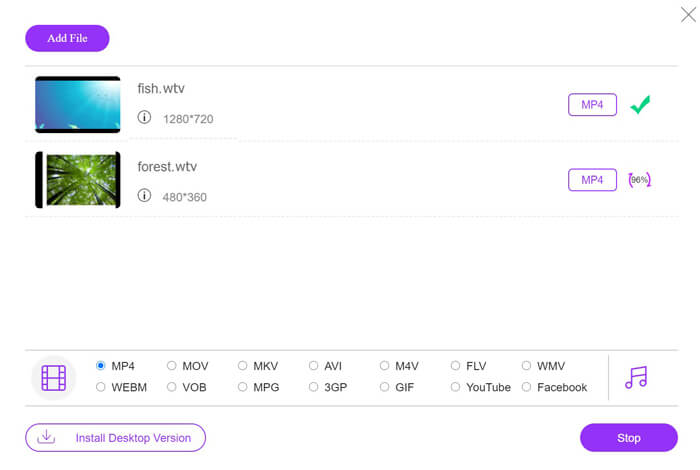
Steg 1. Lägg till WTV-filer
Öppna denna kostnadsfria onlineomvandlare från WTV till MP4 via din webbläsare. Klicka på knappen Add Files to Convert, och ett popup-fönster uppmanar dig att ladda ner och installera startprogrammet. Ladda bara ner det, så visas fönstret med öppen källkod efter den lyckade installationen. Därefter kan du välja WTV-inspelningarna på din dator för uppladdning. Det här gratisverktyget stöder batchkonvertering och du kan lägga till fler än en WTV-fil online.

Steg 2. Välj MP4
Markera kryssrutan MP4 längst ned, där du kan hitta olika utmatningsalternativ som MKV, AVI, M4V, FLV, VOB, GIF, YouTube, Facebook, MP3, AAC, WMA, WAV, FLAC osv.
Dessutom kan du klicka på ikonen Settings bredvid MP4-utmatningsrutan för att justera codec, bildfrekvens, upplösning, bithastigheter och andra parametrar.

Steg 3. Konvertera WTV till MP4
När allt är klart klickar du på knappen Convert och ett fönster visas där du måste välja platsen där de konverterade MP4-filerna ska sparas. Välj målmapp och gå tillbaka till den här kostnadsfria onlineomvandlaren, klicka på Convert igen för att börja konvertera och ladda ner MP4-filerna automatiskt. Du kan se konverteringsförloppet i procent direkt.
Del 2. Handbroms - Konvertera WTV till MP4 på PC / Mac
Ett annat gratis sätt att konvertera WTV till MP4 är att använda HandBrake. HandBrake är ett fåtal program som kan läsa WTV-filer. Dessutom kan den också koda WTV till MP4 / MKV på din Windows- och Mac-dator.
HandBrake är skrivbordsprogrammet med öppen källkod, så du bör ladda ner den här gratisomvandlaren först på din dator.
Återigen är de enkla stegen att konvertera WTV till MP4 i HandBrake följande:
1. Lägg till WTF-filerna eller hela mappen i HandBrake.
2. Anpassad MP4-profil i HandBrake.
2. Förhandsgranska och konvertera WTV till MP4.
Här är den omfattande guiden för att ändra WTV till MP4 i HandBrake.
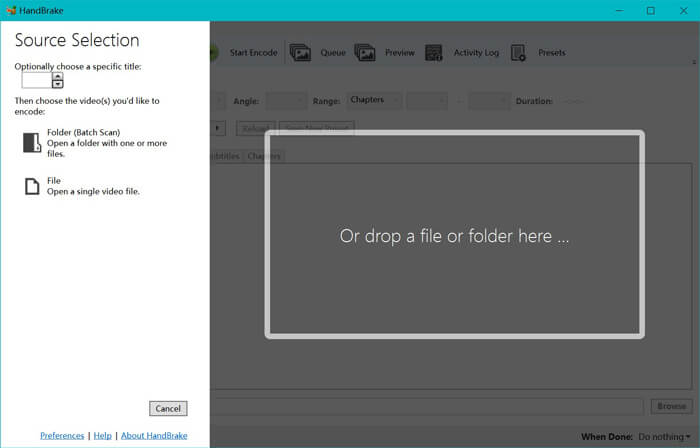
Steg 1. Lägg till WTV-filer i HandBrake
När du har installerat HandBrake på din dator visar HandBrake som standard dialogrutan för öppen källkod. Här kan du klicka på Folder eller File för att välja WTV-filer eller mapp till huvudfönstret. Alternativt kan du också dra och släppa WTV-filerna i den här programvaran.
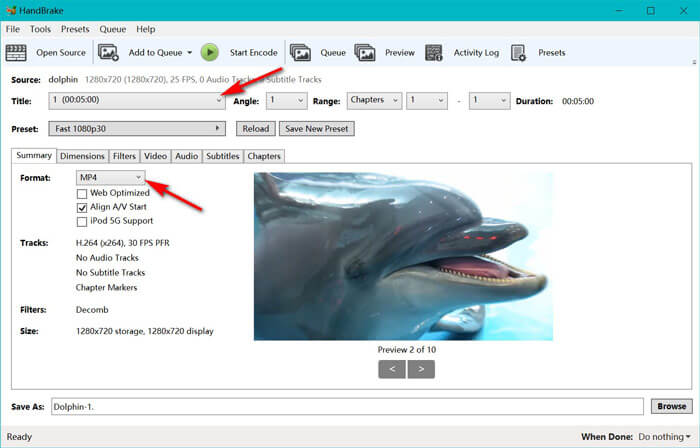
Steg 2. Välj MP4-format
När du har laddat in WTV-filerna kan du välja den exakta WTV-filen från rullgardinsmenyn Title. Välj sedan MP4 på fliken Summary som utdata för den valda WTV-filen. Dessutom låter HandBrake dig justera dimensioner, filter, videocodec/kvalitet, ljudspår osv. Förutom MP4 kan det även konvertera andra format som AVI, MOV, M2TS osv. till MKV.
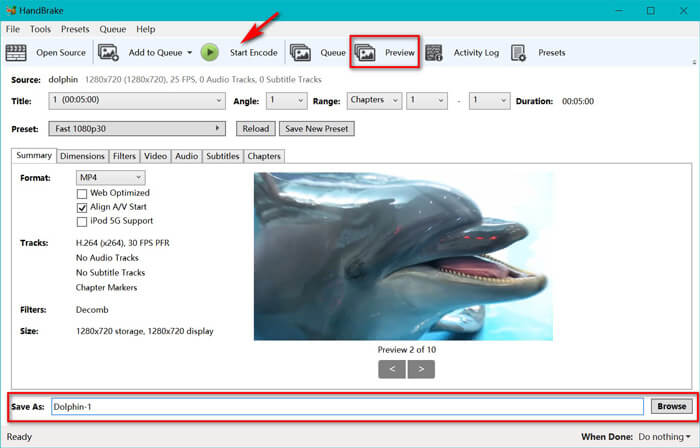
Steg 3. Förhandsgranska och konvertera WTV till MP4
HandBrakes funktion Preview på verktygsfältet gör att du kan se hur din nya MP4-video kommer att se ut innan du kodar den. När alla inställningar är som du vill, ge de konverterade MP4-filerna ett namn och välj platsen för dina nya videor genom att klicka på knappen Browse längst ned. Klicka slutligen bara på knappen Start Encode på verktygsfältet för att konvertera WTV till MP4.
Del 3. Vanliga frågor om WTV till MP4
Varför sparar HandBrake MP4 som M4V?
För MP4-filer kommer HandBrake att MP4-filerna automatiskt använder M4V-tillägget när du väljer AC3-ljud och SRT-undertexter eller har kapitelmarkörer för att anpassa MP4-filen. Men du kan ändra .m4v-tillägget till .mp4 direkt.
Kan VLC-spelare spela WTV-filer?
VLC kan inte spela WTV-filer direkt. Du bör installera K-Lite kodpaketet för att installera WTV-kodpaketet och sedan spela upp WTV-filer på VLC.
Kan jag konvertera skyddade WTV-filer?
Jo det kan du. Men endast MCEBuddy stöder de skyddade kommersiella WTF-filernas redigering och konvertering. Du måste använda denna programvara för att kopiera och konvertera de skyddade WTV-filerna.
Slutsats
För att enkelt använda Window Media Center-inspelade WTV-filer bör du först konvertera WTV till MP4. Detta inlägg delar två gratis sätt att konvertera WTV till MP4 online via Free Online Video Converter och HandBrake. Gratis Online Video Converter låter dig konvertera WTV till MP4 och andra populära format, medan HandBrake ger dig fler kontroller för redigering med begränsade utdataformatalternativ.
Vilket sätt är din favorit?
Eller kanske har du en bättre WTV till MP4-omvandlare?
Hur som helst vill jag höra från dig. Så fortsätt och lämna en kommentar nedan.
-
 Hur konverterar man MXF till MP4 via gratis konverterare
 Det här inlägget är den detaljerade guiden för att konvertera MXF till MP4 på datorn. Du kan få 4 gratis MXF till MP4-omvandlare för att koda om videokameran MXF till MP4 i enkla steg.
-
 Topp 3 sätt att gratis konvertera MP4 till MOV
 Hur konverterar man MP4 till MOV på Mac? Finns det något gratis sätt att konvertera MP4 till MOV utan kvalitetsförlust? Det här inlägget delar 3 enkla sätt att hjälpa dig att göra videokonvertering från MP4 till MOV på Mac, Windows PC och online.
-
 Hur man konverterar M2TS till WMV på Windows / Mac / Online (helt gratis att använda)
 Här är 3 enkla sätt att konvertera M2TS till WMV-videor. Du kan snabbt ändra videoformat från M2TS till WMV gratis på Windows, Mac och online. Satsomvandlingen stöds.
