


 Video Converter Ultimate
 Skärminspelare
 Video reparation
Lär dig hur du spelar upp video omvänt med 3 Elite-programvaran
Många videor som laddas upp löpande på olika videodelningsplattformar har redan fått en omvänd effekt för att göra dem mer intressanta för tittarna. I den här artikeln ska vi därför prata om hur man spelar upp en video baklänges med detaljerade steg och olika program du kan använda. Fortsätt läsa artikeln för att få en uppfattning om hur man vänder en video.

Del 1. Bästa sättet att spela upp video omvänt
Den fenomenala konverteraren har redan tagit det första steget inom videoredigering, särskilt när det gäller att vända videor. Många användare använder redan det här verktyget för att göra sina videor enastående. Video Converter Ultimate har redan bevisat mer än vad lojala kunder förväntade sig. Dessutom erbjuder programvaran många avancerade funktioner som du kan använda för att göra din inspelning till något nytt i tittarnas ögon. Vill du alltså veta hur man spelar upp en video baklänges och sparar den? Följ då stegen nedan och prova själv.
Steg 1. Innan du kan använda Video Converter Ultimate måste du först ladda ner den. Installera programmet och gör den snabba och enkla grundinställningen.
Gratis nedladdningFör Windows 7 eller senareSäker nedladdning
Gratis nedladdningFör MacOS 10.7 eller senareSäker nedladdning
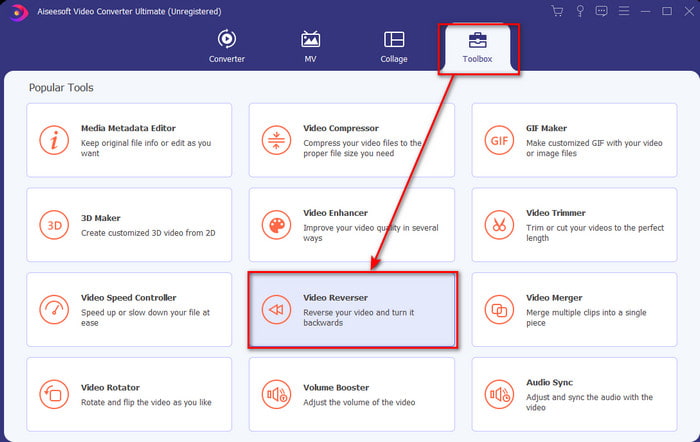
Steg 2. Gå till Verktygslåda och hitta Video Reverser.
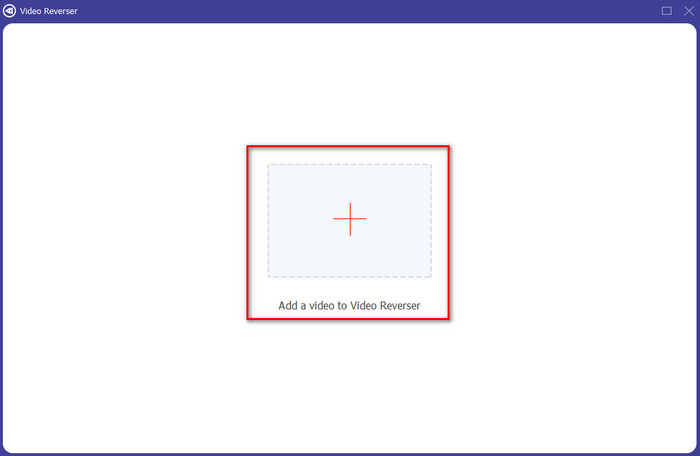
Steg 3. För att lägga till filen, klicka på +-knappen så visas en mapp. Välj videofilen och klicka på Öppna för att infoga filen.
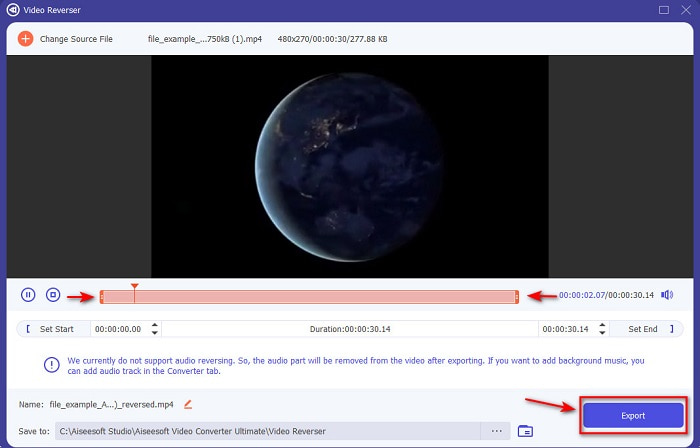
Steg 4. Ändra playback in and out om du vill göra videon kortare. Klicka sedan på Exportera för att börja spara den omvända videon på ditt skrivbord.
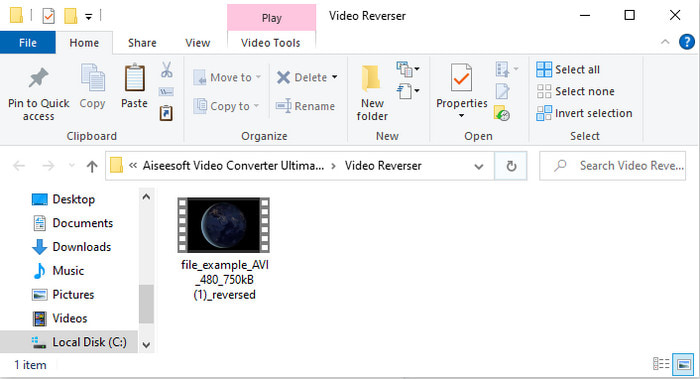
Steg 5. När videon har exporterats visas en mapp med den omvända videon på skärmen. Klicka på filen för att titta på den omvända videon.
Fördelar
- Den har många avancerade funktioner och är mycket lättare att hantera än Adobe Premiere Pro.
- Den stöder alla videoformat. Så du behöver inte oroa dig om din video är i formatet AVI, MP4, MKV, MOV eller annat.
- Lämplig för proffs och nybörjare som vill ha ett enkelt verktyg som ger en fenomenal konverteringsfunktion.
Nackdelar
- Det är betalt men priset för det är mycket lägre om vi jämför det med premiere pro-mjukvaran.
- Innan du kan komma åt verktyget måste du ladda ner det först.
Del 2. Hur man spelar upp en video omvänt på iMovie
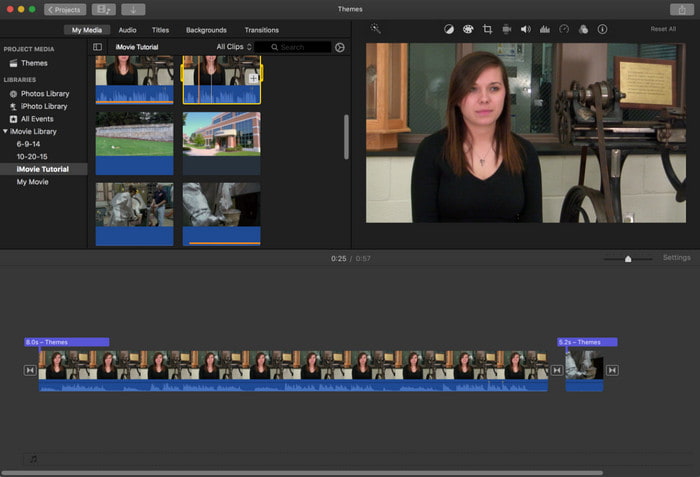
iMovie är den inbyggda videoredigeraren du kan använda gratis på Mac. Det här verktyget är redan förinstallerat på din hårddisk, så du behöver inte ladda ner det för att komma åt det. Om du vill veta hur man spelar upp en video baklänges i iMovie följer du stegen nedan.
Steg 1. Öppna iMovie på din Mac. Dra sedan filen till Tidslinjen.
Steg 2. Klicka på knappen med klockliknande form och markera Reverse. Justera sedan hastigheten till Normal, Långsam, Snabb och mer.
Steg 3. För att spara resultatet klickar du på knappen Exportera och sparar det i ditt galleri.
Fördelar
- Ingen nedladdning behövs och det är gratis för alla Mac-användare.
- Lätt att använda för snabba redigeringar som du vill göra direkt.
- Den har funktioner för autospara så det finns inget behov av att kommando + S.
Nackdelar
- Att exportera videor här skulle ta mycket tid.
- Den saknar avancerade funktioner du behöver som professionell redaktör.
Del 3. Hur man spelar upp en video omvänt med Adobe Premiere Pro
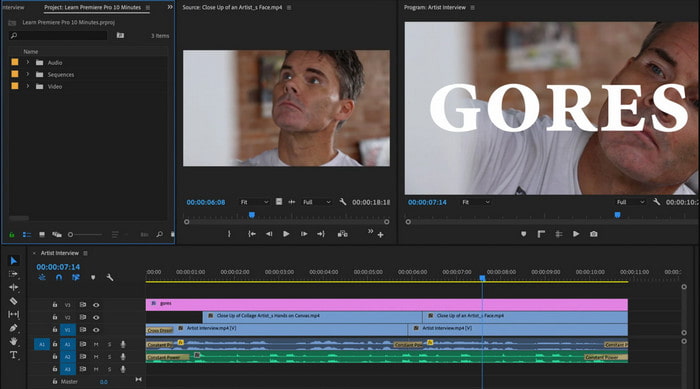
Adobe Premiere Pro är det bästa redigeringsverktyget du kan använda om du vill ha ett resultat på proffsnivå. Men verktyget kan kännas överväldigande för nybörjare som inte har erfarenhet av videoredigering. Om du vill lära dig hur man spelar upp en video baklänges i Premiere Pro kopierar du stegen nedan.
Steg 1. Ladda ner Adobe Premiere Pro till din dator och starta programmet.
Steg 2. Dra och släpp videofilen i Media Port och flytta den sedan till Tidslinjen. Klicka på videon och högerklicka sedan och gå till Speed/Duration.
Steg 3. Markera Reverse Speed och ställ in önskad längd, klicka sedan på OK.
Fördelar
- Det är det bästa valet för proffsredigeraren eftersom det stöder avancerade funktioner för professionell produktion.
- Den kan göra tung redigering och du måste producera högkvalitativ redigerad video.
- Den stöder nästan alla videoformat.
Nackdelar
- Det är riktigt dyrt om du bara vill vända eller göra enkel redigering.
- Att lära sig hur du använder detta kommer att ta dig mycket tid. I grund och botten är det inte användarvänligt.
- Ibland kraschar programvaran av okänd anledning.
Del 4. Vanliga frågor om att spela upp video bakåt
Hur spelar man upp en video omvänt på en iPhone?
iPhone har ingen inbyggd funktion för att spela upp video baklänges, men du kan ladda ner appar som hjälper dig att vända videor på din iPhone enkelt. Till exempel de appar som nämns här. Om du vill veta mer klickar du på den här länken för att gå till andra videoreverserare du kan använda.
Varför minskar mina videor kvaliteten efter att ha backat?
Det kan vara utgången du ställer in i mitten eller låg. Men för att undvika detta kan du ställa in inställningarna till höga för att få en omvänd video utan kvalitetsförlust. Förvänta dig dock en mycket större filstorlek än den med låg kvalitet.
Hur kan jag lägga till ljud på min omvända video?
Alla dessa verktyg vänder din video, men ljudet inkluderas inte. Om du vill veta hur man lägger till bakgrundsmusik i din video kan du läsa den här artikeln, där vi förklarar hur man lägger till ljud i video för att göra den bättre.
Slutsats
Nu när vi vet hur man spelar upp en video baklänges är det rätt tid att göra det. Med hjälp av det här otroliga verktyget som du kan hitta på internet. Om du vill göra en mer extraordinär omvänd video än iMovie, men billigare än Premiere Pro, är det rätta verktyget för dig Video Ultimate Converter. Enligt kundernas efterfrågan är den här programvaran utmärkt i alla avseenden du kan önska när det gäller att vända video. Innan du påbörjar din resa med att vända videor måste du alltså välja rätt verktyg som kan göra din video fenomenal. För att få veta mer måste du först ladda ner det här verktyget och låta det göra jobbet.
-
 Concrete Tutorial - Hur man slår samman två ljudspår i Audacity
 Audacity åtnjuter rykte för att redigera ljud. Du laddade ner Audacity men vet inte hur man slår ihop ljudspår i Audacity? Det här inlägget kommer att berätta hur du slår ihop spår i Audacity.
-
 2 Effektiva metoder för att slå samman MPEG-filer för att kombinera gamla TV-serier
 När du har några gamla TV-serier i MPEG kan du lära dig mer om de två effektiva metoderna för att slå samman MPEG-filer till en film enligt dina behov.
-
 2 sätt att komprimera AMV-videor till mindre storlek
 Oavsett om du vill ladda upp eller ladda ner animerade MV online, är den stora filstorleken på AMV en bummel. Detta inlägg delar två enkla sätt att minska AMV-filstorleken på datorn för att lösa detta problem.
