


 Video Converter Ultimate
 Skärminspelare
 Video reparation
 Säker nedladdning
4 lättanvända FLAC-inspelare som kan generera högkvalitativt ljud
Musik är en av de mest fängslande kommunikationsformerna eftersom den ger människor ett sätt att uttrycka och förmedla sina känslor, avsikter och budskap. Vilken kraft den har beror på musikens totala kvalitet. Under lång tid har folk framför allt varit vana vid det vanliga MP3-formatet. Men det finns mer än så – nöj dig inte med mindre. Om du vill lyfta lyssningsupplevelsen och få musik av ännu högre kvalitet som dessutom är kompatibel med dina enheter, passar Free Lossless Audio Codec (FLAC) dig. Det är ett ljudkodningsformat för förlustfri komprimering av dina digitala ljudspår. Det kostar i regel lika mycket som motsvarande MP3-filer i nätbutiker, men låter betydligt bättre. Självklart behöver du en FLAC-inspelare för att få det. För att ge dig en fingervisning kommer här viktig information du kan lägga märke till.

Del 1. Topp 2 praktiska FLAC-inspelare som kan nås online
När det gäller FLAC-inspelning är det ett trumfkort om du kommer att använda en inspelare som passar och kan göra operationen sömlöst åt dig. Må det vara FLAC-inspelare gratisprogram och mjukvara, du måste välja det bästa av det bästa eftersom vi inte nöjer oss med mindre här. För att vägleda dig ger den här artikeln dig en grundlig utvärdering av de verktyg du kan använda.
1. FVC gratis ljudinspelare
FVC Free Audio Recorder är ett ljudinspelningsverktyg som gör det enkelt för användare att spela in ljud. Det fungerar effektivt på både Windows-datorer och Mac-datorer. Därför kan du använda det oavsett vilket operativsystem du har. Du kan spela in systemljud, röst via mikrofon eller båda samtidigt. Det gör inspelningsarbetet mycket enklare och behåller samtidigt hög ljudkvalitet. Följ stegen nedan:
Steg 1. För att använda denna gratisprogramvara och säkerställa att den fungerar som den ska i din webbläsare laddar du ner startprogrammet och följer anvisningarna tills verktyget har aktiverats.
Steg 2. Klicka sedan på knappen Start Recording, vilket gör att ett popup-fönster visas.
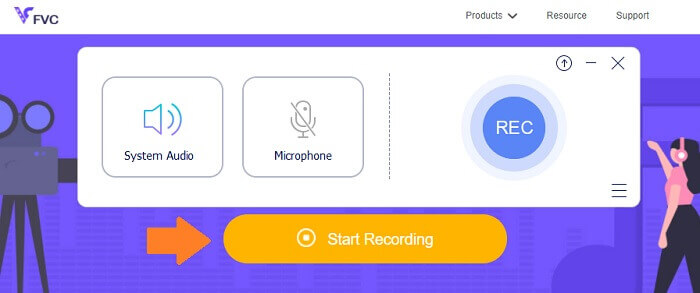
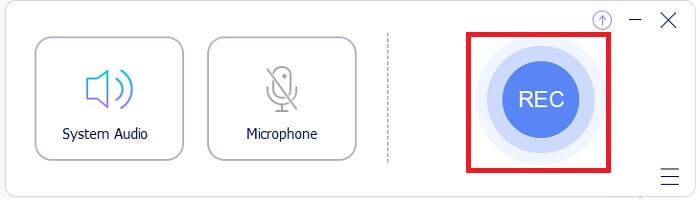
Steg 3. Klicka på REC-knappen i gränssnittet för att starta inspelningen.
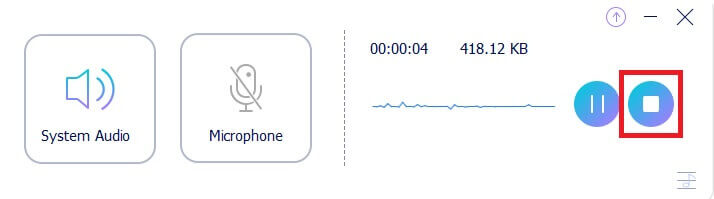
Steg 4. Om du vill pausa inspelningen klickar du på knappen Pause bredvid stoppknappen. När du är klar med inspelningen klickar du på stoppknappen. Det är ikonens kvadrat inuti en cirkel. Se bilden nedan för bättre förståelse.
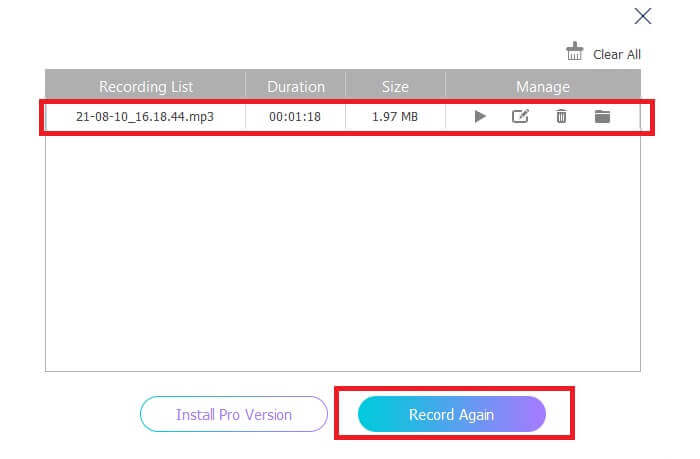
Steg 5. Efter inspelningen kontrollerar du den inspelade filen i popup-fönstret som visas efter att inspelningen avslutats.
2. Apowersoft gratis online ljudinspelare
Apowersoft Free Online Audio Recorder är en utmärkt gratis ljudinspelare som erbjuder omfattande funktioner. Den låter dig spela in ljud direkt på Windows- eller Mac-datorer med ett brett urval av in- och utformat som passar dina behov. Denna gratisprogramvara är lätt att använda och låter dig spela in vilket ljud som helst i förlustfri kvalitet. Den har en FLAC-ljudinspelare som är bättre än vanlig, traditionell inspelningsprogramvara. Sammantaget är den här lösningen bäst när du vill lyfta dina inspelningar från det vanliga till ett format med bättre kvalitet. För att komma igång följer du den detaljerade guiden nedan:
Steg 1. För att använda denna gratisprogramvara och säkerställa att den fungerar som den ska i din webbläsare måste förstaanvändare ladda ner och installera startprogrammet. Klicka sedan på knappen 'Start Recording', vilket gör att ett popup-fönster visas.
Steg 2. I gränssnittet klickar du på 'Record', markerad med en röd knapp, för att starta inspelningen. Om du vill pausa inspelningen en stund trycker du bara på den röda knappen i mitten av gränssnittet. På samma sätt, om du vill stoppa inspelningen trycker du på den röda knappen längst ned i mitten av gränssnittet.
Steg 3. Om du vill pausa inspelningen en stund trycker du bara på den röda knappen i mitten av gränssnittet. På samma sätt, om du vill stoppa inspelningen trycker du på den röda knappen längst ned i mitten av gränssnittet. Efter inspelningen går du till panelen med inspelningslistan för att se dina inspelade filer och kontrollera filtypen. Det var allt – nu är du klar.
Del 2. Professionell FLAC-inspelare programvara för Windows och Mac
1. FVC -skärminspelare
FVC Screen Recorder är ett verktyg med full funktionalitet som gör att du kan spela in inte bara video utan även ljud och andra format. Därmed kan du spela in allt ljud du behöver, förlustfritt och utan ansträngning, eftersom verktyget är lätt att använda. På så sätt kan du få bästa möjliga ljudkvalitet i den utdata du behöver, oavsett vilket format du vill ha. FVC Screen Recorder har en justerbar bithastighet, vilket kan vara mycket användbart för att ta fram ljudinspelningar med hög kvalitet. Verktyget höjer ribban när det gäller att få ut det bästa av dina ljudinspelningar. Läs vidare för att se hur verktyget fungerar.
Steg 1. Ladda ner appen till din dator och installera den enligt anvisningarna.
Gratis nedladdningFör Windows 7 eller senareSäker nedladdning
Gratis nedladdningFör MacOS 10.7 eller senareSäker nedladdning
Steg 2. Starta appen och välj Audio Recorder.
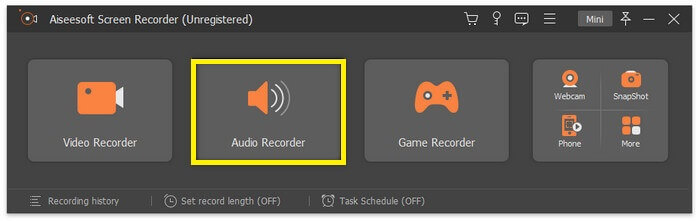
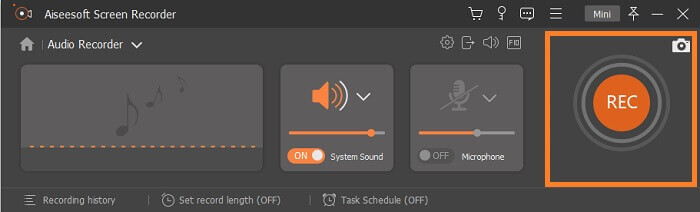
Steg 3. Aktivera sedan systemljudet innan du spelar in. Klicka sedan på REC för att börja spela in.
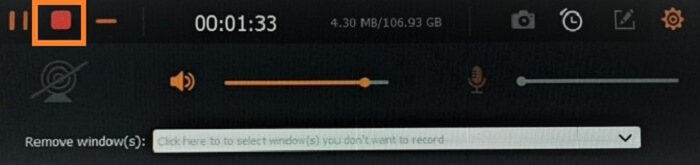
Steg 4. När inspelningen är klar klickar du på knappen Stop. Det är fyrkantsikonen i den flytande menyraden.
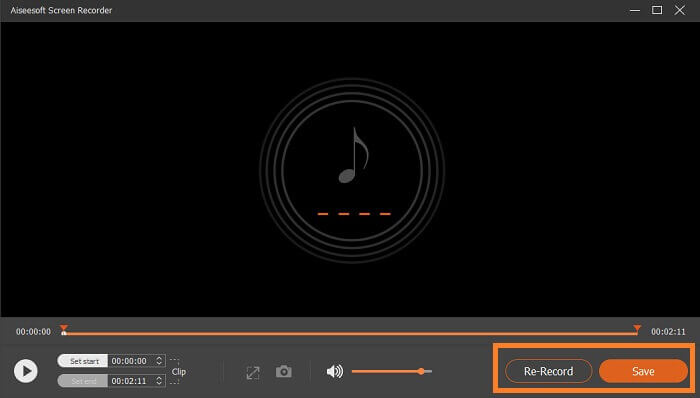
Steg 5. Ett nytt fönster visas då, där du väljer om du vill Save eller Re-Record. Därefter ser du ett fönster där du kan spela upp filen. Dubbelklicka på filnamnet för att spela upp den.
Vidare läsning
2. Total Recorder
En Total Recorder är ett mångsidigt verktyg som kan användas som FLAC-omvandlare, redigerare och inspelare. Med dess funktioner kan du konvertera din FLAC-fil till andra tillgängliga, kompatibla format och tvärtom. Dessutom stöder den konvertering av flera filer samtidigt med hjälp av sin inbyggda batchmotor för konvertering. Dessutom blir det extra intressant av att du enkelt kan redigera, lägga till eller ta bort taggdata.
Del 3. Vanliga frågor om FLAC Recorder
Är FLAC det bästa ljudformatet bland de andra?
Visst, ja! FLAC-filljudformatet är det bästa av det bästa formatet för ljudkvalitet. Eftersom det stöder förlustfri komprimering av dina digitala ljudspår. Observera att FLAC-filer är ungefär större än ett MP3-filformat. De är hälften så stora som en CD och det är därför de kan få samma ljudkvalitet som CD-skivor. Dessa typer av filer anses vara högupplösta eftersom de ibland är bättre eller lika med CD-kvalitet. Det är därför om du siktar på kvalitet, hög upplösning och utmärkt utdata, är det bäst att överväga att använda en FLAC-ljudinspelare med hjälp av gratisprogram och programvara.
Vad är FLAC egentligen?
FLAC eller Free Lossless Audio Codec dök upp 2001 som ett öppen källkods-alternativ till andra förlustfria format som kom fram vid den tiden. Det är ett musikfilformat som fungerar på samma sätt som cd-skivor och anses vara ett av de allra bästa ljudformaten, kompatibelt med nästan alla enheter. På liknande sätt jämförs FLAC ofta med MP3-filer i fråga om vilket format som är bäst. Det kanske inte är lika välkänt bland alla idag, men det har mer att erbjuda än de vanliga formaten och kommer med stor sannolikhet att ta sig upp på prispallens förstaplats.
Kan jag konvertera andra ljudfiler till FLAC-filer?
Ja, det är möjligt! Om du vill uppgradera din vanliga ljudfil till en FLAC-fil kan du göra det. Du kan använda olika verktyg som finns tillgängliga online, men jag rekommenderar att du använder FVC Audio Converter. Det är en webbaserad ljudkonverterare som låter dig konvertera ljudfiler online från ett format till ett annat så snabbt som en minut. Bortsett från det, det som gjorde det bekvämare är att det stöder alla typer av ljudformat så att du enkelt kan konvertera ditt ljud till ditt föredragna format utan att gå igenom en komplicerad konverteringsprocess.
Slutsats
Som du ser är de listade gratis- och betalprogrammen några av de bästa du kan hitta på nätet. Det finns mängder av liknande appar som kan användas som alternativ, men bara ett fåtal fungerar verkligen bra. De flesta kostnadsfria webbaserade verktyg kan faktiskt skada din dator på grund av obehöriga nedladdningar som följer med den skapade filen. Så om du vill vara säker på trygghet och pålitlighet bör du välja från listan vi tagit fram här. Om du är osäker på vad du ska välja kan du börja med FVC Free Audio Recorder.
-
 Bästa XviD-skärminspelare för nybörjare 2021 (online och offline)
 XviD är känt för att komprimera videofiler. Det är programvara med öppen källkod som utför ISO MPEG-4-formatet. Fortsätt läsa och läs mer om detaljerna.
-
 [Go-To-Guide] Spela in Blu-ray på OBS Studio och alternativa verktyg
 Lär dig hur du spelar in Blu-ray på OBS-studio och andra substitut med dessa användbara enkla steg och tips. Fortsätt läsa och låt oss dyka ner i detaljer.
-
 Process för att rippa och spela in DVD med VLC för att digitalisera spelbart format
 VLC stöder många audio-video-komprimerade filformat, inklusive inspelning på DVD-skivor. Håll bara bollen rullande för mer diskussion och detaljer upp till slutet.
