


 Video Converter Ultimate
 Skärminspelare
 Video reparation
 Säker nedladdning
Bästa OGG-röstinspelaren hjälper till att spela in OGG på alla plattformar
OGG är det bästa ljudfilsformatet snarare än MP3. Detta öppna ljudformat underhålls av Xiph.org. Den här typen av format används av spelindustrin som deras ljudformat, eftersom det låter bättre och komprimerar filer mycket mer. Användare tycker dock ofta att det är besvärligt, eftersom vissa inspelningsprogram inte stöder detta format då standardljudformatet är MP3. Nedan följer en lista över de bästa OGG-inspelarna som stöder detta format. För att fördjupa dig i mer detaljerade steg och information, läs noggrant för att förstå funktionerna hos de olika verktygen så att du hittar det som passar dina behov som användare och kanske i framtiden som kund.

Del 1. Bästa OGG-inspelaresprogramvaran för PC- och Mac-användare
I listan nedan finns de bästa OGG-inspelare som finns tillgängliga i alla olika funktioner med steg och information.
FVC Free Audio Recorder

Ett verktyg som är specialiserat på att spela in ljudformat. FVC Free Audio Recorder är känt som det bästa onlineverktyget du kan hitta på webben. Detta öppenkällkodsverktyg kan hjälpa dig att spela in ljud du kan behöva var du än är, så länge du har en internetanslutning. Det är också ett bra val som din OGG-inspelare. För att ge mer utförliga detaljer om detta fantastiska verktyg, fortsätt läsa och följ stegen för hur du gör en ljudinspelning.
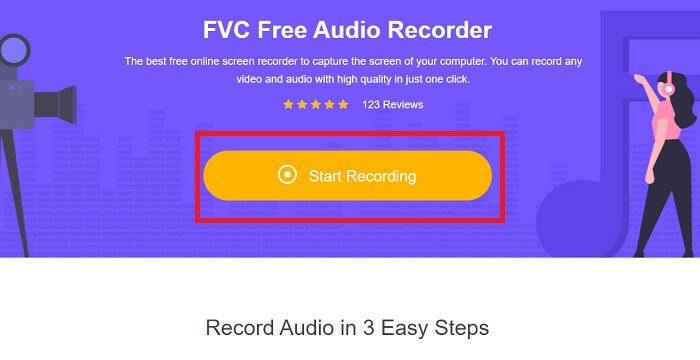
Steg 1. Klicka på denna länk för att gå till verktygets webbsida. Klicka på Start Recording och starta verktyget.
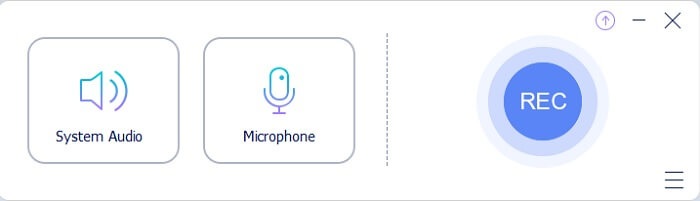
Steg 2. En flytande verktygsrad som denna kommer att visas på skärmen.
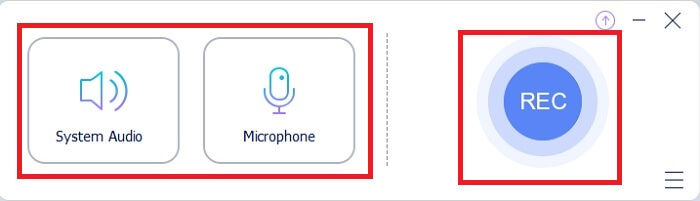
Steg 3. Sätt på Speaker för att lägga till systemljud och Mic för att lägga till din röst. Klicka på den runda knappen för att börja spela in.
Steg 4. Efter att du klickat på inspelningsknappen kommer du till denna vy, vilket betyder att inspelningen redan har startat.
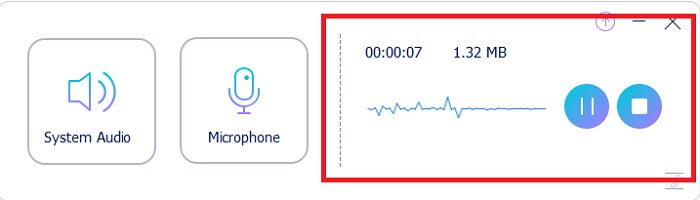
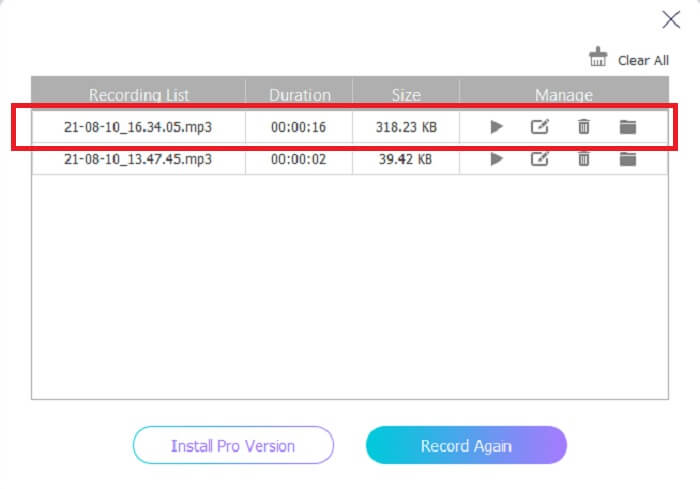
Steg 5. När inspelningen är klar klickar du på Stop-knappen så sparas den automatiskt på din enhet. Historiklistan över dina inspelningar visas på skärmen. Njut av inspelningsresultatet i bästa kvalitet.
Fördelar
- Användarvänlig på grund av sin instruktion på plats.
- Den producerar ett komprimerat ljudformat så det är också lagringsvänligt.
- Öppen källkod så att den är tillgänglig för alla som vill använda verktyget.
Nackdelar
- Den behöver en internetanslutning innan du kan använda den.
- Den har inte brusreducering som premium.
Del 2. Andra användbara OGG-inspelare för alla operativsystem
1. FVC -skärminspelare
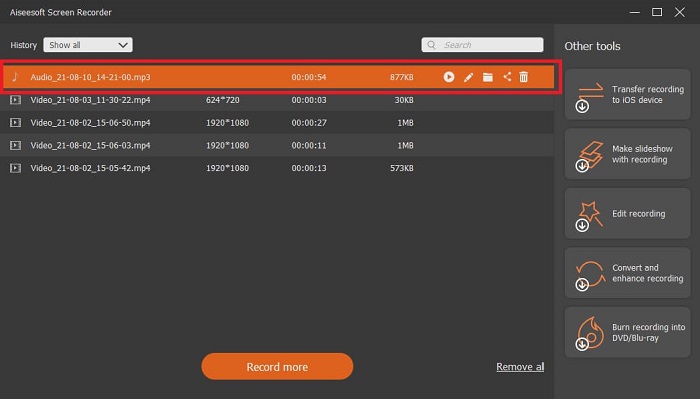
Om du tycker att verktyget ovan är smart, så kan man för att ge ett mer specifikt exempel säga att om Galileo Galilei är den moderna vetenskapens fader, så är detta verktyg den moderna inspelningsteknikens fader. FVC Screen Recorder är den bästa inspelaren oavsett om det gäller ljud- eller videoformat. Den ger dig ett av de bästa resultaten och ändå behöver du knappast anstränga dig för att använda själva verktyget. Till skillnad från andra verktyg är detta program utformat för att ge användaren den bästa upplevelse du kan tänka dig. Så om du är en av dem som tycker att det är svårt att spela in ljud, följ då dessa enkla steg nedan och följ dem noggrant.
Steg 1. Ladda ner verktyget enligt specifikationen för ditt operativsystem. Nedladdning och installation tar bara några sekunder. Ändra Preference baserat på dina önskemål och klicka på Finish för att fortsätta.
Gratis nedladdningFör Windows 7 eller senareSäker nedladdning
Gratis nedladdningFör MacOS 10.7 eller senareSäker nedladdning
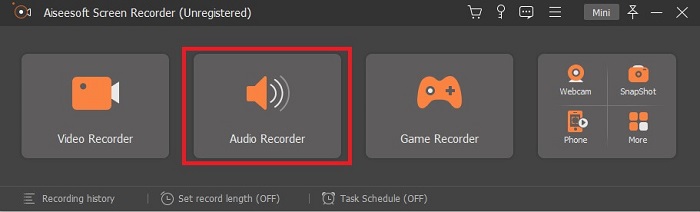
Steg 2. Klicka på Audio Recorder i verktygsfältet.
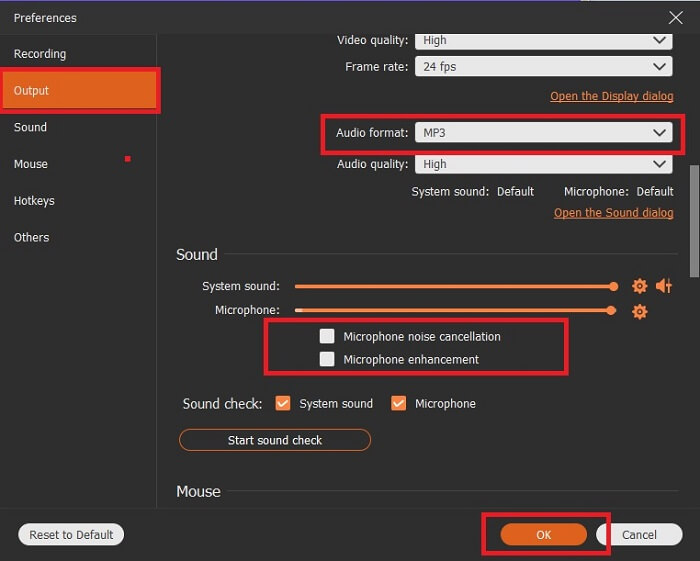
Steg 3. Leta upp Gear-ikonen för att justera andra alternativ. Gå till Output för att ändra till MP3-, WMA-format eller vilket annat format du vill genom att skrolla med mushjulet. Andra alternativ du kan använda under inspelningen är Noise cancelling och Microphone enhancement. Klicka på OK för att fortsätta.
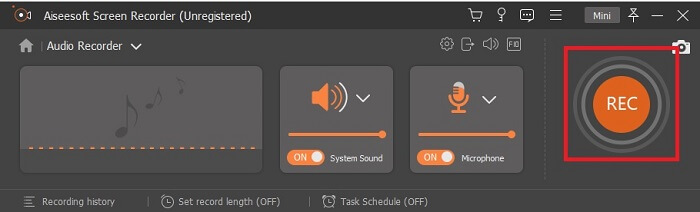
Steg 4. Efter att du justerat inställningarna, slå på din Speaker och Microphone i verktygsfältet för att lägga till ljudutgången i din inspelning. Klicka sedan på den rundformade knappen för att börja spela in.
Steg 5. Om du vill avsluta inspelningen klickar du på den fyrkantiga knappen för att stoppa. Klicka på Save och Next för att gå vidare. Spela sedan upp din OGG-röstinspelning på valfri medieplattform.
Fördelar
- Du kan spela in när som helst var som helst med detta verktyg med kristallklart ljud.
- Det ger en fantastisk upplevelse för användaren som redan använder det här verktyget.
- Allt-i-ett-inspelning.
Nackdelar
- Betala för att använda.
- Den behöver 2,4 MB lagringsutrymme.
2. Screencast-O-Matic
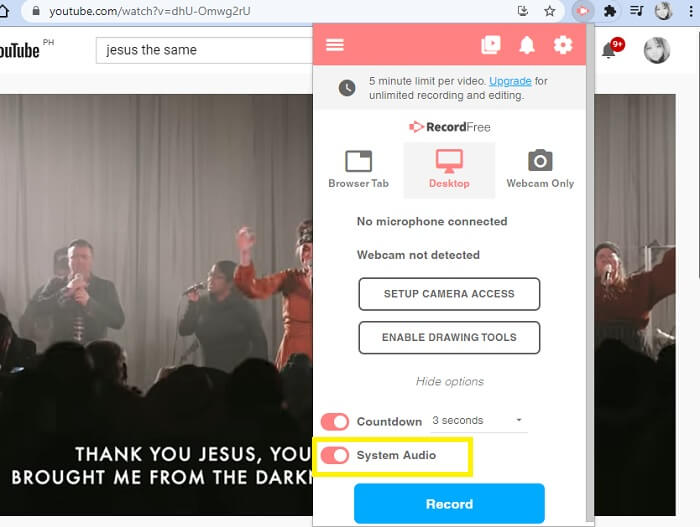
Ett annat bästa skärminspelningsverktyg som kommer att göra jobbet. Screencast-O-Matic är ett av de bästa verktygen du hittar på webben. Det gör din inspelning enkel och effektiv. Den har också sitt onlineverktyg om du besöker onlinewebbplatsen, men det kommer att ta en minut eller två för processen att slutföra själva onlineverktyget. Så om du inte är ett fan av att stå i kö är detta inte det bästa valet för dig. Men om du gillar att vänta så är det värt det till slutet.
Fördelar
- Det är lättare att använda än Camtasia.
- Arbeta som en organisation istället för en individ med säkerhetslösenordet.
- Mycket engagerande och det är en okej blockflöjt.
Nackdelar
- Verktygsgränssnittet är on-point men det är monokromatiskt så förvänta dig att det är intetsägande i färgen vilket gör det mindre intressant att använda.
- Det tillåter bara användaren att spela in max 15 minuter i gratisversionen.
3. ShareX
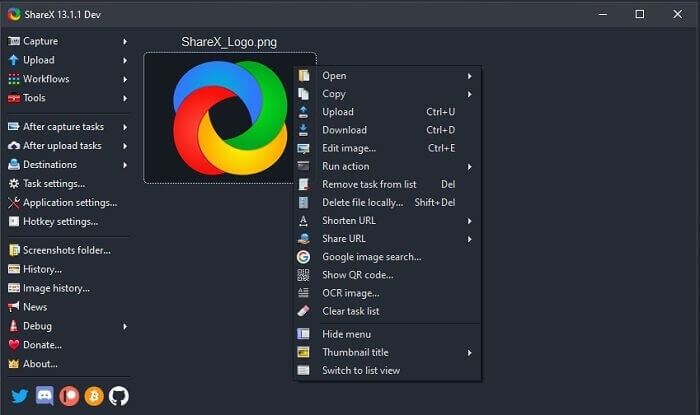
Ett av de verktyg du kan stöta på på webben när du söker efter en skärminspelare. Det är endast tillgängligt för Windows OS. Det betyder att om du är Mac- eller Linux-användare kommer detta verktyg inte att fungera på ditt system eftersom det inte stöder dessa plattformar. Share kan enkelt placera sig bland de 20 bästa skärminspelarna som finns på webben, eftersom det stöder över 80 destinationer dit du kan överföra slutresultatet.
Fördelar
- Anpassningsbart verktyg.
- Tillhandahåller egna redigeringsverktyg om det behövs.
- Ändra kortkommandon för att göra inspelningen så enkel.
Nackdelar
- Överväldigande för någon som är ny med detta verktyg. Det är jobbigt att lära sig använda det här verktyget.
- Ej tillgängligt för Mac-användare.
Del 3. Jämförelsestabell
| Funktioner | FVC Free Audio Recorder | FVC -skärminspelare | Screencast-O-Matic | ShareX |
| Ljudinspelning |  | | | |
| Brusreducering |  | | | |
| Mikrofonförbättring | | | | |
| Verktygets komplexitet | Instruktioner för onlineinspelning på plats. | Lätt att använda eftersom det redan anges i verktyget vad syftet är och hur det fungerar. | Det är ett lättanvänt verktyg med mindre detaljer. | Verktygets komplexitet är svårt för den nya användaren. |
| Tillgängliga plattformar | Alla operativsystem. | Alla operativsystem. | Windows PC, Mac och Chromebook. | Windows 7 SP1 eller senare. |
| Tillgängligt ljudformat | MP3 och OGG | MP3, WMA, AAC, M4A, FLAC, OGG, Opus och många fler. | Kan inte spela in ljud separat. | MP3 och WAV |
| Prisklass | Gratis onlineverktyg | För 1 månad: $25.00 För ett år: $31.20 För livstidslicens: $55.20 | Den har en gratisversion. För premiumsolo. Deluxe $1.65/månad Premiärminister $4.00/månad För lagplaner. Du kan ställa in team deluxe eller team premier. | gratis och öppen källkod. |
Del 4. Vanliga frågor om OGG Recorder
Hur gör man en OGG-fil med en ljudinspelare?
Använd en ljudinspelare som i listan ovan. För mer detaljerad information läs artikeln ovan för information och steg om hur du spelar in med ljudutgångsformatet för OGG.
Vilket är det bästa ljudformatet? MP3 eller OGG?
OGG är det bästa ljudfilformatet. Men användare tenderar att använda MP3 eftersom det är mer standard än OGG. Ändå innehåller OGG metadata med mindre lagring och bästa ljudutgång, till exempel namnet på artisten och spårdata.
Varför kan mitt OGG-format inte spelas upp i min mediaspelare?
Vissa mediespelare stöder inte den här typen av format. Därför kan du använda FVC Free Online Video Converter som din konverterare. Detta gör det möjligt för användaren att konvertera OGG-filen till MP3 eller ett annat ljudformat du föredrar så att den kan spelas upp. Eller så kan du använda FVC Free Video Player eller andra OGG-spelare för att spela den här typen av format, eftersom detta verktyg kan spela upp nästan alla olika typer av ljud- och videoformat.
Slutsats
I slutet av diskussionen har du nu skaffat dig en ny kunskap bara genom att läsa den och välja vilket verktyg som passar dina krav. Olika val listas i den här artikeln med steg och lite information om verktyget. Följ bara stegen och ge dig tid att läsa den så att du förstår den. Du måste välja klokt.
Men för att ta ett exempel uppfyller FVC Screen Recorder användarens krav. Som användare bör du sätta dina behov och önskemål med en inspelare i första rummet. Till exempel om inspelaren är lätt att använda, om den är bäst för ljudinspelning, om den finns tillgänglig på nästan alla plattformar, och om den är avgiftsbelagd bör den vara billig men ändå ge bästa möjliga kvalitet. Alla dessa egenskaper finns samlade i FVC Screen Recorder. Nöj dig inte med mindre, för du förtjänar mer.
-
 Snagit 2025 Review – För-, nackdelar och det bästa alternativet
 Vad är det bästa alternativet till Snagit? Finns det ett skärmbildverktyg som Snagit? Det här inlägget kommer att granska Snagit och dela det bästa alternativet till Snagit för att fånga skärmen.
-
 QuickTime-skärminspelning - Spela in video med ljud på Mac och PC
 Inspelningsskärm med ljud på Mac är till nytta. Den inbyggda spelaren, QuickTime Player kan göra det. Läs hans inlägg och veta hur man tar en skärm med ljud på Mac och PC.
-
 DU Recorder Review 2025: Säkerhet&Pris&Funktioner&Användning&Betyg
 DU Recorder är en skärm- och ljudinspelare för iPhone och Android. Är det värt att ladda ner? Är det säkert? Läs hela recensionen för att se om appen passar dig.
