


 Video Converter Ultimate
 Skärminspelare
 Video reparation
Upptäck hur du höjer volymen på AirPods & Aid Pods Pro med steg
Med AirPods & AirPods Pro kan du styra Siri, lyssna på din favoritmusik, svara på telefonsamtal och göra mer. En annan bra sak med att ha en Air Pod är att den är trådlös, vilket innebär att du inte kommer att ha svårt att ta bort den knutna ledningen från dina hörlurar. Du kan också enkelt ändra ljudvolymen genom att beordra Siri att höja eller sänka volymen.
Men det finns tillfällen då Siri inte kan uppfatta din röst, så det bästa sättet att ändra volymen är att göra det manuellt. Nedan hittar du de bästa sätten att höja volymen och stegen som beskrivs för de olika funktionerna. Alla dessa funktioner är testade och fungerar utmärkt för att ändra ljudvolymen. Låt oss lära oss hur man höjer volymen på AirPods eller AirPods Pro utan vidare dröjsmål.
Del 1. Hur man höjer volymen på AirPods/AirPods Pro på dina iOS-enheter
Alla tekniker vi presenterar här hjälper dig när du behöver öka ljudet i dina AirPods. Även om vissa av dem inte är nya för oss tar vi ändå med dem. Men innan något annat måste du se till att dina AirPods eller AirPods Pro är anslutna till din telefon via Bluetooth. Om du inte vet hur du ansluter dem kan du hålla dina AirPods eller AirPods Pro intill din iOS‑enhet; se till att avståndet är under 30 meter. Öppna fodralet, tryck på och håll ned knappen på fodralets baksida. Omedelbart visas en ruta på skärmen; tryck på Anslut. När de är anslutna börjar lampan på fodralet blinka och blir sedan fast sken. Därefter kan du spela upp ljud i dina AirPods.
Sätt 1. Använd volym upp-knappen
Det är det vanligaste sättet att höja volymen för alla ljud som spelas på din iOS, och det är genom att använda de hårda volymknapparna. Dessa hårda tangenter finns till vänster på dina iOS-enheter. Låt oss lära oss hur du höjer volymen på Aird Pods Pro eller dina AirPods utan förseningar.
Steg 1. När AirPods eller AirPods Pro är anslutna kan du spela upp ljud på din iOS‑enhet. När du spelar upp, tryck på volym upp-tangenten på din telefon för att höja ljudet.
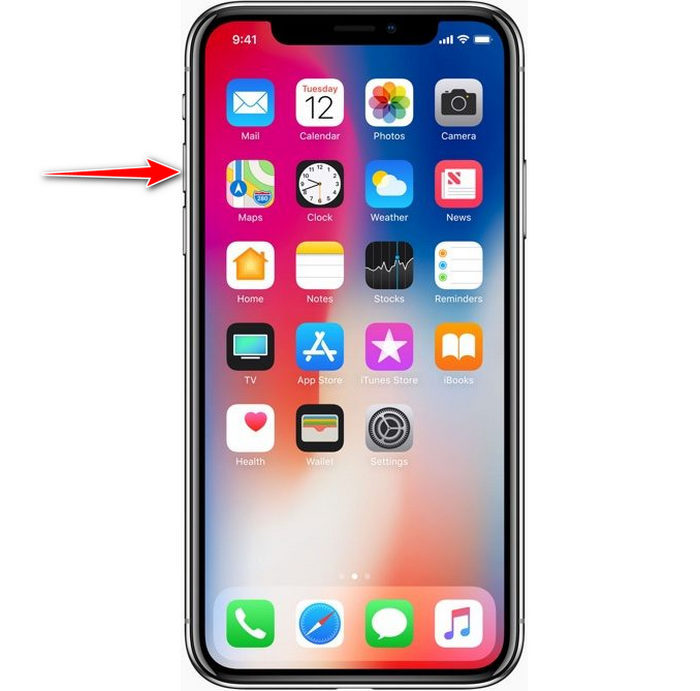
Steg 2. Om du tycker att ljudet blev för högt trycker du på volym ned-tangenten för att balansera det.
Sätt 2. Använd kontrollcentret
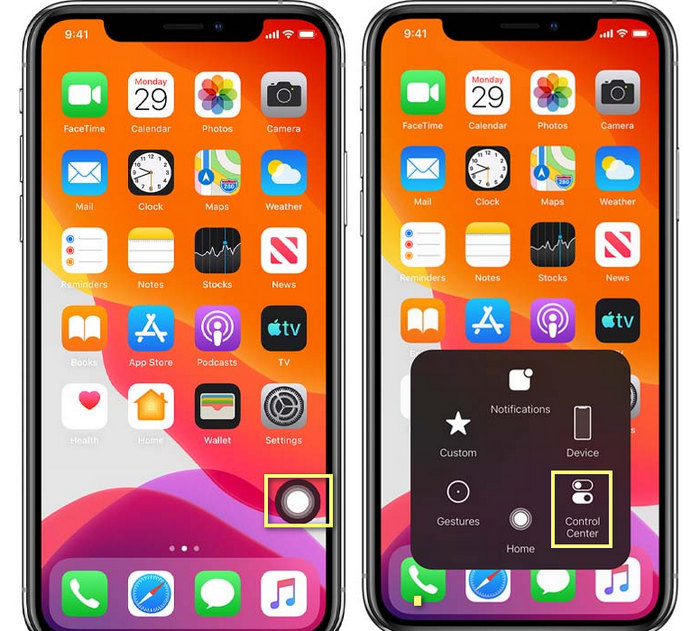
Följande teknik är som den första; det är dock ovanligt att använda detta eftersom den första tekniken är mycket lättare. Men det här är användbart om volymknapparna är trasiga eller inte kan. Så om du vill prova att använda den här tekniken kan du följa följande steg.
Steg 1. Tryck på System Touch som visas på din iOS‑enhet och tryck sedan på Kontrollcenter.
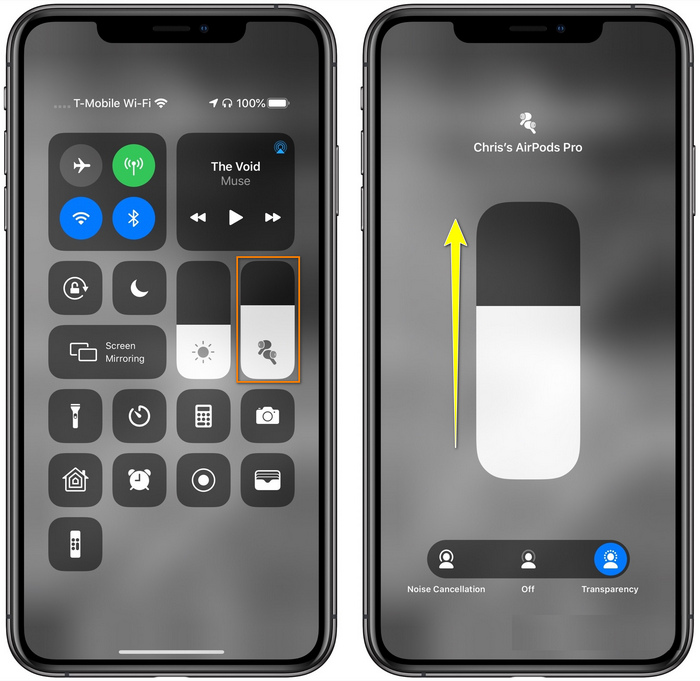
Steg 2. I Kontrollcenter trycker du på och håller ned ljudreglaget, justera reglaget uppåt i nästa vy du ser på skärmen. I detta område kan du slå på brusreducering och transparens om du behöver.
Sätt 3. Använd inställningarna
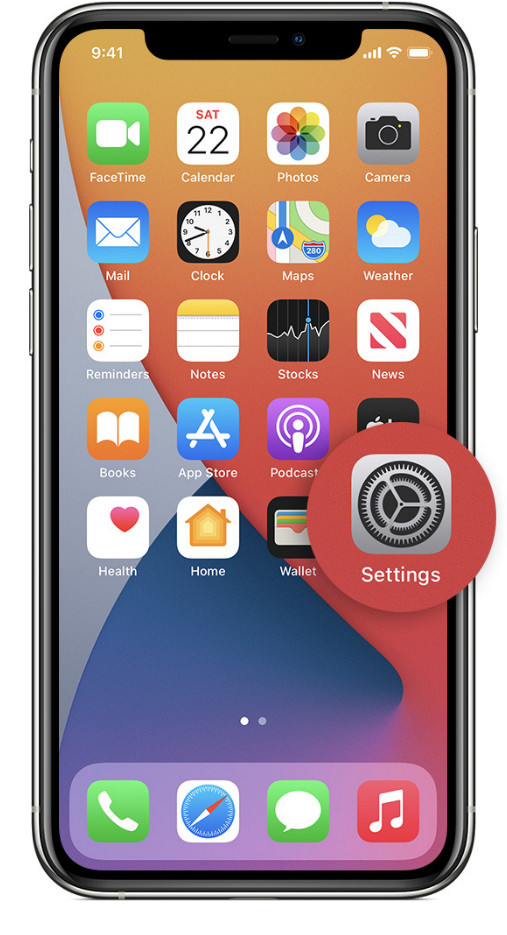
Visste du att du kan göra en större justering av volymen om du går till Inställningar på din iOS‑enhet? Detta steg fungerar dock bara om du strömmar musik till dina AirPods. Volymen kommer bara att ändras lite, men den ökar. Så om du är redo att fördjupa dig i hur man höjer volymen på AirPods via Inställningar kan du följa stegen nedan.
Steg 1. Öppna Inställningar, leta upp Musik och tryck på det.
Steg 2. Under Uppspelningsalternativ trycker du på EQ och väljer en av equalizer‑inställningarna du vill lägga till i din musik.
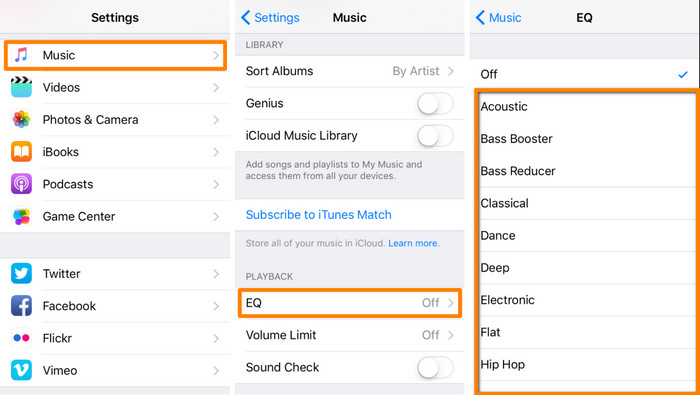
Steg 3. När du har valt kan du nu trycka på volym upp-tangenten på din telefon för att höja volymen.
Bonus: Hur man ökar volymen på dina videor med den bästa volymförstärkaren på Windows och Mac
Är du inte nöjd med volymteknikerna vi gick igenom ovan? I så fall kan du använda FVC Video Converter Ultimate för att öka volymen på filen så att du hör den klart och tydligt. Med detta verktyg kan du förstärka volymen på videofilen innan du tittar på den. Nackdelen är dock att det inte är tillgängligt på mobila enheter och att det bara kan förstärka ljudet i en fil åt gången.
Dessutom, om du behöver öka volymen här, kommer du att höra skillnaden mellan originalljudet och ett förbättrat; du kan följa de angivna stegen. Men innan allt annat, kom ihåg att överföra ljudfilen du vill öka volymen. Följ stegen nedan för att lära dig hur du höjer volymen på AirPods.
Steg 1. Ladda ner programvaran till din dator, installera den, följ installationsprocessen och tryck på Starta nu för att köra verktyget på ditt system.
Gratis nedladdningFör Windows 7 eller senareSäker nedladdning
Gratis nedladdningFör MacOS 10.7 eller senareSäker nedladdning
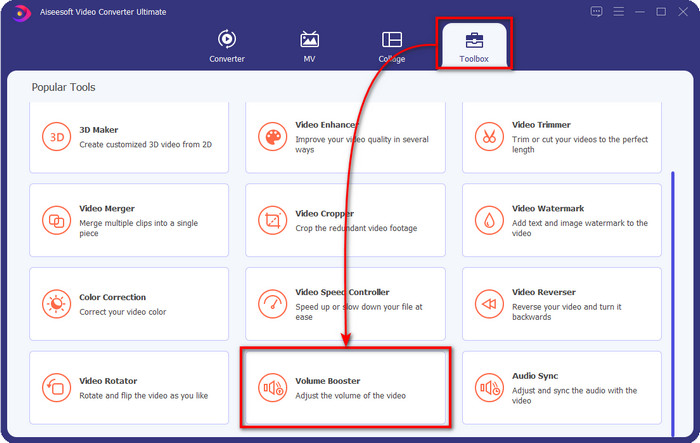
Steg 2. Gå till fliken Verktygslåda, leta efter Volume Booster och klicka på den.
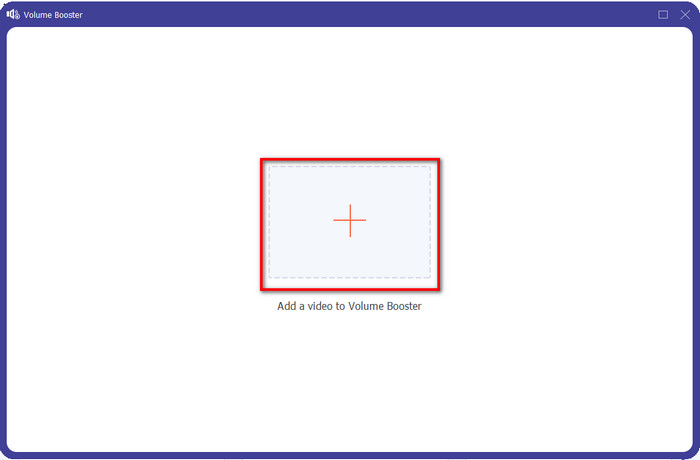
Steg 3. Ett nytt fönster visas; klicka på knappen lägg till för att infoga filen du vill höja volymen på. Bläddra efter filen och tryck på Öppna.
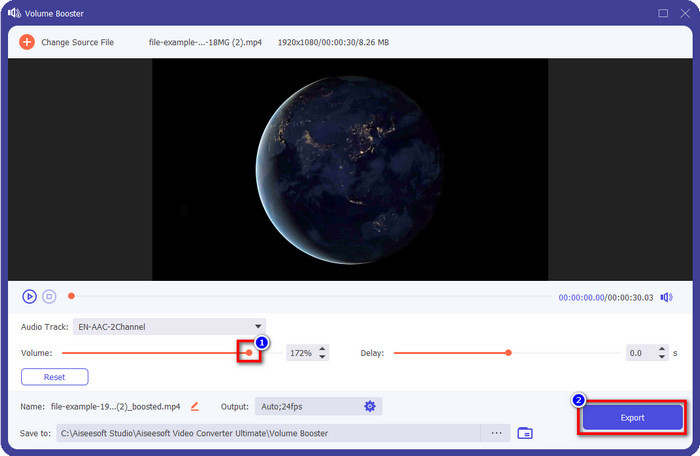
Steg 4. Gå sedan till Volym och justera den genom att dra reglaget åt höger för att öka volymen. När du är klar klickar du på Exportera för att fortsätta. Därmed har du redan ökat volymen på den video du vill.
Relaterat:
Del 2. Vanliga frågor om öka volymen på AirPods
Låter det bra att lyssna på högt?
Nej, det är inte lämpligt för ditt öra. Även om det är bra för oss att lyssna på musik på maxnivå är det inte för våra öron. Se till att du inte överexponeras för 70 decibel för att undvika hörselnedsättning och andra permanenta skador, i första hand om du använder hörlurar eller AirPods. I allmänhet kommer detta inte att påverka ditt öra direkt eftersom vårt headset inte kan skapa ett öronbedövande ljud som en explosion. Men i längden blir det ett dåligt resultat. Så innan det händer måste du förhindra det.
Varför behöver jag öka ljudet?
I vissa fall kommer du att behöva öka volymen för att höra ljudet bättre, speciellt för att lyssna på några anhöriga detaljer som är en del av ljudet eller videon. Men kom ihåg att undvika att överexponera ditt öra för ett högt ljud för att undvika vissa komplikationer som kan leda till permanent skada.
Varför har mina AirPods buzz?
Det finns många möjliga orsaker till varför dina AirPods kan gå till surr. En av anledningarna är att du lägger intensivt tryck på AirPods samtidigt som du spelar ljudet för länge på basen. Buzzet kommer att hända efter det kontinuerliga trycket på AirPods. Så för att undvika att detta händer måste du använda volymen korrekt och inte för högt.
Slutsats
Nu har vi lärt oss hur man höjer volymen på AirPods på dina iOS‑enheter på ett snabbt sätt. Även om teknikerna vi presenterar kan hjälpa dig att öka volymen är det ibland inte tillräckligt. Så om du fortfarande inte är nöjd med volymen kan du använda FVC Video Converter Ultimate tillsammans med metoderna vi har gått igenom. Med detta verktyg kan du snabbt öka volymen på ditt ljud med bara några klick. I dag är din lyckodag, för du kan ladda ner det direkt genom att klicka på nedladdningsknappen nedan. Vad väntar du på? Ingen anledning att oroa sig; det är säkert att ladda ner för alla.
-
 Hur du gör din volym högre och upplever den bästa ljudkvaliteten [2021]
 Har du problem eftersom volymen på ditt tittande är mycket låg? Läs sedan den här artikeln när vi inkluderar knep för hur du ökar volymen och ett verktyg du kan använda.
-
 Snabba och enkla sätt att synkronisera ljud och video i Adobe Premiere Pro
 Vill du veta hur man synkroniserar ljud och video i Premiere Pro? Då kommer den här artikeln att passa dina behov. När vi provar själva hur man synkroniserar för att bara tillhandahålla de riktiga och enkla stegen.
-
 Topp 3 lösningar på hur man åtgärdar problemet vid ljudfördröjning [2021]
 Vill du veta hur du fixar ljudfördröjningen på din video? Då är du på rätt plats när vi förklarar vad som är faktorerna och hur man fixar det.
