


 Video Converter Ultimate
 Skärminspelare
 Video reparation
 Säker nedladdning
Lär dig allt om vad som är 3D eller tredimensionellt
Vill du veta vad 3D är? 3D eller tredimensionella filmer och bilder blir mer populära. Eftersom vi är i modern tid är det lätt att skapa en 3D-film med olika verktyg. Men först måste vi förstå allt om 3D: bakgrunden, definitionen och hur man gör en 3D-video.
I den här artikeln ska vi fördjupa oss i 3D och dess parametrar. Så om du vill lära dig om vad 3D är, läs den här artikeln.

Del 1. Vad är 3D
3D eller tredimensionella objekt visar bredd, höjd och djup. Dagligen ser vi 3D-objekt eftersom vår fysiska miljö är tredimensionell i sig. På grund av den 3D-uppfattning som vi människor har kan vi uppfatta 3D-objekten, även kallad djupuppfattning. När du ser dig omkring bildar näthinnan i våra ögon en tvådimensionell bild, och vår hjärna bearbetar de två bilderna som 3D-visuella bilder. Men visste du det? Har vi människor verktyg som vi använder för djupuppfattning?
Här är de mänskliga verktygen som vi använder för djupuppfattning:
Stereoskopiskt seende – Stereoskopiskt seende är ett djupseende som uppfattas av de två ögonen. Det är en av hjärnans förmågor att registrera tredimensionella former och visuella intryck. I detta seende ser föremål mer åtskilda ut när de är nära än när de är längre bort.
Parallax – Vinklarna mellan två linjer mäter den här typen av seende. När du rör huvudet i sidled rör sig närmare föremål mer än de som är längre bort.
Storleksigenkänning – Om du är bekant med storleken på ett föremål kan du, även om det är långt borta, ungefär veta hur stort det bör se ut. På samma sätt, om två föremål har samma storlek men det ena ser större ut, antar man att det större är närmare.
Ackommodation – När du fokuserar på ett nära föremål förändras ögonlinsen fysiskt. På så sätt kan du bedöma hur långt bort föremålet är. Detta är också ögats sätt att behålla skärpan på ett föremål.
Luftperspektiv – I luftperspektiv uppfattar du föremål som mindre eftersom vyn är på långt håll. Avlägsna föremål verkar också ha lägre kontrast och mindre färgmättnad.
Det finns också olika typer av 3D i vår fysiska värld. 3D beskrivs också som en bild som ger en illusion av djup på olika avstånd, vilket är vanligt förekommande i datorspel, grafik, virtuell verklighet och filmer.
Olika typer av 3D:
3D-datorgrafik – 3D-datorgrafik kan skapa tredimensionella objekt på en bildskärm eller i ett tvådimensionellt utrymme. Bildpunkterna i 2D-grafik har olika egenskaper, såsom position, färg och ljusstyrka. 3D-pixlarna ligger sedan på en Z-axel. När pixlarna kombineras med sitt djup resulterar det i en 3D-yta, även kallad en textur.
3D-filmer – 3D-filmer är rörliga bilder som har ett tredimensionellt djup. Med hjälp av 3D-glasögon kan vi se en 3D-film. För att skapa den här typen av film använder man stereoskopiskt seende, vilket innebär att två bilder visas samtidigt, en för vartdera ögat.
3D-utskrift – 3D-utskrift kallas också additiv tillverkning. Det är en process där man skapar ett tredimensionellt föremål i fast form utifrån en digital fil. Med hjälp av datorstödd konstruktion (CAD) kan du skriva ut ett 3D-objekt från en digital modell.
Del 2. Hur man spelar 3D-filmer
Nu när du vet vad 3D betyder, låt oss veta hur man spelar upp 3D-filmer med den mest enastående programvaran du kan använda.
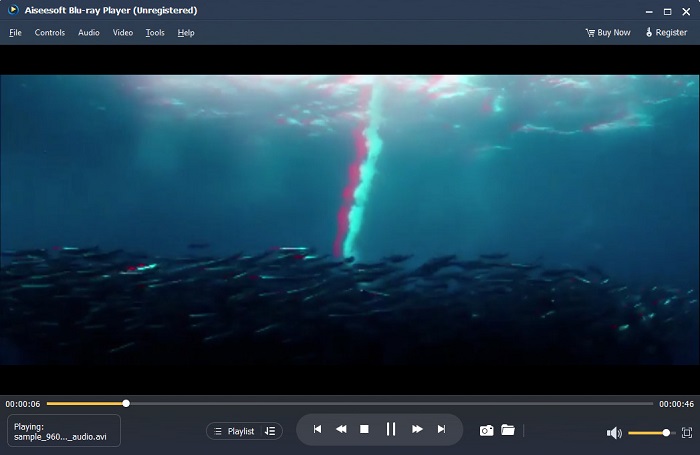
Blu-ray Player är ett skrivbordsprogram där du kan spela upp alla typer av video. Med det här verktyget kan du även spela upp 3D-filmer utan att använda några plug-ins. Dessutom rekommenderar många människor denna mediaspelare på grund av dess enkla och rena användargränssnitt. Dessutom kan denna kraftfulla mediaspelare spela Blu-ray-skivor, Blu-ray-mappar, DVD/mappar/ISO-filer, som andra mediespelare inte stöder. Du kan också njuta av att titta på HD-videor med 100 procent förlustfritt ljud och dramatiskt HD-surroundljud. Vad som till och med är fantastiskt är att du kan skapa din spellista så att du inte har svårt att separera de videor eller ljud du vill ha.
Så här spelar du upp en 3D-film i Blu-ray-spelare:
Steg 1. Ladda ner Blu-ray Player till din enhet. Följ installationsprocessen och starta sedan appen.
Steg 2. På programmets huvudgränssnitt klickar du på knappen Open File. Din enhets filer visas, där du väljer din 3D-film.
Steg 3. Därefter börjar din video laddas upp. Du kan nu ta på dig dina speciella 3D-glasögon och njuta av att titta på din 3D-film.
Del 3. Vad är 3D-TV och 3D-glasögon
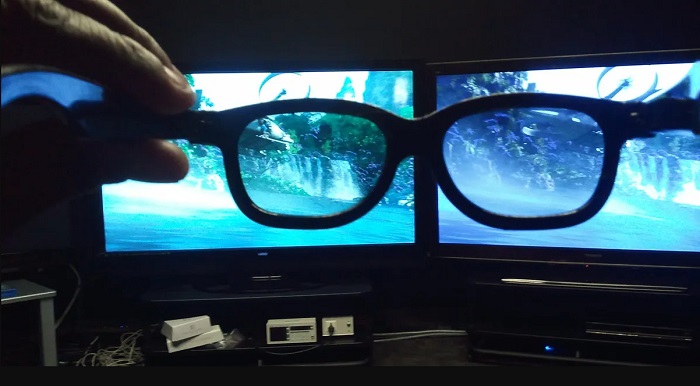
Det finns två typer av 3D-TV:er: Active-shutter 3D, Active 3D och Passive 3D. Den här delen kommer att särskilja deras skillnader och avgöra vilken typ av 3D-glasögon som ska användas när du tittar på Active-shutter eller passiv 3D-TV.
Active-shutter eller Active 3D är en typ av 3D-TV som visar högkvalitativa 3D-bilder växelvis på skärmen. En Active 3D-TV visar växelvisa bilder på skärmen för höger och vänster öga. 3D-glasögonen växlar sedan svart slutning växelvis för att skapa den 3D-effekt du ser på TV-skärmen. Detta gör att varje öga ser den bild som är avsedd för det. De 3D-glasögon du måste använda när du tittar på en Active-shutter-3D är aktiva 3D-glasögon. Denna typ av 3D-glasögon behöver ett batteri som används för att elektroniskt blockera och öppna slutaren i glasens linser. Dessa glasögon är försedda med LCD-linser för att samverka med de alternerande bildrutorna.
Som kontrast är en passiv 3D-TV på sätt och vis lik den 3D-teknik som biografer använder. Denna typ av 3D-TV använder specialfilter på skärmen för att visa 3D med hjälp av polariserade linser i glasögonen. Dessutom blandar passiva 3D-TV-apparater de två bildrutorna i en, växelvis mellan de horisontella linjerna för det vänstra och högra ögat. Glasögonen som dessa 3D-TV-apparater använder är passiva 3D-glasögon, vilka har olika polarisering i varje lins. Det ena ögat ser bara de udda linjerna, medan det andra ser de jämna linjerna, vilket skapar en 3D-bild. De passiva 3D-glasögonen behöver inga batterier för att fungera.
Del 4. 2D vs. 3D
2D och 3D är faktiska dimensioner i en datorarbetsyta. 2D eller tvådimensionella är platta objekt som använder de horisontella och vertikala dimensionerna (X- och Y-axeln). Eftersom 2D bara har två dimensioner kommer du bara att se en linje när du vänder dem åt sidan. Den har bara en höjd och bredd men har inget djup. Medan å andra sidan innehåller 3D eller tredimensionell höjd, bredd och djup. Tredimensionell bild behöver effekten av två ögon som arbetar i tandem för att se en tredimensionell perceptivitet. Om 2D använder X- och Y-axeln, lägger 3D till Z-dimensionen, så att du kan se ett objekts djup.
Om du frågar vilket som är bra att använda, 2D vs. 3D, är svaret både och. 2D och 3D har olika fördelar och nackdelar. Du kan till exempel titta på 2D-videor eller filmer var som helst på vilken enhet som helst utan att bära några speciella 3D-glasögon. Den 3D-effekt som 3D-filmer producerar är dock häpnadsväckande och roligare att se än 2D.
Del 5. Hur man konverterar 2D-film till 3D
Om du vill se en fantastisk 3D-film eller ett klipp i ditt hem utan några 3D-glasögon, kan du konvertera din 2D-film till 3D med den ultimata videokonverteraren. Så om du vill konvertera din 2D-film till en 3D-film, använd den här fantastiska programvaran.
FVC Video Converter Ultimate är ett program som är populärt för videokonvertering. Det här programmet kan inte bara konvertera filformat. Det låter dig också göra om din 2D-video till en 3D-video, såsom anaglyf-3D och delad skärm-3D. FVC Video Converter Ultimate är välkänt bland användare eftersom det stöder nästan alla filformat, som MP4, MKV, AVI, FLV, WEBM, MOV, DIVX och över 1000 till. Det har också mängder av avancerade redigeringsfunktioner, såsom 3D-skapare, GIF-skapare, borttagning av videovattenstämpel osv.
Hur man konverterar 2D-filmer till 3D-filmer med FVC Video Converter Ultimate:
Steg 1. Ladda först ner FVC Video Converter Ultimate genom att klicka på knappen Download nedan.
Gratis nedladdningFör Windows 7 eller senareSäker nedladdning
Gratis nedladdningFör MacOS 10.7 eller senareSäker nedladdning
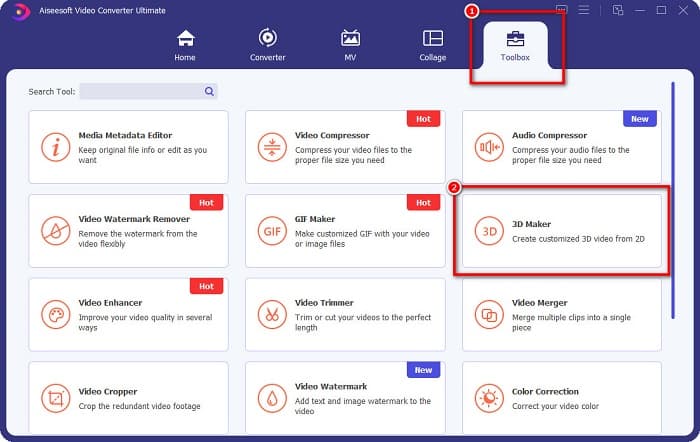
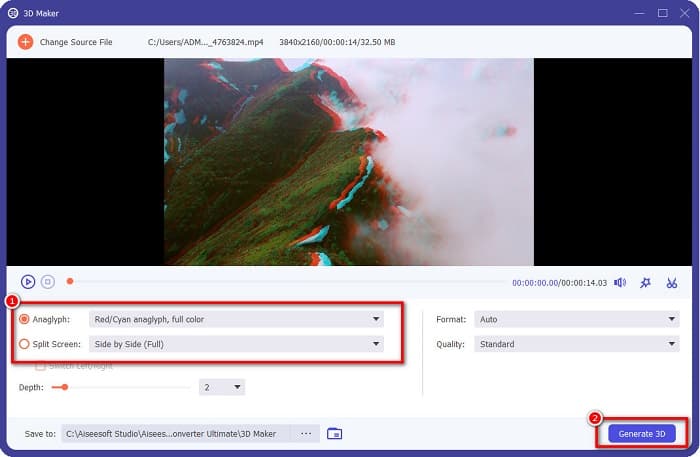
Steg 2. Öppna appen, gå sedan till panelen Toolbox och välj 3D Maker.
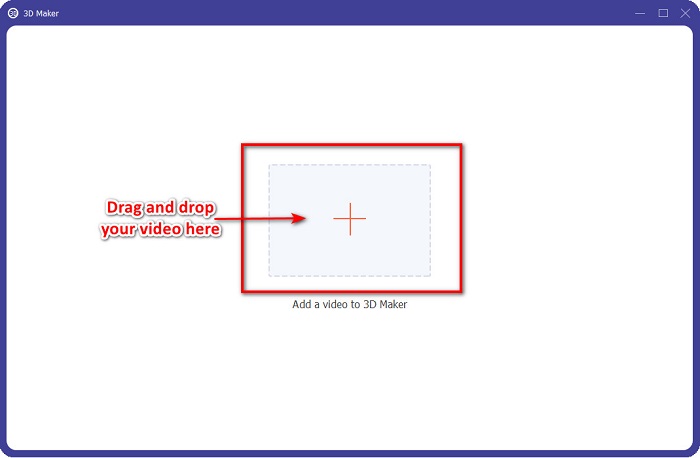
Steg 3. Klicka på knappen med +-tecknet eller dra och släpp din 2D-video i rutan i nästa gränssnitt.
Steg 4. Välj sedan mellan Anaglyph 3D eller Split Screen 3D. Klicka sedan på knappen Generate 3D.
Relaterat till:
Snabbaste sätten att konvertera AVI till WMV [Bästa konverterarna]
Konvertera enkelt MOV till WMV med dessa fantastiska konverterare
Del 6. Vanliga frågor om Vad är 3D
Kan du titta på 3D-videor på VLC Media Player?
Ja. VLC Media Player stöder alla filformat. Du kan också spela upp 3D-filmer i VLC-mediaspelaren.
Kan du konvertera 3D-videor till 2D?
FVC Video Converter Ultimate kan konvertera 3D-videor till 2D. Du kan också ändra filformatet på din video med denna omvandlare.
Vilken är mest använd, 2D eller 3D?
Nuförtiden, i filmbranschen, är 3D-filmer mer dominerande än 2D-filmer. På grund av den intressanta grafiken och den realistiska animationen är 3D-filmer mer populära än 2D-filmer.
Slutsats
3D, eller tredimensionell, är allmänt känt inom filmindustrin och särskilt inom datorvärlden. Nu när du vet vad 3D är har du grundläggande kunskap om hur du kan skapa det. Om du vill göra en 3D-video enkelt, använd FVC Video Converter Ultimate.
-
 3 sätt att konvertera MPG till 3GP på Windows och Mac [gratis]
 Om du letar efter sätt att konvertera MPG till 3GP, läs den här artikeln för att veta de bästa sätten att konvertera MPG till 3GP på Windows och Mac.
-
 Topp 5 bästa gratis MPEG till DivX-omvandlare för Windows och Mac
 Konvertera enkelt din MPEG-fil till en DivX-fil med de bästa MPEG till DivX-omvandlarna. Läs den här artikeln för att få mer information om dem.
-
 Bästa MOV till DivX gratis att använda omvandlare för Mac och Windows
 Vi har lösningen för dig om du letar efter MOV till DivX gratis omvandlare. Den här artikeln presenterar de bästa MOV till DivX-omvandlarna för Mac och Windows.
