


 Video Converter Ultimate
 Skärminspelare
 Video reparation
 Säker nedladdning
Allt du kan lära dig om vad en PNG-fil är
Numera är filformatet PNG ett av standardformaten för bilder. Du kan se det på internet, på datorer, i mobiltelefoner osv. Vissa användare har dock ingen uppfattning om detta format. Som tur är ger det här inlägget dig all information du behöver. Du kommer att få reda på vad ett PNG‑format är. Dessutom erbjuder det här inlägget utmärkta metoder för att konvertera bilder till PNG‑format.

Del 1. Detaljerad information om PNG-fil
Rasterfamiljens Portable Network Graphics (PNG)-tillägg utför förlustfri bildkomprimering. Det är inte patenterat och skapades som en ersättning för GIF, Graphics Interchange Format. Förutom de vanliga gråskalebilderna som ger transparens kan de baseras på en palett. PNG stöder inte ytterligare färgtyper som CMYK. Det beror på att ett av dess huvudsakliga syften är att skicka bilder över Internet. Dessutom tog den inte hänsyn till några professionella utskriftssysslor. Bilden i filen är uppdelad i bitar med information. Det inkluderar pixlar eller textkommentarer kodade, och integritetsverifiering görs under RFC 2083. Många användare stöter på PNG-formatet. Det beror på att det är ett av de populära formaten nuförtiden. Det kan vara en e-postbilaga eller en bild som du hämtat från en webbplats. Ibland har skärmdumpar också denna upplösning. Det är mer användbart för proffs som kan använda det.
Historiskt sett startade PNG-bildformatet 1995. Oliver Fromme, en IT-expert, kom på formatet PING. Men senare blev det PNG. Detta filformat är nästa utveckling av GIF-formatet. GIF-formatet är åtta år äldre än PNG. GIF har många nackdelar. Den behöver en patentlicens och ett begränsat utbud av 256 färger. Denna begränsning kan påverka bilden när den öppnas på datorskärmen. Som ett resultat är att göra en PNG-fil det bästa valet. Den är patentfri och har en större färgpalett.
Del 2. Hur man öppnar en PNG-fil
Eftersom du redan vet vad en .png-fil är, kommer den här delen att berätta hur du öppnar detta format på dina enheter och olika webbläsare. Du kan öppna dina PNG-foton i vilken populär webbläsare som helst. Det inkluderar Firefox, Chrome, Explorer och mer. Metoden är problemfri.
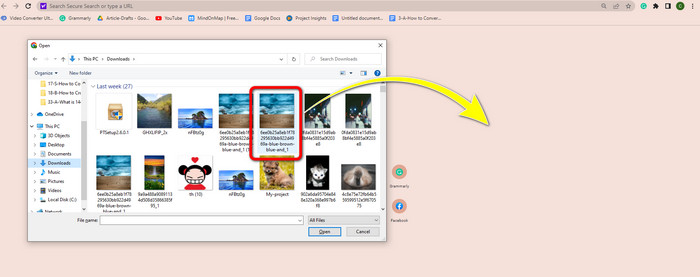
Om du använder din webbläsare kan du öppna PNG‑bilden genom att trycka på Ctrl + O på tangentbordet. Välj den PNG‑bild du vill öppna. Klicka sedan på knappen Öppna i din filkatalog.
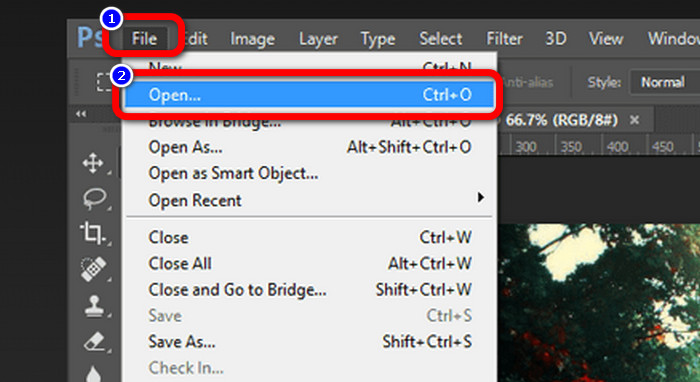
Det finns också sätt att öppna PNG‑bilder i Photoshop, Drive eller andra appar. Du kan gå till Arkiv > Öppna > och välja fotot. Klicka därefter på Enter. På så sätt kan du visa din PNG‑bild i programmet.
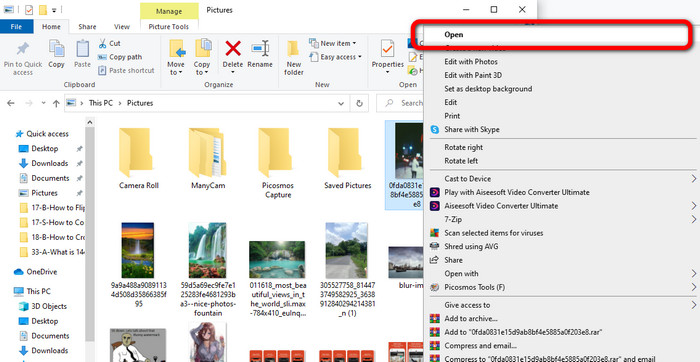
På din Windows‑dator är det enkelt att öppna en PNG‑fil. Klicka på filikonen i aktivitetsfältet för att öppna den. Gå till fliken Snabbåtkomst för att se PNG‑bilden. När du ser bilden, högerklicka på den och välj alternativet Öppna. På så sätt kan du visa bilden i helskärmsläge.
Del 3. Effektivt sätt att konvertera bilder till PNG-format
Konvertera bilder till PNG med FVC Free Image Converter
Du kan använda olika onlinetjänster för att konvertera bilder till PNG‑format. Men vissa av dem är inte säkra. Andra konverterare är dessutom kostsamma. Om du vill ha en säker och kostnadsfri bildkonverterare kan du använda FVC Free Image Converter. Det här verktyget är en av de främsta applikationerna för att konvertera bilder online. Du kan använda det gratis, vilket gör det tillgängligt för alla användare. Dessutom kan du ladda upp bilder i olika format, som TIFF, JPG, PNG, GIF och fler. Bildkonverteringen är dessutom enkel. Det krävs bara tre steg för att konvertera dina bilder till PNG‑format. Du kan också konvertera många bilder samtidigt. Den här konverteraren erbjuder batchkonvertering. På så sätt sparar du mer tid. Dessutom garanteras sekretessen genom att dina data raderas efter konverteringsprocessen. Vidare behöver du inte registrera dig eller skapa ett konto i den här appen. Du kan använda den direkt när du har öppnat webbplatsen.
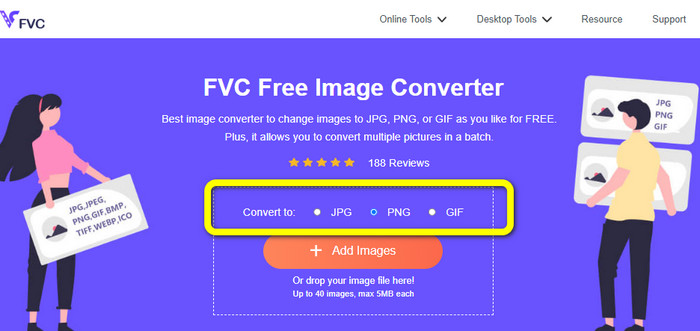
Steg 1: Besök först webbplatsen FVC Free Image Converter. När du är på huvudsidan går du till formatalternativet och väljer PNG som önskat utdataformat.
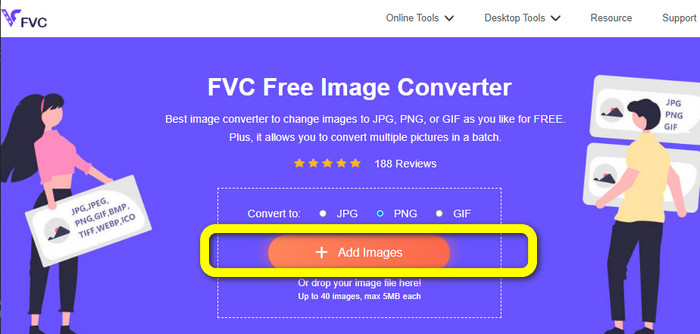
Steg 2: Klicka på knappen Add Images i mitten av gränssnittet för att ladda upp fotot. Öppna fotot du vill konvertera från din filkatalog.
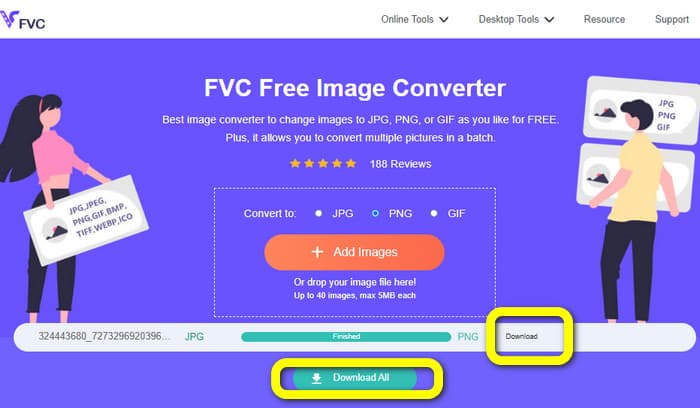
Steg 3: Efter konverteringsprocessen klickar du på knappen Download för att spara din slutliga bild. Därefter kan du öppna din PNG‑bild på datorn.
Konvertera bilder till PNG med Coolutils
Du kan använda bildkonverteraren Coolutils online utan att ladda ned någonting. Du behöver inte vänta på en e‑postlänk, eftersom den här onlinetjänsten genomför konverteringen direkt. Det här onlineverktyget låter dig snabbt konvertera bilder till PNG-format. En sak vi gillar med den här tjänsten är möjligheten att rotera och ändra storlek på en bild innan konverteringen. Däremot visas ingen förhandsgranskning av hur den roterade bilden kommer att se ut efter konverteringen. Eftersom den fungerar via en webbläsare kan du använda den här metoden med alla operativsystem, inklusive Windows, Linux och Mac. Programmet stöder många indataformat, bland annat JPEG, PNG, GIF, BMP och TIFF.
Steg 1: Öppna din webbläsare och sök efter Coolutils. Klicka sedan på knappen Upload File to Convert för att lägga till bilden du vill konvertera.
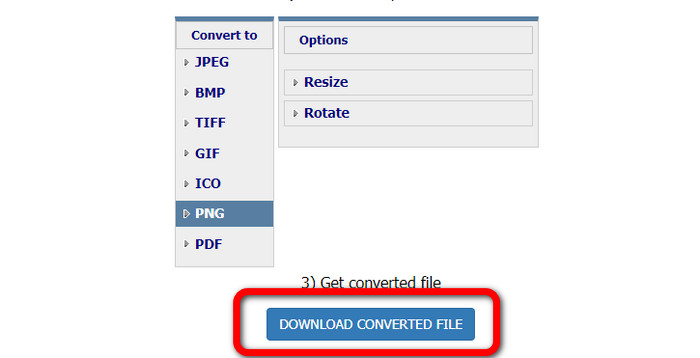
Steg 2: Välj formatet PNG från formatalternativen.
Steg 3: Klicka på knappen Download converted file för att spara bilden på skrivbordet. Du kan också använda det här verktyget för att konvertera bilder till JPG.
Del 4. Vanliga frågor om PNG-fil
1. Vad är skillnaden mellan PNG och JPG?
Den största skillnaden mellan PNG- och JPG-filformat är deras komprimeringsalgoritm. PNG-filformatet använder en förlustfri algoritm. Det betyder att den kan behålla all information från bilden. JPG-formatet använder en komprimeringsalgoritm med förlust. Det kasserar en del av bildinformationen för att minska filstorleken.
2. Hur effektivt visar PNG-formatet skriven text?
Det är effektivt. Den förlustfria komprimeringen av denna fil kan visa texttunga foton. Den innehåller sidlayouter och skärmdumpar. Skanningar av tryckt text som handskrivna dokument och tidningssidor ingår.
3. Vad är bättre, JPG eller PNG?
Det beror på ditt syfte. JPG-fil sänker bildkvaliteten. Det fungerar också bättre för att minska filstorleken på en bild. PNG komprimerade filen samtidigt som bildkvaliteten bibehölls. Den är utmärkt för att lagra föremål, såsom text, ikonisk grafik och linjeteckningar.
Slutsats
All information ovan berättar om PNG‑filformatet. Den ger dig till och med tillräckligt med fakta om vad en PNG‑fil används till. Dessutom visar den här artikeln praktiska instruktioner för hur du konverterar bilder till PNG‑format med FVC Free Image Converter. Så om du vill konvertera bildfiler, använd den här pålitliga bildkonverteraren online.
-
 8 häpnadsväckande bildkonverterare [komplett information]
 Den här recensionen kommer att berätta om de bästa bildfilsomvandlarna du kan använda för att konvertera bildfiler. Läs det här inlägget för att veta den bästa bildkonverteraren för dig
-
 Fullständig information om skillnaderna mellan JPEG vs. JPG vs. PNG
 Det här inlägget kommer att ge dig tillräckligt med information om skillnaderna mellan JPEG vs. JPG vs. PNG. Dessutom kommer du att lära dig hur du konverterar bilder till dessa filer
-
 Vad är JPEG/JPG: Konvertera dina bilder till JPG utan ansträngning
 Är du nyfiken på vad JPEG betyder? Vi har ett svar till dig. Du kommer också att lära dig hur du konverterar olika bildformat till JPG-filer. Läs inlägget nu.
