


 Video Converter Ultimate
 Skärminspelare
 Video reparation
Bästa av de bästa omvandlarna du kan använda för att konvertera 3GP till AVI online och offline
3GP-formatet är ett flexibelt format som överför ljud- och videoströmmar till 3:e generationens mobiltelefoner via GSM. Det matchar 3G-anslutningen för snabbare överföring av filer. Detta format används oftast på äldre telefonmodeller eftersom det är mångsidigt och kan överföras snabbt. Numera kan dock 3GP-filer inte spelas upp i din vanliga mediaspelare, eftersom nya mediaspelare inte förstår formatets struktur. Det bästa sättet att titta på alla dina 3GP-filer på mobil eller dator är därför att konvertera dem. I stället för att leta på internet efter vilken konverterare som är bäst att använda, har vi samlat fyra konverterare du kan välja mellan. Verktygen nedan är utmärkta och kan konvertera 3GP till AVI-format utan kvalitetsförlust.

Del 1. Konvertera 3GP till AVI offline med Ultimate Converter
FVC Video Converter Ultimate
Om du inte vill anstränga dig alls för att konvertera dina 3GP-filer rekommenderar vi starkt att du använder FVC Video Converter Ultimate. Denna programvara är ett av de bästa valen för filkonvertering, och den konverterar filer mycket snabbt – ofta inom några sekunder. Dessutom delar många användare som provar detta verktyg samma åsikt. Sammanfattningsvis säger de tydligt att detta verktyg hjälpte dem att lösa deras konverteringsproblem på ett ögonblick.
Ytterligare förklaring, detta verktyg är inte bara det bästa för att konvertera filen; den har också de mest avancerade funktionerna du skulle vilja prova. Exempel är redigerare, GIF-tillverkare, volymförstärkare, synkronisering av ljud och video, reversering och mer. Om du köper det här verktyget kommer du att få alla de nämnda verktygen tidigare, och det finns mycket mer att komma med. Så nu, låt oss försöka följa steg-för-steg för att konvertera 3GP till AVI på Mac och PC utan att förlora kvaliteten.
Steg 1. Klicka på nedladdningsknappen och välj om du är PC- eller Mac‑användare, installera programmet därefter.
Gratis nedladdningFör Windows 7 eller senareSäker nedladdning
Gratis nedladdningFör MacOS 10.7 eller senareSäker nedladdning
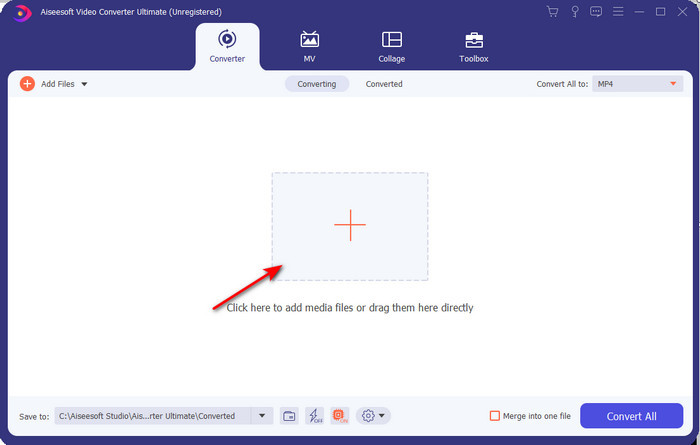
Steg 2. Starta verktyget, klicka på plustecknet i mitten av gränssnittet, välj .3gp-filen i din mapp och klicka på Öppna. Du kan också göra en batchkonvertering här om du vill; klicka på Lägg till filer för att lägga till fler.
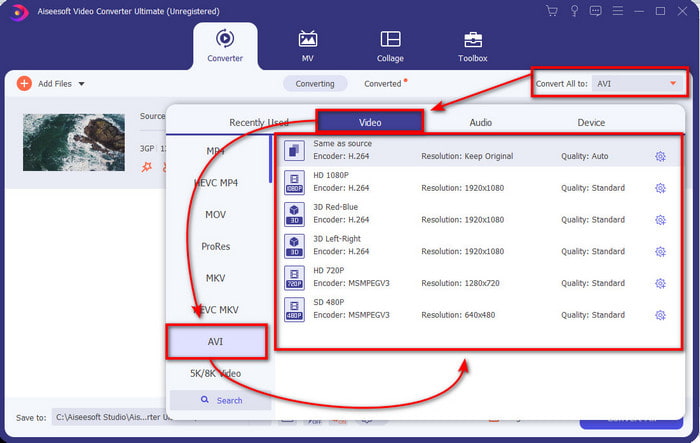
Steg 3. För att ändra 3GP-formatet klickar du på alternativet Konvertera alla till och väljer formatet AVI under kategorin Video.
Steg 4. För att starta konverteringsprocessen klickar du på Konvertera alla, och konverteringen av dina 3GP-filer börjar nu.

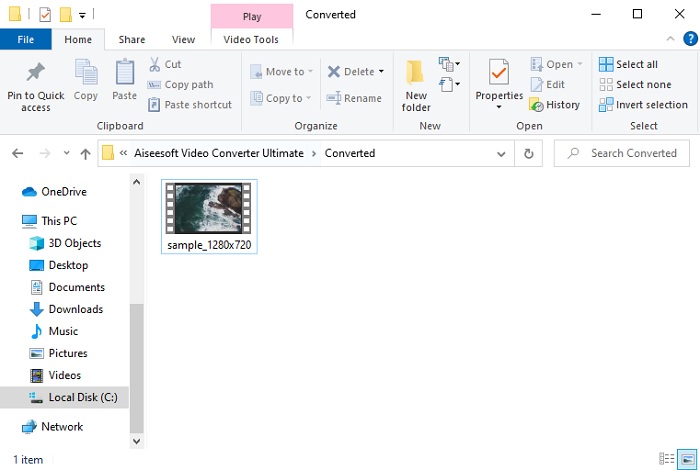
Steg 5. Efter konverteringen visas en mapp på skärmen med den konverterade 3GP-filen. Klicka på den nykonverterade AVI-filen du just skapat för att titta på den och redigera den senare om du vill.
Del 2. 3 tillgängliga onlinekonverterare för att konvertera 3GP till AVI
1. FVC Free Video Converter Online

Vi försäkrar att verktyget i den här listan är den bästa 3GP till AVI‑konverteraren online, nämligen FVC Free Video Converter Online. Alla funktioner du vill se i en onlinekonverterare finns här. Det är den bästa onlinekonverteraren vi nämner ur alla olika aspekter. Om du till exempel vill ha en effektiv onlinekonverterare, en säker konverteringsprocess och helt utan annonser, då är detta webbverktyget för dig. Även om webbtjänsten ser bra ut och fungerar utmärkt, stöder den ändå bara ett medelstort antal format. Avancerade funktioner som du kan stöta på i FVC Video Converter Ultimate finns inte här. Men fördelen jämfört med programvaruversionen är att den är helt gratis. Utan fler dröjsmål går vi vidare till stegen för att konvertera din fil till en ny version.
Steg 1. Klicka på denna länk för att gå till webbplatsen.
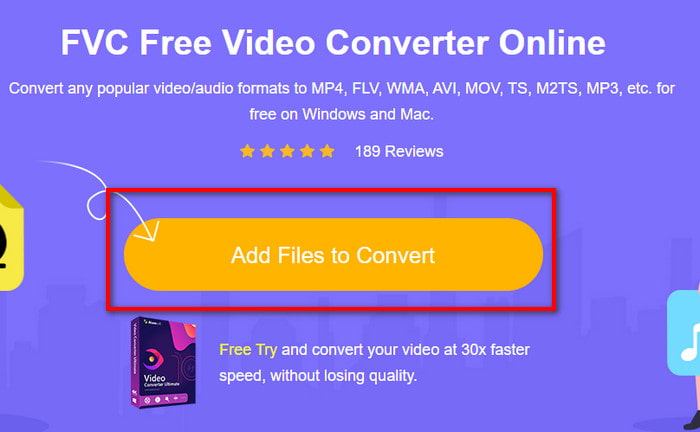
Steg 2. Tryck på Add Files to Convert för att starta onlineverktyget; en mapp visas där du letar upp .3gp-filen. Om det är första gången du använder verktyget måste du ladda ner startprogrammet genom att klicka på Add Files to Convert och sedan klicka igen för att starta.
Steg 3. När du har valt filen väljer du AVI-format i avsnittet nedan.
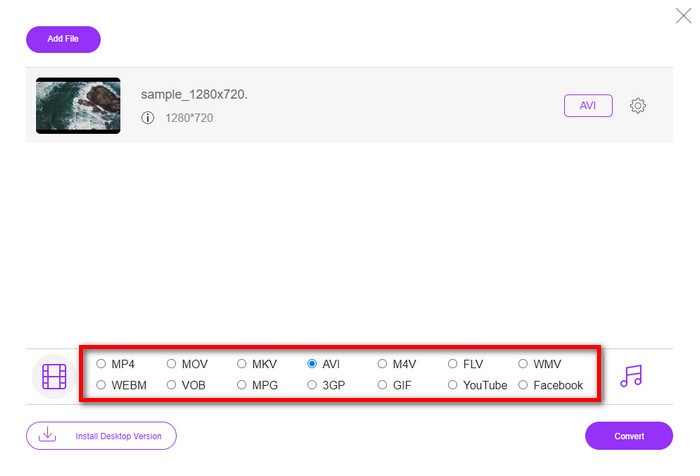
Steg 4. När du är redo att konvertera filen klickar du på Convert.
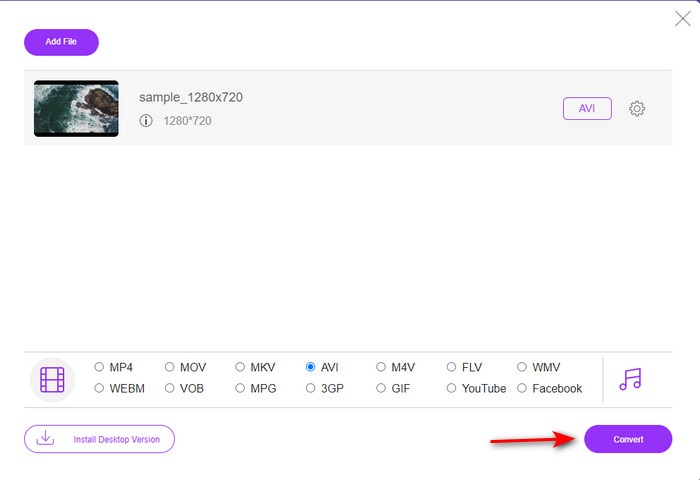
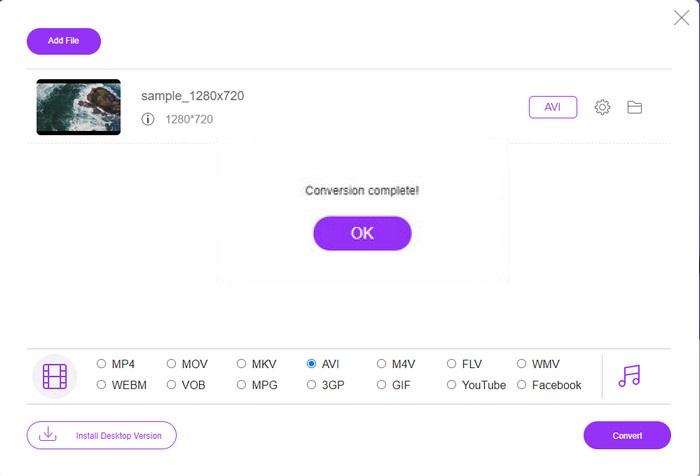
Steg 5. Efter konverteringen visas en mapp igen, men nu med filen du konverterade nyss.
2. Fconvert.com
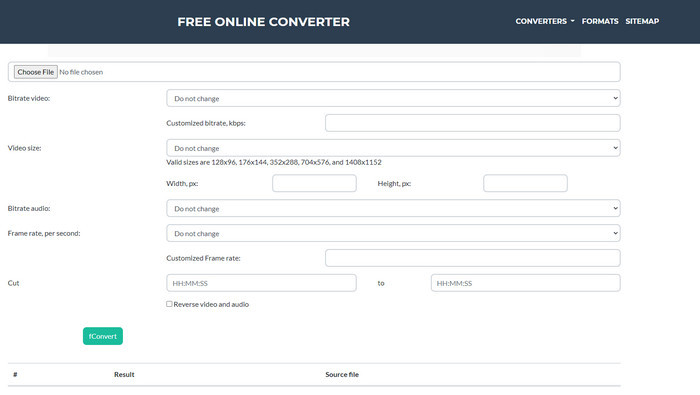
När det gäller filkonvertering måste Fconvert.com finnas med på listan eftersom detta webbverktyg är en av de fantastiska konverterare du kan använda gratis. Denna konverterare kan konvertera nästan alla format du känner till, och troligen även något av dina. Det finns dock ett problem med detta verktyg, och det är annonserna. Varje gång du klickar på något på webbplatsen visas först en annons innan du kommer till det du klickade på. Även om annonserna är irriterande ser appen ändå prydlig ut och fungerar mycket bra för formatkonvertering. Om du vill uppleva hur bra detta verktyg är, följ stegen nedan och lär dig hur du konverterar 3GP till AVI gratis.
Steg 1. Sök efter verktygets huvudsida i din webbläsare.
Steg 2. Klicka på AVI under video, klicka på Choose File, leta upp .3gp-filen, scrolla sedan nedåt och klicka på fConvert.
Steg 3. Scrolla nedåt, så ser du Result; klicka på filen för att ladda ner den.
3. Anyconv
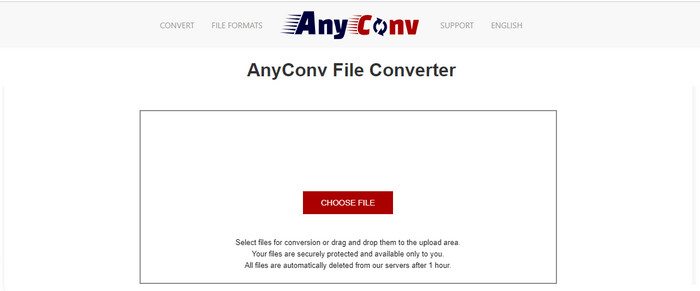
Ett annat verktyg som är specialiserat på formatkonvertering är Anyconv. Detta webbverktyg skiljer sig mycket från Fconvert.com eftersom det är både bättre och snabbare. Dessutom har det färre annonser än det föregående verktyget. Även om annonserna är färre är de större jämfört med Fconvert.com, men när det gäller prestanda fungerar detta verktyg riktigt bra. Låt oss testa verktyget för att se om det fungerar för att konvertera 3GP till AVI gratis utan ytterligare dröjsmål.
Steg 1. Öppna din sökmotor och leta upp Anyconvs webbplats.
Steg 2. Tryck på Choose File, en mapp visas, lägg till .3gp-filen i webbverktyget och fortsätt. För att ändra format måste du klicka på rullgardinsmenyn och hitta AVI. För att starta konverteringsprocessen klickar du på Convert.
Steg 3. Vänta tills processen är klar och klicka sedan på Download AVI för att ladda ner den konverterade filen.
Del 3. Vilket format är bäst; 3GP eller AVI
Om du använder en 3:e generationens telefon och vill lagra video av hög kvalitet, överför den snabbare i 3:e generationens telefon, då är 3GP formatet för jobbet. Men om du försöker skicka AVI-format till 3:e generationens telefoner, kommer filen inte att öppnas eftersom detta format inte stöds. Men i dagens fall är AVI mycket bättre. Den har redan fått mycket stöd från alla mediaspelare och redaktörer jämfört med 3GP. Även om AVI-format är det bästa valet idag, är filstorleken enorm jämfört med 3GP, och om du skulle spara det på din telefon skulle det äta upp mycket utrymme. Dessutom är båda formaten bra, men de har olika syften och användningsområden.
Del 4. Vanliga frågor om 3GP och AVI
Kan jag använda FFmpeg för att konvertera 3GP till AVI?
Du kan använda FFmpeg för att konvertera din 3GP‑fil; det är dock svårt att göra, men hanterbart om du tar dig tid. Första steget är att ladda ner zip-filen med FFmpeg till din dator och packa upp den. Det andra steget är att öppna din CMD för att kommunicera med verktyget. Lokalisera sedan din fil i kommandotolken, kopiera kommandot ffmpeg -i input.3gp -vn -ar 44100 -ac 2 -b:a 192k output.avi, klistra in det i CMD och tryck på Enter för att starta konverteringsprocessen.
Kan 3GP spelas på 4:e generationens telefoner?
Detta format används på telefoner av 3:e generationen, och du kan fortfarande spela upp videor i 3GP-format på vissa telefoner av 4:e generationen men inte alla. För, som tidigare nämnts, är 3GP avsett för 3:e generationen och inte för alla 4:e generationens telefoner. Eller så kan du vända dig till professionella 3GP‑spelare för att njuta av dina videor.
Vilket format är bättre: 3GP eller MP4?
När det gäller kvalitet och mest stödda format är MP4 mycket bättre på detta område. 3GP är dock mycket mindre och fungerar bättre i 3G‑nätverk för snabbare överföring av detta filformat. Vill du konvertera MP4 till 3GP eller tvärtom, klicka här för att få veta mer.
Slutsats
Varje resa måste komma till ett slut, och nu kan du enkelt konvertera 3GP till AVI med hjälp av de ovan nämnda verktygen. Dessutom fungerar alla verktyg som presenteras ovan, låt oss inkludera FFmpeg, utmärkt. Ändå faller det bästa valet alltid till FVC Video Converter Ultimate. Detta verktyg överträffar alla online-omvandlare kan göra i konvertering och många fler aspekter. Så nu, om du vill skaffa programvaran, klicka på nedladdningsknappen och gör omvandlingen snabbt.
-
 [Online och gratis] 3 metoder för att konvertera MP4 till 3GP problemfritt
 Vill du konvertera MP4 till 3GP på ett snabbt och enkelt sätt? Här ska vi dela 3 MP4 till 3GP-omvandlare för att ändra MP4 till 3GP för att spela på olika mobiltelefoner.
-
 Topp 3 gratis sätt att konvertera FLV till 3GP på Windows / Mac
 Kan inte öppna FLV-filer på smartphone eller surfplatta? Oroa dig inte! Här delar vi tre metoder för att konvertera FLV till 3GP utan att förlora kvalitet för att spela på mobilen.
-
 Utmärkt val för att konvertera MKV till ett AVI -format
 Bemästra hur man konverterar MKV-videor med enkla steg som tillhandahålls exklusivt för dig. Vill du veta hur? Klicka sedan på den här länken för att lära dig mer.
