


 Video Converter Ultimate
 Skärminspelare
 Video reparation
Hur man konverterar 3GP till WMV på ett professionellt sätt [Online & Offline]
3GP är ett populärt mobilformat som överför data via mobiltelefoner utan att förbruka särskilt mycket bandbredd samtidigt som det sparar lagringsutrymme. Formatet är dessutom standardiserat för videoinspelning på mobiltelefoner av tredje generationen, men du kan lugnt räkna med att kunna spela upp videon även på andra och fjärde generationens mobiler. Även om det fungerar utmärkt på telefoner är det i praktiken begränsat till smartphones. Det är därför inte förvånande om .3gp-filer inte fungerar särskilt bra på datorer. Du kan dock lära dig att konvertera 3GP till ett format som har betydligt bredare stöd på dator, till exempel WMV. Vill du lära dig hur du kan konvertera 3GP till WMV på ett professionellt sätt? I så fall går vi igenom det direkt utan att slösa tid.

Del 1. Vad är 3GP
Det är ett ISO-baserat format som lagrar mediaströmmar som H.263 eller H.264 för video och AMR eller AAC för ljud, perfekt för förlustkomprimering. Dessutom är detta 3:e generationens format lagringsvänligt för att lagra data på bärbara enheter på våra telefoner, även på IOS. Även om 3GP fortfarande är tillgängligt, började detta formats effektivitet minska, och av den anledningen kom 3GPP med på scenen och blev en bättre version av det.
Del 2. Vad är WMV
Det är ett proprietärt multimediaformat utvecklat av Windows för att streama videor online. Till skillnad från alla andra format, som 3GP, använder WMV en flerfaldig kodare för att göra filen ännu mer komprimerad. På grund av möjligheten att använda många kodare är det mer tillgängligt att effektivt dela videor i detta format. Det finns dock en nackdel med att använda många kodare, särskilt vid redigering och uppspelning, eftersom inte alla mediaspelare och redigerare stöder ett brett utbud av codec. Även om formatet använder en kompressor, kommer inte mediakvaliteten att ändras eller försämras.
Del 3. Professionellt sätt att konvertera 3GP till WMV med Video Converter Ultimate
Vill du få tag på en professionell 3GP till WMV‑konverterare som du kan ladda ner gratis till din plattform? FVC Video Converter Ultimate erbjuder en expertmässig konverteringsprocess utan att du behöver anstränga dig särskilt mycket. Den här konverteraren tar dig till en ny nivå av konvertering som inga andra online‑ eller offlinekonverterare kan erbjuda. Dessutom stöder det ultimata verktyget över 200 mediaformat att välja mellan, till skillnad från många andra verktyg.
Så länge du har denna omvandlare, förvänta dig alltid en professionell utdata på ditt konverterade mediaformat. Vill du använda den professionella omvandlaren för att konvertera dina 3GP-filer? Om så är fallet kan du följa stegen nedan för att framgångsrikt konvertera med det ultimata verktyget.
Steg för hur du konverterar en 3GP‑fil till WMV med FVC Video Converter Ultimate
Steg 1. Nedan finns nedladdningsknappar; välj den plattform du använder. Om du till exempel är Windows‑användare klickar du på nedladdningsknappen för Windows. Är du Mac‑användare klickar du på den andra. När nedladdningen är klar installerar du konverteraren och startar den genom att klicka på Starta nu. Viktigast av allt: efter att du har öppnat programmet bör du bekanta dig med gränssnittet innan du går vidare till nästa steg.
Gratis nedladdningFör Windows 7 eller senareSäker nedladdning
Gratis nedladdningFör MacOS 10.7 eller senareSäker nedladdning
Steg 2. Du ser Add Files uppe till vänster i gränssnittet; klicka där så öppnas en mapp. Bläddra fram .3gp‑filen på din dator och ladda upp den genom att trycka på Open.
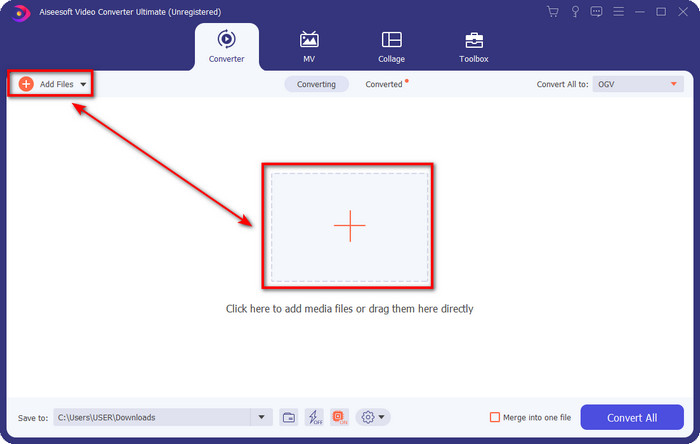
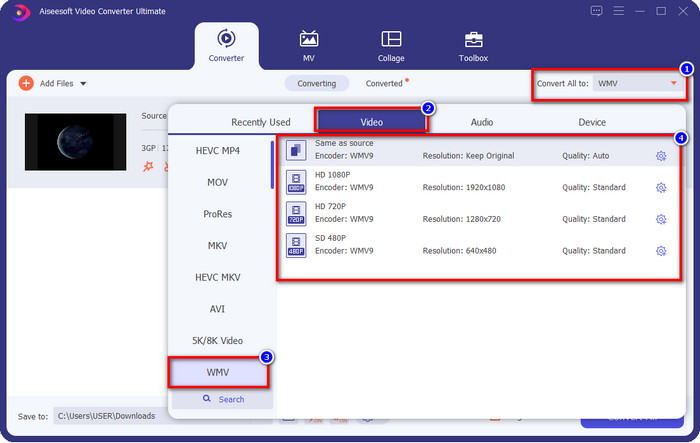
Steg 3. Klicka på Convert All to för att välja WMV‑formatet du vill ha, eller välj WMV som slutligt utdataformat.
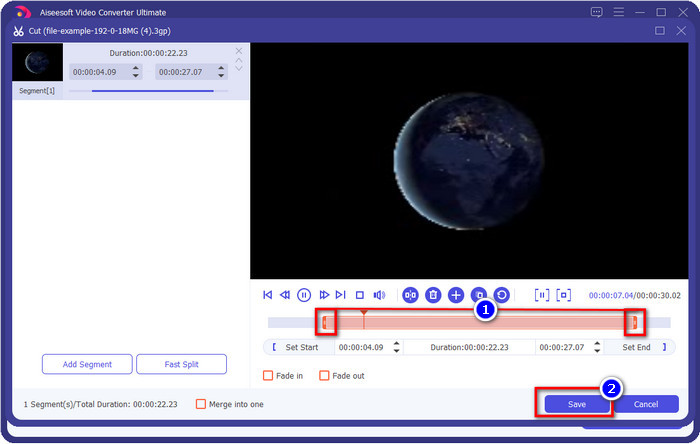
Valfritt. Innan vi konverterar 3GP‑fil till WMV går vi kort igenom några av de andra funktionerna i det här verktyget. Behöver du klippa? Inga problem. Tryck på scissor-knappen, dra slide bar på båda sidor om du vill, och tryck sedan på Save för att tillämpa de klippningar du har gjort.
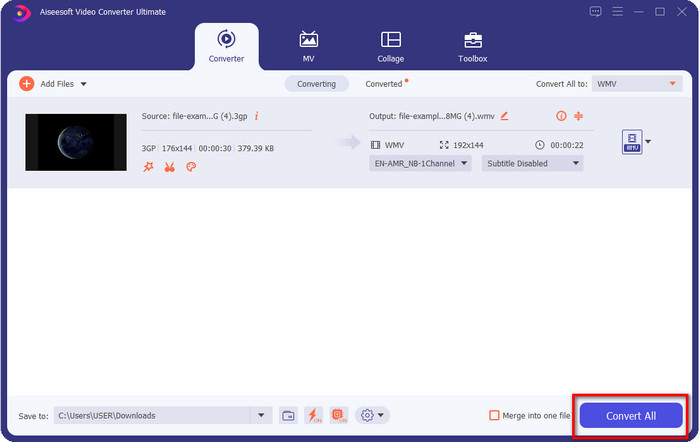
Steg 4. Starta konverteringsprocessen genom att klicka på knappen Convert All. Konverteringen avslutas inom kort, och vips sparas WMV‑filen på din dator.
Del 4. Online sätt att konvertera MXF till WMV med Free Video Converter Online
En annan FVC‑produkt, men denna gång en onlinelösning, är FVC Free Video Converter Online. Den här professionella onlinekonverteraren erbjuder ett rent och överskådligt gränssnitt jämfört med andra webbaserade konverterare. Dessutom behöver du inte ladda ner konverteraren till din enhet innan du använder den; i stället öppnar du bara din webbläsare och går in på konverteraren. Även om webbkoverteraren är bra finns det mycket avancerad funktionalitet som det här verktyget inte kan erbjuda. Men om du vill konvertera 3GP till WMV online är detta rätt val; följ stegen nedan för att använda verktyget.
Steg för hur du konverterar 3GP till WMV gratis online med FVC Free Video Converter Online
Steg 1. Klicka på den här länken för att öppna onlinekonverteraren.
Steg 2. När du har klickat öppnar du konverteraren genom att trycka på Add Files to Convert. Om det är första gången du använder den här konverteraren behöver du installera ett startprogram genom att klicka på Add Files to Convert, men det är inte lika stort som det ultimata verktyget. Leta upp den 3GP‑fil du vill konvertera och klicka på Open.
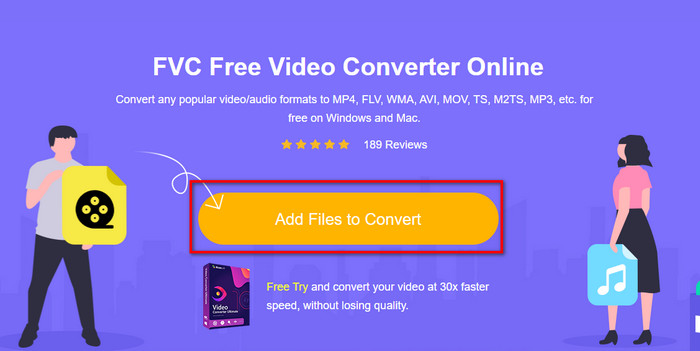
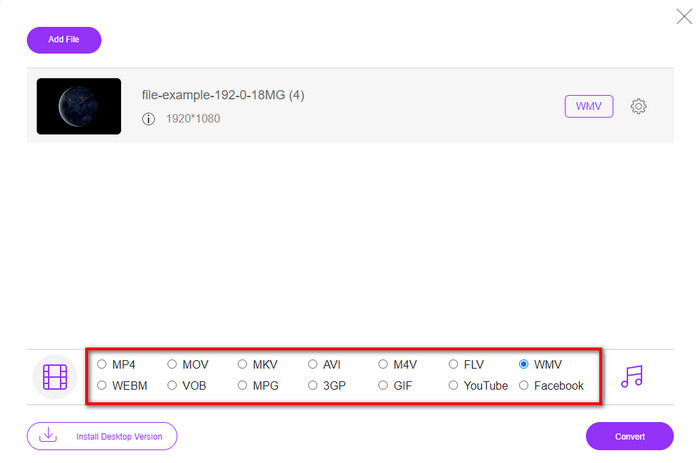
Steg 3. När du har laddat upp 3GP‑filen är det dags att välja något av formaten som visas nedtill, eller klicka på WMV.
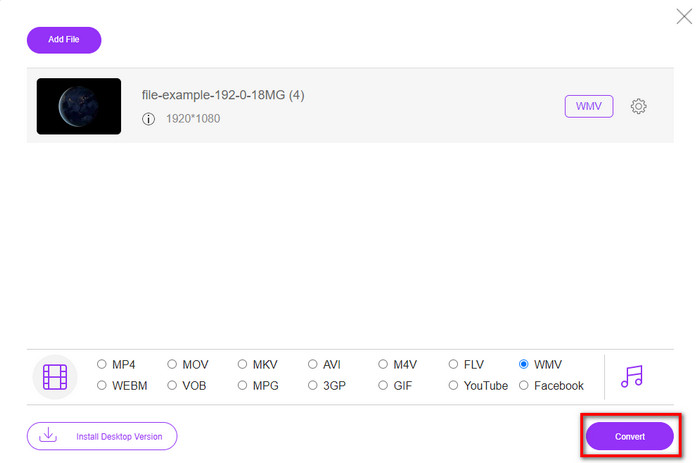
Steg 4. Har du redan valt format? I så fall klickar du på Convert för att starta konverteringen av filen.
Del 5. Vanliga frågor om 3GP till WMV-konvertering
Är det en bra idé att använda en 3GP till WMV-omvandlare online?
Om du inte vill ladda ner en omvandlare på din enhet är det idealiskt att använda en onlinekonverterare. Men kom ihåg att inte alla online- eller offlinekonverterare är säkra att använda. För det mesta har de virus om du installerar dem eller inte gör uppgiften effektivt. Men om du vill ha säkerhet för din konvertering rekommenderar vi att du använder FVC-omvandlarprodukterna eftersom detta är 101%-fri skadlig programvara och garanterar att din konverteringsprocess blir framgångsrik.
Är det möjligt att slå samman flera 3GP-videor?
Ja, med hjälp av FVC:s sammanslagningsverktyg kan du slå ihop flera videor som är i 3GP‑format. Om du nu vill veta hur du slår ihop flera 3GP‑videor bör du läsa den här artikeln för att få veta hur du gör.
Har 3GP-videor bra kvalitet?
3GP har bra kvalitet, men det kan inte lagra högupplöst kvalitet så förvänta dig att videokvaliteten för en 3GP är låg.
Slutsats
Som avslutning kan vi säga att konverterarna som listas i den här artikeln är noggrant utvalda utifrån en viss standard för professionellt resultat. Dessutom har vi själva använt verktygen för att kunna presentera och slå fast enbart faktabaserade beskrivningar av deras egenskaper. Om du inte vill ladda ner en konverterare till din dator för att spara utrymme men ändå vill ha ett professionellt resultat rekommenderar vi varmt att du använder FVC Free Video Converter Online. Men om du vill transkoda dina 3GP‑filer på ett mer professionellt sätt rekommenderar vi starkt att du använder FVC Video Converter Ultimate. Fortfarande inte övertygad av vad vi säger? I så fall bör du prova själv för att uppleva den expertkonvertering som verktyget erbjuder och lära dig hur du konverterar 3GP till WMV.
-
 De 4 mest effektiva sätten att konvertera 3GP till AVI-format [2025]
 Kan jag konvertera mina 3GP-filer till AVI? Tja, du kan enkelt konvertera det om du provar dessa tillgängliga verktyg eftersom vi samlade alla möjliga lösningar på ditt 3GP till AVI-konverteringsproblem.
-
 Bästa 3GP till FLV-konverteraren att använda för att konvertera 3GP till FLV [2025]
 Har du någonsin försökt konvertera 3GP till FLV, men du vet inte vilken typ av omvandlare du kommer att använda? Läs den här artikeln för att lära dig alla detaljer om att konvertera 3GP till FLV.
-
 2 bästa möjliga sätt att konvertera ostödda 3GP till DivX [2025]
 Många användare frågar hur man konverterar 3GP till DivX. Så nu tillhandahåller vi en artikel för det som hjälper dig att konvertera din .3gp-fil utan problem.
