


 Video Converter Ultimate
 Skärminspelare
 Video reparation
 Säker nedladdning
Konvertera GIF till MKV med den mest enkla metoden
GIF är ett av de vanligaste filformaten du kan använda på din enhet, men det finns tillfällen då du kan vilja konvertera det till ett annat videoformat som MKV. Att leta efter ett program kan dock vara mycket arbete. Många konverterare har problem under själva konverteringsprocessen. Dessutom behöver vissa appar repareras eller fungerar inte som de ska. Utöver det är det en utmaning att hitta ett verktyg som stöder många olika videoformat. Men i den här artikeln hittar du den bästa lösningen för dina behov. Du kommer att få upptäcka en utmärkt metod för att konvertera GIF till MKV med hjälp av ett pålitligt program som du kan använda både på Windows och Mac.

Del 1: Introduktion av GIF och MKV
Innan du konverterar kommer du först att lära dig informationen om dessa två format. Se de viktigaste detaljerna i tabellen nedan.
| Formatera | GIF | MKV |
| namn | Grafikutbytesformat | Matroska Multimedia Container |
| Filtillägg | .gif | .mkv |
| Beskrivning | Ett format för att utbyta bilder är GIF. Det är ett allmänt använt grafiskt format som lagrar komprimerad data i ett format utan kvalitet och använder inte mer än 256 färger. CompuServe skapade GIF-formatet för utbyte av rasterbilder över nätverk 1987 (GIF87a). Filformatet ändrades 1989 (GIF89a), vilket gav möjlighet till animering och transparens. GIF är möjligt att ladda upp på Twitter och Facebook. Det är omöjligt att ladda upp GIF-filer på YouTube eller Instagram eftersom de inte är videor. GIF-filer kan inte heller spelas på mediaspelare. Graphics Interchange Format kallas GIF. Huruvida GIF ska uttalas "jiff" eller "gif", med "g" uttalat som "g" i "get", har varit mycket omtvistad. Det är också möjligt att lagra flera filer i en enda GIF-fil. | MKV är en öppen källkodsbehållare som kan innehålla mediamaterial som har komprimerats med olika codecs. Den har många fördelar jämfört med den traditionella AVI-behållaren, inklusive möjligheten att inkludera ljudspår och undertexter på många språk som kan bytas utan att pausa uppspelning och snabb filsökning och spola tillbaka. Dessutom är formatet enkelt att ändra, vilket gör det enkelt att extrahera ljud- och videodata. |
| Utvecklad av | CompuServe | Matroska |
| Kategori | Bildfilformat | Video filformat |
| MIME-typ | bild/gif | video/x-matroska |
Del 2: Detaljerade steg för att konvertera GIF till MKV
Video Converter Ultimate är det program du letar efter om du snabbt och enkelt vill konvertera GIF till MKV-format. Med hjälp av den här programvaran kan du konvertera dina GIF-filer utan kvalitetsförlust. Dessutom kan denna konverterare erbjuda en ultrasnabb konverteringsprocess, upp till 30x snabbare än andra konverterare. Du kan också konvertera flera GIF-filer till ett och samma MKV-format samtidigt, eftersom programmet stöder batchkonvertering. På så sätt kan du vara säker på att det är enkelt och snabbt att omvandla din fil till ett annat format. Dessutom erbjuder Video Converter Ultimate ett intuitivt gränssnitt, vilket är perfekt för alla. När det gäller tillgänglighet kan både Windows- och Mac-användare använda den här konverteraren, vilket är bekvämt för dem.
Dessutom finns det fler funktioner du kan stöta på. Anta att du vill skapa en otrolig musikvideo att spela på födelsedagsfester, bröllop, julfester och mer. Du kan fortfarande lita på den här applikationen eftersom den erbjuder en musikvideoskapare. Den här skaparen har gratis teman för att göra din video mer kreativ och unik. En annan funktion som den kan erbjuda är verktyget Färgkorrigering. Med hjälp av skjutreglaget kan du enkelt justera videons ljusstyrka, kontrast, mättnad och nyans med det här verktyget. På så sätt blir din video mer tilltalande att titta på. Det finns fler funktioner du kan uppleva i denna nedladdningsbara applikation. För att upptäcka mer om det här verktyget, se ytterligare information nedan.
Funktioner
◆ Konvertera ett brett utbud av videoformat, inklusive MP4, MKV, M4V, MOV, AVI, FLV, WMV, VOB, SWF och över 100 fler.
◆ Konvertera många filer samtidigt.
◆ Det erbjuder en snabb konverteringsprocess.
◆ Den erbjuder en videoförbättringsfunktion för att förbättra videon.
Fördelar
- Den har ett lättanvänt gränssnitt med detaljerade guider.
- Lämplig för nybörjare.
- Gratis att ladda ner.
- Tillgänglig på både Windows och Mac.
- Det kan konvertera obegränsat antal video-/bildfiler.
Nackdelar
- Skaffa den betalda versionen för att uppleva fler vackra funktioner.
Följ de detaljerade stegen nedan för att omedelbart konvertera GIF till MKV med hjälp av Video Converter Ultimate på din Windows- eller Mac-dator.
Steg 1: Om du vill ladda ner Video Converter Ultimate enkelt klickar du på knappen Ladda ner nedan. Starta sedan programmet efter installationen.
Gratis nedladdningFör Windows 7 eller senareSäker nedladdning
Gratis nedladdningFör MacOS 10.7 eller senareSäker nedladdning
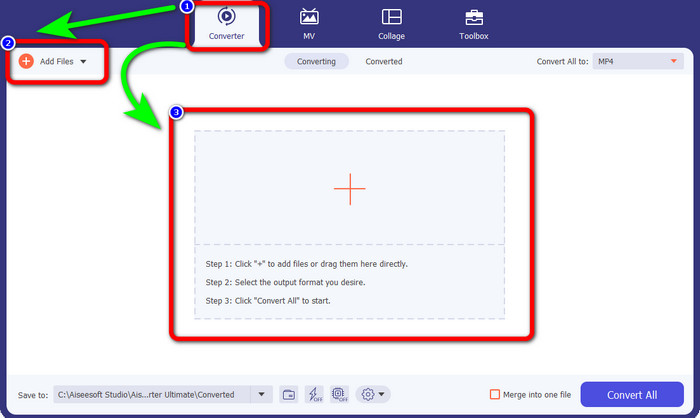
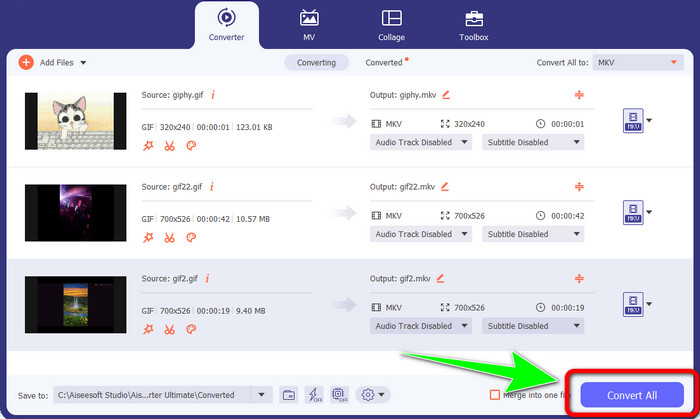
Steg 2: Gå till panelen Converter när gränssnittet redan visas på skärmen. Klicka sedan på knappen Add Files för att lägga in GIF-filen. Du kan också klicka på Plus-ikonen i mitten av gränssnittet för att lägga till filen.
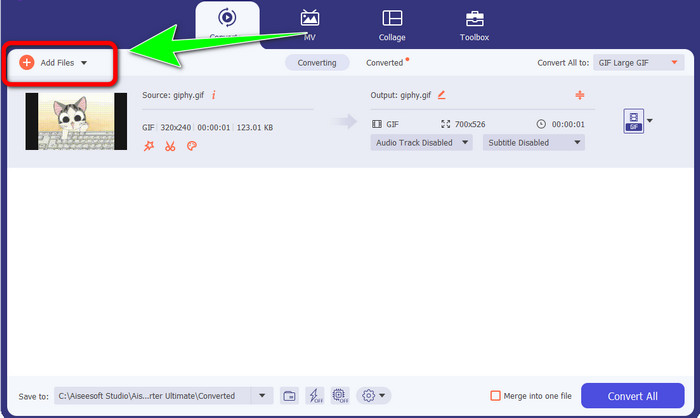
Steg 3: Om du vill göra en batchkonvertering klickar du på knappen Add Files.
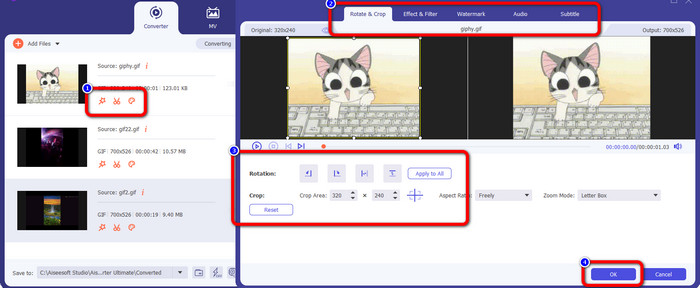
Steg 4: Om du vill redigera din video innan du konverterar den klickar du på ikonerna för Editing-verktygen. Med detta verktyg kan du lägga till filter och effekter i dina videor. Du kan också rotera och beskära dina videor. Klicka sedan på knappen OK.
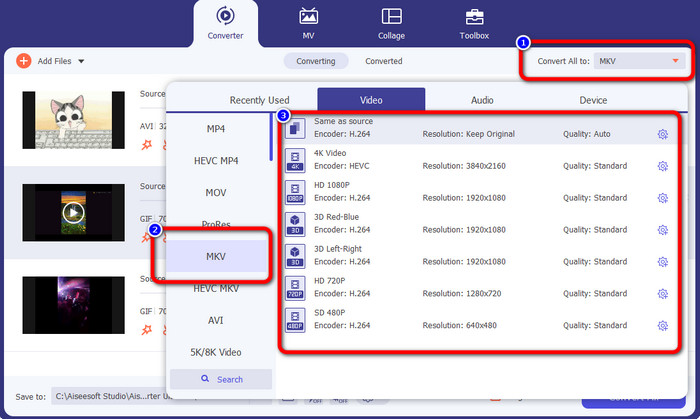
Steg 5: Därefter går du till knappen Convert All to för att konvertera alla filer. Välj MKV-fil från formatalternativen och välj önskad videokvalitet från 480p upp till 4K.
Steg 6: Som sista steg klickar du på knappen Convert All längst ned till höger i gränssnittet. Vänta på att konverteringsprocessen ska bli klar och spara sedan din MKV-video på skrivbordet. Den här programvaran kan också hjälpa dig att konvertera GIF till M4V.
Del 3: Vanliga frågor om att konvertera GIF till MKV
1. Vilket är det bästa filformatet för MKV att konvertera till?
Det bästa formatet du kan konvertera MKV till är MP4-formatet. MP4 är det mest använda filformatet i vår moderna tid. När det gäller kompatibilitet är det utmärkt, eftersom du kan spela upp en MP4-fil i alla program och på alla enheter. Klicka här för att lära dig hur du konverterar MKV till MP4.
2. Har MKV bättre kvalitet än MP4?
Ja. Även om MP4-filen är kompatibel med alla enheter, har MKV-filen bättre kvalitet än MP4-filen. Det beror på att på grund av stödet för ytterligare funktioner, flera ljudspår och undertextspår, är MKV-filer vanligtvis större än MP4-videor. MKV-filen stöder också olika undertextfiler som du kan använda på olika språk.
3. Vilka är fördelarna och nackdelarna med GIF-filer?
Fördelen med GIF-filer är att deras filstorlek är liten, laddningstiden är kort, animeringen är möjlig och det är förlustfri komprimering. Sedan är nackdelen med den här filen att den har ett begränsat urval av färger, bilden är bara platt och den är inte perfekt för fotografering med ett brett spektrum av färger.
4. Varför finns det tillfällen då MKV-filen är laggy?
En anledning är att datorn kanske inte har tillräckligt med minne och CPU-kraft för att hantera högkvalitativ eller UHD MKV-video. Detta filformat har trots allt en stor filstorlek.
5. Vilka videospelare kan stödja MKV-filer?
Du kan spela din MKV-fil på VLC Media Player, Media Player Classic, 5KPlayer, Real Player, KMPlayer, Pot Player, etc. Med dessa program kan du definitivt spela din MKV-videofil.
Slutsats
Med den här metoden kan du konvertera GIF till MKV enkelt och snabbt. Och Video Converter Ultimate är det rätta valet för en enastående offline-konverterare. Så vad väntar du på? Prova det här programmet och dra nytta av de många funktioner du kan ta del av!
-
 Hur man konverterar TRP till MKV utan att förlora kvaliteten
 Har du problem med att ta reda på hur man konverterar TRP till MKV? Då är du i rätt inlägg. Vi kommer att erbjuda dig de bästa sätten att enkelt konvertera TRP till MKV.
-
 Topp 4 bästa lösningarna för att konvertera MXF till MKV [löst]
 Lär känna dessa fyra fantastiska metoder för att enkelt konvertera MXF till MKV online och offline. Apparna som ingår i det här inlägget kan hjälpa dig att konvertera filer utan krångel.
-
 Häpnadsväckande sätt att konvertera OGV till MKV effektivt och enkelt
 Denna guidepost ger dig en problemfri procedur för att konvertera OGV till MKV förlustfritt. Prova dessa mest pålitliga omvandlare och upplev deras fantastiska funktion
