


 Video Converter Ultimate
 Skärminspelare
 Video reparation
2 snabba och enkla sätt att konvertera M2TS till AVI med medföljande steg
När vi kliver längre in i framtiden får många format inte längre särskilt mycket stöd, som till exempel M2TS. Detta format använder fortfarande den gamla Blu-ray Audio Video-behållaren som använder MPEG-2‑ström för att transportera data. Du kan inte öppna detta format på vissa enheter som iPhone, iPod och till och med Android, eftersom de inte kan läsa strukturen hos formatet. Men om du fortfarande har filer med den här filändelsen och vill titta på dem rekommenderar vi att du konverterar formatet till AVI. Låt oss därför ta reda på vilken metod som är bäst för att hjälpa dig i din strävan att konvertera en M2TS‑fil. Dessutom, om du fortsätter att läsa den här guiden kommer du att lära dig att konvertera M2TS till AVI-format både online och offline.

Del 1. M2TS vs. AVI
Som vi förklarade tidigare var M2TS-filer en behållare på Blu-ray som stöder olika videor, ljud och en annan ström i en enda behållare. Dessutom, om ditt filtillägg på din Blu-ray eller AVCHD är i detta format, förvänta dig att kvaliteten på den är utmärkt. Även om detta filformat fungerar bra, är stödet det får på vissa mediespelare fortfarande magert. En annan är att när du vill spela den här typen av filtillägg behöver du plug-in-play, en codec och några komponenter för att titta på videon i detta format. Till skillnad från om ditt filtillägg är .avi. Detta format vinner fans på hela webben på grund av hur bra videokvalitet detta format kan innehålla. Men filstorleken är ett stort problem eftersom den inte har någon korrekt codec för att minska din filstorlek. Men om vi jämför M2TS och AVI så är de båda utmärkta. Ändå är stöden olika, och flexibiliteten i AVI-formatet kan ge dig.
Del 2. Det första sättet är att konvertera M2TS till AVI Online med det enklaste webbverktyget
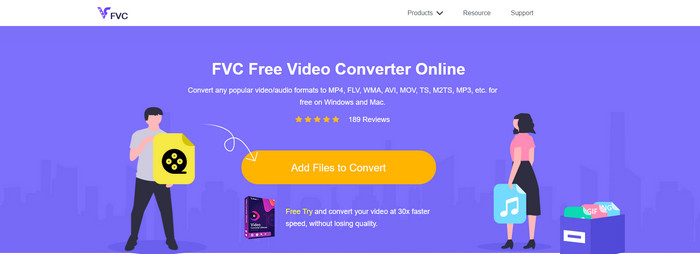
Om du funderar på om du kan konvertera M2TS till AVI gratis är detta något för dig: här presenterar vi FVC Free Video Converter. Det här webbaserade verktyget är en av de bästa onlinekonverterarna du kan hitta på internet. Dessutom, om du har problem med att konvertera ditt format är det också en lösning på det: du kan ändra bithastighet, upplösning och bildfrekvens. Även om verktyget stöder ett medelstort urval av olika format saknar det fortfarande avancerade funktioner för att göra ditt slutresultat lika imponerande som FVC Video Converter Ultimate kan göra åt dig. Men om du inte vill betala och har internetanslutning är detta ditt självklara val för att konvertera formatet till en ny version.
Fördelar
- Ingen programvara behövs för att ladda ner eftersom den kan nås på webben.
- Den stöder medelstora varianter av det format du kan välja.
- Kostnadsfritt och inga annonser på webbplatsens gränssnitt.
Nackdelar
- Den behöver en internetanslutning för att kunna komma åt den.
- Vissa format stöds inte här, och det har begränsat formatstöd.
Steg för hur du använder onlinekonverteraren på webben
Steg 1. Klicka på den här länken för att öppna huvudsidan för onlinekonverteraren – du behöver inte oroa dig, länken är säker att använda eftersom vi har testat den själva.
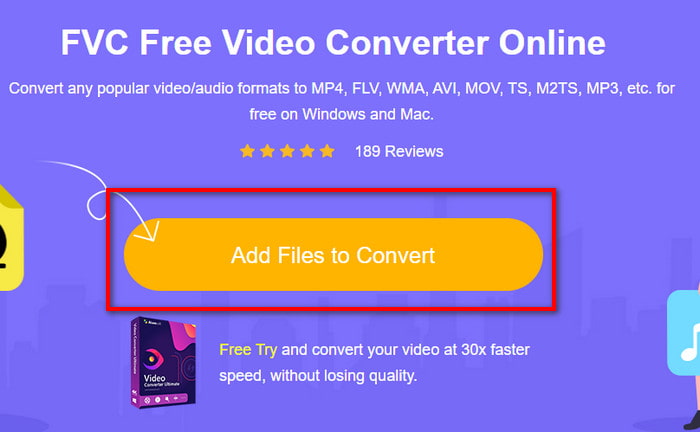
Steg 2. Klicka sedan på Add Files to Convert, så visas en mapp på skärmen. Välj filen med filändelsen .m2ts och klicka på Open.
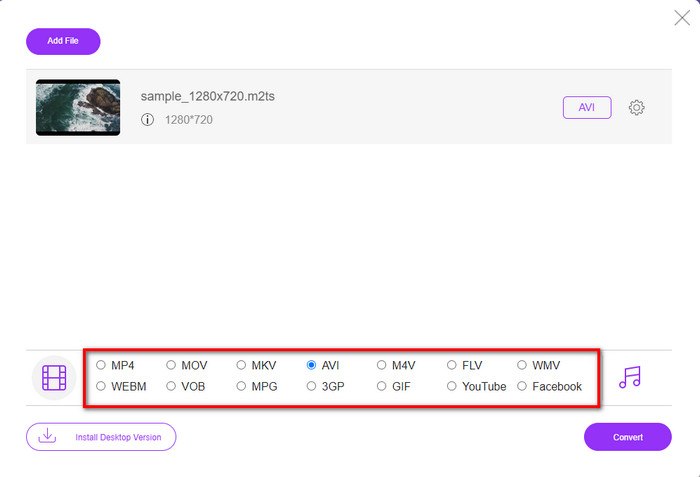
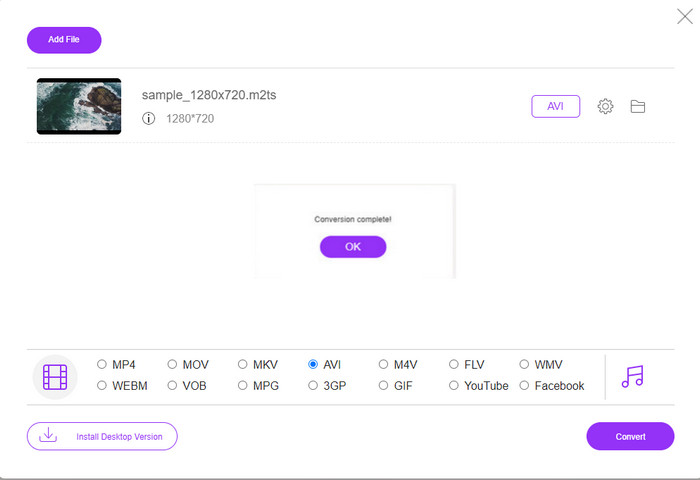
Steg 3. När du har lagt in filen visas ett gränssnitt på skärmen med olika formatalternativ nedtill. Välj AVI‑formatet i listan.
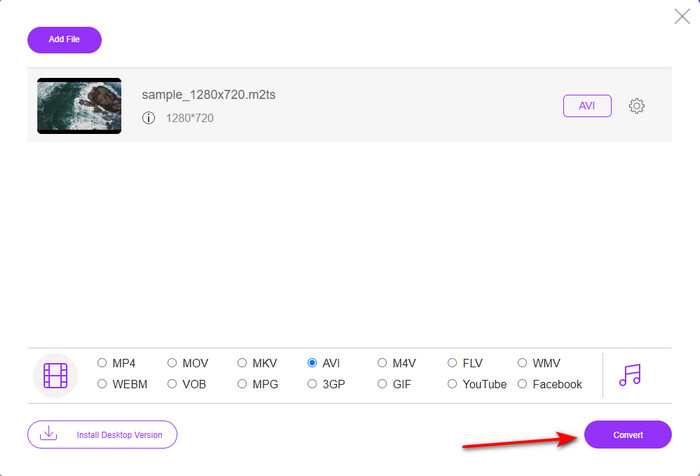
Steg 4. När du har valt format klickar du på Convert för att börja ändra formatet till AVI.
Steg 5. Själva konverteringen tar ungefär en minut; därefter visas en mapp med den konverterade filen du just skapat.
Del 3. Andra sättet är att använda det ultimata verktyget för att konvertera M2TS till AVI offline
Om du vill ha ett verktyg som presterar avsevärt bättre än de online‑ eller offlinekonverterare som finns tillgängliga är FVC Video Converter Ultimate det perfekta verktyget för dig. Det här programmet fungerar mycket bra för olika uppgifter, vare sig det gäller redigering, att skapa en GIF, ändra format, höja volymen och mycket mer. Många avancerade men förenklade funktioner har redan lagts till i denna programvara för att ge bästa möjliga resultat till sina användare. Ja, det stämmer: du behöver bli kund innan du kan använda detta ultimatverktyg. Men du behöver inte deppa, för det är inte dyrt och presterar bättre än andra konverterare. Programmet stöder dessutom alla kända format och givetvis även det filformat som dina enheter eller din dator använder. Om du vill uppleva den bästa konverteringsprocessen kan du följa de angivna steg‑för‑steg‑anvisningarna för hur du använder denna M2TS‑till‑AVI‑konverterare.
Fördelar
- Den stöder mycket mer avancerade funktioner som du skulle älska att använda.
- Kan konvertera en fil inom några sekunder på grund av hårdvaruaccelerationen och snabba konverteringen som detta verktyg ger.
- Tillgänglig på alla plattformar och stöder alla format.
Nackdelar
- För att komma åt verktyget måste du betala.
- Det måste laddas ner till din datorenhet först.
Steg för hur du konverterar M2TS‑videoformat till AVI‑format offline
Steg 1. Ladda ner programvaran till din plattform genom att klicka på nedladdningsknappen nedan. Installera den sedan, gör grundinställningarna och öppna programmet.
Gratis nedladdningFör Windows 7 eller senareSäker nedladdning
Gratis nedladdningFör MacOS 10.7 eller senareSäker nedladdning
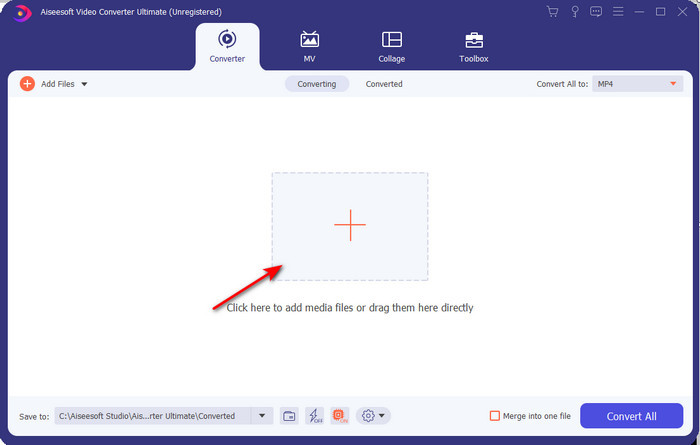
Steg 2. Starta programvaran, klicka på +-knappen för att lägga in .m2ts‑filen från mappen och klicka på Open.
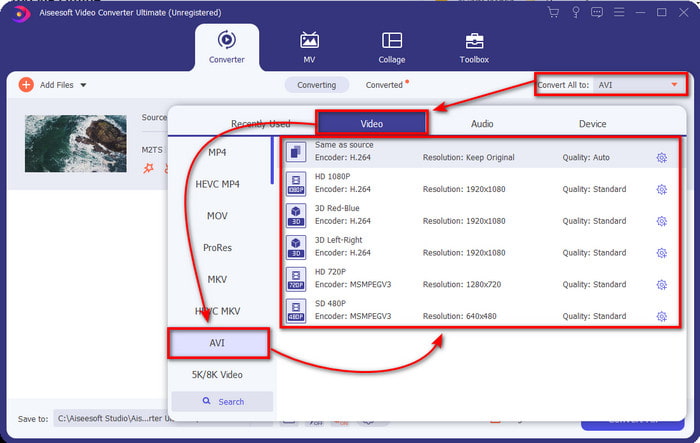
Steg 3. Nu ser du längst upp till höger i gränssnittet menyn Convert All to, klicka på den. En undermeny visas när du klickar, leta upp formatet AVI i listan.
Steg 4. När du har valt format kan du starta konverteringen genom att klicka på Convert All.
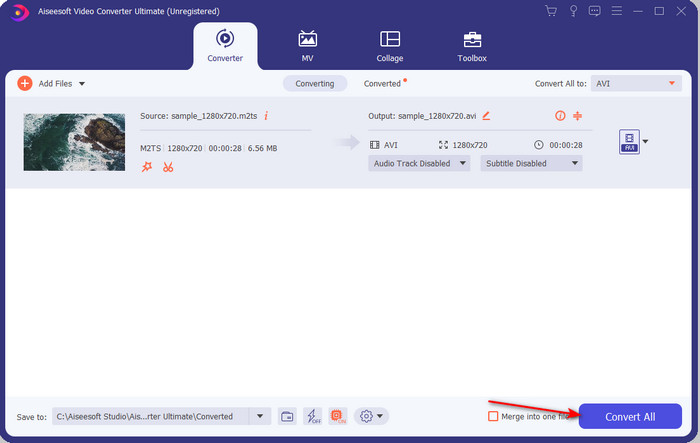
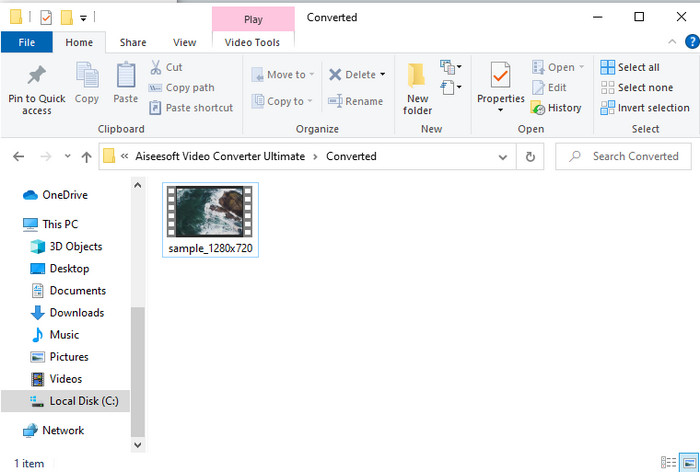
Steg 5. När konverteringen är klar visas en mapp på skärmen, klicka sedan på filen för att titta på den konverterade .m2ts‑filen.
Del 4. Vanliga frågor om M2TS och AVI
Efter att ha konverterat M2TS till AVI, kvarstår kvaliteten på den?
Efter konvertering av M2TS till AVI bör kvaliteten på videon bibehållas. Det finns dock en chans att kvaliteten ändras om du ställer in kvaliteten på utskriften till medel eller låg. Detta kan undvikas om du ställer in den på 1080 eller 4k men filstorleken på den kommer att vara större jämfört med de lågkvalitativa.
Varför kan jag inte spela M2TS på min Windows Media Player?
Det finns i princip en enda orsak till att du inte kan spela upp filer med filändelsen .m2ts, och det är att formatet inte stöds. Så om du ändå vill titta på din .m2ts‑fil måste du antingen konvertera den eller hitta en annan tredjeparts mediaspelare som kan spela M2TS‑filer.
Är MTS och M2TS olika?
Om vi skulle jämföra dessa två format kan du räkna med att det inte finns någon större skillnad. Båda använder dessutom AVCHD‑videoformatet, som lagrar din videokvalitet så hög som möjligt. För att få mer information om MTS‑ och M2TS‑filer kan du läsa Vad är skillnaden mellan MTS och M2TS.
Slutsats
Tillsammans hittade vi nu olika tekniker för hur du konverterar din M2TS-fil till AVI. När vi undersökte varje verktyg individuellt fick vi reda på att FVC Video Converter Ultimate fungerar bra när det gäller att konvertera filer. Så i slutändan föreslår vi att du laddar ner den fenomenala omvandlaren för enklare konvertering och upplever den snabbaste konverteringsprocessen någonsin.
-
 Hur man konverterar M2TS till MKV gratis och online
 Vill du konvertera M2TS till MKV samtidigt som du behåller originalkvaliteten? Det här inlägget visar dig gratis och online-metoder för att ändra M2TS till MKV förlustfritt.
-
 [2021] Topp 6 gratis och online sätt att konvertera M2TS till MP3
 Kan en M2TS-fil konverteras till MP3? I det här inlägget har vi listat topp 6 gratis och online-sätt att hjälpa dig konvertera M2TS till MP3, AAC, AIFF och mer ljudformat.
-
 Hur man konverterar M2TS till MOV gratis [Online & Offline]
 Behöver du konvertera M2TS till MOV för att spela upp videofiler på ett antal spelare och plattformar? Den här artikeln hjälper dig att hitta den bästa metoden Online / Offline för att konvertera M2TS till MOV på Windows / Mac.
