


 Video Converter Ultimate
 Skärminspelare
 Video reparation
Enklaste sätten att konvertera MPG till MKV med de bästa omvandlarna [gratis]
Sadly, MPG files do not contain subtitle tracks; however, you can convert your file to a file format that stores numerous subtitle tracks in different languages. And if you are looking for a way to convert your MPG file to MKV easily, we provide the simple steps to convert MPG to MKV online and offline; read this article until the end.

Del 1. Varför konvertera MPG till MKV
MPG-filformat är ett av de mest använda filformaten på webben. Det här filformatet är utvecklat av MPEG eller Moving Pictures Expert Groups. Dessutom kan den här typen av filer lagra video, ljud och metadata. Dessutom stöder nästan alla mediaspelare i stor utsträckning dessa typer av filer. Däremot är MKV- eller Matroska-filer en mediefilbehållare som lagrar video-, ljud- och undertextspår i en fil. Den här filtypen är också känd för filmentusiaster eftersom den kan hantera ljudspår på olika språk.
Del 2. Snabbaste sättet att konvertera MPG till MKV offline
There are a lot of converters in the market that can convert MPG to MKV. However, if you want a converter that can do an ultra-fast conversion, FVC Video Converter Ultimate is the best tool. And if you want to remove watermark from your videos, this converter has the feature to do so. Moreover, it can also do a batch conversion to merge multiple file-formats into one. Want to know the advantages of using this MPG to MKV Converter? Then read the details below.

FVC Video Converter Ultimate
5 689 200+ nedladdningar- Redigera och förbättra din video explicit.
- Ultrasnabb konverteringsprocess är tillgänglig i denna omvandlare.
- Det kan konvertera MPG-filer till MKV, WMV, AVI, MP4 och andra 1000+ filformat.
- Tillgängligt på alla operativsystem som Windows och macOS.
Gratis nedladdningFör Windows 7 eller senareSäker nedladdning
Gratis nedladdningFör MacOS 10.7 eller senareSäker nedladdning
Följ stegen nedan för att konvertera din MPG-fil till MKV.
Step 1. Download FVC Converter Ultimate by clicking the Download button below for Windows or macOS. Then follow the installation process, and run the app.
Gratis nedladdningFör Windows 7 eller senareSäker nedladdning
Gratis nedladdningFör MacOS 10.7 eller senareSäker nedladdning
Step 2. For the next step, click the Add Files or the + sign button to upload your MPG file on the software's main interface.
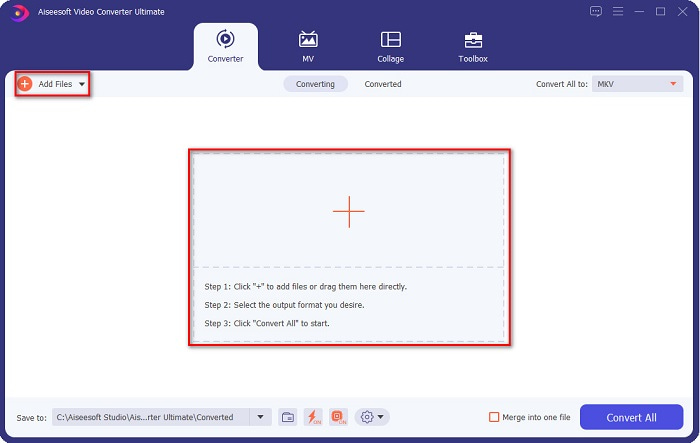
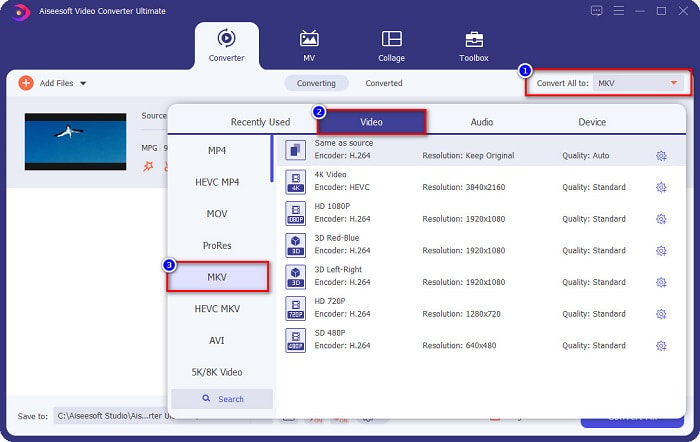
Step 3. After uploading your MPG file, select the output format by clicking the Convert All to button. In your case, choose the MKV file format.
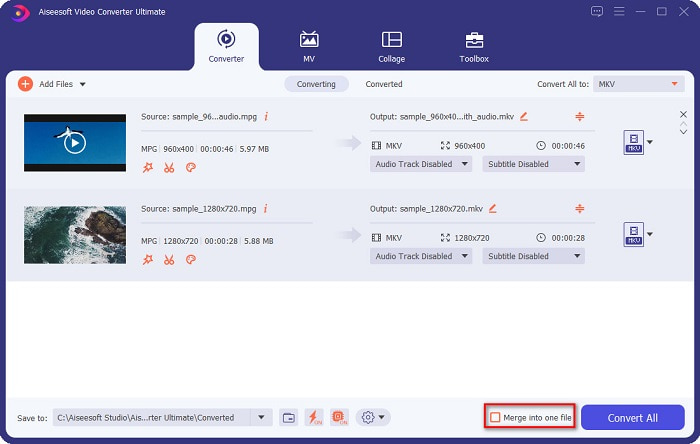
Optional. If you want to convert multiple MPG files into one, tick the Merge into one file box. If not, proceed to the next step.
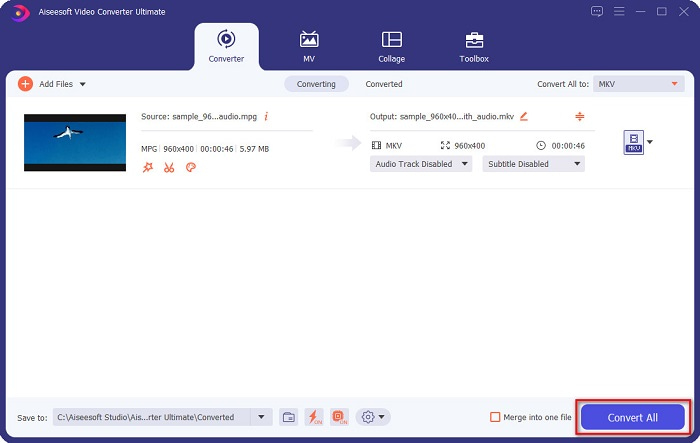
Step 4. To finish, click the Convert All button to convert your MPG file to an MKV file. Wait for a few seconds, and that’s it! As easy as that, you can easily convert MPG to MKV.
Del 3. Konvertera MPG till MKV med hjälp av ett gratisprogram
Ever wonder what the best freeware tool to convert MPG to MKV is? We observed that many users use HandBrake as the first line of choice. This freeware can convert MPG to MKV, WebM, and MP4 files. In addition, it has an easy-to-use interface, which is a good thing if you are a beginner. However, it can only convert limited file formats. Nonetheless, it is still an effective tool for converting MPG to MKV.
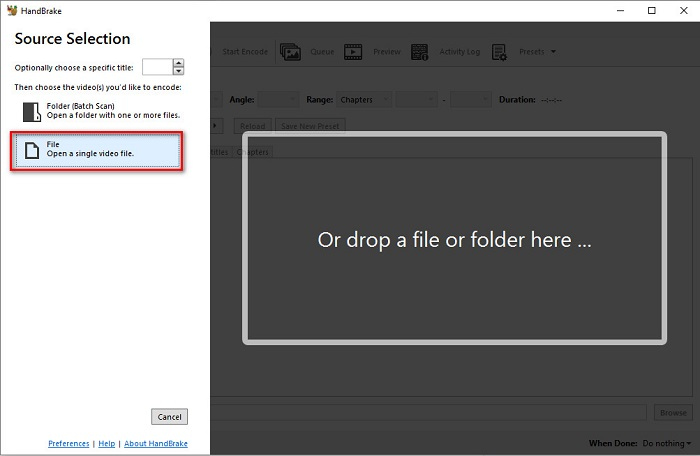
Step 1. Download HandBrake on your device, then run the application. After opening the app, click the File option on the right side of the software’s interface. When your computer files appear, select your MPG file.
Step 2. Then select the output file format that you want on the drop-down button beside Format. And then, by clicking the Browse button, choose where your file destination will be.
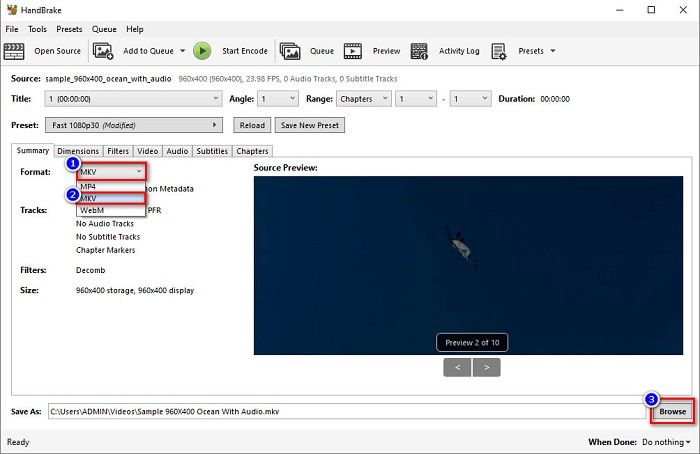
Step 3. Finally, click the Start Encode button to convert your MPG file to MKV file format.
Du kan konvertera MPG till MKV med en freeware-omvandlare genom att följa de enkla stegen ovan.
Del 4. 2 Metoder för att konvertera MPG till MKV Online
Att konvertera via onlinekonverterare kan vara det mest bekväma alternativet att göra. Dessutom behöver du inte ladda ner något när du använder onlinekonverterare. Men istället kan du konvertera direkt online. Din konverteringshastighet kommer dock att bero på hur snabb din internetanslutning är. Icke desto mindre listade vi nedan de två bästa metoderna för att konvertera din MPG-fil till MKV.
Metod 1. Använd FVC Free Online Video Converter
FVC Free Online Video Converter is a free online converter that conveniently converts various file formats. It supports file formats like MPG to MKV, AVI, MP4, MOV, MP3, and more. It also has a beginner-friendly converter because it has an easy-to-use GUI. Moreover, it has a feature that allows you to change your file's video and audio bitrate. So, if you are interested in this MPG to MKV converter online, follow the steps below.
Step 1. In your browser, search FVC Free Online Video Converter, or go directly to the webpage by clicking this link. And then launch the software application.
Step 2. After launching the app, click the Add Files to Convert button. Your computer files will appear, then select your MPG file.
Ladda ner Skrivbordsversionen för att konvertera filer i batch.
Step 3. And then choose MKV as your output format.
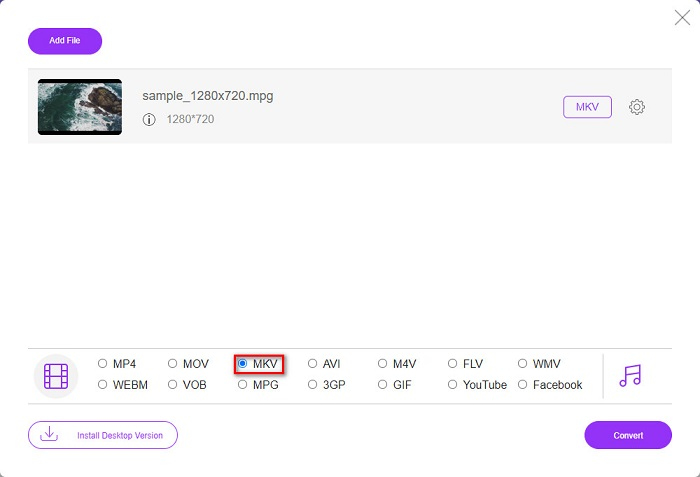
Step 4. For the last step, click the Convert button. Then your MPG to MKV conversion will begin.
Metod 2. Använd CloudConvert
Another online converter that you can use is CloudConvert. This converter is very efficient to use because of its simple interface. Moreover, you can also compress your files when using it. However, it only supports limited file formats. Despite that, many still use this converter for convenience purposes.
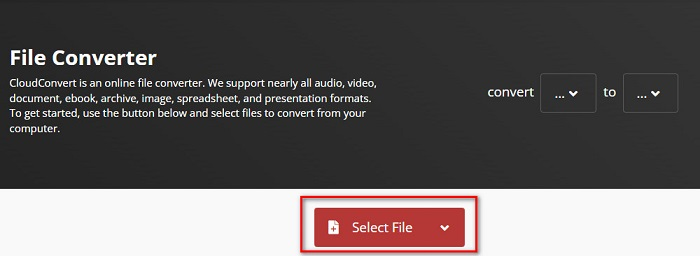
Step 1. In your browser, search CloudConvert. When you are already on the webpage, click the Select Files button. Then select your MPG file when your computer files appear.
Step 2. Then, choose the MKV file as your output format on the drop-down button.
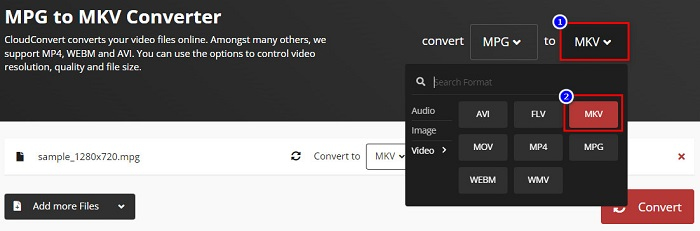
Step 3. Lastly, click the Convert button. Then wait for your file to be converted, and voila! With those three easy steps, you can change MPG to MKV.
MPG kontra MKV
Tillverkad av MPEG (Moving Picture Experts Group), är MPG ett vanligt digitalt videoformat för att lagra video-, ljud- och metadatainformation. Det är ganska användbart när du skapar filmer för delning på Internet. Dessa filer i MPG innehåller vanligtvis MPEG-1 eller MPEG-2 video/ljudkomprimering.
Matroskas multimediacontainerformat, som släpptes 2002, är ett format med öppen källkod som kan innehålla ett antal video-, ljud-, bild- och undertextspår. Så du kan enkelt använda den för att lagra korta videoklipp, TV-program och filmer. Det är ganska populärt för anime-fansubning.
Del 5. Vanliga frågor om att konvertera MPG till MKV
Påverkar konvertering av MPG till MKV filstorleken?
Ja, även om det inte påverkar så mycket när du konverterar MPG till MKV-fil, så ökar filstorleken.
Vilken har en större filstorlek?
MKV-filer har en större filstorlek jämfört med MPG-filer eftersom MKV-filer innehåller video, ljud och flera undertextspår i en fil.
Kan du komprimera MKV-filer?
You can compress MKV files by using a file compressing tool. FVC Video Converter Ultimate has a feature that allows you to compress your large video files.
Slutsats
Den här artikeln fick din rygg om du letar efter de bästa sätten att konvertera MPG till MKV-filer. Alla omvandlare som presenteras ovan visar lovande prestanda vid konvertering av filer. Men om du letar efter en omvandlare med många enastående funktioner, kanske du vill prova att använda FVC Video Converter Ultimate som ditt första val. Om du inte är övertygad ännu, ladda ner den för att prova den bästa konverteraren du kan använda.
-
 3 enkla sätt att konvertera MPG till MOV på din Mac/Windows/Online
 Vill du konvertera dina MPG-filer och senare transportera dem till din iOS, iPod, iPad eller Mac? Den här artikeln hjälper dig att ta reda på hur du konverterar MPG till MOV med steg.
-
 Hur man konverterar MPG till FLV utan att förlora kvalitet [Bevisat]
 Du måste titta på din favoritfilm på den här mediaspelaren, men den stöder inte MPG. Försök att konvertera din MPG-fil till FLV med dessa omvandlare som den här artikeln introducerar.
-
 2 ultimata MPG-omvandlare för att konvertera MPG till WMV gratis
 Vill du konvertera MPG till WMV gratis? I så fall har du tur eftersom vi fick reda på att det finns två verktyg du kan använda för att konvertera dina MPG-filer.

