


 Video Converter Ultimate
 Skärminspelare
 Video reparation
Bemästra konsten att konvertera OGV-fil till AVI-format via online och offline
OGV-filer är ett öppet format skapat av Xiph.org som har samma struktur som OGG Vorbis. Det här formatet kan också innehålla en eller flera codecs för att bära videoströmmar. Men när du spelar .ogv-filer i Windows Media Player eller QuickTime stöds inte codecs som Theora, Daala eller Dirac. I sådana fall kan du inte spela upp videon på grund av kompatibilitetsproblem. Lösningen är att konvertera filen till ett mer allmänt stödformat som AVI. Den här artikeln presenterar vilka konverterare du kan använda och hur du konverterar OGV-filer till AVI.
Del 1. OGV och AVI - En översikt
Som informationen anger tidigare är OGV open source-filer som lagrar videoströmmar av hög kvalitet. Men om du vill synkronisera uppspelning av mediafiler måste AVI vara valet. Även om dessa två behållare fortfarande är fantastiska att använda, har de sitt syfte. Låt oss avgöra deras syfte genom att söka efter mer information om de två formaten.
OGV
Ett annat syfte med OGV är att spela upp videor på HTML 5 eftersom det är ett av de bästa opatenterade formaten du kan infoga på webben. Med den uppgraderade HTML 5 gjord, behöver du ingen plug-in för att spela upp videorna på webben. Dessutom ger detta format webbdesignern som stöder multimedia och bekvämlighet också. Även om OGV-filer stöder strömmande video på HTML 5, stöder formatet fortfarande inte andra mediespelare för att spela detta format.
AVI
Samtidigt får AVI-formatet redan omfattande stöd från alla mediaspelare och redaktörer jämfört med OGV. Och på grund av dess okomprimerade format är filstorleken som sparas i detta format mycket större än det andra medieformatet. Även om filerna är mer omfattande kan du fortfarande använda olika codec-typer för att komprimera detta format och spara dem mindre. Men om du klämmer ihop filen under detta format, förvänta dig att kvaliteten på videon kommer att ändras.
Och nu när vi har en bakgrund om de två formaten är det nu rätt tid att konvertera OGV till AVI på Linux, PC och Mac. För att spela upp den på din lokala mediaspelare eller redigera videon under är det ett måste att konvertera filen till AVI.
Del 2. Best Choice Offline Converter för att konvertera OGV till AVI
FVC Video Converter Ultimate
Vill du veta vilken OGV till AVI‑konverterare som är bäst och erbjuder den snabbaste och säkraste konverteringsprocessen? I så fall är FVC Video Converter Ultimate ett alternativ. Av alla konverterare vi har sökt efter och testat på internet är det här verktyget ojämförligt och ger ett enastående resultat. Programvaran erbjuder många avancerade funktioner i sin verktygslåda, som redigering, sammanslagning, komprimering och mer. Dessutom är konverteringsprocessen upp till 30 gånger snabbare tack vare hårdvaruaccelerering, och därmed snabbare än andra konverterare som finns tillgängliga online eller offline.
Dessutom, om du vill göra batchkonvertering kan du enkelt göra det här utan att svettas. Dessutom är gränssnittet och de avancerade funktionerna tillgängliga för både Windows- och Mac-användare. Så nu, låt oss gå vidare till stegen för att konvertera din OGV-fil till ett nytt AVI-format inom några sekunder genom att följa stegen nedan.
Steg 1. Innan du kan konvertera OGV till AVI på Windows eller Mac måste du först ladda ner programmet. Installera programvaran på datorn och klicka på Start Now för att köra den i systemet.
Gratis nedladdningFör Windows 7 eller senareSäker nedladdning
Gratis nedladdningFör MacOS 10.7 eller senareSäker nedladdning
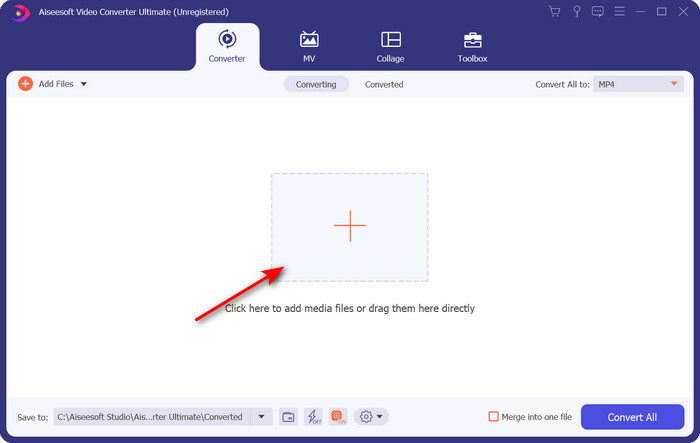
Steg 2. Ladda upp .ogv-filen genom att klicka på +-knappen; en filmapp visas där du kan hitta filen och sedan klicka på Open.
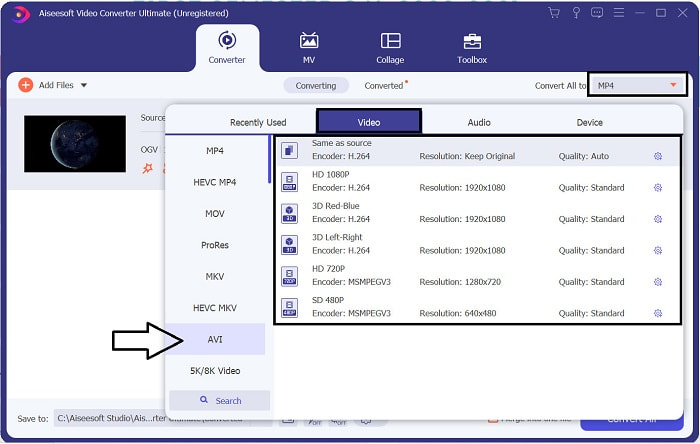
Steg 3. När filen har laddats upp klickar du på Convert All to, väljer AVI-formatet eller ett annat format som du vill att slutresultatet ska ha.
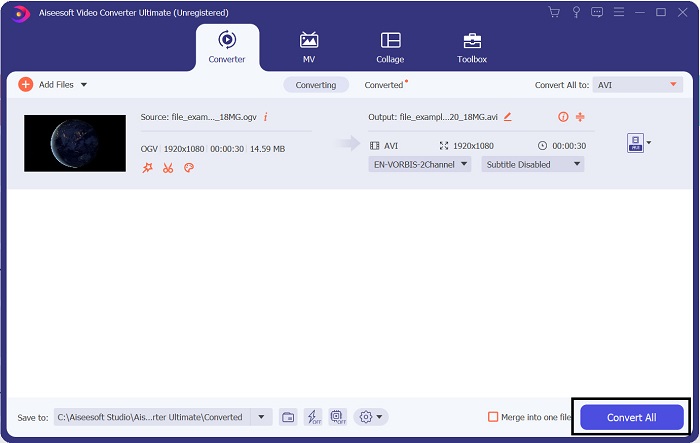
Steg 4. Klicka på Convert All för att starta konverteringsprocessen; den här processen tar bara några sekunder tack vare den snabba konvertering som verktyget erbjuder.
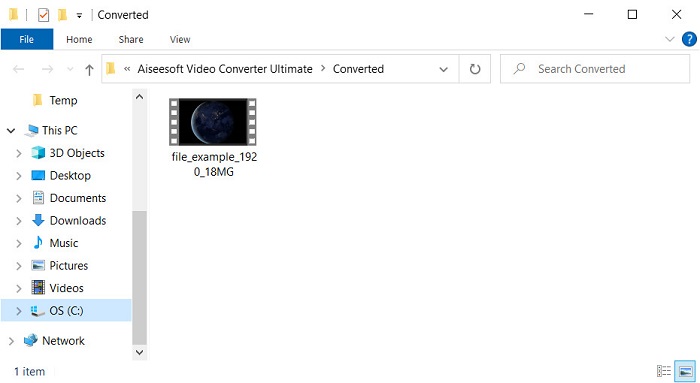
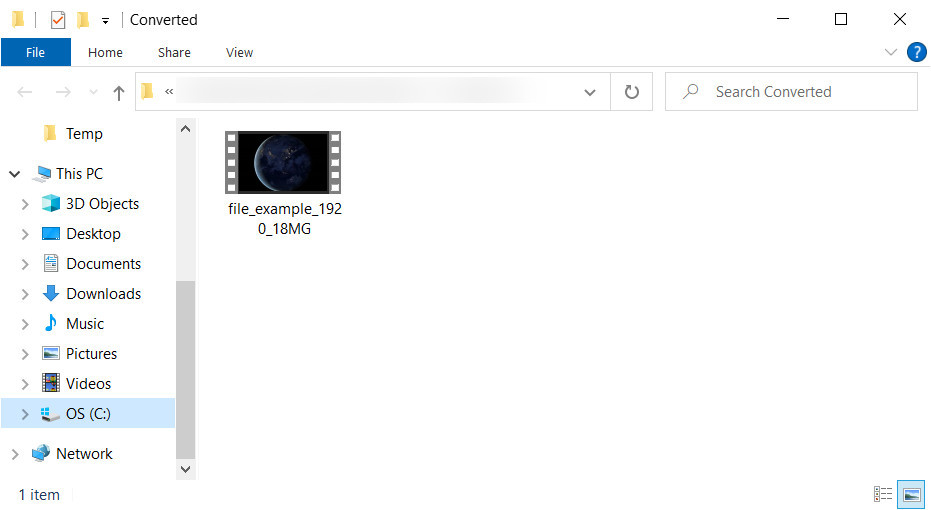
Steg 5. Efter konverteringen visas en mapp på skärmen som innehåller .avi-filen; klicka på filen för att spela upp den i din mediaspelare.
Del 3. Bästa gratis OGV till AVI-konverterare tillgänglig online
FVC gratis videokonverterare online
Vill du inte ladda ner en konverterare på din hårddisk utan istället konvertera OGV till AVI gratis online? Då är FVC Free Video Converter Online det bästa valet. Numera kan du konvertera direkt online genom att söka efter ett webbaserat verktyg som hjälper dig. Men alla webbaserade verktyg har inte stöd för format som .ogv-filer. Även om det finns några pålitliga konverterare är den här onlinekonverteraren den säkraste, reklamfri och en favorit hos många. Om du vill konvertera dina OGV-filer utan att ladda ner någon konverterare och utan begränsningar, följ då dessa steg.
Steg 1. Gå till den officiella webbplatsen för FVC Free Video Converter Online genom att klicka på den här länken.
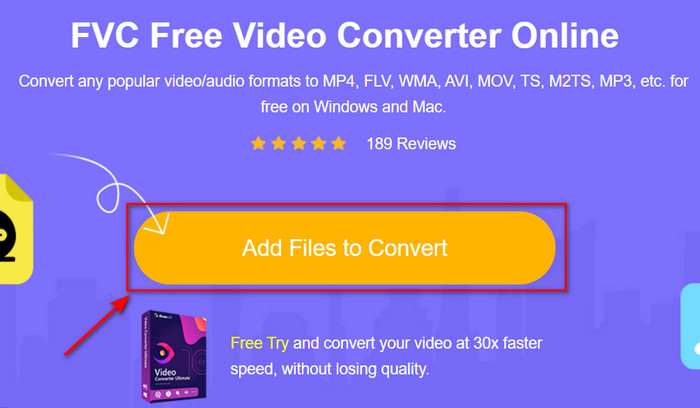
Steg 2. När webbplatsen har öppnats klickar du på Add Files to Convert för att ladda ner startprogrammet. Klicka på den igen för att öppna en mapp där du ser .ogv-filerna och klicka sedan på Open för att ladda upp. Ytterligare information: även om du kan konvertera utan begränsning här kan du fortfarande inte göra batchkonvertering.
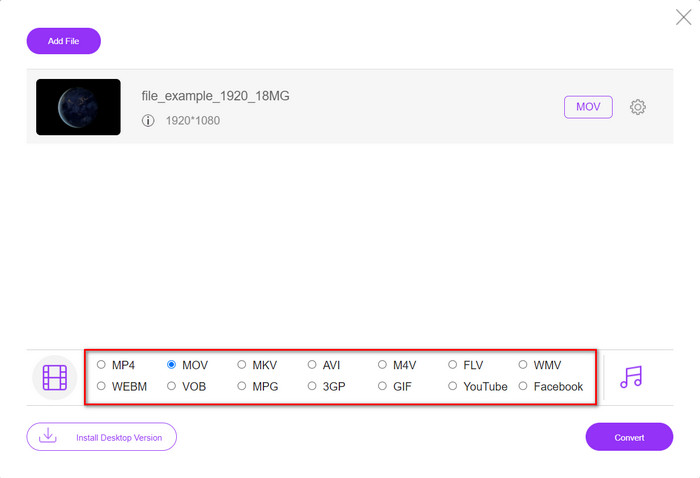
Steg 3. Välj AVI-format i undermenyn och klicka på det.
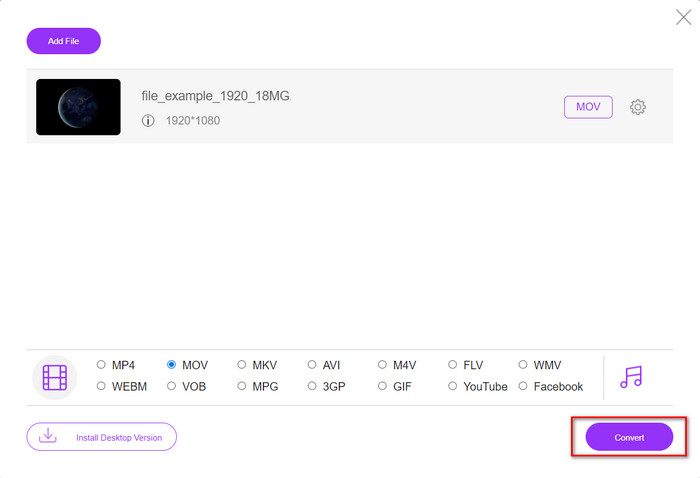
Steg 4. Börja nu konvertera OGV-formatet till AVI genom att klicka på knappen Convert.
Steg 5. Konverteringen av filen avslutas snart, och en mapp visas med .avi-filen.
Del 4. Vanliga frågor om OGV till AVI-konvertering
Kan jag spela .ogv på VLC?
Ja, du kan spela .ogv-videofilen i VLC Player lika enkelt som så, och det är en av de mest populära mediaspelarna du kan ladda ner gratis. Men om du vill känna till de 5 bästa alternativen till VLC, klicka på den här länken för att få en uppfattning om andra mediaspelare du kan använda på PC och Mac.
Är OGG och OGV samma sak?
Xiph.org grundade OGG och OGV för att vara ett av de bästa formaten du kan använda som använder codecs som Vorbis och Theora. Även om .ogg kan innehålla video och ljud, passar den ändå bäst på ljud jämfört med en video. Däremot är .ogv det bästa formatet för att ha både video- och ljudfiler.
Efter konvertering av .ogv, blir kvaliteten lägre?
Det beror på vilken konverterare du använder, eftersom vissa OGV‑konverterare inte ger högkvalitativt resultat. Till skillnad från FVC Video Converter Ultimate låter det här verktyget dig justera kvaliteten till låg, medel eller hög så att resultatet blir bättre i kvalitet och mindre i filstorlek.
Slutsats
Alla konverterare som nämns i den här artikeln konverterar OGV till AVI-format utan kvalitetsförlust. Det är bäst att välja den konverterare som ger det mest effektiva sättet att konvertera formatet. Om du vill konvertera en enstaka fil utan att spendera pengar använder du FVC Free Video Converter Online. Men om du vill göra batchkonverteringar enkelt och utan att behöva leta efter en internetanslutning måste du ladda ner FVC Video Converter Ultimate.
-
 2 av det bästa valet av RMVB-fil till AVI-konverterare [Online & Offline]
 Vet du inte hur man konverterar RMVB till AVI? Den här artikeln fokuserar på omvandlarna du kan använda för att konvertera RMVB till AVI, oavsett om det är online eller offline.
-
 Hur man konverterar XviD till AVI utan att förlora kvaliteten på videon [2025]
 Vill du konvertera din XviD-fil till AVI? Om så är fallet, läs den här artikeln när vi pratar mer om XviD och hur du konverterar din XviD-fil till ett AVI-format.
-
 Bästa strategin för hur man konverterar DV-fil till AVI-format med detaljerade steg
 Vill du konvertera din DV-fil till AVI? Läs sedan den här artikeln för att veta det unika verktyget du kan använda för att konvertera och en mediaspelare för att spela upp din DV på din PC eller Mac.
