


 Video Converter Ultimate
 Skärminspelare
 Video reparation
 Säker nedladdning
Enkel instruktion om hur man konverterar OGV till MKV
Vill du veta hur man konverterar OGV till MKV och öppnar det i en annan mediaspelare? Då har du tur, för det här inlägget presenterar utmärkta program med grundläggande steg för att konvertera olika filer. Du behöver inte heller oroa dig; dessa verktyg är värda att använda och du kommer inte att bli besviken. Så det är bäst att gå vidare till huvudavsnittet, eftersom vi inte vill att du ska behöva vänta längre. Låt oss upptäcka dessa metoder och läs den här artikeln direkt.

Del 1: Information om OGV- och MKV-format
Innan du konverterar OGV-filen till MKV-format, låt oss först ge deras värdefulla information.
Vad är OGV?
Ett gratis, öppen källkod, opatenterat multimediacontainerformat och codec är Ogg Vorbis (OGV). Den tillhör Ogg-formatet och codec-familjen, som den ideella Xiph.Org Foundation skapade för att ta sig an patenterade codecs. OGV kan tidsstyra multiplex (TDM) text (undertexter) och metadata. Dessutom, till förlustfri och förlustfri komprimering, stöder den streaming.
Vad är MKV?
MKV är en öppen källkodsbehållare som kan innehålla mediamaterial som har komprimerats med olika codecs. Den har många fördelar jämfört med den traditionella AVI-behållaren, inklusive möjligheten att inkludera ljudspår och undertexter på många språk som kan bytas utan att pausa uppspelning och snabb filsökning och spola tillbaka. Dessutom är formatet enkelt att ändra, vilket gör det enkelt att extrahera ljud- och videodata.
Del 2: Hur man konverterar OGV till MKV förlustfritt
Om du är här för att lära dig hur man konverterar OGV till MKV utan kvalitetsförlust, är du på rätt plats. Den bästa nedladdningsbara konverteraren du kan hitta är Video Converter Ultimate. Det är en av de mest pålitliga konverterarna för dina Windows- och Mac-datorer. Dessutom stöder detta verktyg över 100 format, såsom FLV, MP4, M4V, MOV, SWF, AVI, MTS och fler. Det är inte heller begränsat till att bara konvertera videor. Du kan konvertera dina bildformat här, eftersom det stöder JPG, PNG, GIF, WEBP osv. Det bästa är att du kan konvertera filer upp till 30x snabbare jämfört med andra verktyg med normal konverteringshastighet. Dessutom är batchkonvertering möjlig i detta verktyg, vilket innebär att du kan lägga till flera videofiler och konvertera dem i en och samma process.
Dessutom finns det fler saker du kan göra på din OGV-fil. Om du vill ändra storlek på din video eftersom filstorleken är för stor, kan du använda den här applikationen eftersom den erbjuder en videokomprimeringsfunktion där du kan ändra storleken på din video. Det finns fler funktioner du kan njuta av för att förbättra din OGV-fil före eller efter att du konverterat den till MKV-format.
Funktioner
◆ Konvertera videoformat, som MP4, M4V, AVI, FLV och 1000+ fler.
◆ Tillhandahåll olika teman för att skapa en musikvideo.
◆ Det går att skapa ett collage.
◆ Kan kombinera ljud och video.
◆ Erbjuder olika funktioner för att förbättra videor, såsom videoförstärkare, vattenstämpelborttagare, videohastighetskontroller, etc.
◆ Det gör det möjligt att ändra hastigheten på en video.
Fördelar
- Har ett begripligt gränssnitt, vilket är perfekt för nybörjare.
- Konverteringsprocessen är 30 gånger snabbare.
- Det erbjuder batchkonvertering.
- Konvertera filer utan att förlora kvalitet.
Nackdelar
- Du måste skaffa proversionen för att uppleva extraordinära funktioner.
För att konvertera OGV till MKV-filformat med Video Converter Ultimate, följ de detaljerade guiderna nedan.
Steg 1: Ladda ner Video Converter Ultimate på din Mac och Windows. Kör programmet efter installationsprocessen.
Gratis nedladdningFör Windows 7 eller senareSäker nedladdning
Gratis nedladdningFör MacOS 10.7 eller senareSäker nedladdning
Steg 2: Efter att du har startat programmet väljer du panelen Converter. Det finns två sätt att lägga till OGV-filen. Du kan klicka på knappen Add Files eller klicka på Plus-ikonen.
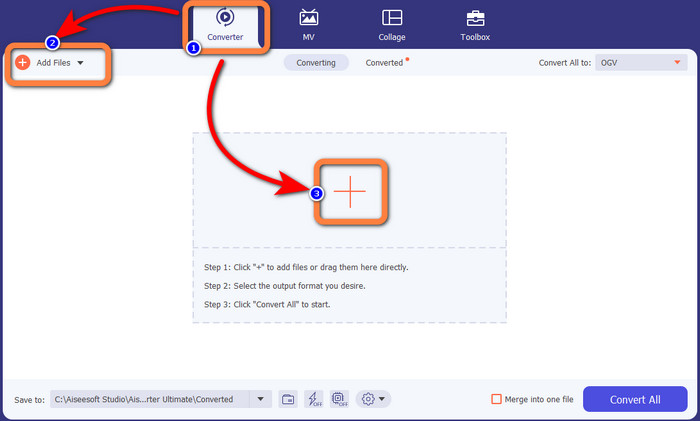
Steg 3: Gå till formatalternativen genom att klicka på rullgardinsikonen bredvid Convert All to och välj filformatet MKV för nästa steg.

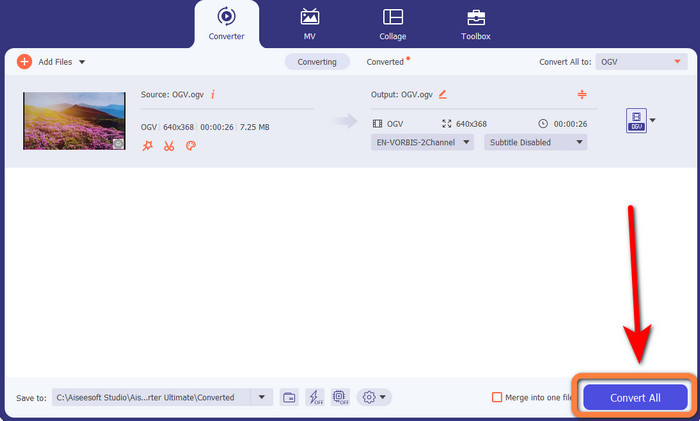
Steg 4: Det sista steget är att konvertera filen genom att klicka på knappen Convert All. Därefter kan du spara din video som en MKV-fil.
Del 3: Enkla onlinelösningar för att konvertera OGV till MKV
Använder Converthelper
Om du är imponerad av Video Converter Ultimate kan du känna dig trygg med att du också kommer att bli nöjd med att använda Converthelper. Detta onlineverktyg låter dig konvertera OGV till MKV enkelt och effektivt. Det stöder också olika filer, såsom WMA, FLV, AVI, MP4, 3GP och fler. Det har dessutom enkla metoder för att konvertera filer, så inte ens en nybörjare kommer att stöta på några svårigheter när hen använder den här webbaserade applikationen. Dessutom kan denna kostnadsfria videokonverterare också konvertera dina videor utan kvalitetsförlust. På så sätt kan du försäkra dig om att videons kvalitet förblir densamma. Det finns dock tillfällen när Converthelper inte fungerar så bra, särskilt om du har en långsam internetanslutning. Dessutom har den en långsam konverteringsprocess, vilket är tidskrävande för användare. Prova att konvertera din OGV-fil till MKV med den här programvaran.
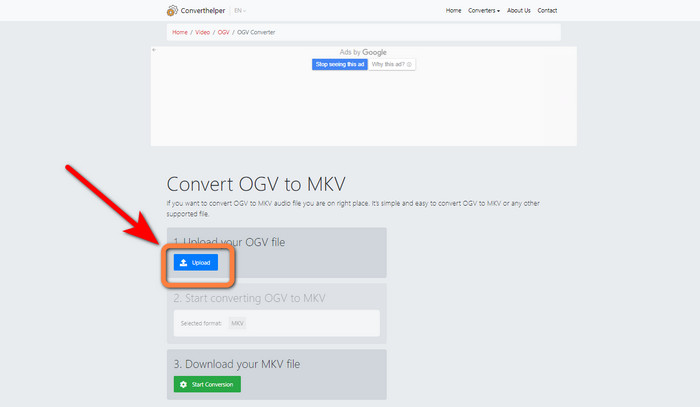
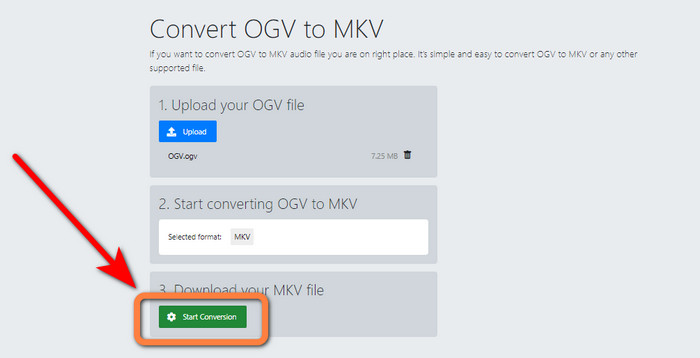
Steg 1: Gå till Converthelper-webbplatsen. Klicka sedan på knappen Upload och importera OGV-filformatet.
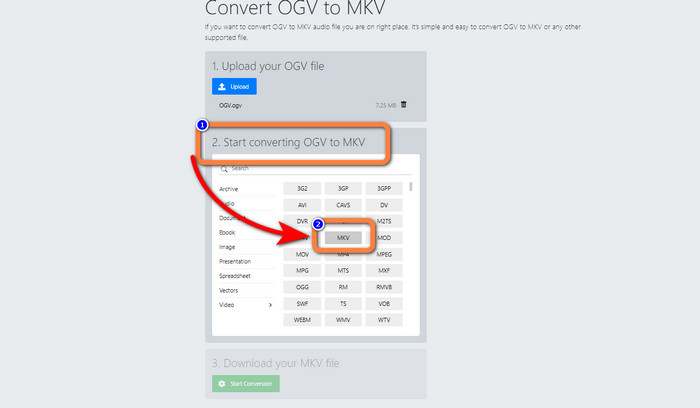
Steg 2: Gå vidare till nummer 2. Välj MKV-filformatet från formatalternativen.
Steg 3: Som sista steg klickar du på knappen Start Conversion och väntar på att konverteringsprocessen ska bli klar. Med det här verktyget kan du också konvertera OGV till FLV.
Använder FreeConvert
FreeConvert låter dig konvertera OGV till MKV direkt. Du kan också använda detta verktyg för att konvertera andra filformat, såsom MP4, WMV, AVI, WEBM, 3GP, MOV osv. Det har också enkla steg för att konvertera filer, vilket är perfekt för nybörjare. Förutom att konvertera kan FreeConvert också komprimera videor, bilder, ljud, dokument med mera. Dessutom kan du redigera din video med dess redigeringsverktyg, såsom videobeskärning och videotrimning. Tyvärr kan det när det gäller konvertering bara hantera en maximal storlek på 1 GB. På så sätt kan du bara konvertera begränsade filer. Du måste köpa en prenumeration om du vill öka den maximala filstorleken. Dessutom är det en webbaserad applikation, så det är nödvändigt att ha en internetanslutning. Följ stegen nedan för att konvertera OGV till MKV.
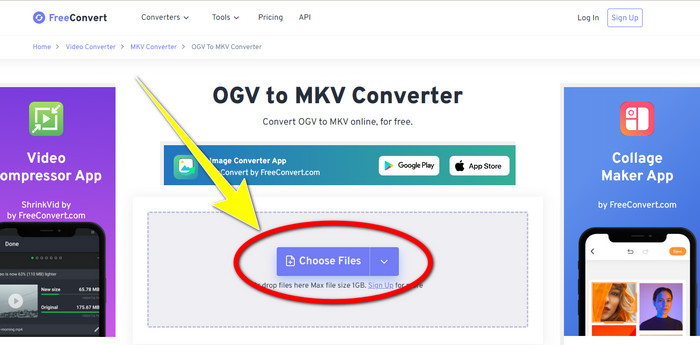
Steg 1: Gå till FreeConvert-webbplatsen. Klicka på knappen Choose File för att lägga till OGV-filen.
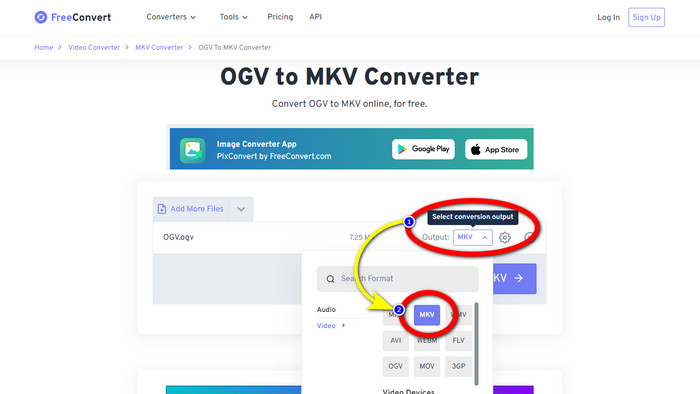
Steg 2: Nästa steg är att gå vidare till knappen Output. Klicka på den för att se formatalternativen och välj filformatet MKV.
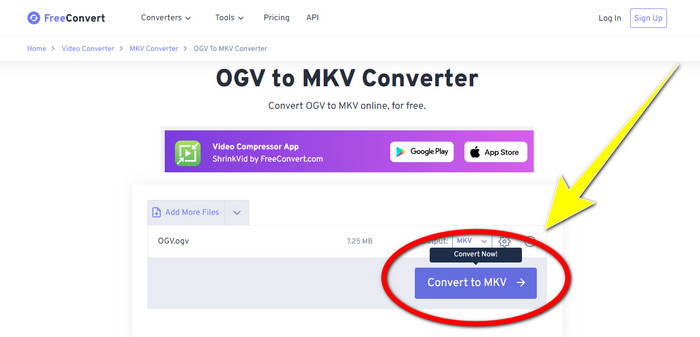
Steg 3: När du har valt MKV-filformatet klickar du på knappen Convert to MKV. Därefter startar konverteringsprocessen och din slutliga video sparas.
Del 4: Vanliga frågor om att konvertera OGV till MKV
1. Kan jag använda FFmpeg för att konvertera OGV till MKV?
Självklart kan du det. Ladda ner FFmpeg. Det är ett kommandobaserat verktyg som kan konvertera olika videofiler, inklusive OGV, MKV, MOV, MP4, AVI och fler.
2. Är MKV ett vanligt format?
Majoriteten av nuvarande enheter är kompatibla med formatet. Många ljud- och undertextspår kan lagras i en fil med MKV- eller Matroska-videoformatet. Den är otroligt omtyckt för att hålla filmer. Ganska liten filstorlek och högkvalitativ video.
3. Är OGV ett OGG?
Nej. OGG är ett format med öppen källkod som används av behållaren OGV. Ett av de primära målen med OGG:s utveckling var att vara fri från begränsningar av mjukvarupatent. En videoström med eller utan ljud som har komprimerats med Opus-, Vorbis-, Theora- eller Speex-metoden lagras med OGV-filtillägget.
Slutsats
Att använda onlineverktyg för att konvertera OGV till MKV är effektivt, men man kan inte bortse från att irriterande annonser alltid dyker upp under konverteringen. Så om du vill konvertera filer utan att störas av annonser kan du använda Video Converter Ultimate.
-
 Topp 4 bästa lösningarna för att konvertera MXF till MKV [löst]
 Lär känna dessa fyra fantastiska metoder för att enkelt konvertera MXF till MKV online och offline. Apparna som ingår i det här inlägget kan hjälpa dig att konvertera filer utan krångel.
-
 4 sätt att konvertera MPG till MKV med online-/offlinekonverterare
 Letar du efter en lättanvänd omvandlare som kan konvertera MPG-filer till MKV? Den här artikeln listar de bästa och enklaste sätten att snabbt konvertera MPG till MKV-filer
-
 Enklaste sätten att konvertera MOV till MKV gratis på Mac
 Vill du konvertera MOV till MKV gratis på Mac? Läs den här artikeln för att veta de enklaste och enklaste sätten att konvertera din MOV-fil till MKV.
