


 Video Converter Ultimate
 Skärminspelare
 Video reparation
Hur man konverterar RMVB till MKV enkelt med de bästa omvandlarna
Om du är en av dem som letar efter ett sätt att konvertera din RMVB‑fil till MKV, kan du med fördel läsa den här artikeln hela vägen till slutet. Den här artikeln visar hur du konverterar din RMVB‑fil till MKV med hjälp av de bästa gratisomvandlarna som är enkla att använda. Sätt dig bekvämt och koppla av medan vi presenterar de bästa sätten att konvertera RMVB till MKV både online och offline.

Del 1. Vad är RMVB- och MKV-filer
RealMedia Variable Bitrate (RMVB) är ett Real Media-videofilformat. Denna typ av fil komprimeras med bithastighet. Dessa typer av filer skapas för mediaspelare som produceras av RealMedia. Dessutom är detta format populärt för animefilmer och asiatiska filmer eftersom de har mindre filstorlekar än andra filformat. De har också lägre bithastigheter, vilket påverkar mängden data som överförs till ljud. Medan å andra sidan MKV- eller Matroska-filer kan lagra ljud-, video- och undertextspår. Denna filbehållare är också framtidssäker, vilket innebär att den är designad så att den inte kommer att vara föråldrad i framtiden.
Del 2. Hur man konverterar RMVB till MKV med FVC Video Converter Ultimate
FVC Video Converter Ultimate är en offlinekonverterare som låter dig konvertera över 1000+ filformat tillgängliga på webben, som RMVB till MKV, WMV, MP4, AVI, FLV, M4V och mer. Denna omvandlare kan också konvertera blixtsnabbt. Den har unika funktioner som låter dig redigera dina filer och till och med batchkonvertera flera filer till en. Dessutom har den en funktion för att skapa en GIF eller göra din videofil till en 3D-fil.
Fördelar
- Erbjuder batchkonvertering för att slå samman flera filer till en.
- Har ett användarvänligt GUI, som inte kommer att ge dig svårt att använda det.
- Har en funktion som kan skapa GIF:er och 3D-videor.
- Finns gratis på Windows och Mac.
Nackdelar
- För att använda dess specialfunktioner måste du köpa appen.
Så om du är nöjd med vad den här omvandlaren kan göra, följ stegen för att enkelt konvertera RMVB till MKV-filer.
Steg 1. För att använda FVC Video Converter Ultimate, klicka på knappen Ladda ned nedan. Följ installationsprocessen och öppna sedan programmet.
Gratis nedladdningFör Windows 7 eller senareSäker nedladdning
Gratis nedladdningFör MacOS 10.7 eller senareSäker nedladdning
Steg 2. Klicka sedan på knappen Lägg till filer eller +-knappen för att ladda upp din fil i programmets första gränssnitt. Dina datorfiler visas och där väljer du din RMVB-fil. Därefter läggs den till i kön.
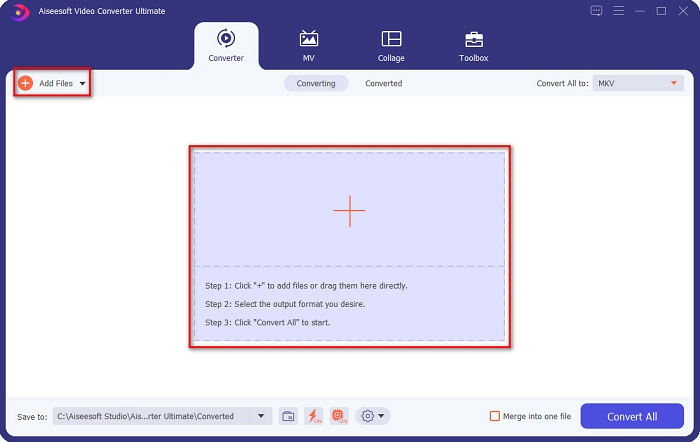
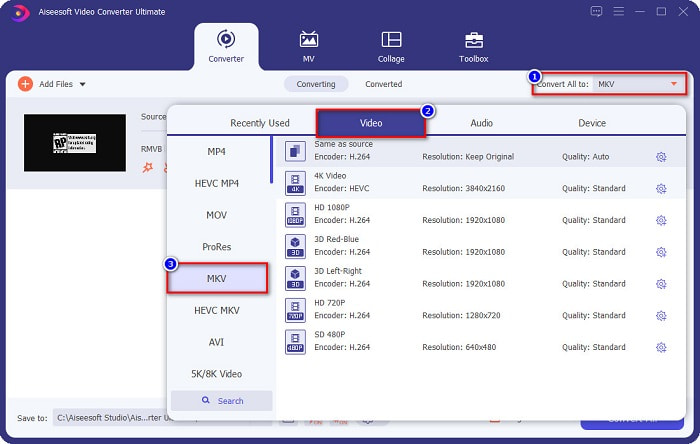
Steg 3. Efter att du har laddat upp din RMVB‑fil klickar du på knappen Konvertera allt till för att välja utdataformat. I ditt fall väljer du MKV-fil.
Steg 4. Och slutligen, klicka på knappen Konvertera allt längst ned till höger i programmets gränssnitt. Din RMVB‑till‑MKV‑fil börjar konverteras. Vänta bara några sekunder, så är det klart!
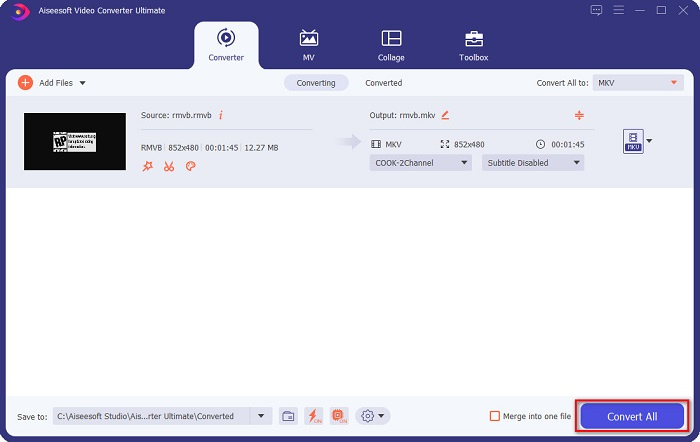
Lätt är det inte? Du kan enkelt konvertera RMVB till MKV-filer genom att bara följa dessa enkla steg.
Del 3. 2 Bästa RMVB till MKV-omvandlare online du måste prova
Bekvämligheten med online-omvandlare är verkligen bättre än offline-omvandlare. Och om du vill ha en bekväm omvandlare, läs stegen nedan om hur du konverterar RMVB-filer till MKV gratis och online.
FVC Free Online Video Converter
FVC Free Online Video Converter är en onlineomvandlare med ett lättanvänt grafiskt gränssnitt, vilket är fördelaktigt för nybörjare eftersom de inte behöver anstränga sig för att förstå programmets gränssnitt. Denna omvandlare stöder också många filformat, inklusive RMVB till MKV, MOV, MP4, WMV, AVI och fler. Eftersom denna omvandlare är webbaserad kan konverteringen dock ibland gå långsamt. Ändå har många använt denna omvandlare, och den räknas som en av de bästa RMVB‑till‑MKV‑omvandlarna.
Steg för hur man konverterar RMVB-filer till MKV-filer med FVC Free Online Converter:
Steg 1. Sök först i din webbläsare efter FVC Free Online Converter eller klicka på den här länken. När du är på deras webbsida startar du programmet.
Steg 2. Klicka sedan på Add Files to Convert. Dina datorfiler visas, där du väljer din RMVB-fil för att ladda upp den.
Ladda ner Skrivbordsversionen för att konvertera filer i batch.
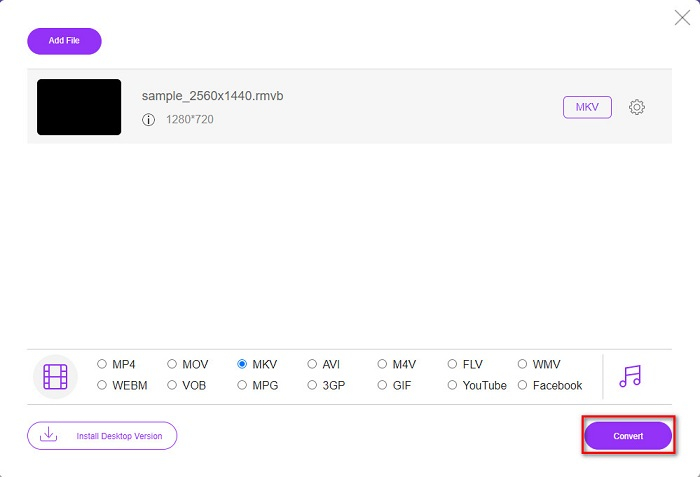
Steg 3. När du valt din RMVB‑fil väljer du ditt önskade filformat längst ned i programmets gränssnitt och klickar sedan på MKV-fil.
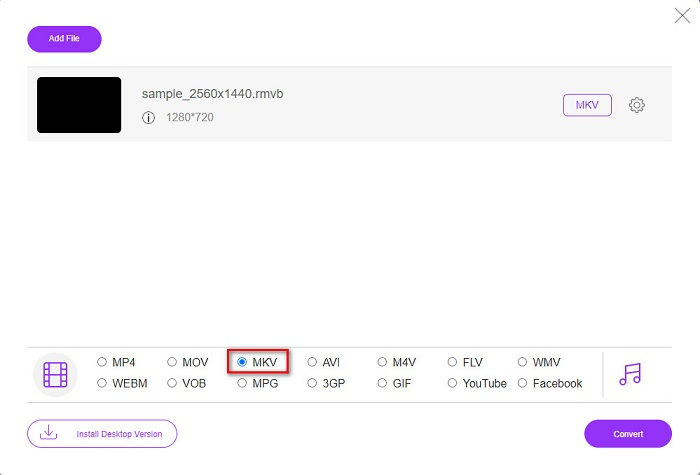
Steg 4. När du slutligen är redo att konvertera din RMVB‑fil till MKV klickar du på knappen Convert och omkodningen börjar.
Video Converter
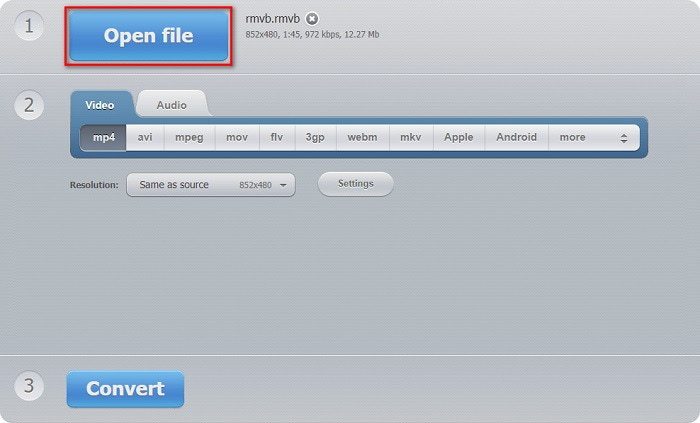
Video Converter är en annan omvandlare som kan konvertera din RMVB till MKV gratis och online. Denna onlinekonverterare kan enkelt ändra filformat. Den stöder även många filformat och är också lätt att använda. Den innehåller dock många störande annonser som kan vara för distraherande för dig. Ändå är det här verktyget fortfarande värt att prova på grund av dess bekvämlighet.
Steg 1. Sök efter Video Converter i din webbläsare och klicka sedan på knappen Open File. Därefter visas dina datorfiler. Välj din RMVB-fil och vänta på att den laddas upp.
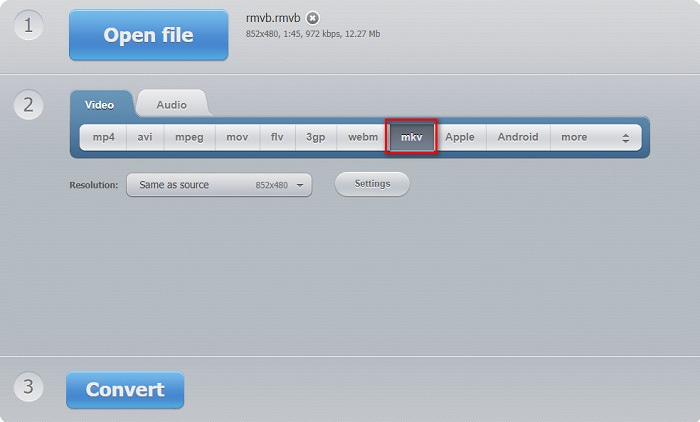
Steg 2. Därefter, fortfarande i programmets huvudgränssnitt, väljer du det utdataformat du vill ha. Klicka på MKV och gå vidare till nästa steg.
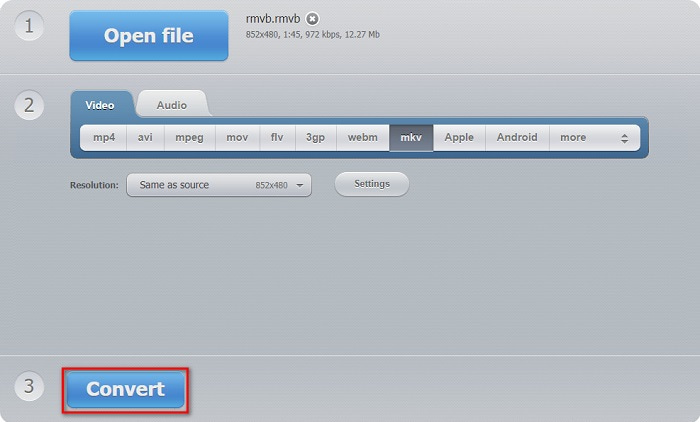
Steg 3. För sista steget klickar du på knappen Convert längst ned i programmets gränssnitt. Därefter börjar din RMVB‑till‑MKV‑fil att konverteras.
Omvandlare 365
Converter 365 är en gratis onlineomvandlare som gör det enkelt att konvertera din RMVB‑fil till MKV. Den är också enkel att använda eftersom den har ett lättöverskådligt grafiskt gränssnitt. Om din internetanslutning avbryts kan dock din fil bli skadad.
Steg 1. Klicka på knappen Lägg till filer för att ladda upp din RMVB‑fil.

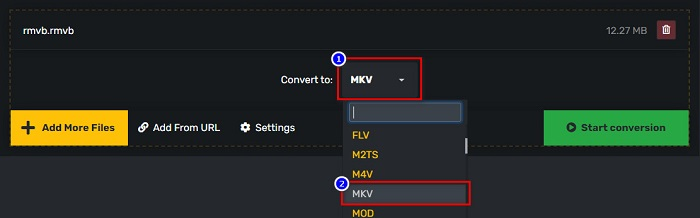
Steg 2. Klicka sedan på rullgardinsmenyn bredvid Convert to för att välja önskat utdataformat.
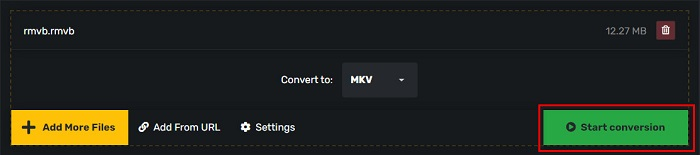
Steg 3. Och till sist, klicka på knappen Start Conversion för att starta konverteringen.
RMVB kontra MKV
RMVB, en nyare variant av standardformatet Real Media (.RM), är ett Real Media-videofilformat komprimerat med en variabel bithastighet. Det är ett populärt format för asiatiska filmer och anime. RMVB-filer är mindre i storlek och har lägre bithastigheter men bättre kvalitet.
Matroskas multimediacontainerformat, som släpptes 2002, är ett format med öppen källkod som kan innehålla ett antal video-, ljud-, bild- och undertextspår. Så du kan enkelt använda den för att lagra korta videoklipp, TV-program och filmer. Det är ganska populärt för anime-fansubning.
Del 4. Vanliga frågor om att konvertera RMVB till MKV
Kan du konvertera RMVB till AVI?
Du kan absolut konvertera RMVB‑filer till AVI‑filer genom att använda en omvandlare. FVC Video Converter Ultimate stöder konvertering från RMVB till AVI. Om du dessutom vill veta mer om hur man konverterar RMVB till AVI, klicka på den här länken.
Kan Mac spela RMVB-filer?
Nej. Mac stöder inte RMVB‑filer. Du kan dock använda ett verktyg från tredje part för att spela upp den här filen på Mac. Du kan också konvertera RMVB till filer som Mac stöder, till exempel MOV. För att få mer kunskap om hur man konverterar RMVB till MOV, läs den här artikeln Converting RMVB to MOV: Simple Steps for Offline and Online.
Vilka mediaspelare kan spela RMVB-filer?
RMVB-filer är inte så populära eftersom många mediaspelare inte stöder denna typ av fil. Ändå kan vissa mediaspelare spela upp den här typen av filer, inklusive RealNetworks Real Player (Windows), VLC Media Player och Aiseesoft Blu-ray-spelare.
Slutsats
Sammanfattningsvis är alla offline‑ och onlineomvandlare för RMVB till MKV som visats ovan lätta att använda och värda att prova. Du kan hitta liknande omvandlare som också finns på webben. Men om du vill ha en gratis omvandlare med en unik funktion och som kan konvertera över 1000+ filformat kan FVC Video Converter Ultimate vara rätt verktyg för dig. Fortfarande inte övertygad? Testa det nu och ladda ned det gratis.
-
 Guide om hur man konverterar RMVB till MP4 på Windows / Mac (3 gratis sätt)
 Vill du konvertera RMVB till MP4 för enkel uppspelning på din dator eller mobiltelefon? Du hittar enkla sätt att konvertera dina RMVB-filer till MP4 i den här guiden.
-
 Topp 4 gratis RMVB till FLV Converter-appar på skrivbordet eller online
 Den här artikeln kommer att berätta de bästa RMVB till FLV-omvandlare och webbappar som kan konvertera RMVB (RealMedia Variable Bitrate) -filer till FLV-video.
-
 Topp 2 omvandlare online och offline för att konvertera RMVB till WMV
 Letar du efter det snabbaste och enklaste sättet att konvertera RMVB-filer till WMV? Läs den här artikeln och lär dig fullständig detaljerad information om konvertering.

