


 Video Converter Ultimate
 Skärminspelare
 Video reparation
[Snabbt och enkelt sätt] Konvertera RMVB-filer till WMV med de 2 bästa RMVB-omvandlarna
Nuförtiden producerar asiater fler tv‑avsnitt, animerade filmer och spelfilmer och distribuerar dem sedan världen över, på liknande sätt som nordamerikaner. De flesta av dessa filmer är kodade i .rmvb, eftersom RMVB‑filer är mindre, har lägre bitrate men ändå mycket bra kvalitet. När du däremot laddar ner filen till din Windows‑dator kan din inbyggda mediaspelare inte spela upp formatet eftersom det inte stöds. Ganska besvärligt, eller hur? Men idag kan vi konvertera din RMVB‑fil till en spelbar WMV‑fil. Av den anledningen ska vi nu ta reda på hur man konverterar RMVB till WMV med hjälp av två olika verktyg.

Del 1. Andra skäl till varför du behöver konvertera din RMVB-fil till WMV
Innan vi börjar vår konverteringsexpedition, låt oss först förstå den möjliga anledningen till att konvertera RMVB-filen. Listan nedan är de möjliga anledningarna till att du behöver en RMVB till WMV-omvandlare online eller offline.
Som nämnts ovan är RMVB‑filer inte kompatibla med nästan alla mediaspelare, särskilt inte med Windows Media Player. Det här är inget nytt problem eftersom det finns många format som Windows Media Player inte stöder – och tyvärr är RMVB ett av dem. Även om du kan konvertera RMVB till ett nytt kompatibelt format finns det en annan lösning: att ladda ner en tredjepartsmediaspelare, till exempel Blu-ray Player. Den här spelaren stöder ett betydligt bredare urval av format för videouppspelning jämfört med Windows Media Player. Om du vill ladda ner den här mediaspelaren kan du klicka på nedladdningsknappen nedan. Men om du vill läsa mer detaljerad information om RMVB‑spelare kan du klicka på den här länken.
Gratis nedladdningFör Windows 7 eller senareSäker nedladdning
Gratis nedladdningFör MacOS 10.7 eller senareSäker nedladdning
RMVB-filer är en filbehållare med öppen källkod, som det här formatet inte använder en specifik codec. Även om det är en stor fördel att manipulera codec, stöder inte alla applikationer öppet alla typer av codecs. Därför, om du vill använda RMVB-filen för redigering eller uppspelning, bör du inte bli förvånad om den inte fungerar med codec som inte stöds.
Så nu, för att ta reda på hur man konverterar RMVB till WMV, låt oss fortsätta med detaljerna nedan och läs det noggrant. Du kommer bara att spendera fem minuter på att läsa den här artikeln och få tillräckligt med kunskap om hur du konverterar dina RMVB-filer med de tillgängliga omvandlarna.
Del 2. Mest exceptionella omvandlare för att konvertera RMVB till WMV med Video Converter Ultimate
FVC Video Converter Ultimate är specialiserad på att konvertera dina RMVB‑filer till WMV, AVI, MKV, MOV, MP4 och mer på mindre än en minut. Programmet har inbyggd supersnabb konvertering och hårdvaruacceleration för att slutföra din konvertering snabbare än blixten. Faktum är att den här konvertern stöder flera och mycket avancerade redigeringsfunktioner som du kommer att uppskatta. Vill du nu snabbt bli klar med att konvertera din RMVB‑fil eftersom du har bråttom? Vad väntar vi på då? Låt oss gå direkt vidare till processen genom att följa stegen nedan.
Steg för att konvertera RMVB‑filer till WMV‑format med FVC Video Converter Ultimate:
Steg 1. Ladda ner FVC Video Converter Ultimate på din Windows‑dator genom att klicka på nedladdningsknappen nedan. Om du är Mac‑användare ska du klicka på den andra knappen för att ladda ner Mac‑versionen av verktyget. Följ installationsprocessen och öppna sedan konvertern.
Gratis nedladdningFör Windows 7 eller senareSäker nedladdning
Gratis nedladdningFör MacOS 10.7 eller senareSäker nedladdning
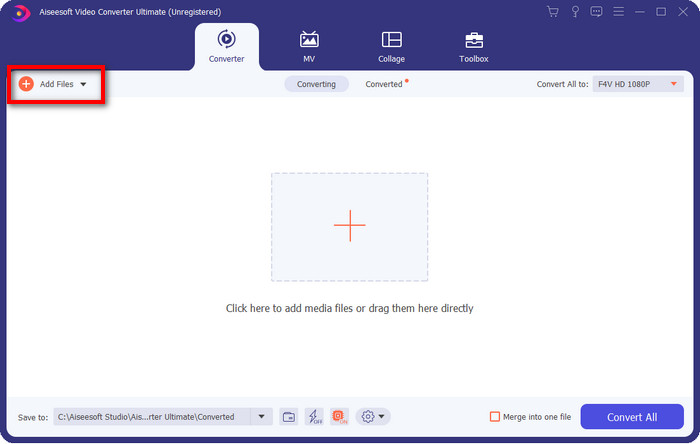
Steg 2. Lägg in RMVB‑filerna i konvertern genom att klicka på Add Files, leta upp filen i mappen som visas på skärmen och klicka på Open.
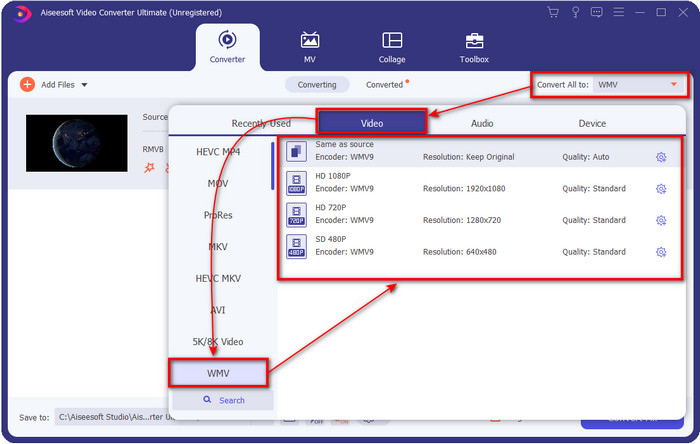
Steg 3. Klicka på knappen Convert All to, så visas en lista med format. Välj det format du vill ha eller WMV genom att klicka på det.
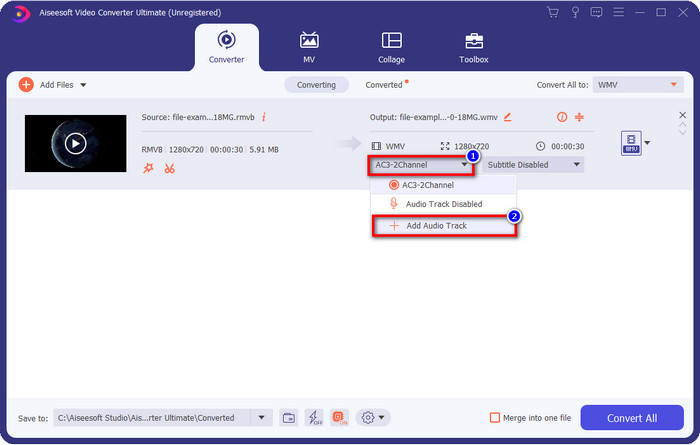
Valfritt: Vill du lägga till ljud till videon innan du konverterar filen? Klicka då på drop-down-knappen, välj Add Audio Track, bläddra fram ljudspåret som är sparat på din dator och klicka på Open.
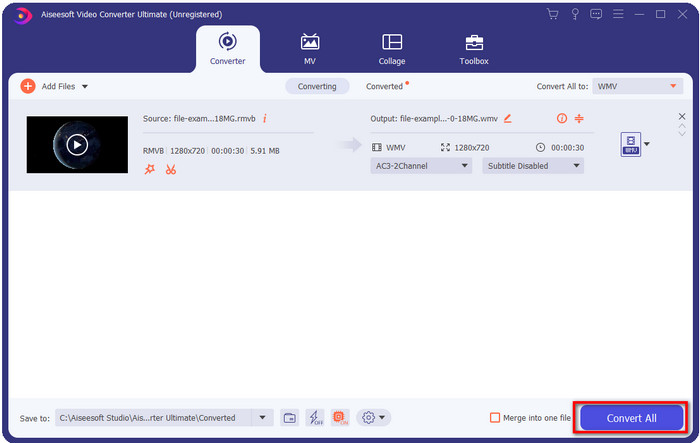
Steg 4. Genom att klicka på knappen Convert All startar konverteringen av filen. När processen är klar visas en mapp med den konverterade filen på skärmen.
Del 3. Bästa webbkonverteraren för att konvertera RMVB till WMV Online
Om du letar efter en kraftfull RMVB‑till‑WMV‑konverterare online bör du använda FVC Free Video Converter Online. Den här webbaserade konvertern är den bästa lösningen på dina konverteringsproblem utan minsta tvekan. Den stöder dock bara ett begränsat antal format som du kan ladda upp och välja, vilket kan vara ett problem, eller hur? Men om du är ute efter en onlinelösning stöds RMVB‑filen här. Nedan finns dessutom en lista över hur du använder det här webbaserade verktyget.
Steg för att konvertera RMVB‑filer till WMV‑format med FVC Free Video Converter Online:
Steg 1. Klicka på den här länken, så öppnas en ny flik i din webbläsare.
Ladda ner Skrivbordsversionen för att konvertera filer i batch.
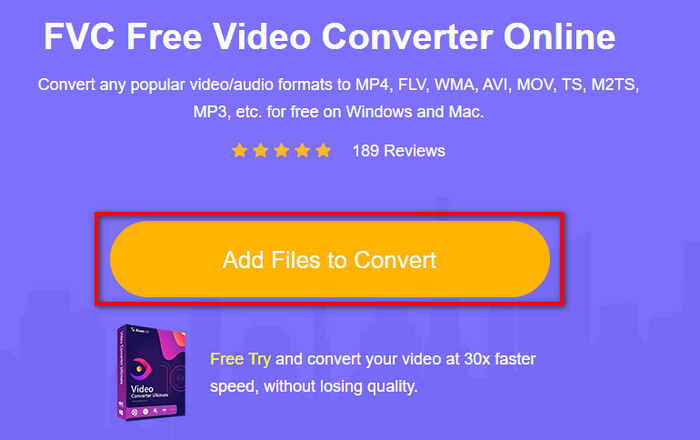
Steg 2. Klicka på Add Files to Convert på webbplatsen, så visas en mapp från datorn på skärmen. Välj den RMVB‑fil du vill konvertera och klicka på Open.
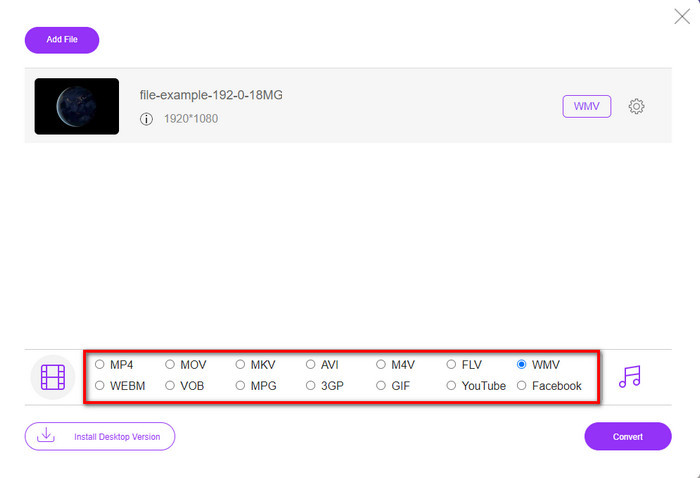
Steg 3. När filen har laddats upp väljer du formatet WMV nedtill eller ett annat format du vill ha från listan.
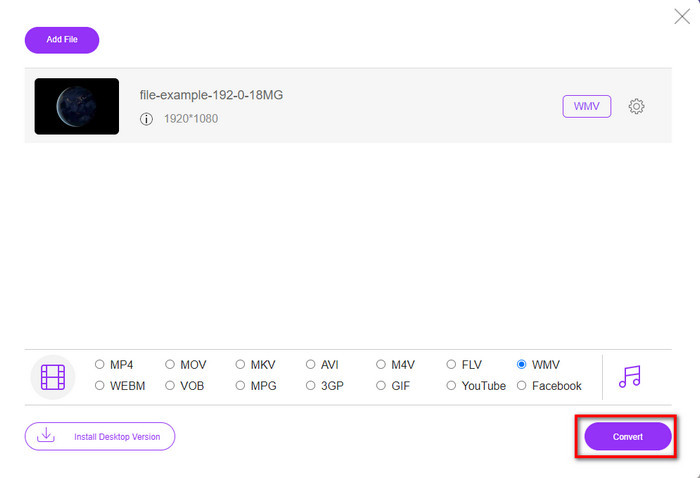
Steg 4. Klicka på Convert för att starta konverteringsprocessen.
RMVB kontra WMV
RMVB, en nyare variant av standardformatet Real Media (.RM), är ett Real Media-videofilformat komprimerat med en variabel bithastighet. Det är ett populärt format för asiatiska filmer och anime. RMVB-filer är mindre i storlek och har lägre bithastigheter men bättre kvalitet.
Producerat av Microsoft var WMV ett av de vanligaste videoformaten på 2000-talet. Den kan ses över webben och spelas upp av olika mediaspelare på Windows. Och det är också standardvideofilformatet för Windows Media Player. Men det har tagits över av andra format nyligen.
Del 4. Vanliga frågor om RMVB till WMV-konvertering
Är RMVB och RM samma sak?
Det finns ingen signifikant skillnad mellan de två behållarna. Namnändringarna beror på att CBR var äldre riktiga codecs för enbart streamingändamål. Namnet ändras, men syftet med formatet är inte det.
Vad ska jag göra för att spela RMVB-filer på Mac?
Du kan ladda ner en tredjeparts RMVB‑spelare till din Mac för att spela upp videon. Men om du inte vill ladda ner en spelare från tredje part kan du överväga att konvertera RMVB till MOV. Vill du veta hur man gör? Klicka då på den här länken för att läsa om hur du konverterar RMVB till MOV.
Försvinner kvaliteten på att konvertera RMVB-filen?
Konvertering av din RMVB bör inte minska kvaliteten på själva videon. Men de flesta av omvandlaren ändrar kvaliteten eftersom 1080 eller ännu högre pixlar inte stöds. Så nu, om du vill konvertera dina filer utan att förlora kvaliteten, måste du använda FVC Video Converter Ultimate. Detta verktyg stöder konvertering av fil 1080 och ännu högre utan att försämra kvaliteten.
Slutsats
Oavsett om du vill ladda ner en konverterare till din dator och behålla den, eller använda ett onlineverktyg, så har FVC lösningen för dig. Dessa två nämnda konverterare är utmärkta på många sätt om vi jämför dem med andra konverterare, både online och offline. I stället för att jämföra de här två verktygen med alla andra, låt oss jämföra dem med varandra. FVC Free Video Converter Online hjälper dig att lösa dina konverteringsproblem, och dess stora fördel är att det är redo att användas närhelst du har internetuppkoppling. FVC Video Converter Ultimate ger däremot ett fenomenalt resultat som kommer att imponera på både dig och andra. Om du vill göra din konverteringsprocess ännu mer intressant använder du den här ultimata konvertern och får ut ännu mer.
-
 Topp 4 gratis RMVB till FLV Converter-appar på skrivbordet eller online
 Den här artikeln kommer att berätta de bästa RMVB till FLV-omvandlare och webbappar som kan konvertera RMVB (RealMedia Variable Bitrate) -filer till FLV-video.
-
 2 av det bästa valet av RMVB-fil till AVI-konverterare [Online & Offline]
 Vet du inte hur man konverterar RMVB till AVI? Den här artikeln fokuserar på omvandlarna du kan använda för att konvertera RMVB till AVI, oavsett om det är online eller offline.
-
 Guide om hur man konverterar RMVB till MP4 på Windows / Mac (3 gratis sätt)
 Vill du konvertera RMVB till MP4 för enkel uppspelning på din dator eller mobiltelefon? Du hittar enkla sätt att konvertera dina RMVB-filer till MP4 i den här guiden.

